


 Video Converter Ultimate
 Näytön tallennin
 Videon korjaus
 Suojattu lataus
Vesileiman poistaminen Renderforestin vietyistä videoista lopulta
Renderforest on täydellinen paketti erinomaisia animoituja malleja introille, outroille, otsikoille, mainoksille tai vastaaville. Voit aloittaa alusta tai käyttää saatavilla olevia malleja täällä. Vaikka et olekaan videoeditoinnin asiantuntija, voit silti selviytyä siitä käyttämällä tätä verkkoalustaa. Sen käytön ja optimaalisen edun vuoksi monet käyttäjät valitsivat tämän alustan luodakseen korkealaatuisen, tehokkaan, yhteensopivan ja luotettavan suunnittelun, jos käytät tilausta.
Näin voit ladata täällä muokkaamasi videon ilmaiseksi rekisteröitymällä, mutta siihen tulee vesileima. Vesileima aiheuttaa ongelmia monille meistä, jotka jo viemme videon ulos täältä, sekä niille, joilla ei ole varaa tämän työkalun tilausmaksuun. Alla listaamme oppaita siitä, miten poistaa vesileima Renderforestista hyödyntämällä arvokkaimpia työkaluja, jotka olemme koonneet tutkimuksemme aikana. Voimme jakaa ne kanssasi, jos jatkat tämän artikkelin seuraavan osan lukemista.

Osa 1. 3 tehokasta tapaa vesileiman poistamiseen Renderforest-videosta
FVC Video Converter Ultimate
FVC Video Converter Ultimate on erinomainen videon vesileimanpoistaja, joka voi opastaa sinua Renderforest-vesileiman poistamisessa. Voit luottaa tähän työkaluun poistaessasi videostasi vesileiman vaivattomasti. Jos vertaamme tätä tehokasta työkalua muihin, tällä työkalulla on AI-teknologian tuella kyky poistaa videostasi vesileima. Se on joka tapauksessa paras työkalu videon vesileiman poistamiseen riippumatta siitä, missä muodossa videon lataat. Mikä tekee tästä työkalusta erinomaisen? Sinun ei tarvitse olla teknisesti taitava käyttääksesi sitä; seuraamalla alla olevaa yksinkertaista ohjetta ja vaiheita voit poistaa videosta vesileiman, jonka Renderforest siihen lisää.
Vaihe 1. Lataa ohjelmisto tietokoneellesi napsauttamalla sopivaa latauspainiketta. Napsauta lataustiedostoa, asenna ohjelma ja valitse Start Now käynnistääksesi ohjelmiston heti.
Ilmainen latausWindows 7 tai uudempiTurvallinen lataus
Ilmainen latausMacOS 10.7 tai uudempiTurvallinen lataus
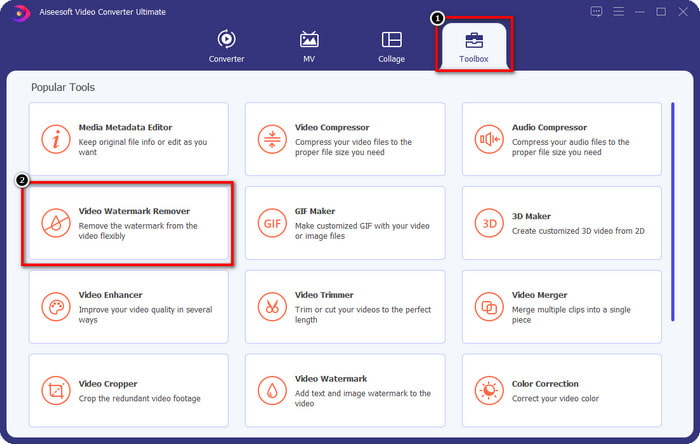
Vaihe 2. Kun olet käynnistänyt ohjelmiston, avaa Toolbox ja napsauta sen alta kohtaa Video Watermark Remover.
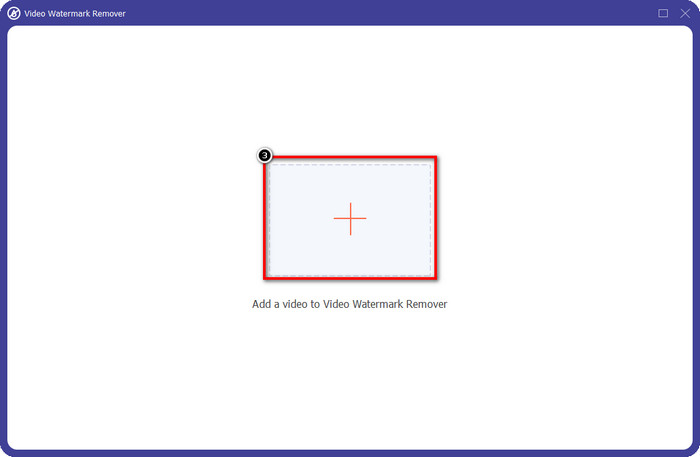
Vaihe 3. Napsauta näytölläsi olevaa +-kuvaketta ladataksesi Renderforest-videon, jonka veit ulos vesileiman kanssa.
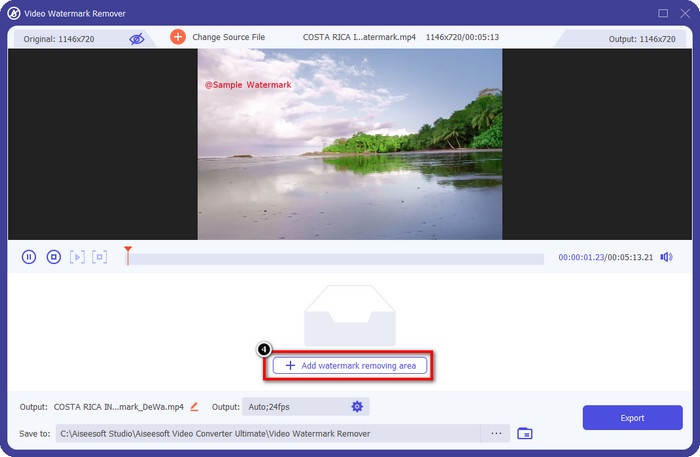
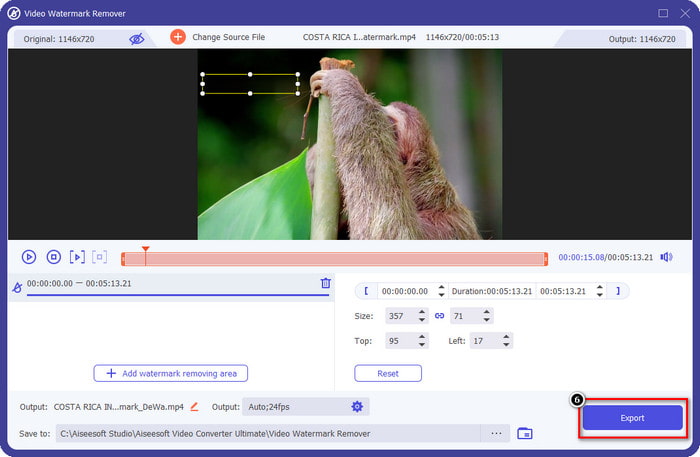
Vaihe 4. Paina Add Removing Watermark Area aloittaaksesi Renderforest-vesileiman poistamisen.
Vaihe 5. Uudessa ikkunassa vedä valintaruutua ja sovita se vesileiman päälle. Voit säätää valintaruutua vapaasti tarpeen mukaan.
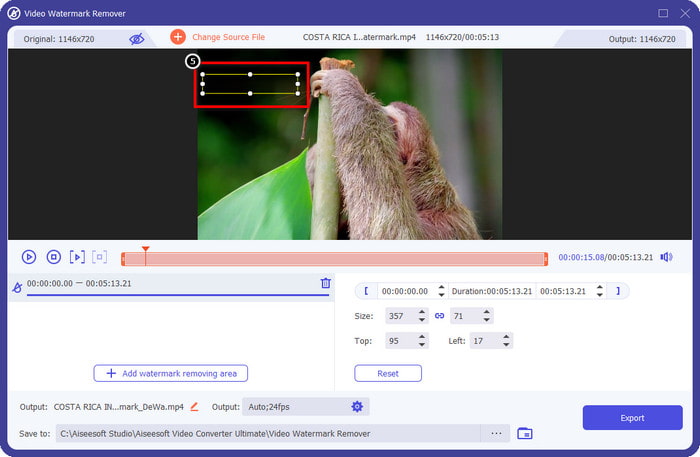
Vaihe 6. Kun valintaruutu on tunnistanut videossasi olevan vesileiman, napsauta Export aloittaaksesi videon käsittelyn ja tallentamisen ilman vesileimaa. Video käsitellään nopeasti, ja voit käyttää videota ilman häiritsevää vesileimaa.
Aiheeseen liittyvää:
Poista Video Helper -vesileima
Poista logo nyt
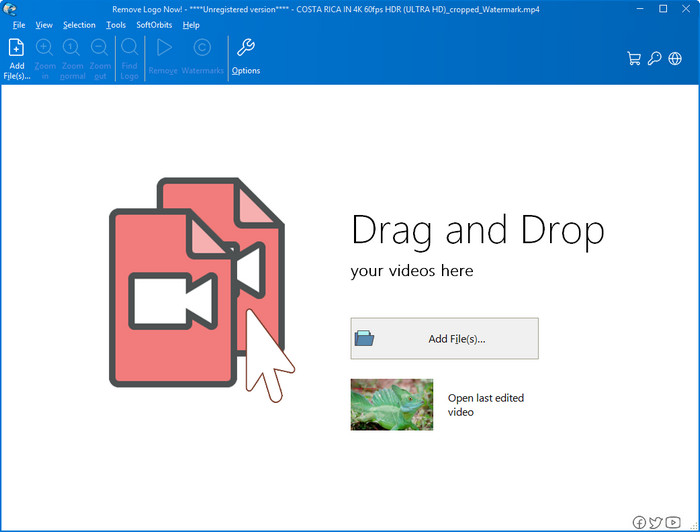
Seuraavana listallamme on Remove Logo Now, joka on saavuttanut erinomaisen maineen päällekkäisten vesileimojen poistamisessa Windowsissa. Tämän työkalun avulla sinun ei tarvitse olla asiantuntija tietääksesi, miten poistaa Renderforest-vesileima PC:llä. Vesileiman poistamisen jälkeen vesileiman alkuperäisestä kohdasta voi tarkasti katsottaessa näkyä hieman jäämiä. Mutta jos et tarkastele videota läheltä, et huomaa vesileimaa tai sen jäämiä viedyssä videossa. Alla oleva opas näyttää, miten voit poistaa videostasi vesileiman Windows-laitteilla.
Vaihe 1. Lataa ja asenna Remove Logo Now -ohjelma tietokoneellesi ja seuraa asennusohjeita.
Vaihe 2. Käynnistä ohjelmisto ja napsauta sitten Add Files ladataksesi videon tänne. Voit myös vetää ja pudottaa videon tänne tehokkaampaa tiedostonlähetystä varten.
Vaihe 3. Valitse, mitä työkalua haluat käyttää vesileiman merkitsemiseen. Kun olet valinnut, korosta vesileima ja napsauta Remove.
Vaihe 4. Napsauta Start aloittaaksesi vesileimanpoistoprosessin, jonka tämä työkalu tarjoaa.
Video Watermark Remover Online

Et pidä ohjelmistojen lataamisesta tietokoneellesi, mutta haluat silti tietää, miten poistaa Renderforest-vesileima? Kokeile tällöin työkalua Video Watermark Remover Online. Voit käyttää tätä täysin automatisoitua vesileimanpoistajaa poistaaksesi videostasi vesileiman ilmaiseksi ilman, että sinun tarvitsee ladata mitään tietokoneellesi. Kuten aiemmin mainituilla työkaluilla, myös tällä työkalulla vesileiman poistaminen onnistuu helposti, vaikka olisit vasta-alkaja videoeditoinnissa tai vesileiman poistamisessa. Voit seurata alla olevaa opasta oppiaksesi käyttämään sitä.
Vaihe 1. Avaa vesileimanpoistaja verkossa etsimällä se suosikkiselaimellasi.
Vaihe 2. Napsauta pääsivulla olevaa upload cloud -kuvaketta lisätäksesi Renderforestista viemäsi videon.
Vaihe 3. Odota, että latausprosessi valmistuu, sillä työkalu poistaa videostasi vesileiman automaattisesti. Napsauta sitten Download ladataksesi videon ilman vesileimaa.
Osa 2. Usein kysytyt kysymykset Renderforst-vesileiman poistamisesta
Kuinka paljon Renderforestin tilausmaksu on?
Renderforest tukee kolmea erilaista hinnoittelua, joita voit käyttää; $ 14,99 Litelle, $24,99 Prolle ja $29,99 Businessille joka kuukausi. Tällä hinnoittelulla on eri tarkoitus kuin toisistaan; voit siirtyä sen pääsivustolle nähdäksesi, mitkä ovat saatavilla haluamallasi tilauksella.
Onko mahdollista poistaa vesileima Renderforest Videosta ilman työkalua?
Kyllä, voit poistaa vesileiman Renderforestistasi ilman työkalua, ja se on ostamalla ohjelmistosta kuukausi- tai vuosimaksu. Joten kun viet videotiedoston, siihen ei lisätä vesileimaa.
Mikä on paras suunnitelma Renderforestille; Kuukausittain vai vuosittain?
Kuukausitilaus on hyvä valinta, jos haluat käyttää työkalua muutaman kerran, mutta jos päätät käyttää ohjelmistoa pitkään, on parempi käyttää vuositilausta, koska se maksaa sinulle vähemmän kuin uusiminen. joka kuukausi. Mutta ennen kuin hyödynnät, voit käyttää Renderforestia ilmaiseksi kirjautumalla tilisi tähän ja yritä sitten käyttää muita sen tarjoamia malleja ilmaiseksi.
Johtopäätös
Tämä artikkeli tarjoaakin vahvan todisteen Renderforest-vesileiman poistamisesta ilmaiseksi käyttämällä kolmea hyödyllisintä vesileimanpoistoainetta, joita voit käyttää. Jos olet Windows-käyttäjä ja haluat poistaa vesileiman työpöydältäsi, sinun on yritettävä käyttää Poista logo nyt -toimintoa. Mutta jos et pidä ohjelmistojen lataamisesta, sinun on kokeiltava Video Watermark Remover Online -ohjelmaa, koska voit käyttää tätä työkalua vesileimien poistamiseen tehokkaasti.
Mutta jos olet Windows- tai Mac-käyttäjä ja haluat tehokkaan vesileimanpoistoaineen, paras vesileimanpoistoaine, jota voit käyttää, on epäilemättä FVC Video Converter Ultimate. Se on paras vesileimanpoistoaine, jonka avulla voit poistaa Renderforest-videotasi häiritsevän vesileiman tehokkaasti ja ammattimaisesti.
-
 2 tapaa poistaa VSDC-vesileima Windowsissa ja Macissa nopeasti
 Etsitkö tapaa poistaa VSDC-vesileiman videoistasi? Tämän artikkelin avulla tarjoamme työkaluja, joiden avulla voit poistaa vesileiman.
-
 Poista Animoto-vesileima videoista helposti ja tehokkaasti
 Kuinka Animoto-vesileima poistetaan videosta? Jatka tämän artikkelin lukemista, sillä toimitimme täydellisen opetusohjelman sen tekemiseen.
-
 Vesileiman poistaminen videosta Final Cut Pron avulla [Täydellinen opas]
 Onko sinulla ongelmia videoiden vesileiman kanssa? Ei sanonut enempää, sillä tarjosimme opetusohjelman vesileiman poistamiseen videosta Final Cut Prolla.
