


 Video Converter Ultimate
 Näytön tallennin
 Videon korjaus
 Suojattu lataus
Vaivaton menettely vesileimojen poistamiseksi MP4-videoista
Kohtaatko ongelmia, kuten ettet tiedä, miten poistaa vesileimat MP4-videoistasi laitteillasi, kuten Macilla ja Windowsilla? Siinä tapauksessa tästä artikkelista löydät parhaat ratkaisut. Jos kuulut niihin, jotka rakastavat katsoa elokuvia, klippejä ja muuta sisältöä, saatat samaistua siihen, miten häiritsevää ja ärsyttävää on katsoa suosikkivideoita, joissa on vesileimoja tai muita tarpeettomia elementtejä MP4-videoissasi. Et myöskään näe koko näytön aluetta, koska vesileimat peittävät sitä. Kaikkein turhauttavinta on, että joissakin videoissa on todella suuria vesileimoja, jolloin et edes pysty nauttimaan suosikkivideoidesi katselusta.
Onneksi on jo olemassa valtava ja merkittävä ohjelmistosovellus, jossa on videovesileimanpoistoaine, jonka avulla voit poistaa videoistasi tarpeettomat kohteet, kuten vesileimat, logot, tekstit, kuvat ja paljon muuta. Voit nopeasti poistaa tai poistaa nämä esineet ja nauttia videoiden katselusta tai toistamisesta näillä sovelluksilla. Näiden sovellusten avulla et koskaan tule turhautumaan tai ärsyyntymään enää. Sitten, jos olet innostunut tästä aiheesta, sinun on luettava tämä artikkeli, jotta saat tarpeeksi tietoa, erityisesti vesileimien poistamiseksi MP4-videoistasi helposti.

Osa 1: Paras tapa poistaa vesileima MP4-videosta
Jos etsit mahdollisimman tehokasta ja vaikuttavaa sovellusta MP4-videoiden vesileimojen poistamiseen, Video Converter Ultimate on paras työkalu. Tämän sovelluksen avulla voit poistaa videoistasi häiritsevät elementit, kuten vesileimat, logot, tekstit tai kuvat. Lisäksi sinun ei tarvitse odottaa kauan tallennusvaiheessa, koska voit tallentaa videosi nopeasti vesileimojen poistamisen jälkeen.
Lisäksi Video Converter Ultimatessa on paljon muokkaustyökaluja, joita voit käyttää, kuten videon tehostin, vesileimojen poistaminen, vesileimojen lisääminen, videon nopeuden säädin, GIF-valmistaja, kollaasivalmistaja, video- ja ääninauhuri, video-/äänikompressori, eri tiedostojen muuntaminen. muotoja, kuten MP4, FLV, MOV, TRP, MTS, M2TS, MKV, AAC, MP3 ja paljon muuta. Lisäksi parasta on, että sinun ei enää tarvitse ostaa tai ostaa tätä sovellusta. Voit käyttää tätä ilmaiseksi. Lisäksi tämä sovellus on erittäin yksinkertainen ja helppokäyttöinen. Jos haluat poistaa vesileimat MP4-videoistasi, Video Converter Ultimate voi tarjota sinulle kaksi tapaa. Lue jatkuvasti oppiaksesi nämä kaksi tapaa poistaa vesileimoja videoistasi.
1. Video Watermark Remover -ohjelman käyttö
Vaihe 1: Siirry Video Converter Ultimate -ohjelman verkkosivustolle. Lataa sovellus ilmaiseksi. Jatka sitten asennusprosessiin.
Ilmainen latausWindows 7 tai uudempiTurvallinen lataus
Ilmainen latausMacOS 10.7 tai uudempiTurvallinen lataus
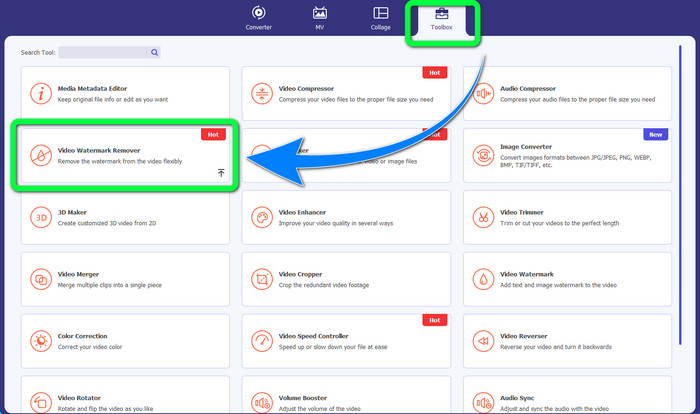
Vaihe 2: Käynnistä sovellus. Valitse Toolbox > Video Watermark Remover.
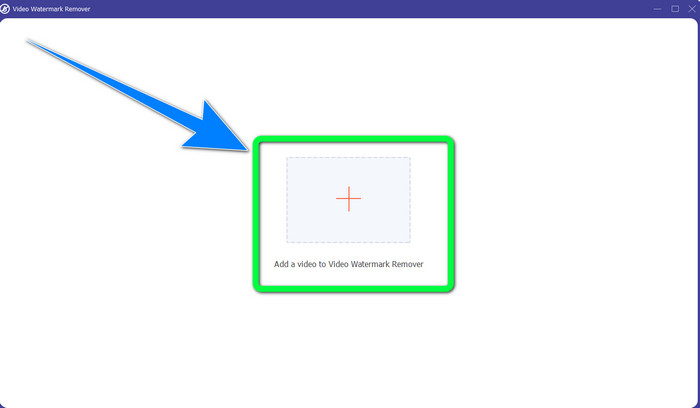
Vaihe 3: Toinen käyttöliittymä avautuu. Valitse Plus-painike ja lisää MP4-videosi, jossa on vesileima.
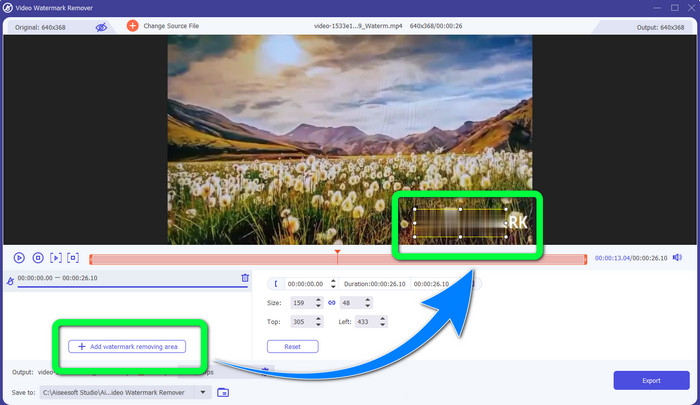
Vaihe 4: Napsauta Add Watermark Removing Area -painiketta. Tämän jälkeen videossasi näkyy pieni laatikko, jota voit vetää ja käyttää vesileimojen peittämiseen videossasi.
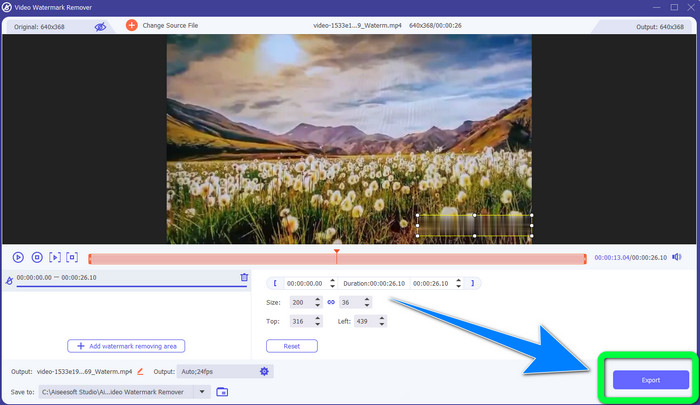
Vaihe 5: Kun olet valmis poistamaan vesileiman, napsauta Export-painiketta tallentaaksesi videosi. Nyt voit nauttia hetkestä katsomalla suosikkielokuviasi ilman vesileimoja.
2. Video Cropperin käyttäminen
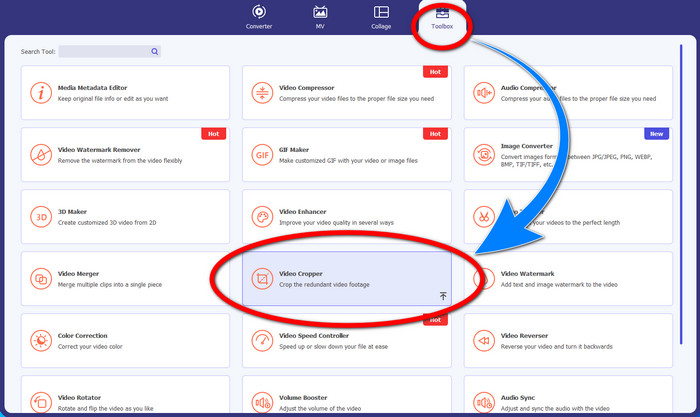
Vaihe 1: Käynnistä Video Converter Ultimate. Napsauta sitten Toolbox > Video Cropper.
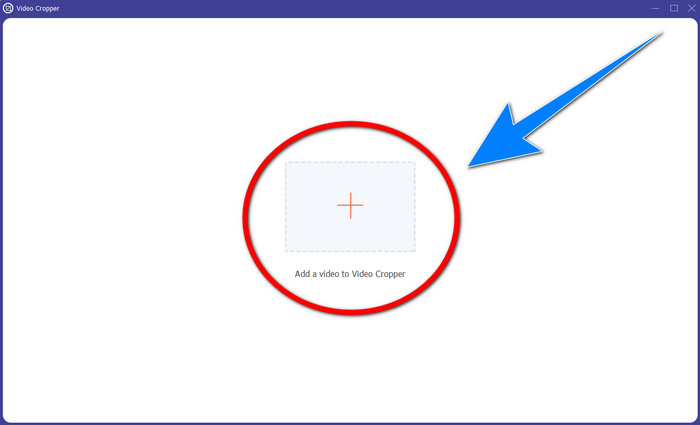
Vaihe 2: Kun olet napsauttanut Video Cropper -toimintoa, avautuu uusi käyttöliittymä. Napsauta Plus-symbolia lisätäksesi MP4-videosi, jossa on vesileima.
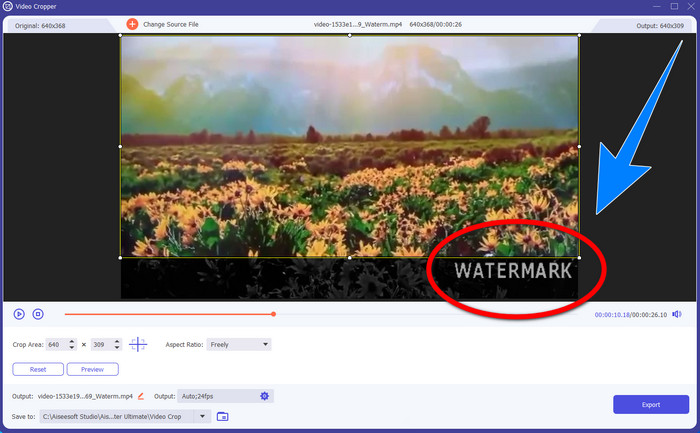
Vaihe 3: Kun olet jo liittänyt videosi, voit rajata MP4-videosi ja poistaa vesileiman.
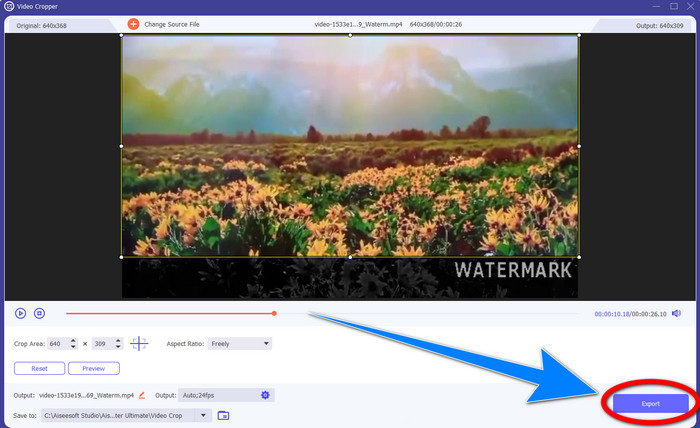
Vaihe 4: Kun olet valmis rajaamaan videosi vesileiman poistamiseksi, napsauta Export-painiketta tallentaaksesi videosi. Näin voit katsoa videotasi ilman vesileimaa.
Osa 2: Poista vesileima MP4 Video Onlinesta
Etsitkö erinomaista sovellusta, jolla voit poistaa vesileimat MP4-videostasi ilmaiseksi verkossa? Silloin HitPaw Online Watermark Remover on sovellus, johon voit luottaa. Lisäksi voit käyttää tätä sovellusta ilman ostamista, koska se on täysin ilmainen. Voit myös poistaa vesileimoja, logoja ja allekirjoituksia ilman rajoituksia, eikä siinä ole mainoksia. Se on myös helppokäyttöinen ja yksinkertainen. Voit poistaa vesileimat videoistasi vain kolmessa vaiheessa, mikä on täydellistä aloittelijoille.
HitPaw Online Watermark Remover on käytettävissä kaikilla laitteilla, kuten Windowsilla, Macilla, iPhonella ja Androidilla. Tämä sovellus on myös turvallinen, ja se varmistaa, että olet ainoa, joka voi katsella ja muokata videoitasi. Jos kuitenkin poistat vesileimat videoistasi, alueesta tulee joskus epäselvä ja häiritsevä. Myös tallennusprosessi on hidas. Jos haluat poistaa vesileimat MP4-videoistasi verkossa, seuraa alla olevia helppoja ohjeita.
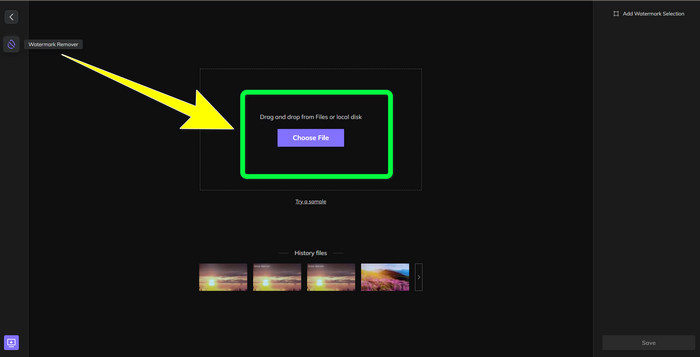
Vaihe 1: Siirry HitPaw Online Watermark Remover -verkkosivustolle. Napsauta Remove Watermark Now ja valitse sitten Choose File lisätäksesi MP4-videosi, jossa on vesileimoja.
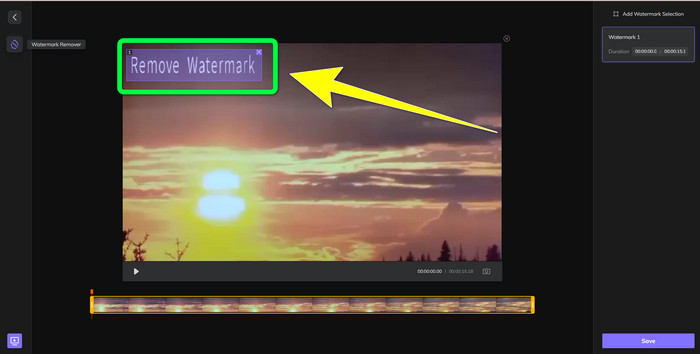
Vaihe 2: Kun olet lisännyt videosi, videossa näkyy suorakulmio. Vedä sitä peittämään ja poistamaan vesileimasi.
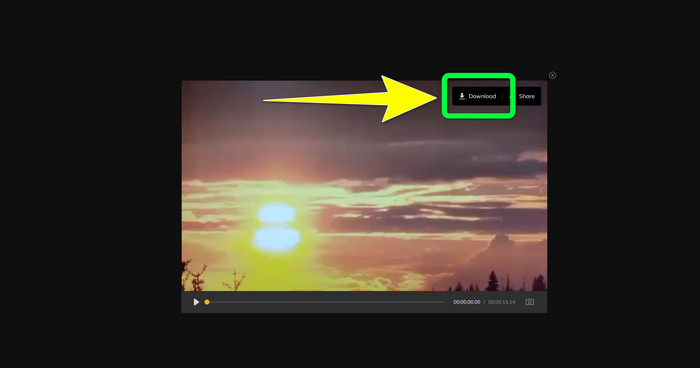
Vaihe 3: Kun olet poistanut vesileimat videostasi, napsauta Save-painiketta. Odota tallennusprosessin valmistumista ja napsauta sitten Download-painiketta tallentaaksesi videon laitteellesi.
Osa 3: Usein kysyttyä vesileiman poistamisesta MP4:stä
Onko myös mahdollista poistaa allekirjoitukset videoistani?
Kyllä, se on mahdollista. Video Converter Ultimate pystyy myös poistamaan allekirjoituksia videoistasi. Kaikki videotasi häiritsevät tarpeettomat objektit voidaan poistaa helposti tämän sovelluksen avulla.
Onko vesileimojen poistaminen MP4-videoista aikaa vievää?
Se riippuu käyttämistäsi sovelluksista. Jos haluat poistaa vesileimat MP4-videoistasi, käytä Video Converter Ultimate -ohjelmaa. Se voi poistaa vesileimat välittömästi.
Mikä on paras videon vesileimanpoistoaine, jota voin käyttää?
Jos etsit luotettavaa sovellusta, joka pystyy poistamaan vesileimat videostasi, Video Converter Ultimate on erinomainen ohjelmisto käyttöösi. Voit poistaa vesileimat ja tallentaa videosi menettämättä niiden laatua.
Voinko käyttää HitPaw Online Watermark Removerin rajaustyökalua vesileimojen poistamiseen?
Ehdottomasti kyllä! Voit myös käyttää tämän sovelluksen rajaustyökalua, jos haluat poistaa vesileimat videoistasi, varsinkin jos vesileimat olivat videoidesi kulmassa tai reunassa.
Onko vesileimojen poistamisen lisäksi mahdollista lisätä vesileimoja Video Converter Ultimate -sovelluksella videoihini?
Ehdottomasti kyllä! Video Converter Ultimate ei rajoitu vain vesileimojen poistamiseen videoistasi. Tämä sovellus voi myös lisätä vesileimoja videoihisi, varsinkin jos haluat laittaa tekstiä, logoja, allekirjoituksia jne.
Johtopäätös
Kuten yllä on kirjoitettu, voit helposti poistaa vesileimat MP4-videoistasi käyttämällä Video Converter Ultimate -ohjelmaa. Lisäksi tämä artikkeli esittelee joitakin ohjelmistoja, joilla voit poistaa tarpeettomia objekteja MP4-videoista verkossa.
-
 Kuinka poistaa Filmoran vesileima videoistasi tai projekteistasi ilmaiseksi
 Kuinka poistaa Filmoran vesileima? Tämä kysymys kiertää verkossa, ja tässä luetellaan erilaisia lähestymistapoja, joita voit käyttää!
-
 Nopein temppu Adobe Stock -vesileiman poistamiseen videosta [Opetusohjelma]
 Onko sinulla ongelmia Adobe Stock -vesileiman kanssa? Lue tämä ja opi poistamaan Adobe Stock -vesileima videosta.
-
 5 tapaa poistaa vesileima videosta ammattimaisesti
 Haluatko poistaa vesileiman videosta, jotta se näyttää ammattimaiselta? No, lue tämä artikkeli, kun lisäämme opetusohjelman sen tekemiseen!
