


 Video Converter Ultimate
 Näytön tallennin
 Videon korjaus
 Suojattu lataus
Vesileiman poistaminen alkuperäkaaviosta tehokkaasti kaaviosta
Saatat tarvita Origin Graph -ohjelmaa luodaksesi mallin matemaattisista tai tieteellisistä tiedoista, jotka ovat liian monimutkaisia ilmaistaviksi sanallisesti. Tämä ohjelmisto on jo auttanut opiskelijoita, tutkijoita, professoreita, liike-elämän ammattilaisia ja muita, joiden täytyy tehdä oma kaavionsa. Sen valmiiden mallipohjien avulla voit valita ja luoda visuaalisesti miellyttävän kaavion, joka kiinnittää katsojien huomion. Ongelmana ilmaisversiota käyttäessä on kuitenkin se, että se lisää tekstivesileiman lopulliseen tulokseen. Onko sinulla hankaluuksia vesileiman kanssa? Ei hätää! Meidän ratkaisumme auttaa. Tässä esittelemme hyödyllisiä vinkkejä Origin Graph -vesileiman poistamiseen, jotta voit käyttää kaaviota Word- tai PowerPoint-esityksissäsi.

Osa 1. Vesileiman poistaminen Origin Graphista Online Image Watermark Remover -ohjelman avulla
FVC Free Watermark Remover Online on ensiluokkainen tekstivesileimojen poistaja, jolla voit poistaa Origin Graphin lisäämän vesileiman. Tämä työkalu on erityisen tehokas poistamaan mitä tahansa kohteita kuvista, jotta ne näyttävät entistä ammattimaisemmilta vesileiman poiston jälkeen. Voimme vakuuttaa, että se on omistettu vesileimanpoistotyökalu, jota voit käyttää ja johon voit luottaa tällaisessa tilanteessa. Mietitkö, onko työkalu helppokäyttöinen? Ei hätää! Alla olevat vaiheet ovat ohjeet, joita voit seurata päästäksesi eroon Origin Graphin kuvaan lisäämästä tekstivesileimasta.
Vaihe 1. Napsauta tätä linkkiä avataksesi kuvien vesileimanpoistotyökalun verkossa; se avautuu suoraan uuteen välilehteen, jossa voit käyttää työkalua.
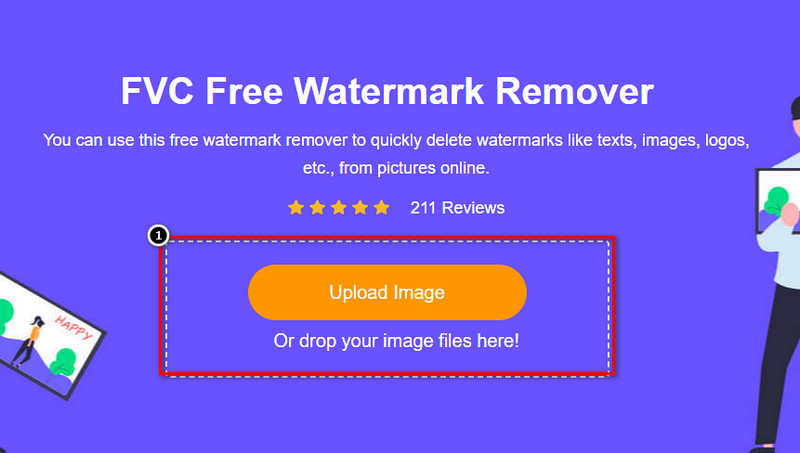
Vaihe 2. Paina Upload Image lisätäksesi vesileimallisen kuvan, etsi kuvatiedosto kansiosta ja napsauta Open ladataksesi sen.
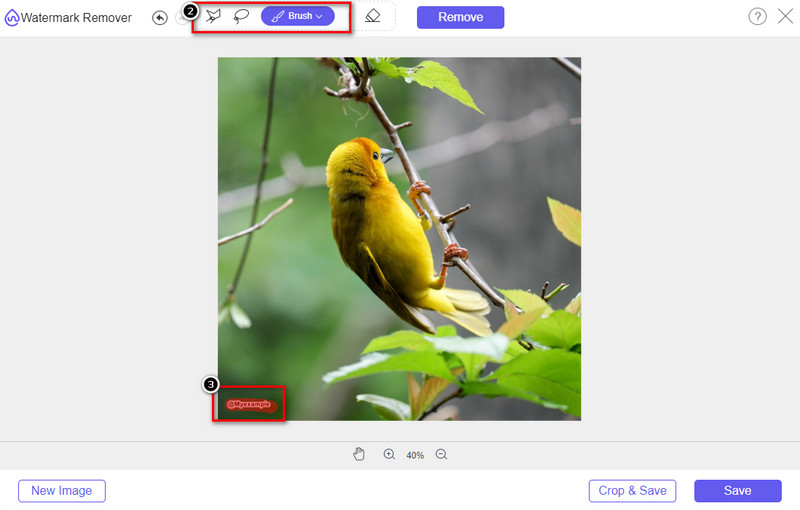
Vaihe 3. Voit käyttää kolmea eri työkalua vesileiman korostamiseen; vaikka ne toimivat eri tavoin, ne ovat yhtä tehokkaita. Valitse yksi työkalu ja korosta sillä kuvan alue, jossa vesileima sijaitsee.
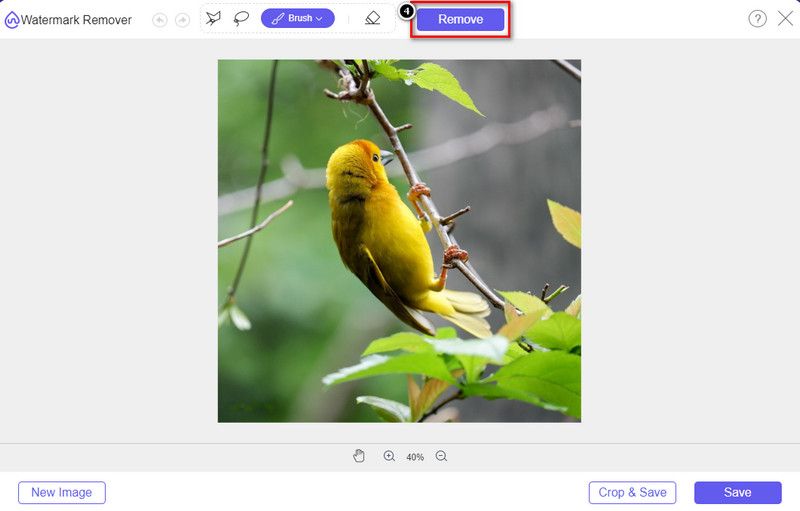
Vaihe 4. Muista napsauttaa Remove-painiketta sen jälkeen kun olet korostanut vesileiman työkalulla. Tämä vaihe on tärkeä, jotta kun viet kuvan, saat sen ilman vesileimaa.
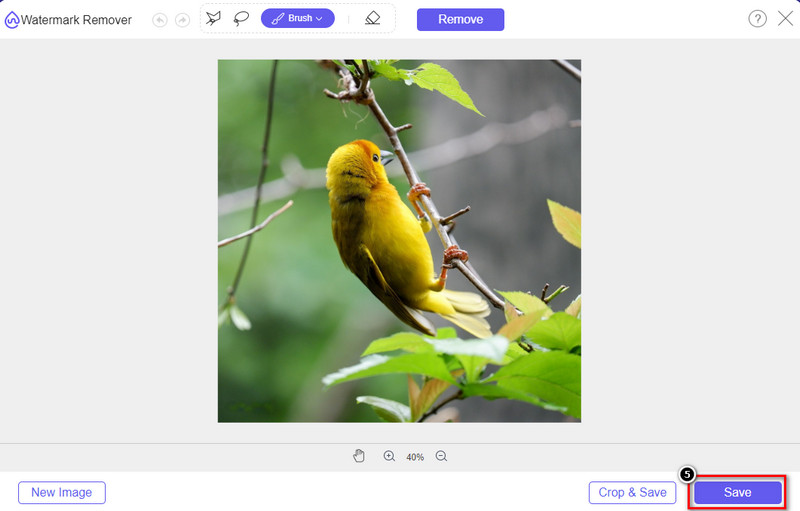
Vaihe 5. Aloita vientiprosessi napsauttamalla Save-painiketta. Odota käsittelyn valmistumista, minkä jälkeen voit tarkistaa kuvan ilman Origin Graph -vesileimaa kyseisellä alueella.
Plussat
- Ilmainen verkkopohjainen vesileimanpoistoaine, jota voit käyttää.
- Se toimii tehokkaasti vesileiman poistamisessa AI-teknologian tuella.
- Se tukee monia erilaisia kuvaformaatteja, joita sinulla voi olla paikallisella asemallasi.
- Vietyihin kuviin ei lisätä vesileimaa.
Haittoja
- Tarvitsee Internet-yhteyden toimiakseen.
- Sen painopiste on vesileiman poistamisessa eikä missään muussa.
Osa 2. Kuvaajien kopioiminen Originista Wordiin tai PowerPointiin ilman vesileimaa
Tässä artikkelin osassa annamme sinulle ohjeet, jotka sinun on tiedettävä lisätäksesi Origin Graphissa luomasi kaavion ilman vesileimaa. Noudata sitä vastaavasti lisätäksesi Microsoft Wordiin ja PowerPointiin luomasi kaavion ilman vesileimaa.
Sinun on vapautettava vähintään 1,9 Gt sen valtavan tiedostokoon vuoksi. 1,9 Gt:n tiedostossa sinulla on tarvitsemasi apu, mutta jos et halua apua, voit ladata sen 652 Mt:n version .zip- tai .exe-tiedoston kautta.
Vaiheet kaavion luomiseen alkuperäkaaviossa ilman vesileimaa:
Vaihe 1. Lataa ensin Origin Graph käyttöjärjestelmääsi sen viralliselta verkkosivustolta. Avaa ohjelma aloittaaksesi haluamasi kaavion luomisen.
Vaihe 2. Kun olet käynnistänyt ohjelmiston, lisää taulukkoon tarvitsemiasi arvoja. Voit lisätä tänne enemmän muuttujia ja vastaavan määrän kaavioita.
Lisävinkki: Voit napsauttaa Plot nähdäksesi muut kaaviotyypit, joita voit käyttää, kuten Basic 2D, Bar, Statistical ja paljon muuta.
Vaihe 3. Napsauta File ja paina sitten Save viedäksesi luomasi kaavion.
Vaihe 4. Voit noudattaa osassa 1 annettuja vaiheita ja seurata ohjetta Origin Graph -vesileiman poistamisesta FVC Free Watermark Remover Online -työkalun avulla.
Graafin käyttäminen Wordissa ilman vesileimaa:
Vaihe 1. Avaa Word-sovellus tietokoneellasi ja valitse Tyhjä sivu. Jos olet jo luonut Word-asiakirjoja, avaa kyseinen tiedosto.
Vaihe 2. Siirry Insert-välilehdelle ja napsauta sitten Pictures. Etsi kaaviotiedosto paikalliselta levyltäsi, napsauta sitä kerran ja paina Open ladataksesi sen Wordiin.
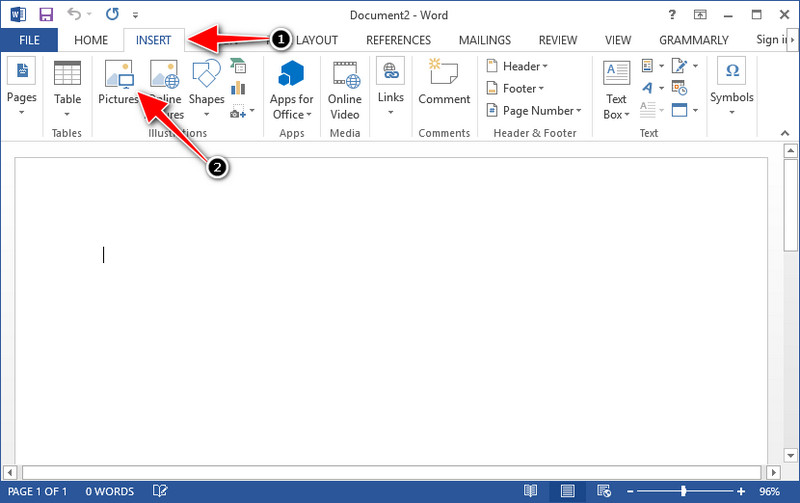
Vaihe 3. Kaavio latautuu automaattisesti avoimeen tai luomaasi Word-asiakirjaan; voit nyt sijoittaa kaavion pitämällä siitä kiinni ja vetämällä sitä dokumentissa.
Graafin käyttäminen Powerpointissa ilman vesileimaa:
Vaihe 1. Käynnistä PowerPoint tietokoneellasi ja valitse Tyhjä esitys. Voit myös tarkistaa vasemmalta puolelta aiemmin luomasi esitykset. Jos siellä on tiedosto, johon haluat lisätä kaavion, avaa se napsauttamalla.
Vaihe 2. Paina Insert ja napsauta sitten Picture lisätäksesi Origin Graphissa luodun kaaviokuvan.
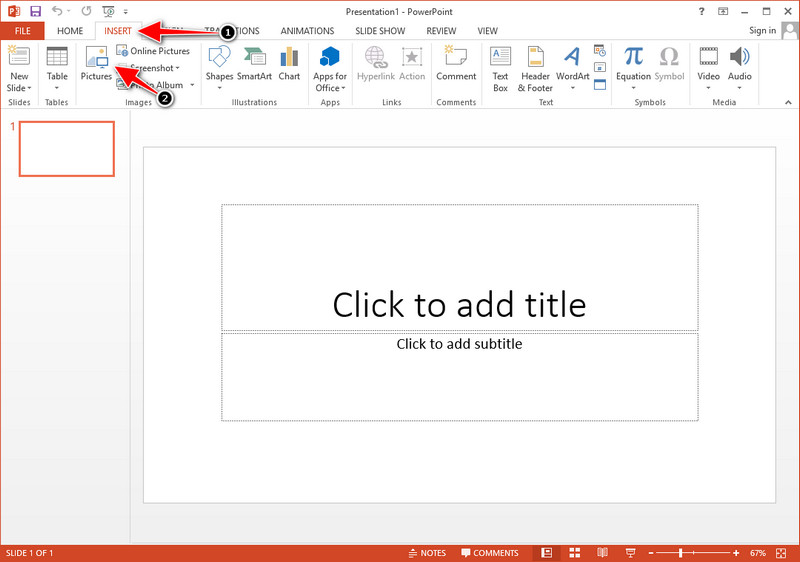
Vaihe 3. Säädä kaaviokuvaa ja sijoita se dioihin haluamallasi tavalla.
Lisälukemista:
Kuinka poistaa B612-vesileima kuvistasi
Kuinka poistaa WOW Slider -vesileima ilmaiseksi
Osa 3. Usein kysyttyä vesileiman poistamisesta Origin Graphista
Kuinka paljon Origin Pro maksaa?
Yksittäisille käyttäjille voit hankkia Origin Graphin premium-version $435:lle alkaen. Voit vierailla sen virallisessa myymälässä Origin Labissa.
Mistä voin ladata Origin Graphin virallisesti?
Vieraile Origin Labissa ladataksesi Origin Graph. Ennen kuin voit ladata ohjelmiston työpöydällesi, se kysyy kysymyksiä. Sen jälkeen on kaksi vaihtoehtoa ladata tiedosto, jos haluat ladata sen avulla tai et, .exe- tai zip-muodossa.
Ovatko Excel ja Origin samat?
Excelissä ja Originissa on laskentataulukkomainen käyttöliittymä tietojen järjestämistä, laskemista ja tarrojen määrittämistä varten. Excel keskittyy kuitenkin sisältämään monia sarakkeita ja rivejä, joita voit käyttää. Mutta Originissa se on tarkoitettu sellaisten määritteiden järjestämiseen, jotka käyttävät sarakekaavaa eikä solukaavaa, kuten Excel tukee.
Johtopäätös
Nyt kun olet oppinut poistamaan vesileiman Origin Graphista, on sinun aikasi käyttää luomaasi kaaviota ja esittää se ammattimaisesti. Jos tarkoituksesi on käyttää sitä Wordissa tai Powerpointissa, voit lukea osan 2, kuinka se tehdään. Vesileiman poistaminen tällä työkalulla on ylivoimaisesti halutuin kaikille, jotka haluavat poistaa vesileiman kuvista. Ongelma on ratkaistu tällä työkalulla. Jos tämä artikkeli auttoi sinua, jätä 5 tähteä alle.
-
 Vesileiman poistaminen Pixlrillä yksityiskohtaisissa vaiheissa [tehokas]
 Haluatko tietää, kuinka vesileima poistetaan Pixlr:llä? Jos näin on, jatka lukemista alla saadaksesi tietää, miten se tehdään ja mitä vaihtoehtoja voit käyttää.
-
 Poista Animotica-vesileima vietyistä videoista kolmella todistetulla tavalla
 Oletko koskaan miettinyt, voiko Animotica-vesileiman poistaa viemistäsi videoista? Tämä artikkeli tarjoaa ohjeet.
-
 Ilmaisia tapoja poistaa VideoShop-vesileima videoista [vaivattomasti]
 VideoShop-vesileiman poistamiseksi laitteesi tarvitsee vesileimanpoistoaineen. Jos haluat tietää, mitä nämä ovat, lue tämä artikkeli.
