


 Video Converter Ultimate
 Näytön tallennin
 Videon korjaus
Uusin online- ja offline-ohjelmisto, jolla voit kääntää MP4-videoita helposti
Useimmiten, kun yritämme kääntää videomme takaperin, syntyy hauskoja reaktioita, jotka saavat meidät ajattelemaan, että se olemme me itse. Koska video toistetaan takaperin, sen vaikutus luo silmillemme jotain uutta. Jos siis haluat tietää tehokkaita tapoja kääntää MP4-videoita takaperin, tämän artikkelin lukeminen on ehdottoman tärkeää. Se esittelee erilaisia verkko- ja työpöytäohjelmia, joilla voit tehdä helposti paljon takaperin toistettavia videoita. Joten ilman enempää viivyttelyä esitellään ne sinulle yksi kerrallaan.

Osa 1. Kuinka kääntää MP4-video (offline)
Koko verkon ilmiömäinen työkalu on Video Converter Ultimate. Tämä työkalu on jo auttanut miljoonia käyttäjiä, joilla on ollut vaikeuksia kääntää MP4-videoita. Toisin kuin mikään muu tämän listan työkalu, tätä ohjelmistoa voi käyttää myös ilman internet-yhteyttä. Lisäksi työkalu voi tuoda ja viedä tiedostoja välittömästi – ennen kuin ehdit edes räpäyttää, video on jo käännetty takaperin. Tällä työkalulla on myös hämmästyttävä ominaisuus: siinä on kaikki edistyneet toiminnot, joita saatat haluta käyttää. Siirrytään siis nyt vaiheisiin, joiden avulla voit kääntää videon tehokkaasti.
Vaiheet videoiden kääntämiseen Video Converter Ultimatessa
Vaihe 1. Lataa ensin työkalu omalle levyllesi. Asenna se ja seuraa asennusohjelman ohjeita.
Ilmainen latausWindows 7 tai uudempiTurvallinen lataus
Ilmainen latausMacOS 10.7 tai uudempiTurvallinen lataus
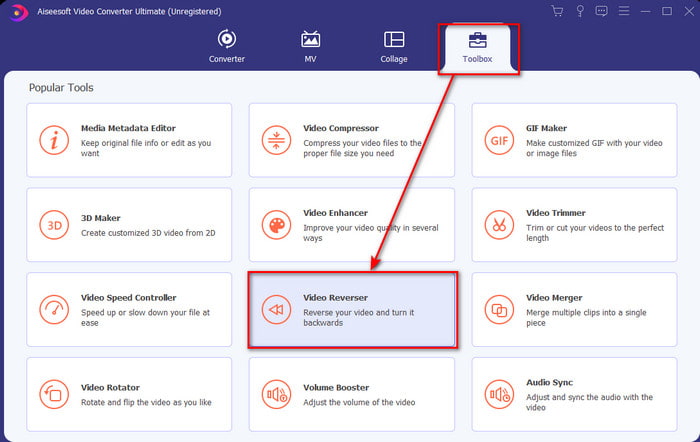
Vaihe 2. Käynnistä ohjelmisto, napsauta Toolbox-valikkoa ja valitse Video Reverser.
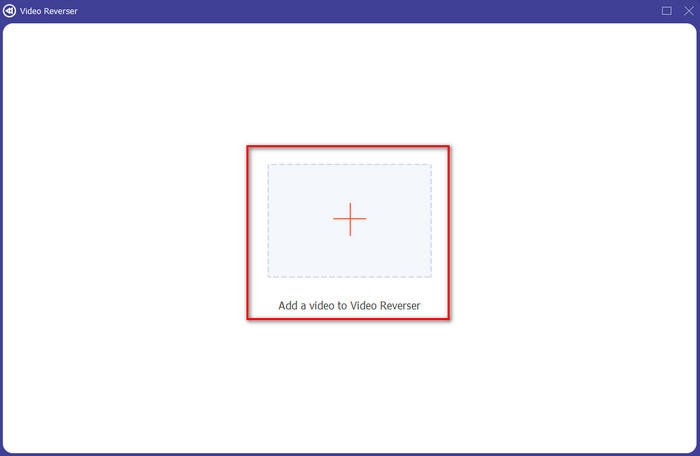
Vaihe 3. Lisää sitten MP4-tiedosto napsauttamalla +-kuvaketta ja valitsemalla tiedoston tietokoneen kansioista. Napsauta sen jälkeen Open, jotta .mp4-tiedosto lisätään käyttöliittymään.
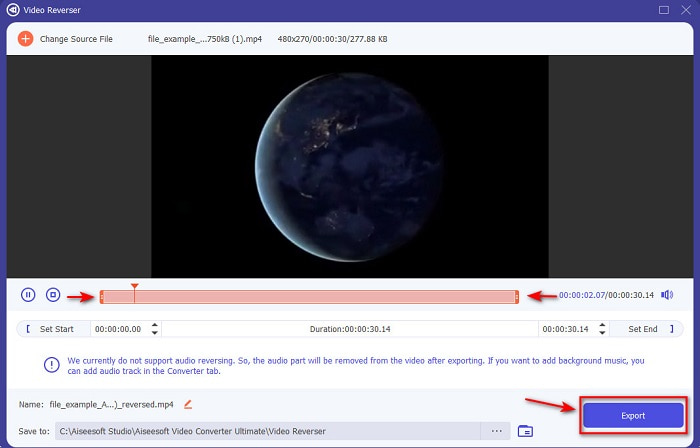
Vaihe 4. Säädä nyt videon kestoa muuttamalla playback in and out -asetuksia. Napsauta Export jatkaaksesi.
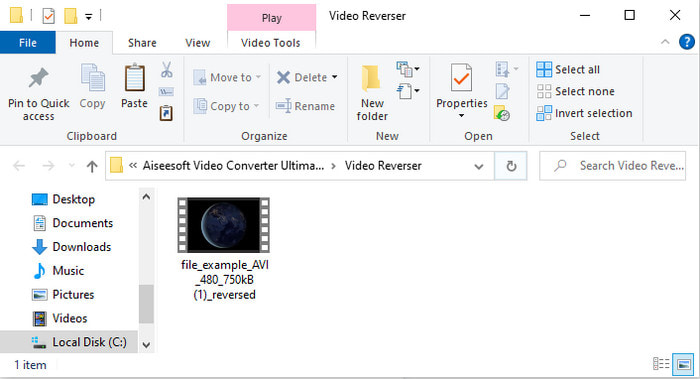
Vaihe 5. Kun vienti on valmis, napsauta tiedostoa kansiossa toistaaksesi käännetyn tiedoston ja nähdäksesi, missä se sijaitsee.
Osa 2. Kuinka kääntää MP4-video (Online)
1. FileConverto
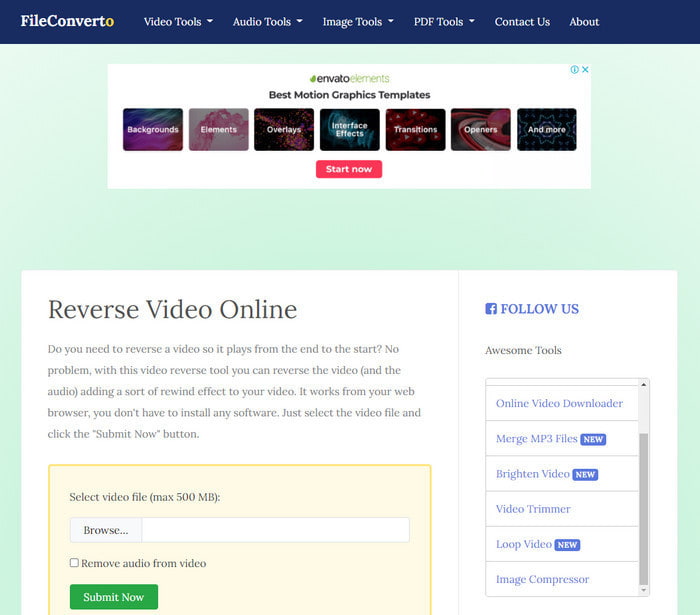
Verkossa toimiva MP4-videoiden kääntäjä FileConverto sisältää paljon verkkotyökaluja, joiden avulla voit tehdä videostasi tavallista erikoisemman. Tämän verkkotyökalun suorituskyky sopii erinomaisesti niille, jotka eivät halua ladata erillistä ohjelmistoa. Verkkokäyttöliittymä on kuitenkin hieman mitäänsanomaton, latausprosessi vie paljon aikaa, eikä se tue kaikkia videoformaatteja. Lisäksi saatat kohdata bugeja ja ponnahdusikkunoita yrittäessäsi kääntää videota. Vaikka siinä on paljon tunnettuja ongelmia, se on silti varsin käyttökelpoinen työkalu.
Plussat
- Ohjelmisto on helppokäyttöinen ja siinä on paljon perusmuokkaustoimintoja, joita tarvitset.
- Erittäin käyttäjäystävällinen, että jopa käyttäjä, joka ei kokenut peruuttamista, voi tehdä sen täällä.
- Se rajoittaa muunnosi 500 megatavuun, mikä on hienoa.
Haittoja
- Tiedostojen tuominen tänne ja vieminen on odotettua hitaampaa.
- Sen verkkotyökalussa on paljon mainoksia, jotka voivat ärsyttää sinua. Ja kun napsautat verkkotyökaluominaisuutta, mainos näyttää, että sinun on napsautettava sitä uudelleen.
- Se ei tue kaikkia videomuotoja.
2. PickFrom
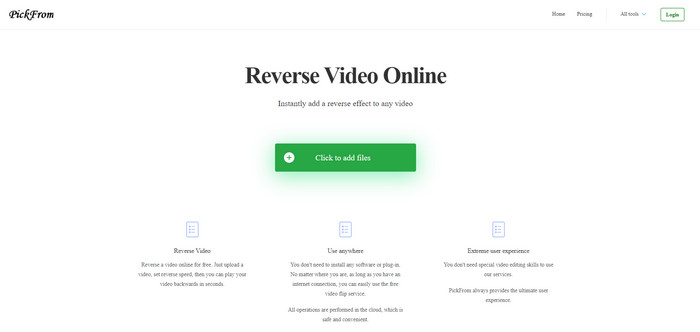
PickFrom-palvelussa on FileConvertoon verrattuna parempi käyttöliittymä. Se hyödyntää minimalistista muotoilua, ja valkoisen ja syaanin värien yhdistelmä toimii hyvin. Tekstit ovat kuitenkin melko ohuita ja siten hieman hankalia lukea. Jos sinulla ei siis ole täydellistä näköä, työkalu voi olla vaikealukuinen. Lisäksi kun haluat kääntää MP4-videoita täällä, valikot ja vaihtoehdot ovat yksinkertaistetulla kiinalla, mikä tekee ymmärtämisestä hieman hankalaa. Tiedostojen tuonti on kuitenkin täällä nopeampaa kuin FileConvertossa.
Plussat
- Sillä on paljon parempi verkkokäyttöliittymä verrattuna FileConvertoon.
- Ei mainoksia verkkosivuston yläosassa, mutta jos vierität alaspäin, siellä on joukko ärsyttäviä mainoksia.
- Tukee monia perusmuokkausominaisuuksia.
Haittoja
- Työkalun asetukset on kirjoitettu kiinaksi, jota on vaikea ymmärtää, jos et osaa puhua kiinaa.
- Kun napsautat aloituspainiketta, työkalu lakkaa reagoimasta ja vientiprosessi vie paljon aikaa.
- Se heikentää viedyn videon laatua.
3. Media.io
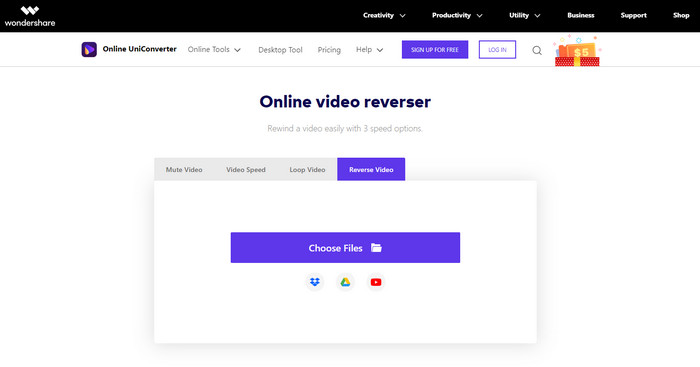
Media.io-palvelussa on kolme erilaista käänteisnopeutta: x 0.5, x 1, x 2. Voit käytännössä kääntää videon ja toistaa MP4:n takaperin sen käännöstoiminnon avulla. Vaikka työkalu näyttää hyvältä, siinä on silti joitakin ongelmia, joihin saatat törmätä käyttäessäsi Media.io-palvelua. Esimerkiksi ennen tiedoston vientiä se pyytää sinua kirjautumaan sisään, jotta voit viedä tiedoston. Lisäksi voit tehdä täällä vain 10 käännettyä videota, ja myös tiedostokoko on rajattu.
Plussat
- Työkalun käyttöliittymä on loistava ja houkutteleva.
- Voit muuttaa käänteisen videon lopullista lähtömuotoa, jos haluat, tai säilyttää alkuperäisen muodon.
- Voit mykistää videon tai poistaa mykistyksen.
Haittoja
- Verkkosivusto pyytää sinua rekisteröitymään ennen vientiä, mikä tarkoittaa, että annat heidän lähettää ilmoituksia sähköpostitse.
- X 2:n kääntöpuoli on vähemmän hidas kuin muiden työkalujen x 2.
- Työkalu rajoittaa verkkotyökalun saatavuutta. Et esimerkiksi voi peruuttaa enempää kuin 10 tiedostoa päivässä, ja tiedostokoolla on enimmäisraja.
Osa 3. Usein kysyttyä MP4:n kääntämisestä
Alentaako se videon laatua kääntämisen jälkeen?
Videon kääntämisen työkalulla ei pitäisi heikentää sen videon laatua, jonka haluat kääntää. On kuitenkin olemassa paljon ohjelmistoja, jotka heikentävät videon laatua. Mutta on joitain tapauksia, joissa asetat sen laadun alhaiseksi eikä korkeaksi.
Kuinka lisätä ääntä käänteiseen tiedostooni?
Useimmat tässä listatut ohjelmistot eivät tue äänen kääntämistä, mutta voit siirtyä tähän linkkiin ja oppia, miten lisäät äänen videoon.
Kuinka voin yhdistää käänteisen videoni iPhonessa?
On olemassa monia erilaisia tapoja yhdistää videoita iPhonessa tehokkaasti. Pelkästään lukemalla tämän artikkelin opit 4 eri tapaa yhdistää videoita iPhonessa.
Johtopäätös
Yhteenvetona: nyt kun tiedämme, miten kääntää MP4-tiedosto takaperin näiden eri työkalujen avulla, voit valita niistä itsellesi sopivan. Kaikki tässä artikkelissa mainitut työkalut eivät kuitenkaan tuota yhtä vaikuttavaa lopullista videota kuin Video Converter Ultimate. Jos siis haluat hämmästyä tämän työkalun tehosta, se kannattaa ehdottomasti ladata. Sinun ei tarvitse lukea paksua käyttöopasta ymmärtääksesi, miten työkalu kokonaisuudessaan toimii.
Ilmainen latausWindows 7 tai uudempiTurvallinen lataus
Ilmainen latausMacOS 10.7 tai uudempiTurvallinen lataus
-
 [2021 Päivitetty] 9 parasta GIF-editoria PC:lle, Macille, iOS:lle ja Androidille
 Haluatko lisätä henkilökohtaisen kosketuksen GIF -tiedostoosi, jotta siitä voi tulla ilmeikkäämpi? Jatka tämän artikkelin lukemista tietääksesi, miten muokata ja mikä on paras työkalu työhön.
-
 Opas videoiden korjaamiseen, joita ei toisteta Android -puhelimissa
 Haluatko tietää, mistä syistä Android-laitteellasi olevia videoita ei voi toistaa? Ja jos on, onko olemassa keinoja korjata ongelma itse? Jatka lukemista saadaksesi lisätietoja.
-
 Yksityiskohtainen opas MKV-tiedostojen toistamiseen PS4:llä [Päivitetty 2021]
 Lukemalla tämän artikkelin opit joitakin tapoja pelata MKV:ta PS4:llä ja miten muuntaa videotiedosto siltä varalta, että video ei tapahdu' pelata.
