


 Video Converter Ultimate
 Näytön tallennin
 Videon korjaus
Kuinka nopeuttaa TikTok-videoita Tiktokissa tai käyttää muuta vaihtoehtoista ohjelmistoa
Yksi nopeimmin kasvavista video viihdesovelluksista, joita voit käyttää matkapuhelimellasi, on TikTok. Vaikka TikTok julkaistiin vuonna 2016, siitä tuli heti erittäin suosittu vain muutamassa kuukaudessa julkaisunsa jälkeen. Yksi suosituista muokkaustavoista tässä on videon nopeuttaminen visuaalisen efektin luomiseksi. Jos siis olet yksi heistä ja haluat tietää, miten se tehdään, olet oikeassa paikassa. Käsittelemme erilaisia työkaluja, jotka auttavat sinua oppimaan, miten videota voi nopeuttaa TikTokissa.

Osa 1. Videon nopeuttaminen TikTokissa
Kuten jo mainittiin, TikTok on yksi suosituimmista lyhyiden videoklippien alustoista, joten videon muokkaaminen täällä on helppoa. Huomaa, että voit nopeuttaa videota jo kuvatessasi, et vasta sen jälkeen kun video on valmis. Jos yrität nopeuttaa videota TikTokissa, sinun täytyy kuitenkin arvioida kokonaisnopeus etukäteen tietämättä tarkasti, onko se juuri haluamasi. Jos et kuitenkaan halua ladata kolmannen osapuolen työkalua videon nopeuttamiseen, TikTok hoitaa homman. Seuraa nyt alla olevia vaiheita, jotta osaat nopeuttaa videota TikTokissa.
Ohjeet nopeutetun videon kuvaamiseen TikTokissa:
Vaihe 1. Lataa ensin TikTok-puhelimeesi ja käynnistä sovellus, kun lataus on valmis.
Vaihe 2. Napauta + -kuvaketta aloittaaksesi kuvauksen. Napsauta sitten Lisää ääni -kohtaa lisätäksesi taustamusiikkia ja halutessasi suodattimen. Nopeuttaaksesi videota napauta Nopeus ja valitse alta haluamasi vaihtoehto. Aloita tallennus painamalla pyöreää painiketta ja paina sitä uudelleen lopettaaksesi.
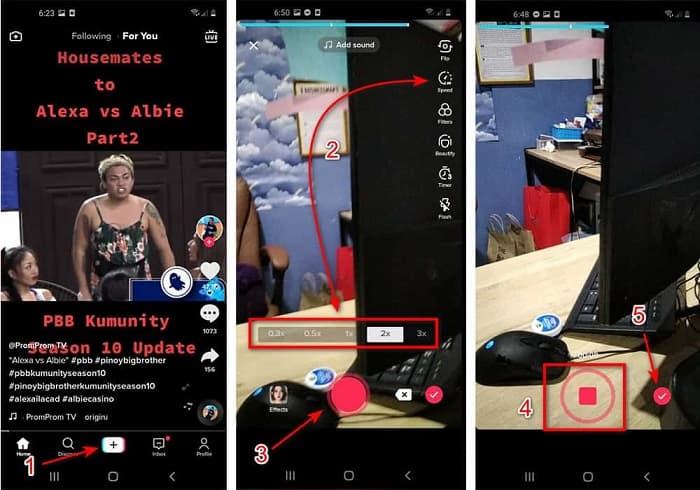
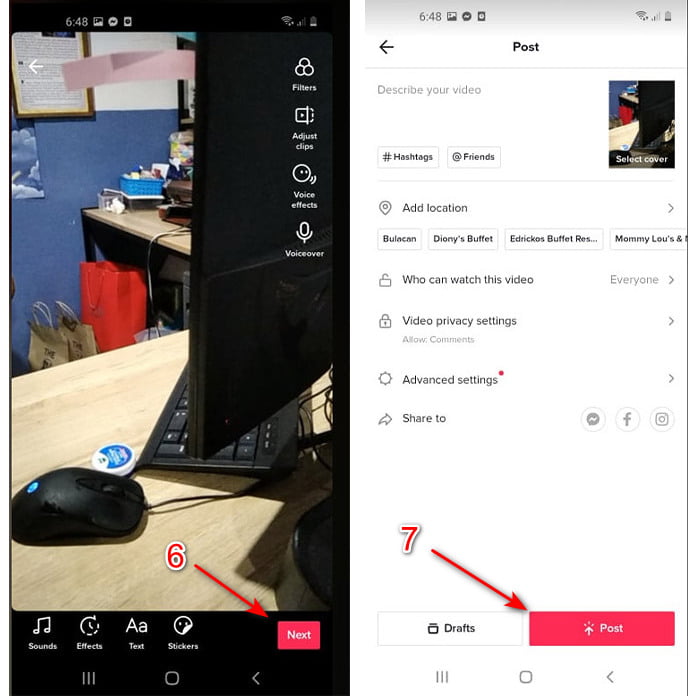
Vaihe 3. Tarkista video painamalla tarkistus-painiketta ja napsauta sitten Seuraava. Napsauta lopuksi Julkaise ladataksesi videon TikTokiin.
Osa 2. Kuinka nopeuttaa kaikkia TikTok-videoita Video Converter Ultimatessa
Toisin kuin TikTokin oma sisäänrakennettu muokkaustoiminto, Video Converter Ultimate antaa sinun nopeuttaa videota manuaalisesti, mutta helpommalla tavalla. Lisäksi videota nopeuttaessasi näet esikatselun, jonka avulla voit arvioida, vastaako videon nopeus mieltymyksiäsi. Tämä ilmiömäinen ohjelmisto tarjoaa käyttäjilleen jo ennestään edistyneen, ammattitason muokkausominaisuuksia yksinkertaistettujen vaiheiden kautta. Koska työkalu tarjoaa edistyneitä ominaisuuksia, siitä täytyy maksaa muutama dollari. Siitä ei kuitenkaan tarvitse huolehtia, sillä hinta ei nouse satoihin tai tuhansiin. Jos haluat tietää, mitä etuja tai avainominaisuuksia saat käyttöösi tämän työkalun avulla, katso alla olevaa listaa.
Parhaat avainominaisuudet, jotka löydät ohjelmasta Video Converter Ultimate:
◆ Tämä on alustasta riippumaton ohjelmisto, joten voit ladata sen PC-, Mac- tai Linux-tietokoneellesi.
◆ Kaikki edistyneet muokkaustoiminnot, muuntimet, GIF-valmistajat ja paljon muuta ovat saatavilla tässä työkalussa.
◆ Työkalun käytettävyys on erittäin kätevä kaikille, myös ammattilaisille tai aloittelijoille.
◆ Sen avulla käyttäjät voivat ilmaista luovuuttaan erilaisten täällä saatavilla olevien muokkausominaisuuksien avulla.
◆ Vaikka työkalu on maksullinen, se on silti halvempi ja erittäin edullinen kaikille, jotka haluavat kokeilla sitä.
Jos haluat nyt tietää, miten TikTok-videoita voi nopeuttaa tällä erinomaisella vaihtoehtoisella editorilla, lue ja seuraa alla olevia ohjeita saavuttaaksesi taatusti onnistuneen lopputuloksen.
Ohjeet TikTok-videoiden nopeuttamiseen ohjelmalla Video Converter Ultimate:
Vaihe 1. Käyttääksesi ohjelmaa sinun täytyy ensin ladata se PC:lle tai Macille. Asenna ohjelma, tee yksinkertainen perusasetusten määritys ja napsauta Lopeta jatkaaksesi.
Ilmainen latausWindows 7 tai uudempiTurvallinen lataus
Ilmainen latausMacOS 10.7 tai uudempiTurvallinen lataus
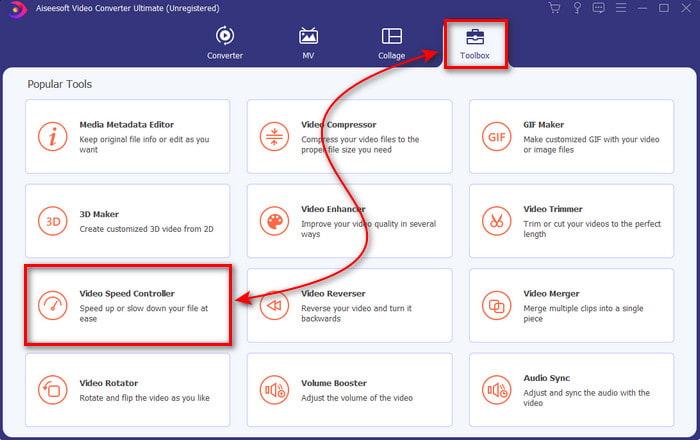
Vaihe 2. Paina Työkalupakki ja valitse sen alta Video Speed Controller.
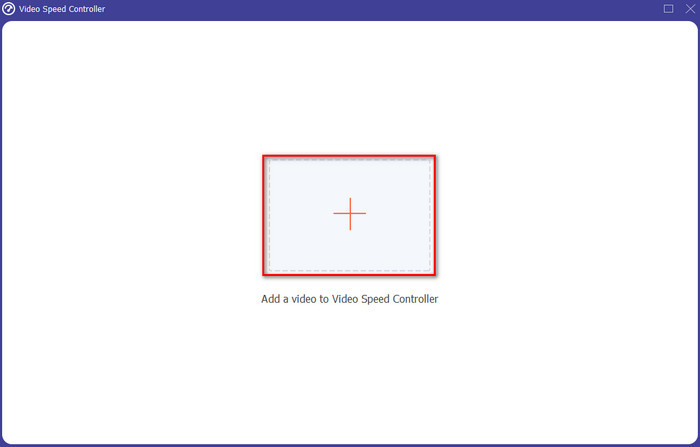
Vaihe 3. Lisätäksesi tiedoston, jota haluat nopeuttaa, napsauta +-painiketta. Valitse sitten seuraavaksi avautuvasta kansiosta tiedosto ja napsauta Avaa jatkaaksesi.
Vaihe 4. Säädä videon nopeutta valitsemalla alhaalta haluamasi nopeus-vaihtoehto. Lataa valmis tiedosto napsauttamalla Vie käynnistääksesi vienti-/latausprosessin.
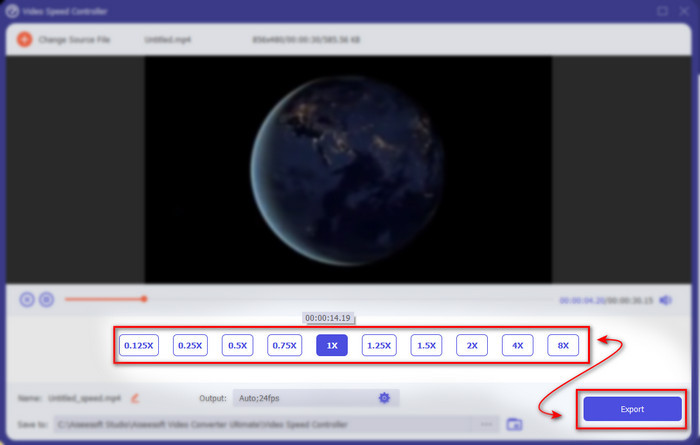
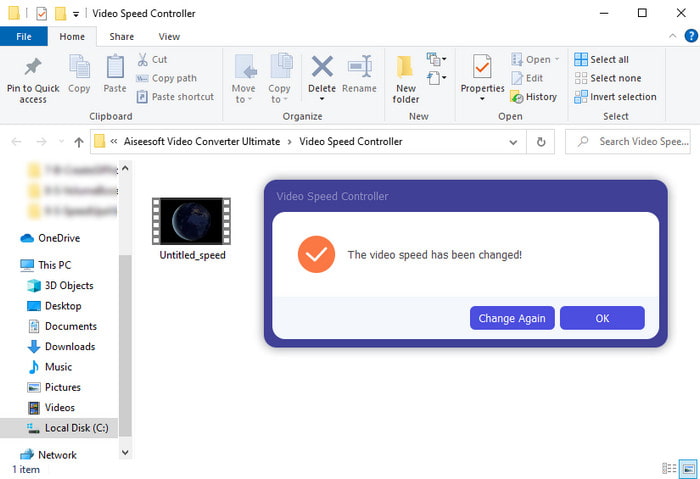
Vaihe 5. Sinun ei tarvitse odottaa minuutteja, sillä tiedosto valmistuu jo muutamassa sekunnissa. Jos näytölle avautuu kansio, se tarkoittaa, että tiedosto on jo viety. Napsauta tiedostoa katsoaksesi nopeutetun videosi.
Aiheeseen liittyvää:
Osa 3. Usein kysyttyä videon nopeuttamisesta Tiktokissa
Kuinka nopeuttaa TikTok-videota, joka ei ole sinun?
Jos haluat nopeuttaa videota, joka ei ole oma luomuksesi, sinun täytyy ensin ladata kyseinen TikTok-video. Napauta +-painiketta ja valitse Lataa, sitten valitse video galleriasta. Valitse nopeusvaihtoehto ja napsauta Seuraava ladataksesi sen. Tai käytä ohjelmaa Video Converter Ultimate videon nopeuttamiseen noudattamalla edellä annettuja ohjeita.
Voinko tallentaa 3 minuutin videon Tiktokissa?
Ehdottomasti Kyllä, voit, jos ne tallennetaan erikseen, mutta et voi tallentaa suoraa 3 minuutin videota. Koska tallennuksen pituus tällä sovellustuella on 15-60 täyttä sekuntia. Joten jos videon pituus, jonka haluat tallentaa, on yli minuutin, on parempi tallentaa se erikseen. Jos olet kuitenkin yksi niistä käyttäjistä, jotka Tiktok on valinnut kokeilemaan 3 minuutin tallennusta, olet onnekas, koska tämä testattiin vain pienelle ihmisryhmälle.
Voinko lisätä MP3:a videoihini Tiktokissa?
Kun TikTok julkaistiin ensimmäisen kerran, käyttäjät saivat lisätä musiikkia videoihinsa, mutta nyt he ovat poistaneet tämän ominaisuuden. TikTokiin tehdyn tekijänoikeusongelman vuoksi. Joten ongelman välttämiseksi he poistavat sen ja lisäävät saatavilla olevan näytemusiikkia tai voit käyttää toista sovellusta tehdäksesi sen puolestasi.
Onko Tiktokilla ikärajoitus?
TikTokin käyttöehtojen mukaan 13-vuotiaan tai sitä vanhemman on oltava tätä sovellusta käyttävän käyttäjän ikä. Tiktokilla ei myöskään ole iän vahvistusta rekisteröityessäsi, joten odota, että syötteessäsi ponnahtaa 16+ sisältöä.
Johtopäätös
Nyt kun tiedät, miten videota voi nopeuttaa TikTokissa, on aika alkaa nauttia siitä. Valitse lisäksi ratkaisu, joka sopii sinulle parhaiten. Jos mielestäsi TikTokin sisäänrakennettu nopeutustoiminto on riittävä, käytä sitä. Mutta jos haluat paremman nopeutuksen esikatselujen kanssa, käytä Video Converter Ultimate -ohjelmaa. Riippumatta siitä, minkä vaihtoehdon valitset, voit odottaa erinomaista lopputulosta näiden työkalujen toimivuuden ja kokonais-suorituskyvyn ansiosta.
-
 7 helppoa vaihetta OBS-äänen viiveongelmien korjaamiseen [ratkaistu]
 Onko sinulla vaikeuksia katsoa videoleikettä tallennuksen jälkeen, koska ääniviive on OBS Studion käytössä? Lue alla olevasta artikkelista, kuinka voit korjata epäsynkronoidun äänen tehokkaasti.
-
 Erinomaisia tapoja mahdollisia | VLC-ääniviiveen korjaaminen [2021]
 Onko sinulla vaikeuksia katsella suosikkielokuvaasi VLC-mediasoittimella äänen epävarmuuden vuoksi? Jatka tämän artikkelin lukemista saadaksesi tietää kaikki mahdolliset tavat korjata VLC-ääniviive.
-
 Parhaat tavat lisätä MP4-äänenvoimakkuutta verkossa ja offline-tilassa
 Onko sinulla vaikeuksia kuulla videoleikkeen äänet? Lue alla oleva artikkeli tietääksesi kuinka lisätä mp4-äänenvoimakkuutta eri tavoilla.
