


 ממיר וידאו אולטימטיבי
 מקליט מסך
 תיקון וידאו
 הורדה מאובטחת
כיצד להמיר MKV ל MP4 ב- Windows / Mac
כשאתה מנגן סרט אתה מגלה שלא ניתן לפתוח אותו מכיוון שתוכנית מסוימת אינה תומכת בפורמט MKV. אז אתה יכול לתהות מדוע זה קורה ואיך לפתור את זה.
הסיבה לכך שאינך יכול לשחק MKV יכולה להיגרם בגלל היעדר רכיבי codec מסוימים במכשיר שלך. בגלל זה, למרות שאתה יכול לראות MKV בכל מקום בימינו, מכשירים או תוכניות מסוימים עדיין לא תומכים בפורמט MKV. לכן, עליכם להמיר אותו לפורמט נפוץ יותר, כגון MP4, פורמט הרבה יותר שמיש הניתן לטעינה נכונה כמעט בכל מכשיר.
היום נציג בפניך שני ממירים חינמיים שיעזרו לך להמיר קבצי MKV ל‑MP4.

חלק 1. כיצד לשנות MKV ל- MP4 באופן מקוון וחינמי
אם אינך יכול לסבול התקנת תוכנות רבות במחשב בדיוק כמוני, אני מציע לך לנסות ממיר מקוון מבוסס אינטרנט.
יש הרבה ממירי וידאו מקוונים בחינם בשוק, אבל למען האמת, לרוב הממירים המכונים 'חינם' אלה יש מספר עצום של גבולות. אתה צריך לשלם להם כדי לקבל תוכנית טובה יותר. רק כך תוכלו להמיר במהירות קבצים גדולים בקבוצות ללא סימן מים.
אז האם יש ממיר וידאו חינמי, מהיר ועוצמתי באמת? התשובה היא כן.
FVC Free Online Video Converter, ממיר וידאו יעיל מ‑MKV ל‑MP4, שיכול לעזור לך להמיר וידאו ללא הגבלה. הוא תומך בהמרת כמעט כל פורמטי הווידאו המרכזיים לפורמטים פופולריים כמו MP4, MOV, WMV, AVI ו‑FLV בתוך שניות. הוא גם תומך בהמרה batch, כלומר באפשרותך להמיר כמות גדולה של סרטונים ולשמור על האיכות המקורית שלהם בו‑זמנית.
מכיוון ש‑FVC Free Online Video Converter הוא כלי מבוסס‑אינטרנט, אפשר להשתמש בו בקלות גם ב‑Windows וגם ב‑Mac, כל עוד יש לך חיבור אינטרנט יציב ודפדפן. מבחינת השימוש, תוכל לשלוט בממיר MKV ל‑MP4 הזה בכמה צעדים פשוטים בלבד.
שלב 1. היכנס לאתר של FVC Free Online Video Converter בדפדפן שלך. לאחר מכן לחץ על הכפתור Add Files to Convert. אם עדיין לא הורדת את FVC Launcher למחשב שלך, תופיע תזכורת להוריד את התוכנה תחילה. פשוט עקוב אחר ההנחיות והתקן את ה‑Launcher.
הורד את גרסת הדסקטופ כדי להמיר קבצים במצב אצווה.

שלב 2. לאחר ההתקנה, חלון Open File יופיע באופן אוטומטי. כעת בחר את קובץ ה‑MKV שברצונך להמיר. אגב, אם אתה רוצה להמיר כמה סרטוני MKV בבת אחת, בחר את כל קבצי ה‑MKV הדרושים לך.
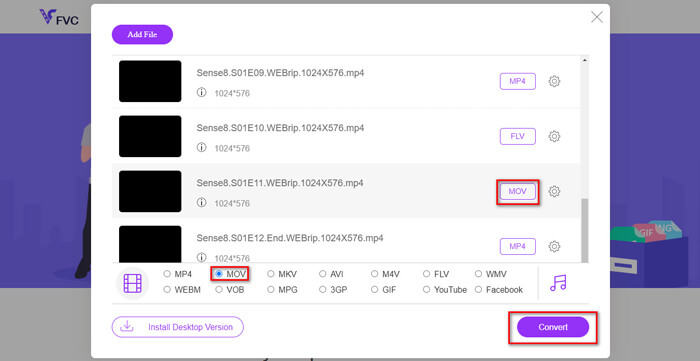
שלב 3. לאחר מכן לחץ על Open ותראה רשימה של הקבצים שנבחרו. בחר את פורמט הפלט MP4 מתחת לרשימה הזו.
אתה יכול גם לבחור פורמטים שונים לקבצים שונים בנפרד על‑ידי לחיצה על הפורמט שליד סמל ה‑Setting ושינוי פורמט הפלט למטה. אבל אפשר פשוט לדלג על זה וללחוץ על כפתור Convert. לאחר מכן בחר תיקייה לשמירת הסרטונים שהומרו.
חלק 2. כיצד להמיר MKV ל MP4 עם נגן המדיה VLC
ייתכן שאתה מכיר את VLC כנגן מולטימדיה, הזמין עבור רוב מערכות ההפעלה לשולחן עבודה. אבל למעשה, הוא גם ממיר וידאו "נסתר". הוא מאפשר לך להמיר קבצי MKV לפורמט MP4. אם VLC כבר מותקן במחשב שלך, שווה לנסות.
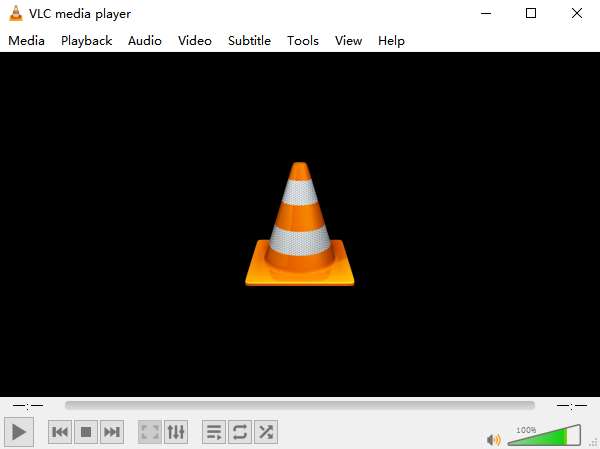
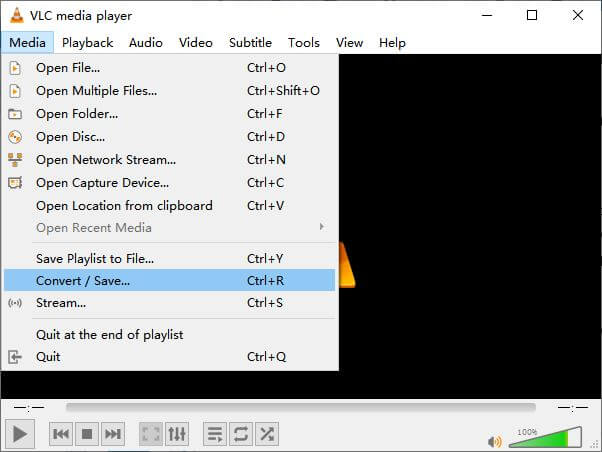
שלב 1. הפעל תחילה את VLC Media Player במחשב שלך. לחץ על תפריט Media. מצא את Convert / Save ברשימת הנפתח.
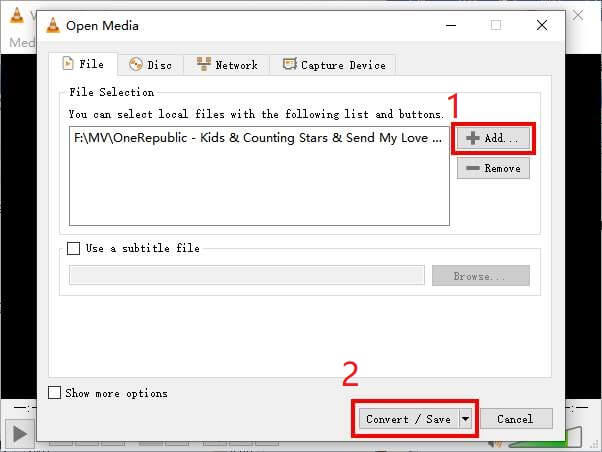
שלב 2. לחץ על + Add ואתר את סרטון ה‑MKV שברצונך להמיר. לאחר מכן לחץ על הכפתור Convert / Save למטה.
שלב 3. בחר את פורמט MP4 בחלון Convert.
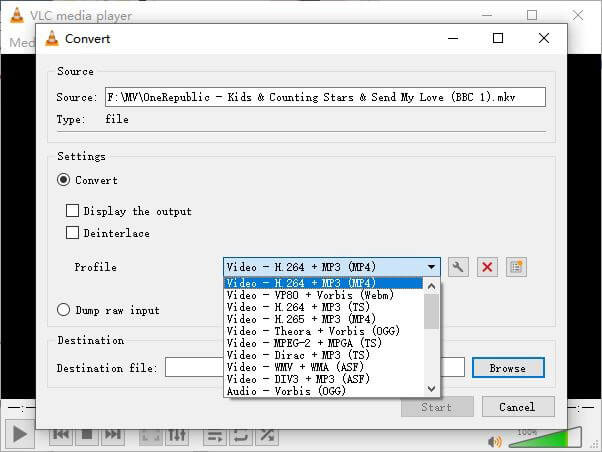
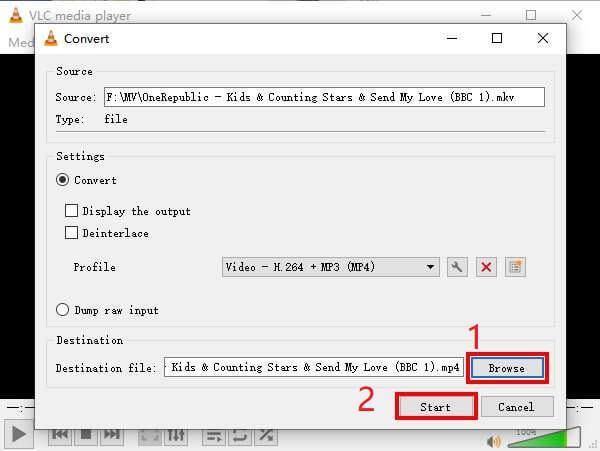
שלב 4. לחץ על כפתור Browse כדי לאשר את מיקום השמירה. לבסוף Start את תהליך ההמרה והמתן לקבלת סרטון ה‑MP4 שלך.
MKV לעומת MP4
פורמט מיכל המולטימדיה Matroska, שיצא בשנת 2002, הוא פורמט קוד פתוח שיכול לכלול מספר רצועות וידאו, אודיו, תמונה וכתוביות. אז אתה יכול להשתמש בו כדי לאחסן קטעי וידאו קצרים, תוכניות טלוויזיה וסרטים בקלות. זה די פופולרי עבור אוהדי אנימה.
פורמט MP4 שוחרר על ידי Moving Picture Experts Group (MPEG) בשנת 2001, ופורמט MP4 יכול לעזור לך לשמור נתוני וידאו, אודיו, כתוביות ותמונה ברצועות נפרדות. זה קיצור של MPEG-4 Part 14. בנוסף, זהו אחד הפורמטים הפופולריים ביותר המשמשים להזרמת ושיתוף סרטונים.
חלק 3. שאלות נפוצות על המרת MKV ל MP4
1. האם ffmpeg יכול להמיר MKV ל MP4?
כן, ניתן להמיר MKV ל‑MP4 באמצעות ffmpeg. אבל ייתכן שיהיה מעט מורכב עבורך להבין כיצד הוא פועל, למרות שהשלב היעיל ביותר הוא רק רצף של תווים: ffmpeg -i my_movie.mkv -vcodec copy -acodec copy my_movie.mp4
2. האם בלם יד יכול לייצא MP4 מ MKV?
אם כל מה שאתה צריך הוא קובץ MP4 לאחר ההמרה, HandBrake אכן יכול לעזור לך בכך. עם זאת, הוא אינו יכול להמיר את הקבצים שלך לפורמטים אחרים, כמו WMV, MOV, FLV. HandBrake תומך ברוב קובצי המולטימדיה הנפוצים, אבל זה נכון לגבי מקורות הקלט הנתמכים שלו. עבור פורמטי פלט, האפשרויות שלך הן MP4(.M4V) ו‑MKV.
3. האם המרת MKV ל MP4 מאבדת את האיכות?
רוב ממירי הווידיאו מאבדים איכות כאשר אתה ממיר קבצי MKV ל MP4, אולי 1% או 5%. בעת קידוד מחדש של קבצי MKV ל- MP4, קשה להימנע מאובדן נתונים לחלוטין. אבל אתה יכול להגדיל את הרזולוציה של התמונות כדי להפוך את האיכות של קטעי וידאו MP4 מיוצאים קרוב לסרטון המקורי.
סיכום
ישנם אינספור ממירי וידאו לבחירתכם. קשה למצוא ממיר חינמי ויעיל לבד. פוסט זה הציג בפניך שתי שיטות להמיר MKV ל MP4. האחד הוא נגן המדיה VLC, והשני הוא ממיר וידאו מקוון בחינם FVC.
אם אתה רק רוצה קובץ MP4, VLC מספיק. עם זאת, VLC תומך רק במספר מוגבל של פורמטים. לכן, אם אתה רוצה ממיר מקצועי יותר, נראה שממיר וידאו מקוון חינם של FVC הוא בחירה טובה יותר.
מקווה שתמצא את הפוסט הזה שימושי. ואל תהססו לספר לנו את דעתכם.
-
 כיצד להמיר קבצי וידיאו MP4 לתמונות GIF מונפשות ללא אובדן איכות
 מחפש את הדרך הטובה ביותר להמיר את סרטון ה- MP4 שלך ל- GIF מונפש? להלן מדריך מפורט לעשות זאת בפוטושופ, Windows Movie Maker, ממיר וידאו מקוון ועוד.
-
 כיצד להמיר MOV ל MP4 מבלי לאבד איכות
 רוצה להמיר קבצי MOV (Apple QuickTime Movie) ל- MP4? הודעה זו חולקת 4 שיטות חינם להמרת קבצי הווידאו MOV שלך לפורמט MP4 ב- Windows 10/8/7 / XP וב- Mac OS X.
-
 4 דרכים קלות להמיר WMV ל MP4 ב- Mac וב- Windows
 כיצד להמיר קבצי WMV ל MP4? להלן 4 הדרכים הקלות להמיר WMV ל MP4 ב- Mac וב- Windows בצעדים פשוטים.

