


 ממיר וידאו אולטימטיבי
 מקליט מסך
 תיקון וידאו
פרטים שאתה צריך להיות מואר בהמרת MPG ל-AVI
באופן כללי, קובץ MPG הוא קובץ וידאו טיפוסי המשתמש בפורמט וידאו דיגיטלי שאורגן ותקנן על‑ידי קבוצת מומחי התמונה הניידת (MPEG). הוא מאחסן וידאו, אודיו ומטא־דאטה בקובץ בודד שבו המידע משורג זה בזה. מקובל להשתמש בקובצי MPG ליצירת סרטים המועברים דרך האינטרנט. סוג וידאו זה אינו פשוט להמרה אם אין לך ידע או רקע בשימוש בממירים שתומכים או ממירים MPG ל‑AVI. המשך לקרוא מאמר זה כדי לקבל הבהרה על הפרטים והאפשרויות שעליך לשקול כדי להשיג את תהליך ההמרה הרצוי לך.
חלק 1. MPG ו-AVI - סקירה כללית
MPEG הוא פורמט קובץ וידאו שפותח על‑ידי קבוצת מומחי התמונה הניידת (Moving Picture Experts Group), אותה קבוצה שהביאה אליך פורמטים כמו MP3 ו‑MP4. בהתאם לאופן השימוש, MPEG משתמש בדחיסת קבצים מסוג MPEG-1 או MPEG-2.
כדי לדחוס וידאו גולמי ברמת VHS ומוזיקת CD לקצב של 1.5 מגה־ביט לשנייה מבלי לפגוע יותר מדי באיכות, נוצר התקן MPEG-1. כתוצאה מכך הוא הפך לאחד מפורמטי הווידאו/אודיו הפופולריים והתואמים ביותר ברחבי העולם. נתוני וידאו עבור MPEG-1 משודרים בדרך כלל בקצב של 30 פריימים לשנייה, ברזולוציה של כ‑352×240 פיקסלים.
עם זאת, מחשבי Windows משתמשים ב‑AVI כפורמט הווידאו המוגדר כברירת מחדל. במבנה קובץ מולטימדיה, כמו DivX או XviD, ניתן לאחסן אודיו ווידאו תוך שימוש במספר מקודדים (codecs). פורמטי וידאו חלופיים רבים, כגון MPEG ו‑MOV, משתמשים בפחות דחיסה ויותר מקום אחסון מאשר קובץ AVI. ניתן גם להפיק קובצי AVI ללא דחיסה כלל. הדבר מוביל לקובצי ענק – בסביבות 2–3 ג׳יגה־בייט עבור דקת וידאו אחת – משום שהקבצים כעת חסרי‑אובדן (lossless). ללא קשר לכמה פעמים תפתח או תשמור את הקובץ, קובץ חסר‑אובדן שומר על איכותו. יתרונות נוספים כוללים ניגון ללא צורך בהתקנת מקודדים.
חלק 2. התוכנה היעילה ביותר להמרת MPG ל-AVI
אם אי‑פעם תהית כיצד להמיר קובץ וידאו MPG ל‑AVI בחינם, התוכנה החדשה והטובה הזו היא מה שהמאמר ממליץ שתשתמש בו. Video Converter Ultimate היא תוכנה להורדה חינמית הזמינה ב‑Windows וב‑Mac, שיכולה להמיר את קובץ ה‑MPG שלך ל‑AVI במהירות רבה יותר מאשר המרה מקוונת. מעבר לשני פורמטי הווידאו האלה, תוכנה זו תומכת גם במגוון פורמטים נוספים לבחירתך. היא נחשבת לטובה ביותר בזכות איכות הפלט שתשיג אם תשתמש בה. כעת, לאחר שקיבלת הצצה למה שהתוכנה יכולה לעשות, התכונן ובוא נגלה כיצד התוכנה פועלת:
שלב 1. כדי להתחיל, פשוט לחץ על כפתור Free Download המופיע למטה. לאחר שההורדה תסתיים, תוכל לבחור להוריד את התוכנה ל‑Windows או ל‑Mac. לאחר התקנת התוכנה על שולחן העבודה של המחשב, תוכל להתחיל להשתמש בה על‑ידי לחיצה על הכפתור Start Now.
הורדה חינמיתל-Windows 7 ומעלההורדה מאובטחת
הורדה חינמיתל-MacOS 10.7 ומעלההורדה מאובטחת
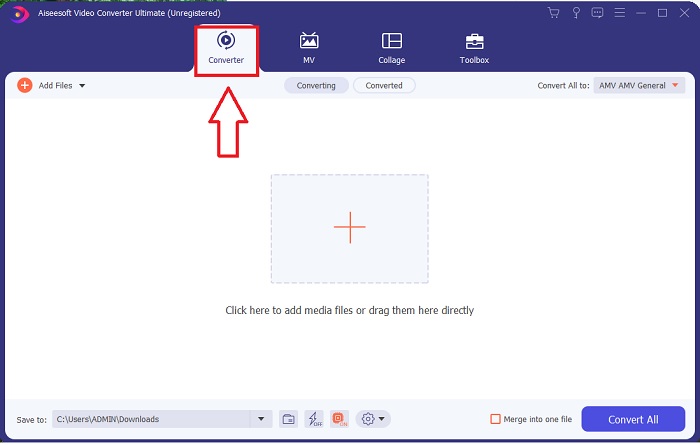
שלב 2. פתח את התוכנה שזה עתה הורדת. כאשר תפתח את התוכנה לראשונה, תראה חלון עם ממשק Converter. כאן תתחיל את תהליך הטרנסקוד (transcoding) של הווידאו שלך.
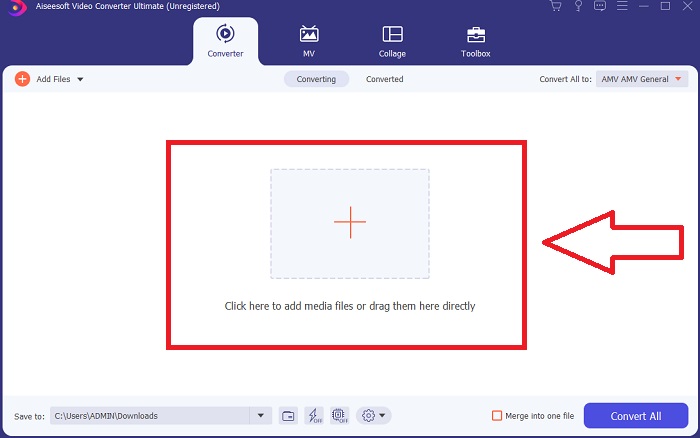
שלב 3. תוכל להתחיל בתהליך ההמרה על‑ידי ייבוא הקבצים לתוך התוכנה. המרת וידאו פשוטה כמו גרירתו על גבי הסמל Plus.
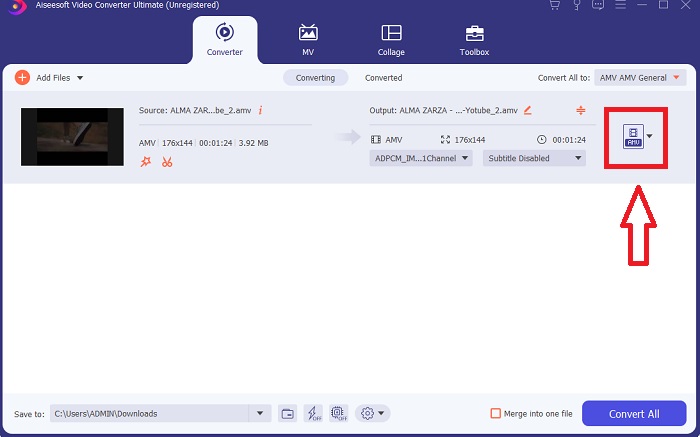
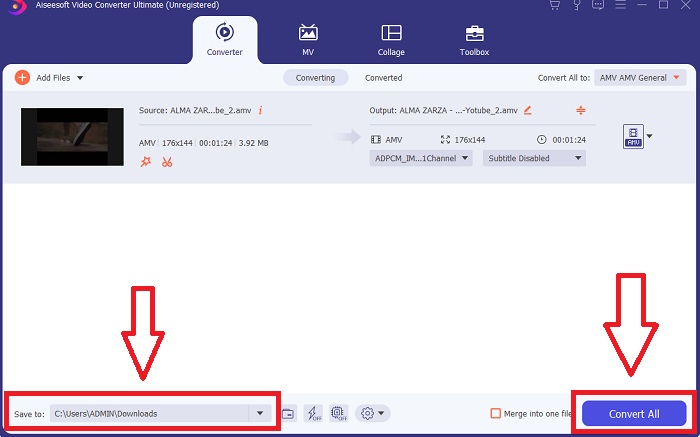
שלב 4. לחץ לחיצה ימנית על פורמט וידאו ובחר Save to או Save to external storage. חפש ולאחר מכן בחר סוג קובץ AVI מתפריט הבחירה. לאחר שבחרת סוג קובץ וידאו AVI, יהיו לרשותך הגדרות איכות וידאו רבות. אם פלט הווידאו הרצוי אינו מופיע, תוכל לשנות את הגדרות האיכות. סמל גלגל‑השיניים מאפשר לך לשנות את רזולוציית התצוגה, קצב הפריימים ואיכות האודיו. כדי לשמור את השינויים, לחץ על הכפתור Create New.
שלב 5. לחץ על Convert All כאשר סיימת לערוך את הווידאו שנבחר והוא מוכן להעברה למחשב שלך.
חלק 3. טיפים מהירים: כלים יעילים אחרים שכדאי לשקול
שיטה 1. השתמש ב-CloudConvert
CloudConvert הוא ממיר וידאו מקוון. ממיר מקוון זה תומך גם ב-MP4, WEBM ו-AVI, בין שאר הפורמטים. אתה יכול לבחור את האיכות, הרזולוציה וגודל הקובץ של הסרטון. אם אתה חושב כיצד להמיר MPG ל-AVI בכלי מקוון זה, הנה ההליך כיצד להשתמש בו:
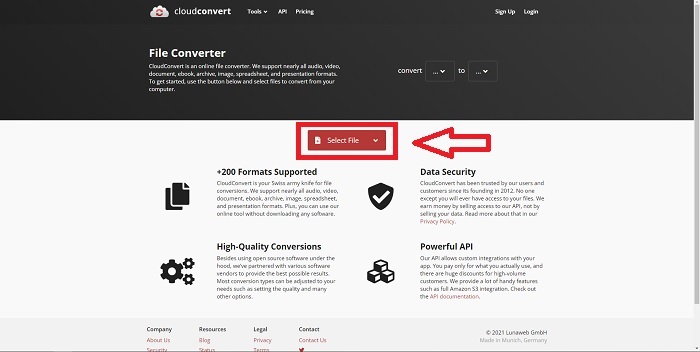
שלב 1. העלה קובץ מהמחשב שלך על‑ידי לחיצה על Select the File.
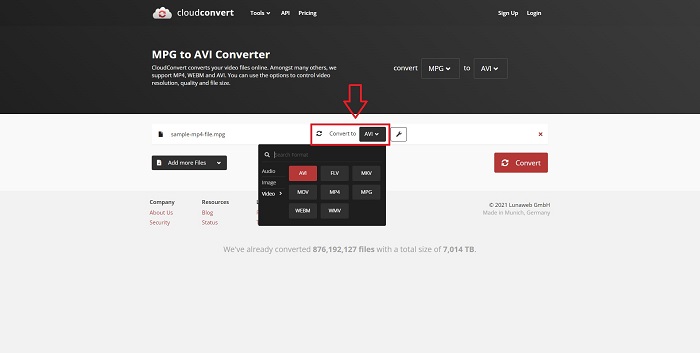
שלב 2. לאחר מכן המשך בבחירת היעד אליו יומר הקובץ על‑ידי לחיצה על אזור הפורמט שליד סמל המפתח (wrench). באפשרותך גם להוסיף קבצים נוספים להמרה.
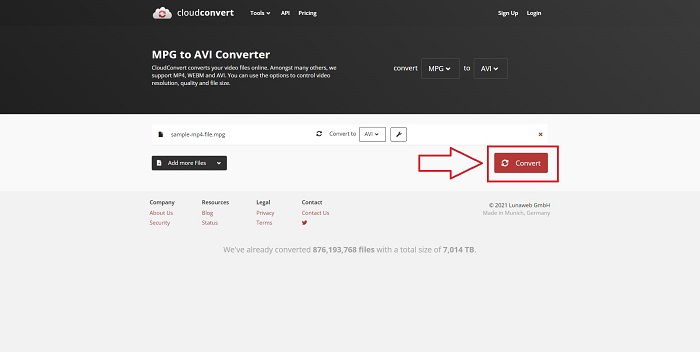
שלב 3. לחץ על Convert כדי להמיר את כל הקבצים שהעלית.
שיטה 2. השתמש ב-Zamzar
Zamzar הוא כלי מבוסס אינטרנט להמרת קבצים. ניתן לבצע המרות במגוון פורמטים ללא צורך בהורדת תוכנה כלשהי. Zamzar עשויה להמיר קובץ מפורמט אחד לאחר, כגון Adobe PDF למסמך Microsoft Word, על ידי הקלדת כתובת URL או העלאת קובץ אחד או יותר (כל עוד כולם באותו פורמט). על מנת לקבל ידע על כלי מקוון זה, הנה השלבים שסופקו עבורך:
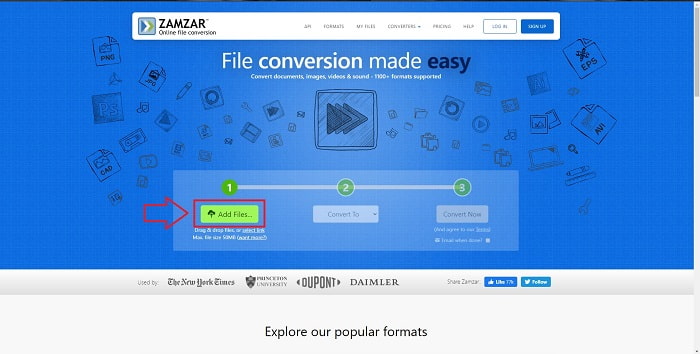
שלב 1. חפש Zamzar בכל מנוע חיפוש. לאחר שתלחץ על האתר, תוכל כעת להעלות קובץ בממשק על‑ידי לחיצה על Add Files.
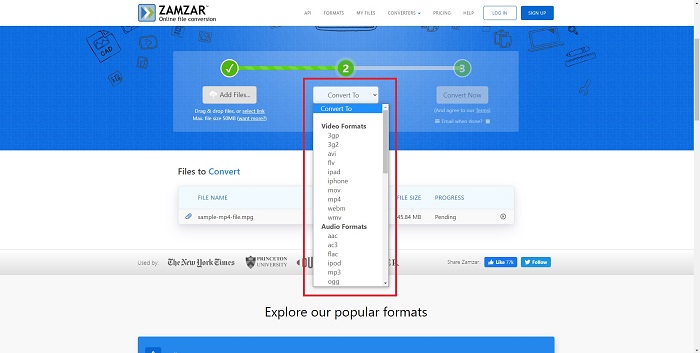
שלב 2. לאחר מכן תוכל להמיר את הקובץ על‑ידי בחירה לאיזה פורמט תרצה להמיר. לחץ על Convert To כדי לראות את כל הפורמטים הנתמכים שהכלי המקוון הזה מציע.
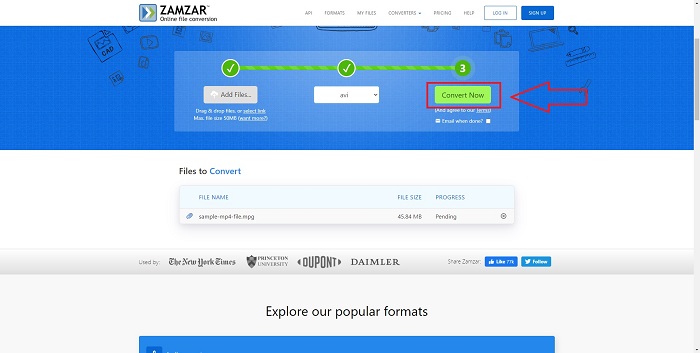
שלב 3. כדי להמיר את הקובץ, לחץ על Convert Now.
חלק 4. שאלות נפוצות לגבי MPG ו-AVI
האם AVI או MPG טובים יותר?
אחסון אפשרי עם קבצי AVI, בעוד הקלטת וידאו מתבצעת עם קבצי MPEG. AVI עדיף במעט על MPEG; עם זאת, אם MPEG הוא הפורמט לשימוש, ברצונך לצרוב סרטוני DVD. Microsoft Windows פיתחה את פורמט הקובץ AVI בתגובה לפורמט הקובץ MOV של אפל, בעוד שקבוצת Moving Picture פיתחה את פורמט MPG.
מהם היתרונות והחסרונות של AVI?
בהשוואה לשאר הפורמטים של קבצים, קבצי AVI יכולים להיות גדולים במיוחד אם אינם דחוסים. אתה חייב להיות מוכן לוותר על שטח דיסק בתמורה ליתרונות של קובץ ה-AVI, מכיוון שלא תוכל לאחסן קבצים רבים כמו אחרת. אם תדחס קובץ AVI באינטרנט מעבר לנקודה מסוימת, איכות הווידאו תפחת כתוצאה מכך.
איזה גודל קטן יותר AVI או MPG?
כשמדובר באינטרנט, לקבצים גדולים לוקח יותר זמן לרדת. יש היגיון בקידוד סרטים לקבצים בעלי נפח קטן יותר, גם אם הדבר גורם לאובדן קל באיכות. כשזה מגיע לניגון, AVI עדיין מועדף על‑פני MPG משום שיותר נגני מדיה ייעודיים יכולים לנגן קובצי AVI מאשר קובצי MPG. אם ברצונך לנגן את קובצי ה‑MPG שלך במחשב, לחץ כאן כדי ללמוד עוד.
סיכום
לסיכום כל מה שדיברנו עליו, Video Converter Ultimate היא תוכנת ההמרה הטובה ביותר שכדאי לך לשקול להשתמש בה לעומת כל ממירי ה‑MPG ל‑AVI המקוונים שצוינו לעיל. תוכנה זו חינמית, ותהליך ההמרה שלה מהיר יותר מזה של כלי ההמרה המקוון. היא גם תומכת בהרבה פורמטים ומספקת איכות גבוהה בפלט הווידאו. מעבר לכך, אין סיבה שלא תשתמש בתוכנה הזו.
-
 כיצד להמיר קבצי MPEG לקבצי MP4 בחינם ב- Windows, Mac, באינטרנט
 קרא וקבל 3 דרכים בחינם להמיר קבצי MPEG לקבצי MP4 במחשב שלך. אתה יכול להשתמש בממיר וידאו מקוונים ושולחניים כדי להפוך את MPEG לפורמט MP4 בקלות.
-
 [2025] הכלים הטובים והדרכים הקלות כיצד להמיר MPEG ל-MP3
 מאמר זה מדבר בעיקר על איך אתה יכול להמיר את סרטוני ה-MPEG שלך ל-MP3 עם השימוש בכלים האמינים ביותר ברשימה.
-
 4 דרכים יעילות להמיר MOV ל-AVI במחשב וב-Mac [2025]
 האם אתה רוצה לדעת מהו ממיר ה- MOV ל- AVI הטוב ביותר באינטרנט? ולמה ממיר הווידאו Ultimate FVC עשוי להיות זה בשבילך.
