


 ממיר וידאו אולטימטיבי
 מקליט מסך
 תיקון וידאו
הבנה עמוקה לגבי 5 עורכי הווידאו בהילוך איטי הזמינים
האם אתה אוהב לצפות בספורט עתיר מהירות ופגיעות כמו מרוצים, אגרוף, בייסבול, כדורעף ועוד? כל ענפי הספורט האלו זקוקים למצלמה מהירה במיוחד רק כדי לבצע ניתוח תנועה. אם אתה רוצה לנתח כל תנועה של כל ספורטאי, נסה להכיר את היוצר סרטוני ה־Slow Motion הטוב ביותר שתוכל להשתמש בו. בנוסף, בעזרת הכלי שלמטה לא תצטרך שום ציוד נוסף מלבד מחשב שולחני, אינטרנט או טלפון. בהמשך, קרא בעיון על הכלים ובחר באיזה מהם הכי מתאים לך להשתמש.

חלק 1. 3 יצרנית הווידאו בהילוך איטי הטוב ביותר עבור Windows PC, Mac ו-Online
1. Video Converter Ultimate
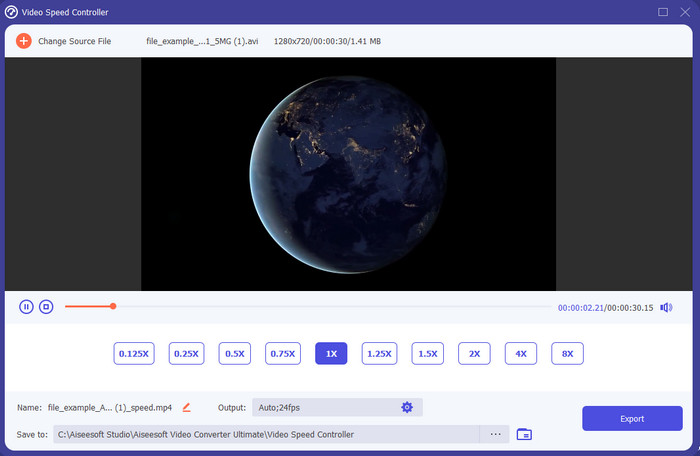
רוצה לדעת איזה מתוך העורכים לסרטוני Slow Motion הוא הטוב ביותר לשימוש כדי להפוך את ניגון הווידאו שלך להילוך איטי? נסה להשתמש ב־Video Converter Ultimate, משום שהכלי הזה הוא לא רק הטוב ביותר, הוא יוצא מן הכלל. לכלי הזה כבר יש המון פונקציות מתקדמות שתרצה להשתמש בהן גם אם אינך עורך וידאו מקצועי. גם אם אתה מקצוען, התוכנה הזו היא הבחירה הטובה ביותר, בלי קשר לרמת כישורי העריכה שלך. נוסף על כך, תוכל להוסיף במהירות אפקטים של הילוך איטי לסרטון שלך בלי לקרוא מדריך או לצפות בסרטוני הדרכה. זאת מכיוון שהכלי מציג הוראות הרבה יותר פשוטות מאשר הכלי שלמטה. אמנם צריך לשלם עבור הכלי לפני שניתן לגשת לכל הפונקציות שלו, אבל המחיר עדיין אינו גבוה. אם אתה רוצה לדעת עוד על הכלי הזה, קרא את תכונות המפתח שלמטה.
תכונות עיקריות של Video Converter Ultimate:
◆ אפליקציית יוצר סרטוני Slow Motion מתקדמת עם הוראות בסיסיות.
◆ ממשק כלי ידידותי למשתמש.
◆ כוונן את מהירות הווידאו בקלות בבקר מהירות הווידאו.
◆ תומך ביותר מ-200+ פורמטי וידאו ואודיו.
◆ ניתן להוריד אותו ולגשת אליו במערכות ההפעלה PC ו-Mac.
הורדה חינמיתל-Windows 7 ומעלההורדה מאובטחת
הורדה חינמיתל-MacOS 10.7 ומעלההורדה מאובטחת
2. יחידת זמן בוריס Continuum
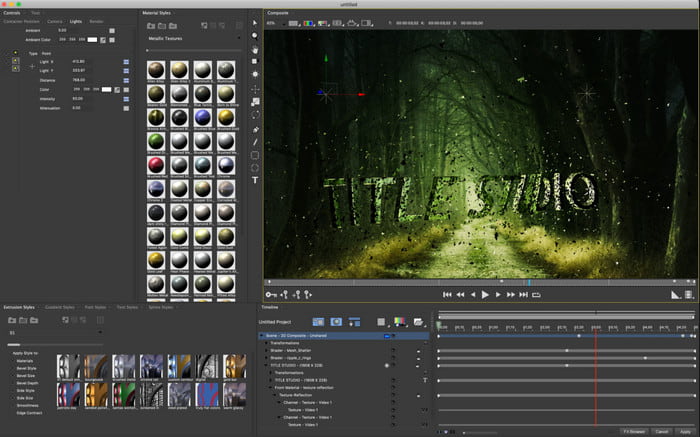
Boris Continuum Time Unit הוא הבחירה הטובה ביותר אם אתה רוצה אפליקציית יוצר סרטוני Slow Motion כבדה וחזקה במיוחד. אין כלי אחר שמסוגל לעשות את כל מה שכלי זה מספק כדי לקבל תוצאה מקצועית. בנוסף, לכלי הזה יש את אפשרויות העריכה המפורטות ביותר שתרצה לנסות. למרות שהכלי טוב יותר מכלים אחרים, המחיר שלו באמת יקר מאוד. כמו כן, אם אתה רוצה להשתמש בכלי הזה עליך להיות מצויד במחשב שולחני חזק ועדכני, משום שלא תוכל להפעיל אותו על מחשבים ישנים.
יתרונות
- הכלי הטוב ביותר לשימוש כדי לבצע עריכה כבדה.
- זה תואם לכל הפלטפורמות.
- ממשק הכלי נראה יותר כמו כלי מקצועי.
חסרונות
- תוכנה זו היא היקרה ביותר בכתבה זו.
- צריך יחידת מערכת ברמה גבוהה.
- לא הבחירה הטובה ביותר למתחילים שאין לו רקע בעריכה.
3. VEED.IO
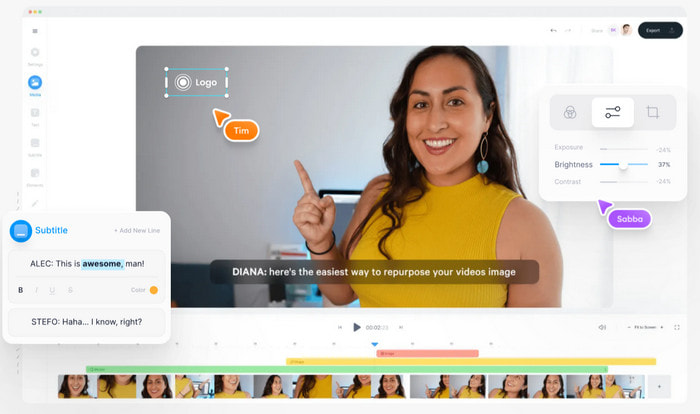
אז אם אינך רוצה להוציא אפילו שקל ויש לך חיבור אינטרנט, נסה להיכנס אל VEED.IO. זהו התוכנה הטובה ביותר ליצירת סרטון בהילוך איטי אונליין, משום שהיא פשוטה וקלה לגישה. הממשק הכולל של הכלי נקי מאוד עם הוראות ברורות, ולכן הוא נוח לשימוש עבור כולם. עם זאת, ניתן להעלות רק קבצים שגודלם קטן מ־50MB, ואם תרצה להעלות קובץ גדול יותר הכלי ידרוש ממך לשדרג. בנוסף, אם לא רכשת את הכלי, צפה לכך שהתוצאה הסופית תכיל סימן מים.
יתרונות
- ניתן לגשת בקלות לכל מי שיש לו חיבור לאינטרנט.
- אין פרסומות טורדניות באתר.
- קל להתמודד איתו על ידי המתחילים בעריכה.
חסרונות
- תכונות הכלים מוגבלות מאוד בגרסה החינמית של הכלי.
- תלוי באינטרנט. לכן, אם האינטרנט שלך איטי, צפה לקצב איטי של העלאה, הורדה ועריכה. כמו כן, אינך יכול לגשת לכלי זה אם אין לך חיבור לאינטרנט.
חלק 2. 2 של אפליקציית הווידאו האיטי הטובה ביותר באנדרואיד ו-iOS
1 SloPro
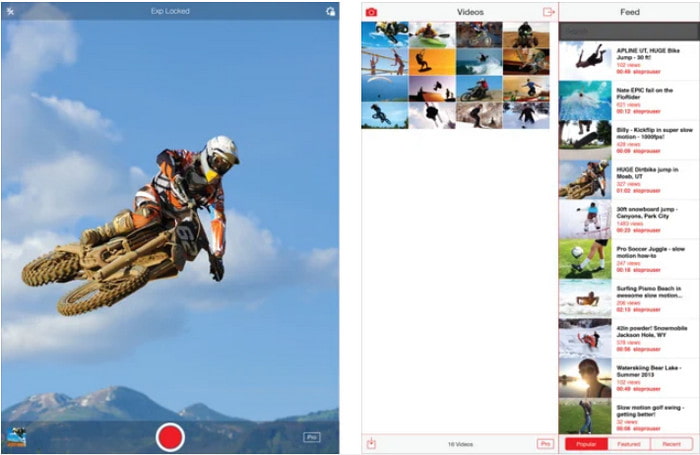
SloPro היא האפליקציה לסרטוני Slow Motion הטובה ביותר שתוכל להוריד בחינם ב־iOS. האפליקציה יכולה להפעיל את הסרטון בהילוך איטי של עד 500 עד 1000 פריימים לשנייה. נוסף על כך, תוכל לשנות את הסרטון מהפעלה מהירה להילוך איטי או להפך. למרות שהכלי יכול להיות אפשרות נהדרת, עדיין יש לאפליקציה לא מעט חסרונות. לדוגמה, קובץ הווידאו יישמר בגלריה של האפליקציה ולא ב־Camera Roll. בנוסף, אם תנסה להשתמש ב־1000 פריימים לשנייה, הווידאו עלול להפוך למקוטע, לפי משתמשים שכבר ניסו זאת. עם זאת, הכלי עדיין מצוין משום שהוא חינמי, וניתן להאט את הסרטון בקלות רבה.
יתרונות
- השמעה בהילוך איטי הטוב ביותר שתוכל להשתמש ב-iOS בחינם.
- הוא כבר מקבל דירוג הוגן ו-3.3 כוכבים.
- פשוט וקל לשימוש.
חסרונות
- הפלט הסופי לא נשמר ישירות בגלריה.
- כל הסרטונים שנשמרו בגלריית SloPro הם אקראיים ואינם מסווגים כראוי.
- אם אתה משתמש ברזולוציה של 1000 fps אז צפה לפלט וידאו באגי.
2. יוצר וידאו בהילוך איטי
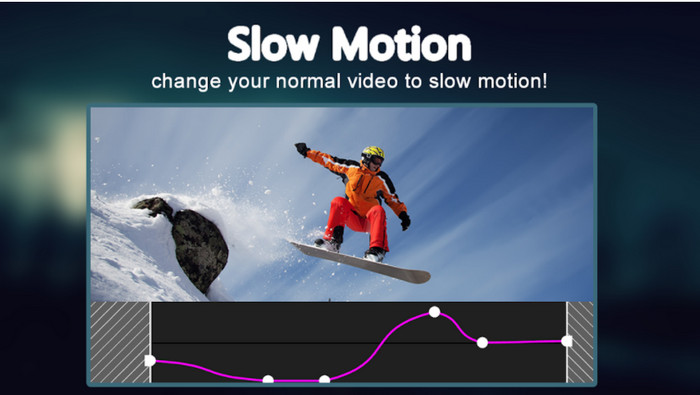
אחד מיוצרי סרטוני ה־Slow Motion הטובים ביותר שתוכל להוריד בחינם לטלפון האנדרואיד שלך הוא Slow Motion Video Maker. בעזרת אפליקציה זו תוכל לבצע ניגון מהיר (Fast Forward) וגם ניגון בהילוך איטי בקלות על הסרטונים שלך. עם זאת, באפליקציה יש הרבה פרסומות מציקות שקופצות משום מקום. בנוסף, ההילוך האיטי שניתן להחיל הוא רק עד פי 0.5. אבל בסך הכול, היא מצוינת לשימוש להאטת וידאו באנדרואיד, אלא שהפרסומות פוגעות מאוד בחוויית השימוש.
יתרונות
- האפליקציה ניתנת להורדה בחינם בחנות Play.
- זה נהדר להשתמש בו כדי להאט את הסרטון בצורה חלקה.
- האפליקציה קלה לניהול.
חסרונות
- יש לו הרבה מודעות מטרידות שמופיעות משום מקום.
- הורדת הסרטון עשויה להימשך זמן רב מכיוון שאין לו מהירות עיבוד.
חלק 3. שאלות נפוצות על יוצר וידאו בהילוך איטי
מה התפקיד של FPS?
הוא משמש לחישוב סדרת הפריימים הרצופה שמוצגת בלוח התצוגה שלך. זה נראה לרוב בכל לכידת תנועה כמו במשחקי וידאו, מצלמות, סרטים, ואפילו העין שלנו יכולה לראות 30 עד 60 פריימים לשנייה.
מהו קצב FPS הטוב ביותר בהילוך איטי?
ה-FPS האידיאלי שתוכל להשתמש בו כדי לצפות בווידאו בהילוך איטי הוא בין 120 ל-240 פריימים לשנייה. לכן, אם אתה רוצה הפעלה מפורטת יותר בהילוך איטי, הפוך את ה-FPS גבוה יותר.
איך להפעיל סרטון בהשמעה מהירה?
כדי לקבל מושג כיצד להפעיל וידאו בהילוך מהיר, נסה ללחוץ על הקישור הזה. למד מהם ה5 הכלים הטובים ביותר שתוכל להשתמש בהם כדי להאיץ וידאו.
סיכום
לסיכום, כל הכלים שהוצגו כאן הם יוצרי ה־Slow Motion הטובים ביותר שתוכל למצוא ברשת. נוסף על כך, המאמר הזה כבר סייע לך והפך את החיפוש שלך לקל מאי פעם. עם זאת, יש כלי אחד ספציפי שאולי תרצה להשתמש בו כדי לשפר את הווידאו שלך, בעזרת Video Converter Ultimate. כל הפונקציות המתקדמות שתוכל להשתמש בהן כאן הן יוצאות מן הכלל ובכל זאת קלות לשימוש. יתר על כן, אם אתה עדיין לא משוכנע, נסה קודם להוריד את הכלי ולבדוק אותו בעצמך.
-
 אפליקציית אנדרואיד הטובה ביותר להפעלת קבצי MOV בטלפונים הניידים שלך
 מתקשה כי לא ניתן היה להפעיל את הקלטת ה-MOV שלך באנדרואיד שלך? אז במקרה זה אתה מחפש מהו נגן ה-MOV הטוב ביותר עבור אנדרואיד.
-
 5 נגני AVI רבי עוצמה לצפייה והפעלה של קבצי AVI [אינטרנט ושולחן עבודה]
 למד באילו נגני AVI אתה יכול להשתמש כדי לשחק ולצפות בקבצי ה-.avi. המשך לקרוא למטה ובחר איזה נגן מדיה טוב יותר מהשני.
-
 דרכים יעילות כיצד לקבץ MKV ב- Xbox One S 2021
 גלה דרכים שיכולות לעזור לך לנגן קבצי MKV ב-Xbox One S שלך באמצעות כמה מהממירים הטובים ביותר.
