


 ממיר וידאו אולטימטיבי
 מקליט מסך
 תיקון וידאו
כיצד להאיץ סרטוני TikTok ב- Tiktok או להשתמש בתוכנה האלטרנטיבית האחרת
אחד מיישומי הווידאו לבידור שגדלים הכי מהר שאפשר להשתמש בהם בטלפון הנייד הוא TikTok. אף על פי ש‑TikTok הושקה ב‑2016, היא הפכה מיד לפופולרית מאוד בתוך כמה חודשים ממועד ההשקה. בנוסף, אחד מסוגי העריכה הפופולריים כאן הוא האצת הווידאו כדי ליצור אפקט ויזואלי. לכן, אם אתה אחד מהם ורוצה לדעת איך לעשות זאת, אתה במקום הנכון. נסקור כלים שונים שיעזרו לך ללמוד איך להאיץ וידאו ב‑TikTok.

חלק 1. כיצד להאיץ סרטון ב-TikTok
כפי שנאמר קודם, TikTok הפכה לאחת הפלטפורמות המפורסמות לקליפים קצרים, ולכן ניתן לערוך כאן וידאו בקלות. שים לב שאפשר להאיץ את הווידאו תוך כדי הצילום ולא רק אחרי שהווידאו הסתיים. כמו כן, אם תנסה להאיץ וידאו בTikTok, יהיה עליך להעריך את המהירות הכוללת בלי לדעת אם זו באמת המהירות שתרצה להשיג. עם זאת, אם אינך רוצה להוריד כלי צד שלישי כדי להאיץ וידאו, אז TikTok תעשה את העבודה. כעת, עקוב אחרי השלבים הבאים כדי להאיץ וידאו ב‑TikTok.
שלבים כיצד לצלם וידאו מואץ ב‑TikTok:
שלב 1. קודם הורד את TikTok לטלפון הנייד והפעל אותה לאחר שסיום תהליך ההורדה.
שלב 2. לחץ על סימן ה‑+ כדי להתחיל בצילום. לאחר מכן לחץ על „הוסף צליל” כדי להכניס מוזיקת רקע ופילטרים אם תרצה. כעת, כדי להאיץ את הווידאו לחץ על מהירות ובחר את האפשרויות שמתחתיה. כדי להתחיל את ההקלטה לחץ על הכפתור העגול ולחץ עליו שוב אם אתה רוצה לעצור.
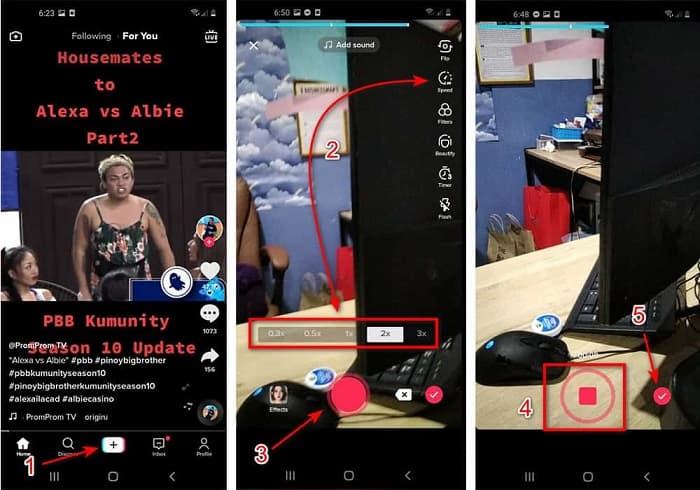
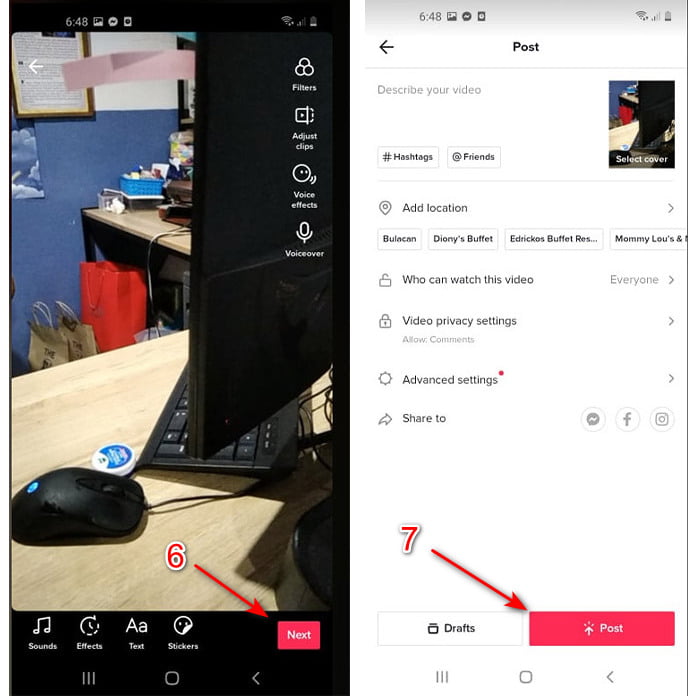
שלב 3. כדי לבדוק את הווידאו, לחץ על כפתור הוי ולאחר מכן על הבא. אחר כך לחץ על פרסם כדי להעלות אותו ל‑TikTok.
חלק 2. כיצד להאיץ כל סרטוני TikTok ב-Video Converter Ultimate
בניגוד לפונקציית העריכה המובנית ש‑TikTok מציעה לך, התוכנה Video Converter Ultimate מאפשרת לך להאיץ באופן ידני אך בצורה קלה יותר. בנוסף, בזמן ההאצה יוצג תצוגה מקדימה שתאפשר לבדוק אם מהירות הווידאו מתאימה לטעם שלך. יתרה מזו, התוכנה המרשימה הזו כבר מאפשרת למשתמשיה ליהנות מרמת עריכה מתקדמת‑מקצועית אך עם צעדים פשוטים. בגלל הפיצ’רים המתקדמים שהתוכנה מציעה, יהיה עליך לשלם כמה דולרים. אבל אין צורך לדאוג, כי זה לא יעלה אלפים או אפילו מאות. אם אתה רוצה לדעת מהן ההטבות או התכונות המרכזיות שתקבל אם תהיה ברשותך תוכנה זו, עיין ברשימה.
התכונות המרכזיות הטובות ביותר שתמצא ב‑Video Converter Ultimate:
◆ זוהי תוכנה שאינה תלויה בפלטפורמה, מה שאומר שאתה יכול להוריד אותה למחשב, Mac או Linux שלך.
◆ כל עריכה מתקדמת, ממיר, יצרנית GIF ועוד זמינים בכלי זה.
◆ השימושיות של הכלי שימושית מאוד לכל אחד, אפילו למקצוענים או חדשים בעריכה.
◆ זה מאפשר למשתמשים לבטא את הצד היצירתי שלהם באמצעות תכונות עריכה שונות הזמינות כאן.
◆ למרות שהכלי בתשלום הוא עדיין פחות יקר ומשתלם מאוד לכל מי שרוצה לנסות אותו.
כעת, אם אתה רוצה לדעת איך להאיץ סרטוני TikTok באמצעות עורך חלופי מרשים זה, קרא ועקוב אחר ההוראות למטה כדי להגיע להצלחה מלאה.
שלבים כיצד להאיץ סרטוני TikTok בעזרת Video Converter Ultimate:
שלב 1. כדי להשתמש בתוכנה, עליך להוריד אותה קודם למחשב האישי או ל‑Mac. לאחר מכן התקן, בצע את ההגדרה הידנית הפשוטה ולחץ על „סיום” כדי להמשיך.
הורדה חינמיתל-Windows 7 ומעלההורדה מאובטחת
הורדה חינמיתל-MacOS 10.7 ומעלההורדה מאובטחת
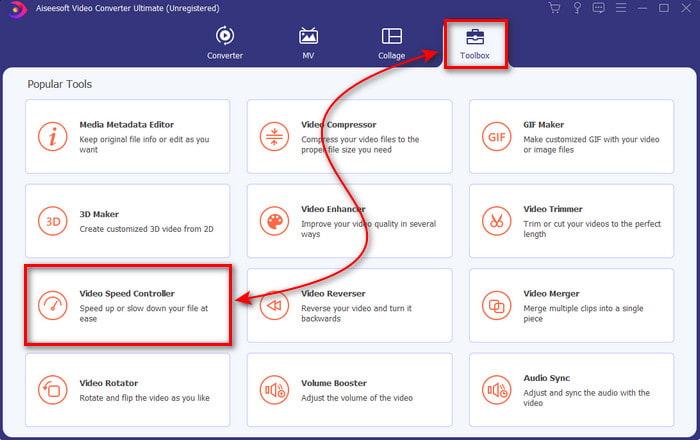
שלב 2. לחץ על ארגז הכלים ובחר בבקר מהירות וידאו שמתחת.
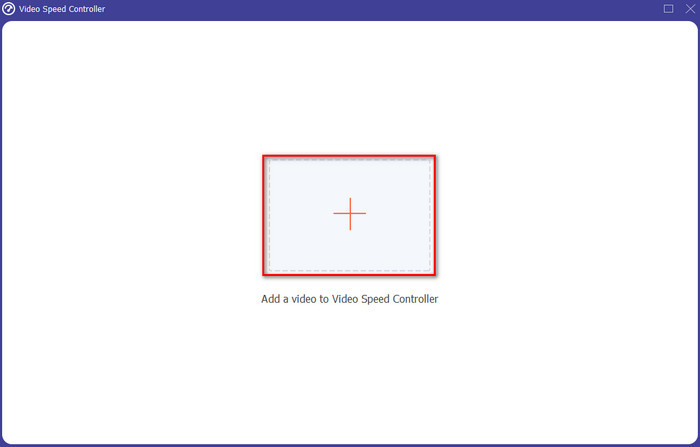
שלב 3. כדי להוסיף את הקובץ שברצונך להאיץ, לחץ על כפתור ה‑+. לאחר מכן בחר את הקובץ מתוך התיקייה שתופיע ולחץ על פתח כדי להמשיך.
שלב 4. כדי לכוונן את מהירות הווידאו, בחר באפשרות מהירות למטה. כדי להוריד את הקובץ, לחץ על ייצוא כדי להתחיל בתהליך ההורדה.
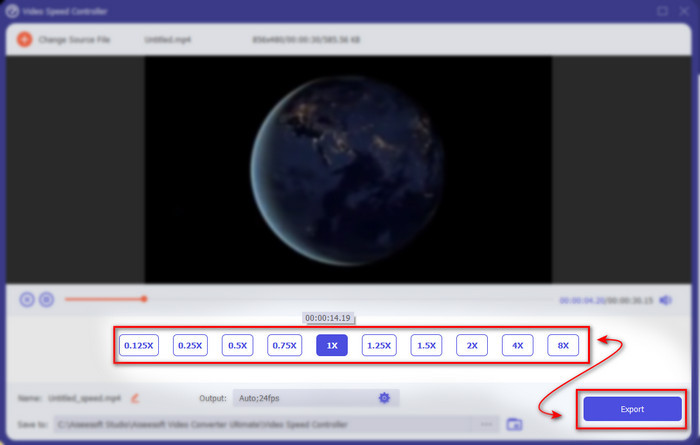
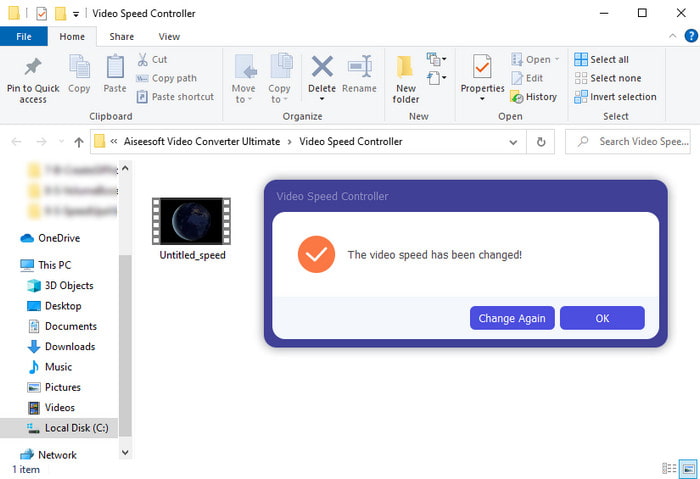
שלב 5. אין צורך להמתין אפילו דקה, כי הקובץ יהיה מוכן אחרי כמה שניות. אם תיקייה מופיעה על המסך לאחר מכן, פירוש הדבר שהקובץ כבר יוצא. לחץ על הקובץ כדי לצפות בווידאו שהאצת.
קשור:
חלק 3. שאלות נפוצות לגבי זירוז סרטון ב-Tiktok
איך לזרז סרטון TikTok שהוא לא שלך?
אם אתה רוצה להאיץ וידאו שאינו שלך, עליך קודם להוריד את סרטוני ה‑TikTok. לחץ על כפתור ה‑+ ועל העלה, ואז בחר את הווידאו מהגלריה. בחר באפשרות המהירות ולחץ על הבא כדי להעלות אותו. לחלופין, השתמש ב‑Video Converter Ultimate כדי להאיץ אותו לפי השלבים שהוסברו למעלה.
האם אוכל להקליט סרטון של 3 דקות בטיקטוק?
בהחלט כן, אתה יכול אם הם מוקלטים בנפרד אבל אתה לא יכול להקליט וידאו ישר של 3 דקות. מכיוון שאורך ההקלטה עם תמיכה באפליקציה זו הוא 15 עד 60 שניות מלאות. לכן, אם אורך הסרטון שאתה רוצה להקליט הוא יותר מדקה אז עדיף להקליט אותו בנפרד. עם זאת, אם אתה אחד מהמשתמשים שנבחרו על ידי Tiktok לנסות את ההקלטה של 3 דקות אז אתה בר מזל כי זה נבדק רק עבור קבוצה קטנה של אנשים.
האם אוכל להוסיף MP3 לסרטונים שלי בטיקטוק?
כאשר TikTok שוחרר לראשונה, משתמשים הורשו להוסיף מוזיקה לסרטון שלהם, אך כעת הם הסירו את התכונה הזו. בגלל בעיית זכויות היוצרים שהוגשה ל-TikTok. לכן, כדי להימנע מהבעיה הם מסירים את זה ומוסיפים מוזיקה לדוגמה זמינה או שאתה יכול להשתמש באפליקציה אחרת כדי לעשות זאת עבורך.
האם לטיקטוק יש הגבלת גיל?
על פי התנאים וההגבלות של TikTok, גיל 13 ומעלה חייב להיות הגיל של המשתמש שישתמש באפליקציה זו. כמו כן, ל- Tiktok אין אימות גיל כשאתה נרשם, אז צפה שיופיעו למעלה מ-16 תכנים בעדכון שלך.
סיכום
ועכשיו, כשאתה יודע איך להאיץ וידאו ב‑TikTok, זה הזמן ליהנות מזה. בנוסף, בחר את הפתרון שלדעתך מתאים לך ביותר. אם אתה סבור שהתכונות המובנות של TikTok להאצת וידאו מצוינות – השתמש בהן. אבל אם אתה רוצה לחוות האצה איכותית יותר עם תצוגות מקדימות, השתמש בVideo Converter Ultimate. בלי קשר לאיזו אפשרות תבחר, תוכל לצפות לתוצאה נהדרת בזכות הפונקציונליות והביצועים הכוללים שלהן.
-
 7 שלבים פשוטים כיצד לתקן בעיות עיכוב שמע OBS [נפתר]
 האם אתה מתקשה לצפות בווידאו קליפ שלך לאחר ההקלטה בגלל עיכוב השמע בעת השימוש ב-OBS Studio? קרא את המאמר שלהלן כדי ללמוד כיצד לתקן אודיו לא מסונכרן ביעילות.
-
 דרכים מצוינות אפשריות | כיצד לתקן עיכוב שמע VLC [2021]
 האם אתה מתקשה לצפות בסרט האהוב עליך בנגן המדיה VLC שלך בגלל חוסר הוודאות האודיו? המשך לקרוא מאמר זה כדי לדעת את כל הדרכים האפשריות לתקן עיכוב שמע VLC.
-
 הדרכים הטובות ביותר להגביר את נפח MP4 באופן מקוון ולא מקוון
 האם אתה מתקשה לשמוע את הצלילים של הווידאו קליפ שלך? קרא את המאמר שלהלן כדי לדעת כיצד להגביר את עוצמת הקול של mp4 בדרכים שונות.
