


 ממיר וידאו אולטימטיבי
 מקליט מסך
 תיקון וידאו
למד את 3 הדרכים כיצד להמיר VOB ל-AVI באופן מקוון ולא מקוון
קבצי VOB משמשים לאחסון זרמים פרטיים והוא משתמש בדחיסת וידאו מאבדת כמו MPEG-2. כמו כן, יש להם כמעט אותו מבנה אם היינו משווים בין השניים. עם זאת, לקבצי .vob יש מגבלה ומפרט לפני שתוכל להשתמש בהם. ובגלל זה אתה לא יכול בקלות לנגן קובץ VOB בנגן המדיה המקומי שלך. אז עכשיו, כדי לחסוך זמן בחיפוש כיצד לפתוח אותו, אנו מציעים שתצטרך להמיר אותו על ידי בחירת ממיר למטה. במקרה כזה, אנו מציגים בפניכם את הממיר הטוב ביותר שנוכל להמציא וללמוד כיצד להמיר VOB ל-AVI באופן מקוון או לא מקוון עם הכלים שנמצאים ברשימה.
חלק 1. כיצד להמיר VOB ל-AVI באינטרנט
אם התקציב שלך מוגבל, אנו מציעים להשתמש בכלי חינמי. במהלך החיפוש שלנו באינטרנט גילינו כלי הנחשב לממיר המקוון הטוב ביותר, והוא FVC Free Video Converter. מעבר לכך, הכלי הזה מציע פשטות ונוחות לכל משתמש שכבר השתמש בו, וכולם מתרשמים מאיכות הפעולה שלו. לכן, אם גם אתה רוצה להתרשם מאיכות הממיר הזה, נסה להמיר קובץ VOB לפורמט AVI על‑ידי ביצוע השלבים המפורטים להלן.
שלב 1. כדי להגיע מיד לאתר הממיר, לחץ על הקישור הזה.
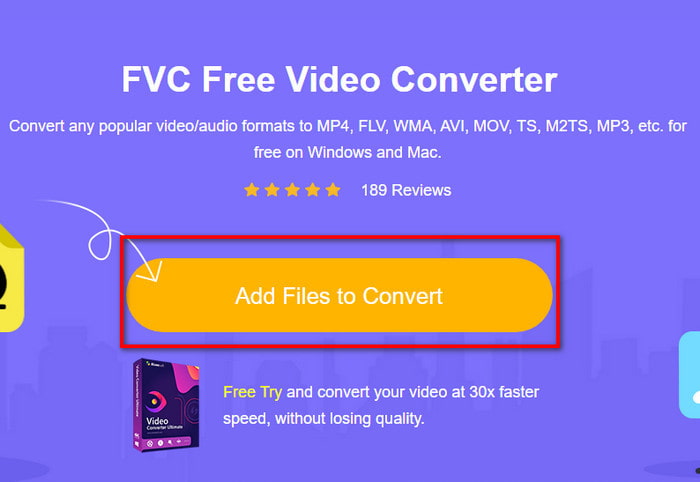
שלב 2. באתר, לחץ על Add Files to Convert כדי להוריד את תוכנת ההתקנה. אין צורך לדאוג, היא שוקלת רק כמה ק״ב. לאחר מכן לחץ שוב כדי להפעיל את הכלי ואתר את הקובץ בתיקייה. לאחר שמצאת אותו, לחץ על Open.
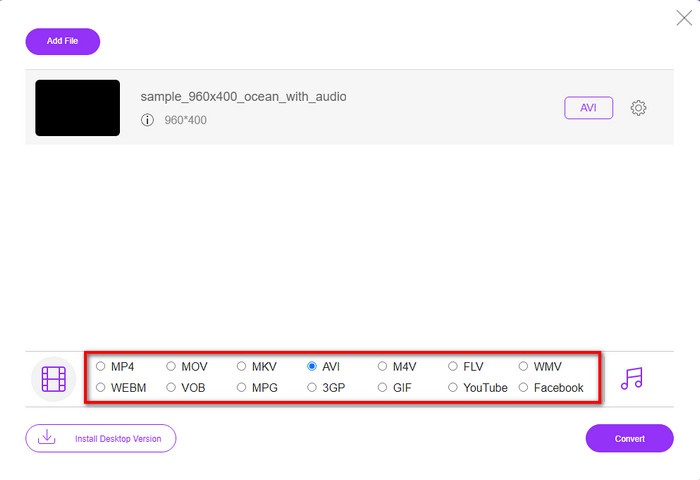
שלב 3. ממשק חדש של FVC יופיע על המסך. ברשימה למטה, בחר בפורמט AVI או כל פורמט אחר שאליו תרצה להמיר.
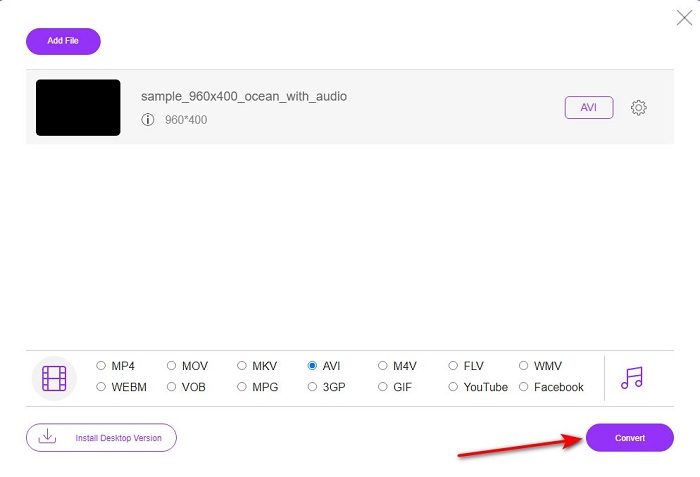
שלב 4. לאחר שסיימת לבחור את הפורמט, התחל בהמרת הקובץ על‑ידי לחיצה על Convert.
שלב 5. הפעולה תימשך פחות מדקה בערך. כאשר תהליך ההמרה יסתיים, תיפתח תיקייה ובה הקובץ שהומר זה עתה.
חלק 2. כיצד להמיר VOB ל-AVI ב-Windows וב-Mac
השתמש בממיר הפנומנלי: FVC Video Converter Ultimate
אם אתה מחפש להוריד ממיר VOB ל-AVI, זו חייבת להיות הבחירה הטובה ביותר שתרצה לעשות. FVC Video Converter Ultimate תמיד עומד בשמו ככלי האולטימטיבי שפותר כל מצב אולטימטיבי שאתה יכול להגיע אליו, במיוחד בהמרה. תוכנה זו שונה בהרבה משני הכלים המוזכרים. אולי אתה חושב למה, וזה רק בגלל שזה מתאים באופן מושלם לכל אחד בין אם אתה מקצוען או מתחיל. הביצועים הכוללים שאנו חווים כאשר אנו מנסים את הכלי הזה כבר מדהימים ואנחנו מתרשמים כמה מהר ניתן לבצע את ההמרה. ועכשיו, אם אתה רוצה לחוות את ההמרה הפנומנלית, אנחנו מדברים עליה, בצע את השלבים המצוינים למטה.
שלב 1. לפני שתוכל להשתמש בו, עליך להוריד אותו תחילה. לאחר סיום ההורדה, התקן את התוכנה, בצע את ההגדרות הדרושות ולחץ על Start Now.
הורדה חינמיתל-Windows 7 ומעלההורדה מאובטחת
הורדה חינמיתל-MacOS 10.7 ומעלההורדה מאובטחת
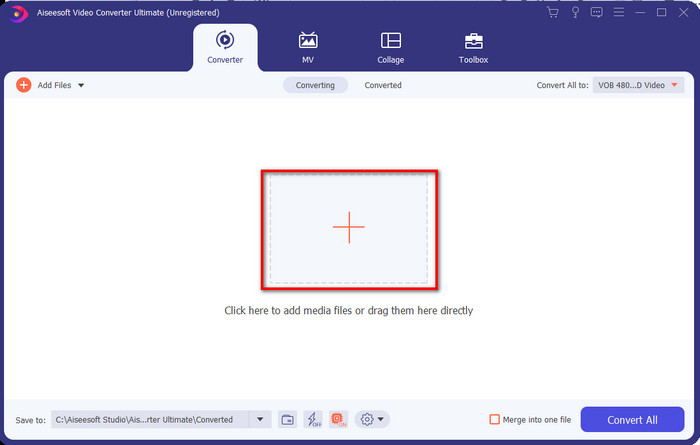
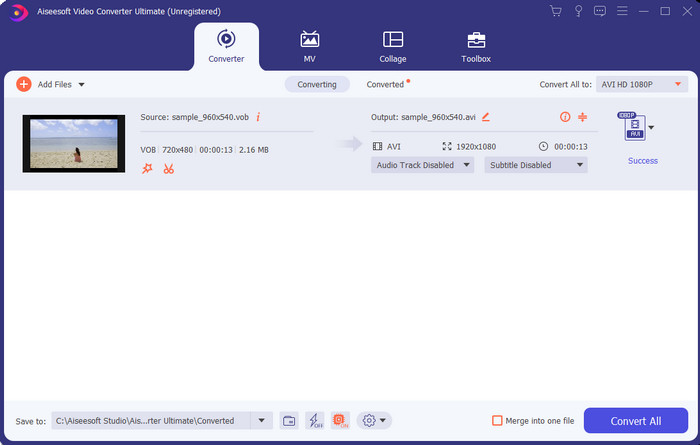
שלב 2. לאחר סיום ההתקנה, פתח את התוכנה. ממשק כמו זה יופיע על המסך. בחלק האמצעי של הממשק לחץ על כפתור + ותופיע תיקייה על המסך. לחץ על Open כדי להמשיך לשלב הבא בתהליך.
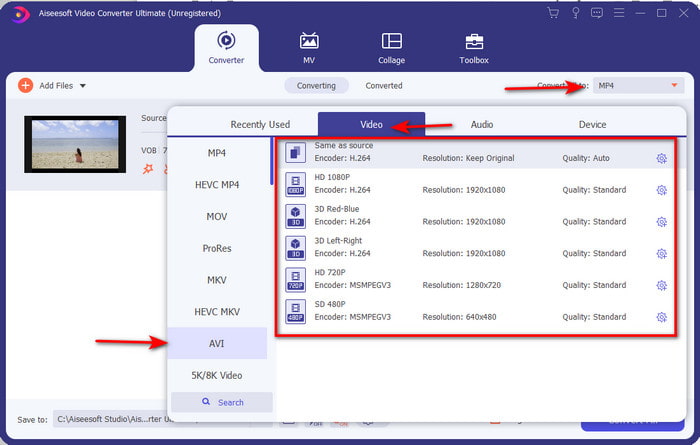
שלב 3. לחץ על כפתור Convert All בצד שמאל למעלה של הממשק ובחר בפורמט AVI מרשימת קטגוריית הווידאו.
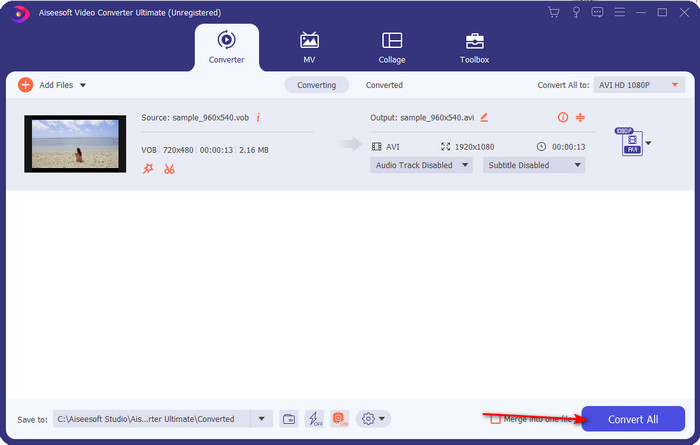
שלב 4. לאחר שסיימת לבחור את הפורמט, לחץ על Convert All כדי להתחיל את ההמרה.
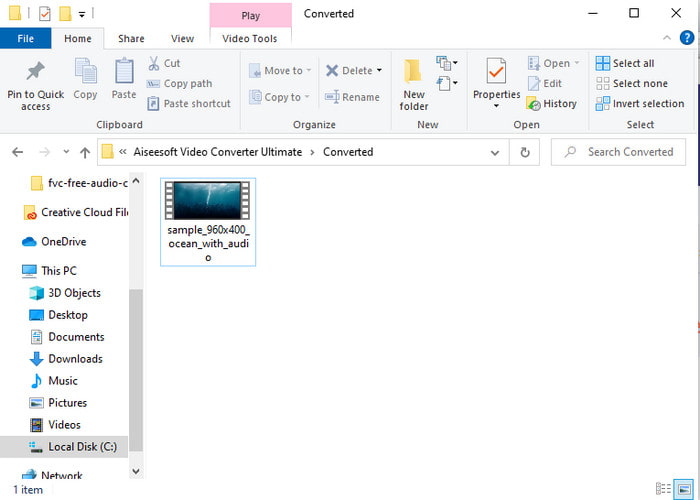
שלב 5. אין צורך לדאוג מהמתנה ממושכת, משום שההמרה תסתיים תוך כמה שניות. לאחר מכן תיפתח אוטומטית תיקייה על המסך ובה קובץ המדיה שהמרת לפני רגע. לחץ עליו כדי לצפות וליהנות מהגרסה החדשה של קובץ ה‑.vob שלך.
השתמש בכלי החינמי: בלם יד
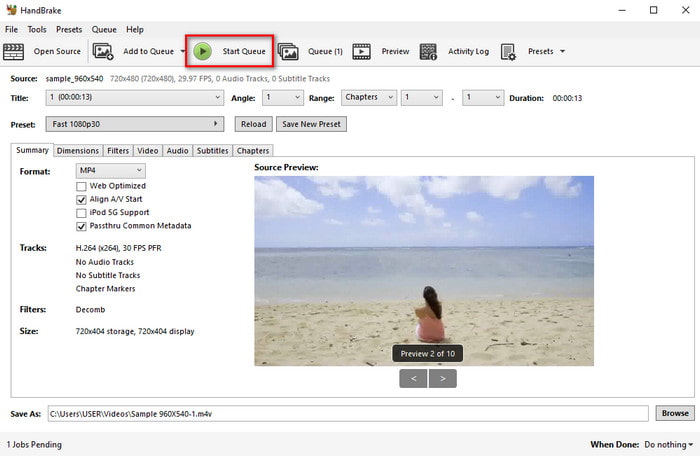
אם אתה מחפש כלי חינמי, אז HandBrake יכול לסייע לך, ואינו דורש חיבור לאינטרנט כדי לפעול, בדיוק כמו FVC Video Converter Ultimate. בנוסף, הוא חינמי להורדה ולשימוש לכל מי שיש לו מחשב בבית, בעבודה או בכל מקום אחר. עם זאת, כאשר אתה מוריד את הכלי, עליך להוריד קובץ נפרד בשם .NET 5.0 לפני שתוכל בכלל להשתמש בו. חלק מהמשתמשים מוצאים זאת מעט מעצבן, משום שלאחר הורדת הכלי צריך להוריד שוב קובץ נוסף. אבל אם אתה רוצה לבצע תהליך המרה יעיל וחינמי, נסה להשתמש ב‑HandBrake להמרת VOB ל‑AVI ופעל לפי השלבים הבאים.
שלב 1. התקן את הכלי תחילה על כונן המחשב שלך.
שלב 2. לחץ על File ואתר את קובץ ה‑.vob בתיקייה שלך.
שלב 3. לחץ על Format ובחר מהרשימה הזמינה ואז לחץ על Start Queue.
חלק 3. מהו הממיר הטוב ביותר לשימוש להמרת קבצי VOB לפורמט AVI
| מאפיינים | ממיר וידאו חינם FVC | ממיר וידיאו אולטימטיבי | בֶּלֶם יָד |
| המרת פורמט |  | | |
| האצת חומרה והמרה |  | | |
| קישוריות לאינטרנט | | | |
| משפר וידאו או עריכה | | | |
| תוכנית נתמכת | כלי מבוסס אינטרנט | כלי מבוסס שולחן עבודה | כלי מבוסס שולחן עבודה |
חלק 4. שאלות נפוצות על VOB ו-AVI
מהם הקבצים האחרים ש-VOB יכול להכיל?
VOB הוא פורמט DVD רב-צדדי ובגלל זה הוא יכול להכיל לא רק סרטונים ואודיו אלא גם כתוביות, תוכן ניווט ותפריט גם כן.
למה אני לא יכול לנגן קבצי VOB בנגן המדיה שלי?
אחד הגורמים לכך שקובץ VOB אינו ניתן לניגון בנגן המדיה שלך הוא שהפורמט הזה נתמך על‑ידי מספר מצומצם של נגני מדיה. תוכל ללחוץ כאן כדי לקבל נגני VOB זמינים. אם הבעיה עדיין נמשכת, פתרון אפשרי הוא להמיר את הקובץ בעזרת אחד הממירים שהוצגו למעלה.
מדוע קבצי VOB גדולים מדי?
הסיבה היחידה שהפורמט הזה כל כך גדול היא שהוא מכיל נתונים שונים שצריך להיות ל-DVD. כמו כן, אנחנו לא יכולים להשאיר את האפשרות של אורך הסרטון. או לחץ כאן כדי ללמוד כיצד לדחוס קבצי VOB.
סיכום
אז עכשיו, אם אתה רוצה להמיר את קובץ VOB אז זה יכול להיעשות בקלות בעזרת הכלים הזמינים לעיל. מלבד זאת, FVC Video Converter Ultimate הוא הממיר שבאמת בולט בין שאר הכלים המקוונים והלא מקוונים שהוזכרו. כי אתה יכול להמיר VOB ל-AVI ב-Windows ואפילו ב-Mac בקלות. אם עדיין אין לכם מושג במה להשתמש, אנו ממליצים בחום שתצטרכו להוריד את הכלי הפנומנלי כדי לחוות פלט מפורש ולהיות מופתע.
-
 VOB ל MP4 - 3 דרכים להמרת קבצי VOB ל MP4 בחינם בתפזורת
 מאמר זה מציג 3 ממירי VOB ל- MP4 בחינם והדרכות הקשורות. אתה יכול להמיר בחינם קבצי VOB לקבצי MP4 בחינם ב- Windows / Mac / באינטרנט בקלות.
-
 הדרכים הטובות ביותר להמיר VOB ל-FLV [כלול בחינם ומקוון]
 רוצה להמיר קובץ VOB לקובץ FLV? אתה יכול להשלים את המשימה בקלות באמצעות ממירים שולחניים או מקוונים. קרא מדריך זה ולמד כיצד להפוך את VOB ל- FLV בקלות ובמהירות.
-
 מהו קובץ VOB וכיצד להפוך קובץ VOB ל- GIF בחינם
 האם אתה רוצה לדעת יותר על קבצי VOB וכיצד לשתף אותם לאחר העתקה? או למה אתה צריך להמיר VOB ל-GIF? לאחר מכן קרא בעיון את המאמר הזה.
