


 ממיר וידאו אולטימטיבי
 מקליט מסך
 תיקון וידאו
בביקורות מפורטות על 3 ממירי האינטרנט והשולחן העבודה המשמשים להמרת קבצי WMV ל-AVI
יהיה רגע שבו תרצה להמיר את הקובץ שלך לקובץ חדש משום שאי‑אפשר לנגן אותו. דוגמה מצוינת למצב כזה היא פורמט WMV. אם אתה משתמש ב‑Windows, כנראה שכבר שמעת על הפורמט הזה. הוא מאחסן קובצי וידאו ואודיו שונים במכל אחד. עם זאת, הפורמט הזה כמעט ואינו נתמך על ידי רוב נגני המדיה. לכן הדרך הטובה ביותר לצפות בקובץ וידאו ששמור כסיומת .wmv היא להמיר אותו. אם אתה שואל כמו אחרים: האם אפשר להמיר WMV ל‑AVI? המשך לקרוא למטה, שם ריכזנו מגוון כלים מקוונים שתוכל להשתמש בהם יחד עם השלבים המפורטים.
חלק 1. 3 הממירים המובילים לחופשי המרת WMV ל-AVI באינטרנט
Top 1. FVC Free Video Converter Online
את פעולת ההמרה ניתן לבצע במהירות אם יש לך גישה לאינטרנט ותשתמש ב‑FVC Free Video Converter Online. תוכנה זו תומכת בהמרה מהירה ואיכותית בהרבה לעומת כלים מקוונים אחרים. בנוסף, אין צורך להמתין העלאת הקובץ, מפני שהכלי הזה בנוי כך שלא תצטרך להמתין זמן רב. יתרון נוסף של כלי רשת זה הוא ספריית הווידאו המובנית של הקבצים שהומרו. כך ניתן לגשת ביעילות ובנוחות לסרטונים או קובצי האודיו שהמרת. עם זאת, אם אין לך גישה לאינטרנט, לא תוכל להשתמש בו, כמו גם בשאר הכלים המקוונים שיוצגו בהמשך. אם תרצה לנסות את הכלי הזה, הנה השלבים שתוכל לעקוב אחריהם כדי להמיר WMV ל‑AVI בחינם אונליין.
שלב 1. תחילה, עבור לאתר הראשי של FVC על ידי לחיצה על קישור זה.
שלב 2. לאחר מכן לחץ על Add Files to Convert כדי להתקין את משגר (launcher) כלי הרשת. אין צורך לדאוג, מדובר בקובץ קטן מאוד ובטוח לשימוש. לאחר שקובץ ההתקנה נמצא בכונן שלך, לחץ שוב על Add Files to Convert, בחר את קובץ ה‑.wmv בתיקייה ולחץ על Open.
הורד את גרסת הדסקטופ כדי להמיר קבצים במצב אצווה.
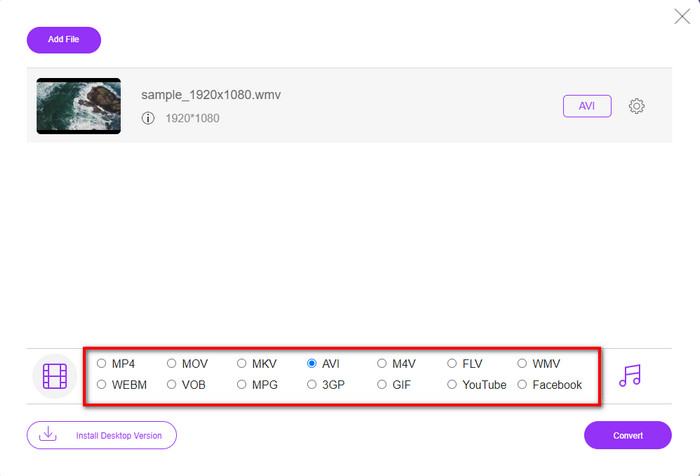
שלב 3. לאחר שקובץ ה‑WMV מופיע בממשק, עליך כעת לבחור בפורמט AVI מתוך האפשרויות הזמינות למטה.
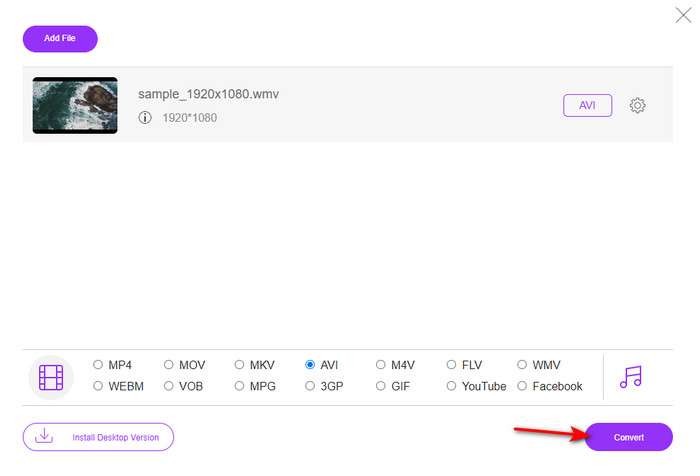
שלב 4. לאחר שבחרת את הפורמט, הגיע הזמן להמיר על ידי לחיצה על Convert.
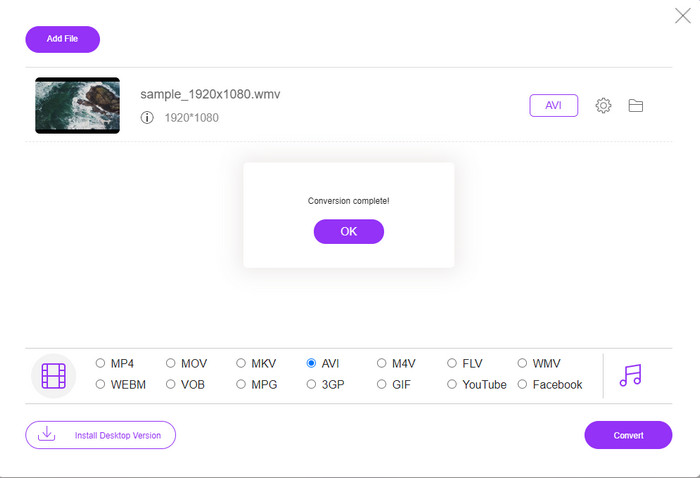
שלב 5. המתן מספר דקות עד לסיום התהליך, ולאחר מכן תיקייה המכילה את הקובץ שהומר תופיע על המסך. לחץ עליה כדי לצפות בקובץ ה‑WMV החדש שיצרת בעזרת הכלי הזה.
למעלה 2. Convertio
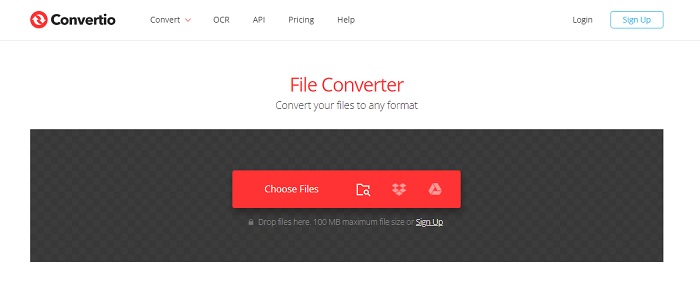
ממיר אונליין נוסף שתוכל להשתמש בו כדי להמיר קובצי WMV ל‑AVI בחינם הוא Convertio. בניגוד לכלי הרשת שנזכר קודם, אין צורך במשגר כדי להשתמש בו. בנוסף, ניתן להמיר בעזרתו קובצי PDF, תמונות, אודיו ועוד. עם זאת, החיסרון העיקרי הוא שזמני ההעלאה וההורדה של הקבצים ארוכים יחסית. כמו כן, אין בו ספרייה מובנית שמרכזת את כל הקבצים שהמרת. אם ברצונך להשתמש בו כממיר שלך, פעל לפי השלבים הבאים.
שלב 1. היכנס לדפדפן המועדף עליך וחפש Convertio.io.
שלב 2. לחץ על Choose File ואתר בתיקייה את קובץ ה‑WMV שברצונך להמיר. לאחר מכן לחץ על כפתור ה‑drop-down ובחר AVI.
שלב 3. תהליך ההעלאה יגזול מעט מזמנך, ולאחר סיום ההמרה לחץ על Download כדי לשמור את הקובץ המומר.
למעלה 3. CloudConvert
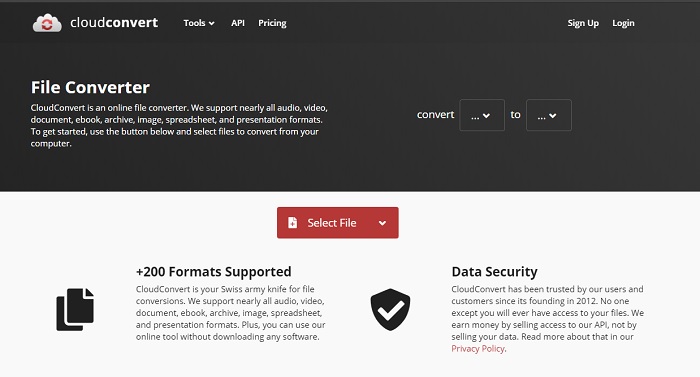
CloudConvert תומך במגוון פורמטים בקנה מידה קטן שניתן לבחור להמרה. תהליך ההמרה כאן מאובטח ואינו שומר תיעוד של פעולות ההמרה שלך. כמו ב‑Convertio, גם לכלי זה אין ספרייה מובנית. בנוסף, תהליך ההמרה כאן איטי יותר משום שאינו תומך בהאצת חומרה (hardware acceleration) להגברת מהירות ההמרה. אם תרצה ליהנות מהמרת WMV ל‑AVI בחינם אונליין, פעל לפי השלבים הבאים.
שלב 1. פתח את דפדפן האינטרנט שלך וחפש Cloud Convert.
שלב 2. לחץ על Select File, ולאחר מכן אתר בתיקייה שתופיע על המסך את קובץ ה‑.wmv.
שלב 3. לחץ על Convert to, בחר בפורמט AVI, לחץ על כפתור Convert, ולאחר סיום ההמרה לחץ על Download.
חלק 2. כיצד לשנות WMV ל-AVI ב-Mac & PC עם ממיר מהירות הברק
התוכנות המקוונות שצוינו למעלה אינן משתוות למה ש‑FVC Video Converter Ultimate מציע למשתמשיו. אם אתה מחפש כלי רב‑תכליתי, זהו ככל הנראה הבחירה הטובה ביותר. ניתן להשתמש בתוכנה הזו כממיר, עורך, יוצר קובצי GIF ועוד. מעבר לכך, התוכנה חורגת מהציפיות הן ביכולותיה והן במהירות סיום המשימות. הביצועים הכוללים של הכלי הזה הרשימו אותנו, ואם תרצה גם אתה להיות מופתע, הורד את ממיר הווידאו המרשים הזה למחשב שלך. כעת נעבור להמרת WMV ל‑AVI ב‑Mac וב‑PC תוך ביצוע השלבים המפורטים להלן.
שלב 1. לפני שתוכל להשתמש בכלי, עליך להוריד אותו תחילה ולבחור את הפלטפורמה שבה אתה משתמש כרגע. לאחר מכן התקן את התוכנה במחשבך, ותהליך ההתקנה המהיר יימשך פחות מדקה.
הורדה חינמיתל-Windows 7 ומעלההורדה מאובטחת
הורדה חינמיתל-MacOS 10.7 ומעלההורדה מאובטחת
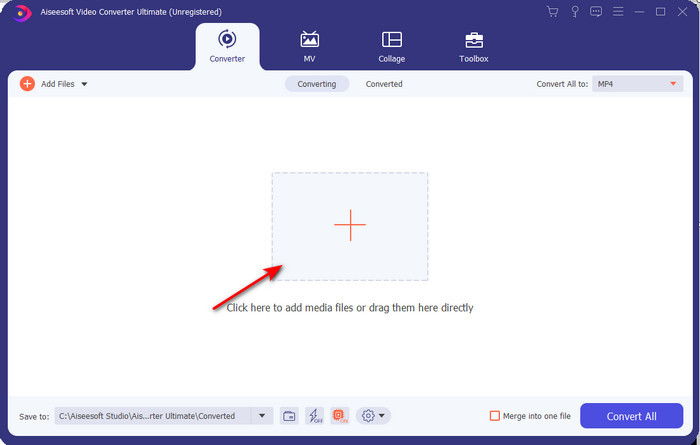
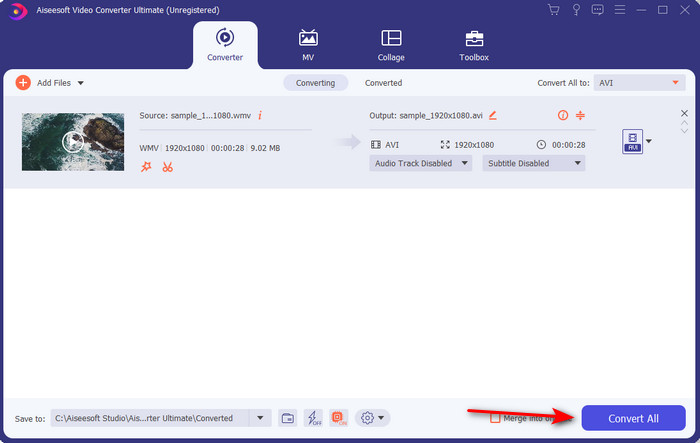
שלב 2. פתח את התוכנה כדי להמשיך לשלב הבא; לאחר ההפעלה תראה סימן +. לחץ עליו כדי להוסיף קבצים ולאחר מכן בחר Open.
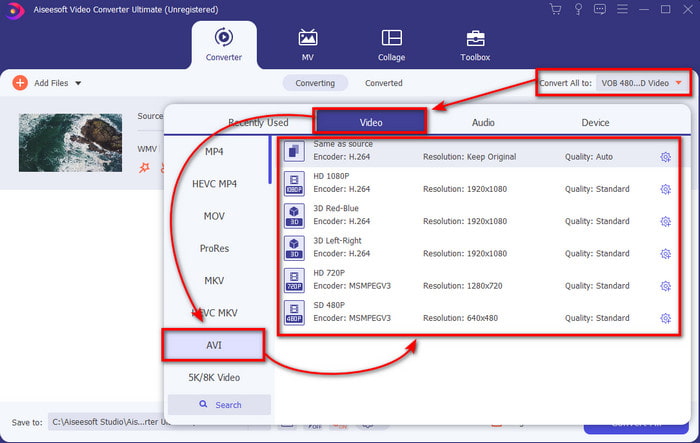
שלב 3. כדי לשנות את הפורמט, לחץ על תפריט ה‑drop‑down של Convert All to ובחר AVI בתת‑התפריט.
שלב 4. כעת, כדי להמיר בהצלחה את קובץ ה‑WMV ל‑AVI, לחץ על Convert All והמתן מספר שניות עד לסיום התהליך.
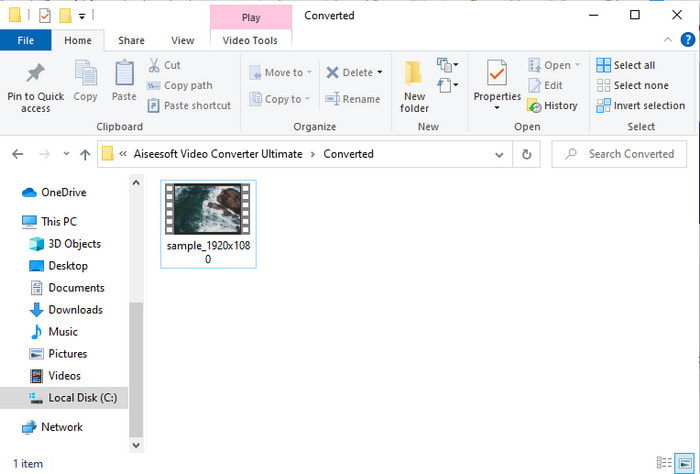
שלב 5. לאחר ההמרה, תיקייה תופיע על המסך ובה הקובץ שהומר לפני מספר שניות. כדי לצפות בו לחץ על קובץ הווידאו ותיהנה מהקובץ שהומר מ‑WMV מבלי לאבד מאיכות התמונה או הצליל.
חלק 3. WMV VS AVI; איזה פורמט מניב את הביצועים הטובים ביותר
WMV ו-AVI הם חלק ממיכלי קבצי הווידאו המובילים שבהם תשמח להשתמש. שני הפורמטים שהוזכרו יכולים להכיל וידאו ואודיו באיכות גבוהה, אך כעת הבה נבחן את ההבדלים ביניהם על ידי קריאת טבלת השוואה זו.
| WMV | אבי | |
| מוכר גם בשם | Windows Media Video | אינטרלונטיות אודיו וידיאו |
| השימוש הטוב ביותר עבור | זה היה הופך קובץ גדול לקטן יותר עבור הזרמת וידאו מקוונת מובנית היטב. | משמש לאחסון וידאו ואודיו בנפרד ולהשמיע אותם בו זמנית ללא עיכובים. |
| פותח על ידי | מיקרוסופט | מיקרוסופט |
| החסרונות של הפורמט | זה זוכה פחות תשומת לב ותמיכה מנגני המדיה. | הוא זקוק ל-Codec כדי לדחוס את הקובץ הגדול הזה לקובץ קטן בהרבה אבל בגבולות גבול. |
WMV לעומת AVI
הופק על ידי מיקרוסופט, WMV היה אחד מפורמטי הווידאו הנפוצים ביותר בשנות ה-2000. ניתן לראות אותו דרך האינטרנט ולהפעיל אותו על ידי נגני מדיה שונים ב-Windows. וזה גם פורמט ברירת המחדל של קובץ הווידאו של Windows Media Player. אבל זה השתלט על ידי פורמטים אחרים לאחרונה.
בהתבסס על Resource Interchange File Format (RIFF), פורמט AVI הוצג על ידי מיקרוסופט בשנת 1992. הוא יכול לשמור וידאו/אודיו באיכות גבוהה מכיוון שהוא משתמש בפחות דחיסה. אבל זה גם גורם לגודל הקובץ הגדול של קובץ AVI, מה שעלול להוות בעיה כאשר יש מקום מוגבל.
חלק 4. שאלות נפוצות לגבי פורמט WMV ו-AVI
האם הפיכת WMV ל-AVI משפיעה על האיכות?
האיכות של קובץ ה-WMV בעת הפיכתו ל-AVI אסור שתשתנה. עם זאת, נניח שה-WMV שלך משתנה והאיכות יורדת. במקרה כזה, הממיר שבו אתה משתמש אינו תומך בפיקסל באיכות גבוהה של הסרטון שלך.
האם גודל ה-WMV שלי משתנה לאחר המרה?
גודל הקובץ של ה-WMV עשוי להיות שונה מעט מגודל הקובץ המקורי. יש סיבה למה זה משתנה. אחת הסיבות היא שהקובץ הדחוס הופך ללא דחוס, כך שגודל הקובץ משתנה. אבל השינויים חייבים להיות קרובים לגודל הקובץ המקורי ולא צריכים להיות כל כך רחוקים או גדולים.
האם אני יכול להשתמש ב-WMV כדי לצרף סרטון לאימייל?
כן, אידיאלי להשתמש בפורמט WMV ולצרף את הסרטון למייל מכיוון שהוא תומך בדחיסה טובה ומהירה יותר מאשר MPEG-4, לפי מיקרוסופט. כמו כן, זה ידוע בתור פורמט מיניאטורי בגלל גודל הקובץ יכול להיות קטן. עם זאת, איכות הסרטון נשארת.
סיכום
בסיום, קל לנו יותר להבין שלא כל הפלטפורמות והתוכנות תומכות ב-WMV. יתר על כן, כלי הרשת אכן מתפקד היטב, אך יש כלי אחד שיכול להמיר קבצי אצווה הרבה יותר מהר וקלה: FVC Video Converter Ultimate. נניח שאתה רוצה לחוות את ההמרה הפנומנלית שהתוכנה הזו מספקת. במקרה כזה, עליך להוריד את זה עכשיו על שולחן העבודה שלך ולהשתמש בו.
-
 כיצד להמיר WMV ל-MP4 בחינם ומקוון [נפתר]
 כיצד להמיר קבצי WMV ל MP4? להלן 4 הדרכים הקלות להמיר WMV ל MP4 ב- Mac וב- Windows בצעדים פשוטים.
-
 WMV ל-MP3 - כיצד להמיר וידאו לאודיו בחינם [שולחן עבודה/מקוון]
 בזמן צפייה בסרטון WMV, אתה מוצא את חלק השמע מרתק. לפיכך, אתה רוצה לנגן אותו בנגן ה-MP3 שלך. אבל ברור שהנגן שלך לא תומך בפורמט WMV. זה גורם לך לתהות אם יש דרך להמיר WMV ל-MP3.
-
 2 הדרכים הקלות ביותר להמיר קבצי WMV ל- FLV במחשב / מק
 כיצד ניתן להמיר WMV ל- FLV? ראשית, עליך לקרוא את ההמלצה שלנו ולמצוא את השיטה המועדפת עליך, ולאחר מכן לעקוב אחר המדריך שלנו כדי לבצע את העבודה במהירות.

