


 ממיר וידאו אולטימטיבי
 מקליט מסך
 תיקון וידאו
ממיר מיני DV ל-AVI פנומנלי זמין ב-Windows ו-Mac OS
DV files primary purpose is to contain digital video from video cameras or camcorders under the maker Panasonic and Sony in late 1995. This codec and tape format became famous for its transition from analog to digital production. But nowadays, you can't play the DV file on your default media player or even share it online. And now, if you want to play this file, you must consider converting the file into a most supported and playable format like the AVI. Moreover, the details below will help you understand DV, convert DV files to AVI, and play it to a media player if you don't want to convert.

חלק 1. קרב הפורמטים: DV VS AVI
קובץ DV ו-AVI כמעט דומים מכיוון ששני הפורמטים הללו יכולים להכיל וידאו ואודיו. עם זאת, מטרתם וכיצד הם מאחסנים את קובץ המדיה רחוקים אחד מהשני. במקרה כזה, בואו נקבע מה ההבדלים בין DV ל-AVI על ידי השוואה של 3 היכולות הייחודיות שלהם.
Compatibility of the Format
AVI gains more support and is one of the most compatible formats to play and edit a video. This format can contain a video playback in a synchronized format. In contrast, DV file is unsupported by numerous video editors and media players on PC and Mac. Because of that, this is one of the reasons you need a mini DV to AVI converter.
Compression Supported
AVI הוא פורמט קובץ ללא אובדן לאחסון חזק ומתקדם של קבצי מדיה. עם זאת, פורמט זה יאכל הרבה מאחסון הדיסק הקשיח שלך מכיוון שהוא לא דחוס. אמנם DV משתמש בדחיסה מאבדת עבור הווידאו שלו, אבל קובץ האודיו אינו דחוס. הסיבה שמאחורי הפורמט אובדן היא משום שהוא משתמש ב-DCT כבסיס למסגרת-אחר-פריים המשמש לדחיסת וידאו.
Audio Fidelity
קובץ האודיו נאמנות DV תומך בין איכות שמע ממוצעת לטובה מכיוון שהוא משתמש באודיו PCM דגימה של עד 48 קילו-הרץ עם אורך 20 סיביות של מילה. AVI אכן משתמש ב-PCM לא דחוס ואיכות השמע מעולה. ובכל זאת, זה יכול להיות טוב יותר אם אתה משתמש ב-DV כמקודד כדי להשיג DV-AVI שדוחס.
כעת, לאחר שהבנו מהם הפורמטים הללו, זה הזמן הנכון להמיר DV ל-AVI ב-Mac או במחשב האישי שלך על ידי קריאת המדריך המופיע להלן.
חלק 2. כלי הממיר הפנומנלי הטוב ביותר להמרת DV ל-AVI ב-Mac וב-Windows
ממיר וידיאו אולטימטיבי
Do you have trouble choosing a converter that produces a phenomenal output? If that is the case, we would like you to use the FVC Video Converter Ultimate. This software became one of the most popular choices of the users who do convert format often. Also, the name ultimate is not just by name, but it is also in its performance provided. Moreover, generally speaking, this format is all-out for everyone who needs a helping hand on their conversion problem. Before we proceed to the steps, let's first determine the advantages you will get if you download this software.

ממיר וידאו אולטימטיבי
30000+ הורדות- המר את קובץ הווידאו DV שלך ל-200+ פורמטים זמינים.
- תומך בכל מערכות ההפעלה כמו PC ו-Mac.
- ארגז הכלים שלו כולל תכונות מתקדמות כמו יצירת GIF, עריכת סרטונים, מיזוג ועוד.
- ממשק אינטואיטיבי לכולם.
- הוא תומך בהמרה מהירה פי 30 בהשוואה לממירים האחרים באופן מקוון או לא מקוון.
הורדה חינמיתל-Windows 7 ומעלההורדה מאובטחת
הורדה חינמיתל-MacOS 10.7 ומעלההורדה מאובטחת
אז בלי להתעסק יותר, בואו נמשיך להדרכה למטה, ובואו נמיר DV ל-AVI מבלי לאבד את איכות הסרטון.
Steps on How to Convert DV to AVI with the FVC Video Converter Ultimate:
Step 1. Press the Download button that is below, choose the OS you are currently using. Install the software to your drive and click Start Now to proceed to the next step.
הורדה חינמיתל-Windows 7 ומעלההורדה מאובטחת
הורדה חינמיתל-MacOS 10.7 ומעלההורדה מאובטחת
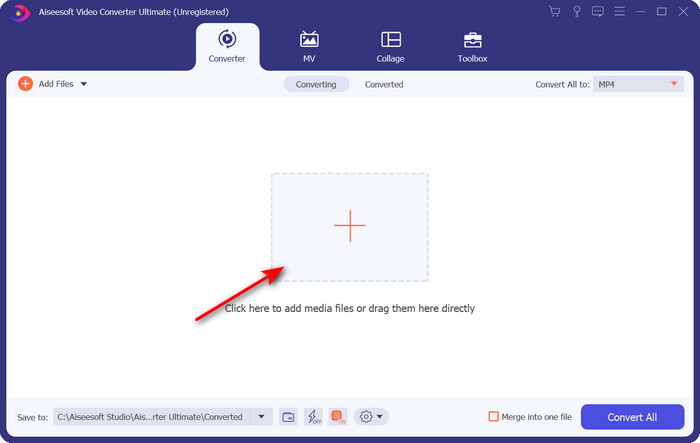
Step 2. Open the software and click the + button located in the middle of the interface of the tool. A folder will show, and to upload the .dv file, click Open.
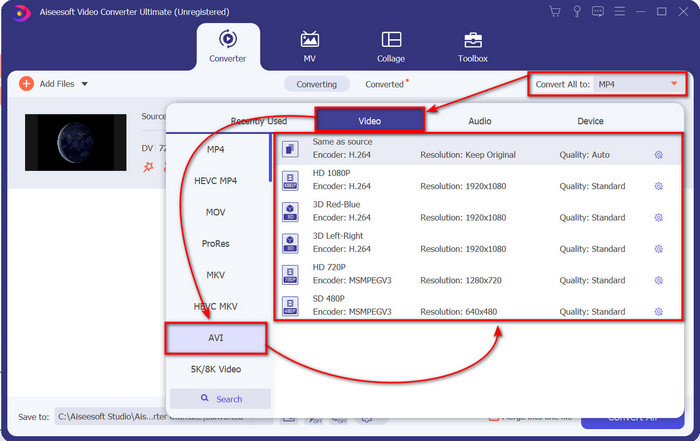
Step 3. To change the .dv file into a .avi, click the drop-down button and search the AVI format.
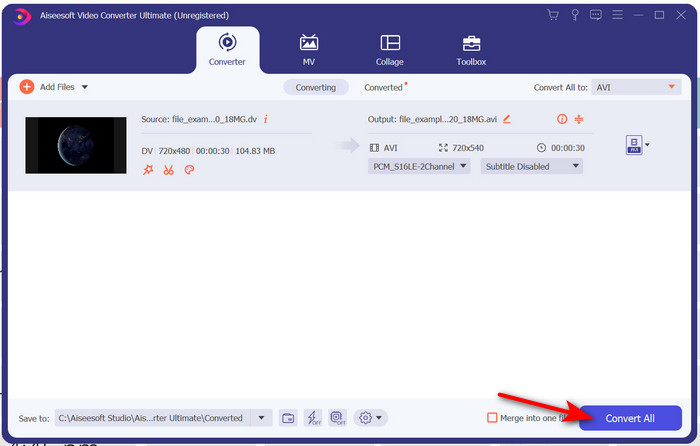
Step 4. Once you choose the format, it is now the right time to turn your DV to AVI by clicking Convert All.
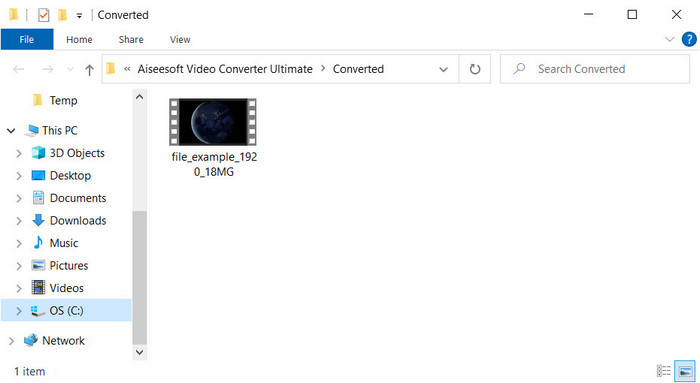
Step 5. Converting a file will take you less than a minute, so waiting is not necessary. Another folder will show with the converted files.
חלק 3: הפעל את קבצי ה-DV שלך עם נגן הווידאו DV הזמין במחשב וב-Mac
נגן Blu-ray
Don't want to convert mini DV to AVI, then try to use this media player that supports this type of format, the Blu-ray Player. This media player supports 300+ formats and codecs as well to play the video on your desktop without any hassle. Also, this media player has the most advanced features a media player should provide to make your watching experience better. You can also use a CD, DVD, or Blu-ray disk to play the video on your computer; basically, everyone uses a portable media player. So now, if you don't want to get into trouble with converting the .dv file, follow these steps to play the video.
Steps on How to Play the DV File with the Help of Blu-ray Player:
Step 1. To download this media player, click the button below, then install the player and launch it.
Free DownloadFor Windows 7 or laterSecure Download
Free DownloadFor MacOS 10.7 or laterSecure Download
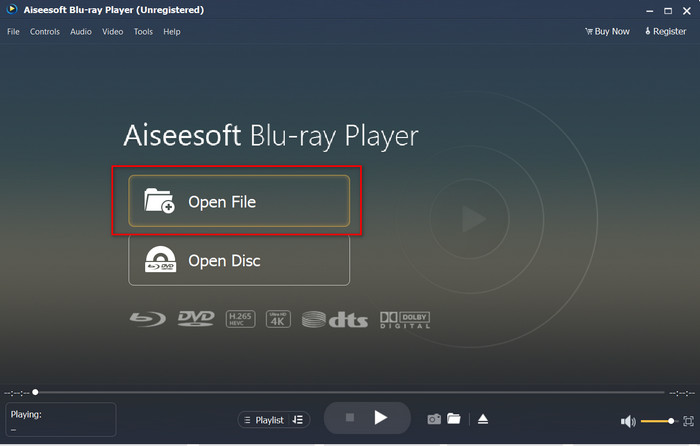
Step 2. Click Open File, then locate the .dv file on your folder and press Open.
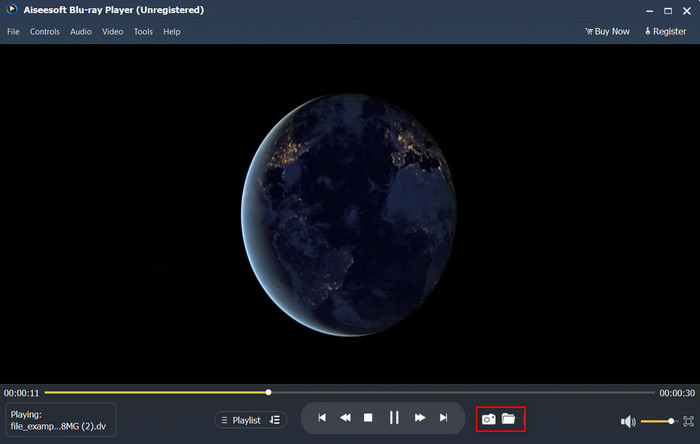
Step 3. The DV file will automatically play on your desktop. Additionally, click the camera button if you want to take a screenshot of what you are watching. Then if you're going to look for the snapshots you've taken, click the folder button.
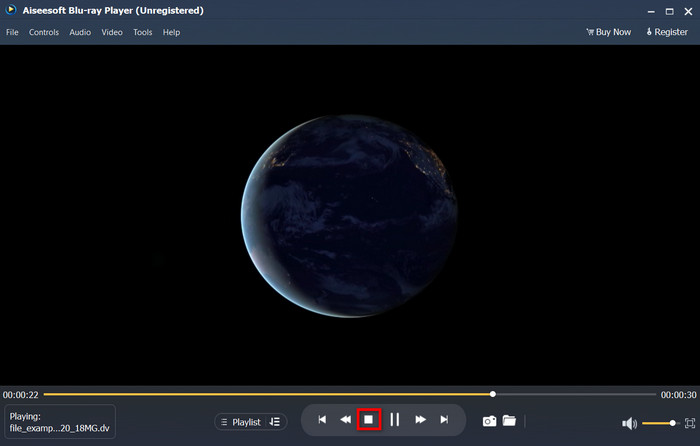
Step 4. If you want to stop watching the .dv file, click the cube button.
Step 5. To watch another file in a different format, follow steps 2 and 3, then enjoy watching the high-quality video.
קשור:
חלק 4. שאלות נפוצות לגבי המרת DV ל-AVI
האם המרת קבצי DV מאבדת מאיכותם?
המרת כל פורמט לגרסה חדשה לא אמורה להפחית את האיכות של פורמט הווידאו המקורי. עם זאת, חלק מהממירים אינם תומכים בהמרת איכות וידאו של 1080 או 4k מכיוון שזה ייקח זמן. אז אם אתה לא רוצה לאבד איכות, השתמש ב-FVC Video Converter Ultimate. צפו ללא פחות מכיוון שהתוכנה הזו לא תיגע באיכות שלכם ותספק לכם אפשרות להגדיל אותה או לשמור עליה.
האם אני יכול לשחק ב-.dv ב-VLC?
לגבי היום, VLC אינו תומך באף קובץ .dv להפעלה; עם זאת, אם אתה דוחס AVI ומשתמש במקום זאת ב-DV-AVI, אתה יכול להפעיל את הסרטון ב-VLC.
איזה פורמט הוא התחליף הטוב ביותר ל-DV?
אם אתה רוצה לדעת מה התחליף הטוב ביותר לקובץ DV, נסה להשתמש בקובץ MP4. פורמט זה ידוע בתור הפורמט הרב-תכליתי מכיוון שהוא תואם לכל שולחן העבודה והמכשירים אם הם רוצים להפעיל את הסרטון או לערוך אותו. אבל האיכות של MP4 ו-DV שונה בהרבה זה מזה אם היינו משווים ביניהם. עם זאת, מבחינת תאימות MP4 הוא פורמט המדיה הטוב ביותר שאתה יכול להשתמש בו כתחליף.
סיכום
To sum it up, we only presented one DV converter to AVI because this is the only software that performs well on converting this file type. As we continued reading this article, we found another way of playing the .dv file by using this DV player. Moreover, we present two tools to do their job, whether you want to play the .dv or convert the file. So now, if you choose the FVC Video Converter Ultimate, then expect a phenomenal quality output within an ample of time. But if you decide to play the DV file, then your go-to must be the Blu-ray Player.
-
 5 האפשרויות הטובות ביותר להמרת MPEG לפורמט AVI [מקוון ולא מקוון]
 האם אתה מתקשה לחפש ממיר ל-MPEG? לאחר מכן נסה לקרוא את המאמר הזה כאשר אנו לומדים כיצד לשנות MPEG לפורמט AVI עם שלבים מפורטים.
-
 4 ממירים מדהימים להמרה בחינם של WMV ל-AVI באינטרנט [2021]
 האם אתה מחפש ממיר WMV ל AVI? ואם כן, נסה לקרוא את המאמר הזה בזמן שאנו מנפים את כל הכלים שאנו יכולים למצוא באינטרנט כדי לעזור לך במשימה האמורה.
-
 4 הממירים המקוונים והלא מקוונים החדשים ביותר להמרת F4V לפורמט AVI
 אין לך מושג באיזה ממיר אתה צריך להשתמש כדי להמיר F4V ל-AVI או כל פורמט וידאו אחר? לאחר מכן קרא את המאמר הזה כשאנחנו לומדים כיצד להמיר עם הכלי הזמין.
