


 ממיר וידאו אולטימטיבי
 מקליט מסך
 תיקון וידאו
דרכים בולטות ומועילות להמיר 3GP ל-FLV [מוכח]
ניתן לאחסן קבצי אודיו ווידאו בפורמט 3GP, הנפוץ בשימוש בטלפונים בדור שלישי (3G). הוא עובד גם בטלפונים בדור שני (2G) ודור רביעי (4G). דרך האינטרנט, מכולה המבוססת על MP4 זו שולחת ומקבלת קבצי מולטימדיה. עם זאת, שירותי וידאו ושמע רבים להזלה (סטרימינג) משתמשים ב‑FLV, מכולת וידאו התואמת ל‑Flash. מלבד Adobe Flash Player, נגני וידאו רבים אחרים יכולים לנגן קובצי FLV. כדי להפוך קבצי 3GP לנגישים יותר וקטנים יותר בנפח, קיימות דרכים פשוטות אחדות להמרתם ל‑FLV. להלן הממירים שכדאי לשקול להשתמש בהם כדי להמיר 3GP ל‑FLV.

חלק 1. שיטות מצוינות להמרת 3GP ל-FLV [לא מקוון]
Video Converter Ultimate הוא כלי מושלם להמרת קבצי 3GP ל-FLV מבלי לוותר על האיכות. באמצעות טכנולוגיית SuperSpeed של התוכנית, משתמשים יכולים להמיר אפילו קבצים גדולים בתוך דקות. בנוסף, האפליקציה מאפשרת לך לערוך את הקבצים שלך כראות עיניך: לחתוך, לסובב ולחתוך את הסרטונים שלך; להתאים פרמטרים של צבע; שינוי רזולוציית וידאו וקצב סיביות; או להוסיף כתוביות. כל המכשירים הפופולריים ביותר, כולל iPhone, iPad, מכשירים מבוססי אנדרואיד, Xbox ו-PlayStation, יכולים להיות נתמכים על ידי תוכנה זו. עכשיו אתם מכירים מבוא קצר לתוכנה זו, הגיע הזמן שתבינו כיצד להמיר 3GP ל-FLV באמצעות תוכנה זו.
שלב 1: תחילה הורד את התוכנה על‑ידי לחיצה על הורדה חינמית המופיעה למטה. באפשרותך להוריד אותה ל‑Windows או ל‑Mac. לאחר ההורדה, התקן את התוכנה במחשבך והפעל אותה על‑ידי לחיצה על התחל כעת בחלון שיופיע על המסך לאחר ההתקנה.
הורדה חינמיתל-Windows 7 ומעלההורדה מאובטחת
הורדה חינמיתל-MacOS 10.7 ומעלההורדה מאובטחת
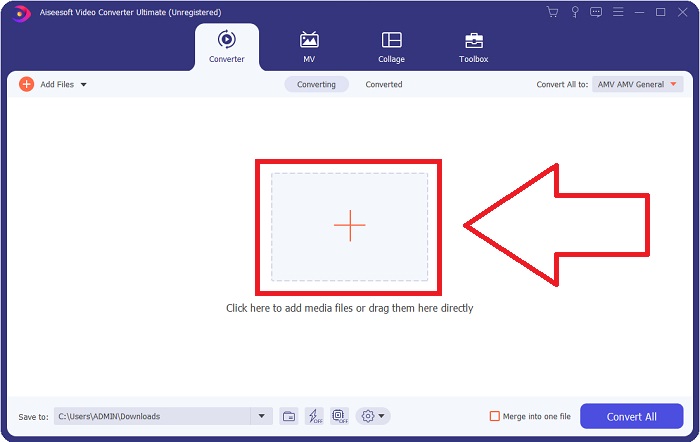
שלב 2: כדי להתחיל בהמרה, עליך קודם להעלות קובץ, ולשם כך לחץ על כפתור ה‑+ במרכז ממשק התוכנה, או שפשוט תוכל לגרור את קובצי הווידאו מהמחשב שלך.
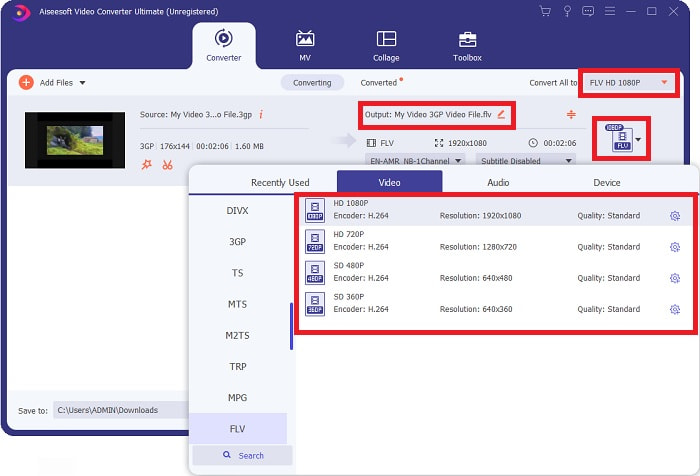
שלב 3: לאחר שהמשכת להעלאת הקובץ, תוכל כעת לבחור את פורמט FLV בתפריט בחירת הפורמטים הממוקם בפינה הימנית של המסך. באפשרותך לבחור איזו איכות תרצה, משום שיוצגו כל המאפיינים האפשריים שתוכל להשתמש בהם.
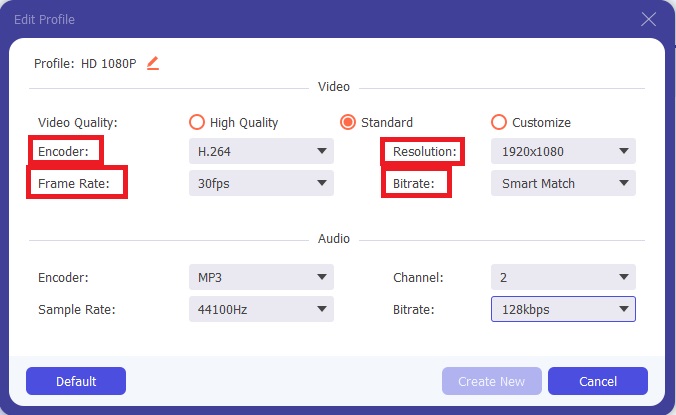
שלב 4: מעבר לאפשרויות האיכות המוצגות, תוכל ליצור את איכות הווידאו הרצויה אם אינה מופיעה ברשימת האפשרויות. לחץ על סמל גלגל‑השיניים והתאם את כל התוכן שיופיע לאחר שהחלון ייפתח. הרזולוציה מתייחסת לאיכות תצוגת המסך ולתדירות ניגון הווידאו (קצב פריימים); קצב הסיביות (bitrate) מתייחס לכמות הנתונים המקודדת בכל רגע. לבסוף, המקודד (encoder) אחראי על אופן מסירת פורמט הווידאו.
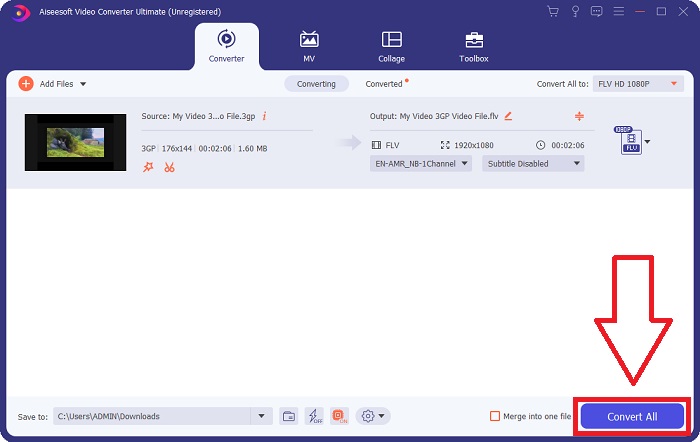
שלב 5: לבסוף, לאחר שהתאמת את כל ההגדרות הדרושות לפלט הווידאו שלך, תוכל כעת להמיר אותו על‑ידי לחיצה על המר הכול.
חלק 2. שיטה מעניינת נוספת להמרת 3GP ל-FLV [מקוון]
מספיק עם התוכנה המקומית; כעת נדבר על כלי מקוון שיכול בהחלט לעזור לך להמיר 3GP ל‑FLV. הכירו את Free Video Converter Online, כשמגוון רחב של פורמטים נתמך על‑ידי ממיר מקוון זה, כולל 3GP ו‑FLV. באפשרותך להמיר קובץ ישירות מהמחשב על‑ידי העלאתו. כדי להעלות קובץ שגדול מ‑500MB, תוכל להשתמש בכלי המקוון הזה כדי להמיר 3GP ל‑FLV. משתמשים יכולים לשנות הגדרות רבות לפני תחילת ההמרה. ניתן למשל לשנות את מקודד האודיו (codec) ואת עוצמת השמע. אפשר גם לשנות את רזולוציית הווידאו. לאחר כל הידע שהועבר, נלמד כעת את כל השלבים שעליך להכיר.
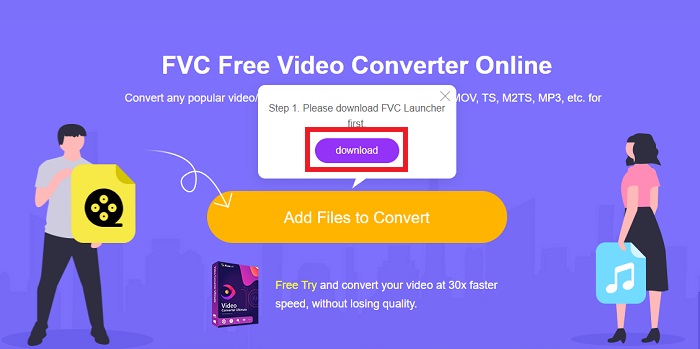
שלב 1: הנה הקישור לכלי המקוון. לחץ עליו כדי שהדף הראשי ייפתח בדפדפן שלך. לחץ על הוסף קבצים להמרה כדי להוריד את המשגר שבו תשתמש לתפעול הכלי המקוון. התקן את המשגר והתחל בהעלאת קובץ.
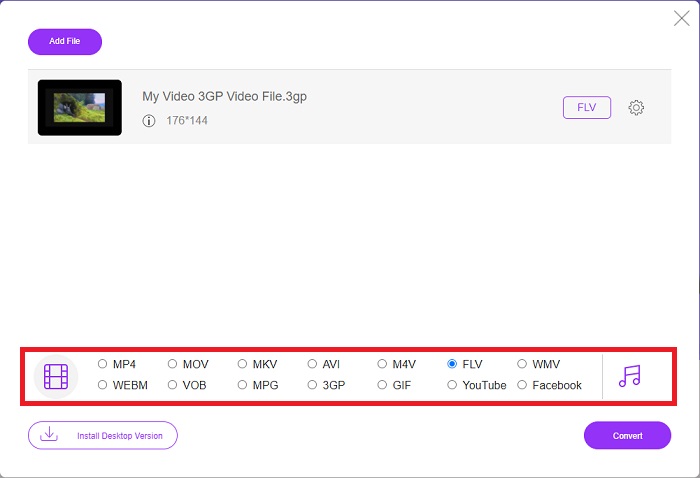
שלב 2: כדי להעלות קובץ, לחץ שוב על הוסף קבצים להמרה. לאחר העלאת הקובץ, תוכל כעת לבחור את פורמט הווידאו FLV מתוך בחירת פורמטי הווידאו הממוקמת בפינה התחתונה של החלון.
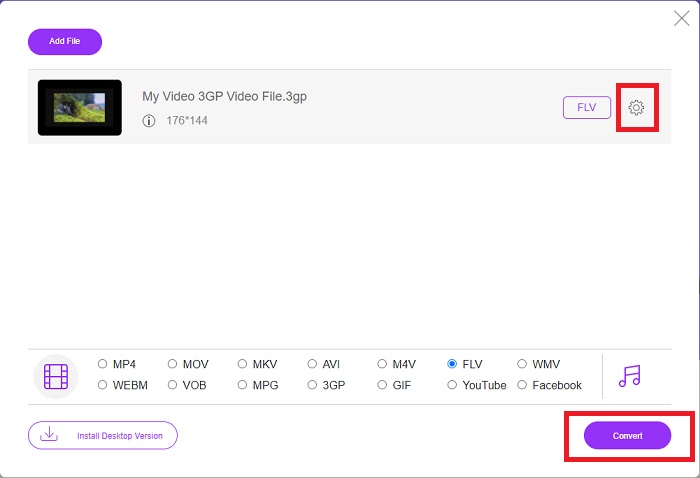
שלב 3: באפשרותך גם לערוך את איכות הווידאו שלך או מפרטים אחרים כגון רזולוציה, קצב פריימים או קצב סיביות, על‑ידי לחיצה על סמל גלגל‑השיניים שליד פורמט הווידאו שבחרת, הממוקם בפינה הימנית של החלון. לאחר שהתאמת את כל ההגדרות המועדפות לפלט שלך, תוכל כעת להמיר את הקובץ בלחיצה על המר.
חלק 3. סקירה כללית: 3GP לעומת FLV
אם אי פעם רציתם לשמור קטע אודיו ווידאו בפורמט 3GP, הגעתם למקום הנכון! (3GPP). פורמט קובץ המדיה ISO משמש כבסיס ל-3GPP, פורמט מיכל מולטימדיה. זרמי וידאו H.263 או H.264 וזרמי שמע AMR-WB, AMR-WB+, AMR-NB, HE-AAC v1, AAC-LC או Enhanced aacPlus נתמכים כולם. בדרך כלל, קבצי 3GP משתמשים בטלפונים ניידים 3G כדי לצלם וידאו, אך משתמשים יכולים גם להפעיל אותם בטלפונים 2G ו-4G מסוימים. למרות שקובצי 3GP עדיין בשימוש, הפופולריות שלהם ירדה מכיוון שפורמטי וידאו יעילים יותר החליפו את פורמט 3GPP.
עם זאת, קובצי וידאו שנשמרו בפורמט המכיל Adobe Flash Video (FLV) הם מסמכי FLV. זרמי אודיו ווידאו יכולים לקודד באותו אופן כמו ה-Flash הרגיל. פורמט SWF ומנות מטא נתונים כוללות כותרת קצרה. הפלאגין Flash Video Exporter (זמין עם Adobe Animate) או יישום התומך בקובצי FLV יכולים לייצר תוכן Flash Video ולייצא אותו כקובצי FLV. Adobe Media Encoder עשוי לקודד וידאו גם בפורמטים של QuickTime או Windows Media. עכשיו שיש לך רעיון לגבי 3GP ו-FLV, אנו מספקים טבלת השוואה כדי לדעת את הפרטים בעניינים ספציפיים.
| סיומת קובץ | 3GP | FLV |
| סוג קובץ | קובץ מדיה ISO | קובץ וידאו פלאש |
| פותח על ידי | פרויקט שותפות דור שלישי | מערכת אדובי |
| יתרונות | למשתמשים ניידים קל יותר לשתף ולאחסן קבצי וידאו מכיוון שפורמט הקובץ 3GP מפחית את גודל הווידאו ואת רכיבי האודיו. למרות שפורמט הקובץ המעוצב 3GP משתמש במכשירים בעלי יכולת 3G, התקני 2G ו-4G רבים יכולים לנגן בפורמט זה. | עבור אתרים שרוצים לכלול אנימציה ואלמנטים אינטראקטיביים, Adobe Flash היא בחירה מצוינת. בטווח הארוך, יכולה להיות לכך השפעה מהותית. במהלך השיא שלה, פלאש השתמש במשחקים פשוטים. |
| חסרונות | למרות שזרמי הווידאו והשמע יכולים לדחוס לקובץ בודד, האיכות והרזולוציה המופחתת, המשתמשים עשויים לשפר מאוד את חווית המשתמש בהשוואה לפורמטים אחרים, כגון איכות שמע, רזולוציית מסך, מהירות השמעה וכו'. | זה חיסרון, כמובן, שהפופולריות של FLV פחתה במהלך השנים האחרונות. זה לוקח הרבה זמן וכסף ליצור תוכן FLV. חיסרון נוסף של פלאש הוא שלא ניתן לצפות בו במכשירי iOS, מה שמגביל מאוד את יכולתו למשוך מעריצים חדשים. |
| תוכניות פותחות את פורמט הווידאו | ◆ QuickTime Player ◆ Windows Media Player | ◆ נגן מדיה VLC ◆ Adobe Flash Player |
חלק 4. שאלות נפוצות לגבי המרת 3GP ל-FLV
האם 3GP איכותי?
קצב סיביות משתנה וקצב פריימים תומכים ב-3GP, בדיוק כמו ב-MP4. 3GP היה פורמט פופולרי לטלפונים רגילים כשהם עדיין היו צורת התקשורת הנפוצה ביותר. אנחנו צריכים סרטון קטן כי החלל היה מותרות בעבר. האיכות שווה למצלמות באיכות תפוחי האדמה שהיו לנו אז בטלפונים, אז זה לא מזעזע.
למה 3GP לא משחק?
נסה להפעיל את קובץ ה‑3GP בנגן המדיה VLC במקום בנגן ברירת‑המחדל שלך אם הוא אינו תומך בקודקים של 3GP. VLC הוא נגן וידאו מצוין בקוד פתוח, משום שהוא מסוגל לנגן כמעט כל קובץ וידאו. נוסף על Windows ו‑iOS, VLC זמין גם עבור Linux ו‑Android.
האם FLV הוא פורמט הקלטה מתאים?
Adobe Flash Player משתמש בפורמט קובץ FLV. בתור פורמט וידאו הנתמך כמעט בכל מקום, זהו אחד הפורמטים הנפוצים ביותר. פלטפורמות להזלת וידאו ברשת כגון YouTube מרוויחות משימוש בפורמט FLV. פורמט זה נוח מאוד כיוון שנפח הקבצים בו קטן. הנה מקליטי ה‑FLV הטובים ביותר שכדאי לך לנסות.
סיכום
באופן כללי, כל הממירים שסופקו עבורכם הם התוכנות והממירים המקוונים הטובים והמומלצים ביותר שכדאי לכם לשקול להשתמש בהם. מכיוון שיש להם תכונות מקצועיות וידידותיות למשתמש, אינך יכול להשוות את שני אלה לתוכנות וכלים מקוונים אחרים. תהנה מהשימוש בו, ואל תשכח לכתוב ביקורת לאחר השימוש בו.
-
 4 הדרכים היעילות ביותר כיצד להמיר 3GP לפורמט AVI [2025]
 האם אוכל להמיר את קבצי ה-3GP שלי ל-AVI? ובכן, אתה יכול להמיר אותו בקלות אם תנסה את הכלים הזמינים האלה, שכן אספנו את כל הפתרונות האפשריים לבעיית ההמרה שלך מ-3GP ל-AVI.
-
 הדרכים הטובות ביותר להמיר VOB ל-FLV [כלול בחינם ומקוון]
 רוצה להמיר קובץ VOB לקובץ FLV? אתה יכול להשלים את המשימה בקלות באמצעות ממירים שולחניים או מקוונים. קרא מדריך זה ולמד כיצד להפוך את VOB ל- FLV בקלות ובמהירות.
-
 שלוש הדרכים המובילות להמיר DAT ל- FLV בשולחן העבודה ובאינטרנט
 רוצה להמיר DAT ל- FLV אבל לא יודע איך? בדוק את ממירי הווידאו המומלצים שלנו ל- DAT ו- FLV ובצע את המדריך הקונקרטי שלנו להשלמת העבודה בקלות.
