


 ממיר וידאו אולטימטיבי
 מקליט מסך
 תיקון וידאו
תהליך המרה מקוון ולא מקוון: SWF ל-WMV
SWF is a legacy file format created by Adobe for the Shockwave Flash player. Flash is no longer supported by many browsers, was never supported by iOS devices, and the SWF file format is seldom used these days due to performance and security problems. On the other hand, WMV is a set of video compression codecs created for early internet video streaming and physical media such as HD-DVD and Blu-Ray. Video in this file format is natively viewable on Windows devices, so you may wish to convert SWF files to WMV because Flash players are becoming more unsupported, and you can no longer play SWF files. Hence, we provide you with two options to convert your SWF to WMV.

חלק 1. כיצד להמיר SWF ל-WMV ב-Windows וב-Mac בקלות
Video Converter Ultimate is a multimedia converter that converts practically all major video and audio files to your desired output format. It can convert video files in batches, making it more potent than it seems. It does not stop at converting; it also enables users to modify their videos with the help of helpful editing tools. Furthermore, this video converter supports various formats, including the most widely used nowadays. More significantly, it converts at a faster rate than comparable software. To use this particular software, follow these simple steps:
Step 1: Click the Free Download button to download the .exe file you will need to install the software. Wait for it to finish, open it, and follow the installation process promptly. Click Start Now and launch the software.
הורדה חינמיתל-Windows 7 ומעלההורדה מאובטחת
הורדה חינמיתל-MacOS 10.7 ומעלההורדה מאובטחת
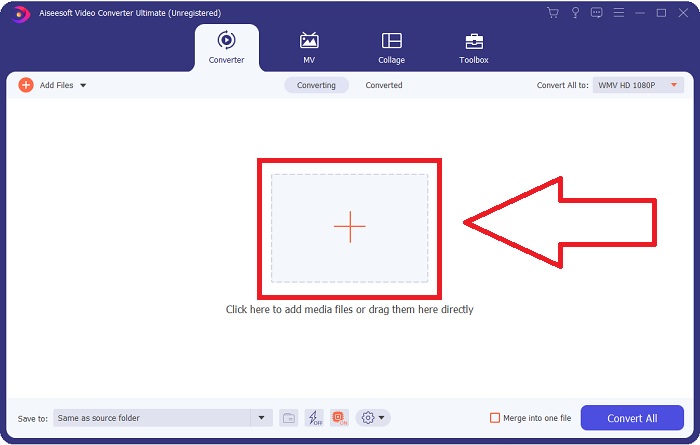
Step 2: Upload the video file you wish to convert by clicking the + button in the middle of the interface. Alternatively, drag the file from your desktop and drop it on the interface, and it will automatically import.
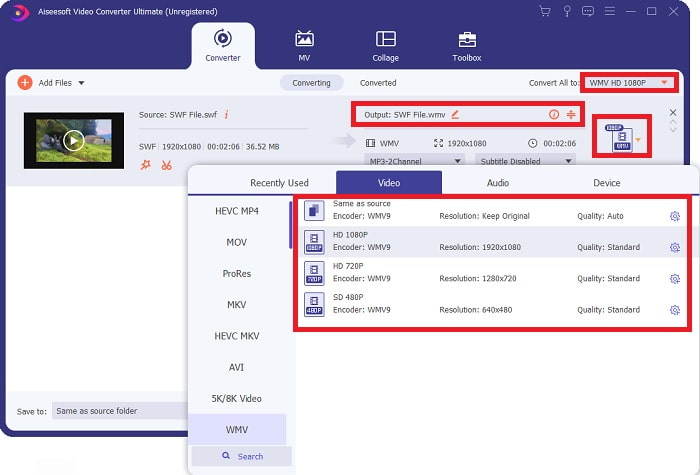
Step 3: Click the drop-down arrow on the right in which you will see the current format your video is in, and it will show you all the available formats to choose. In this case, scroll down and select WMV or just type it in the search bar. All video qualities are also available to choose from on the right panel.
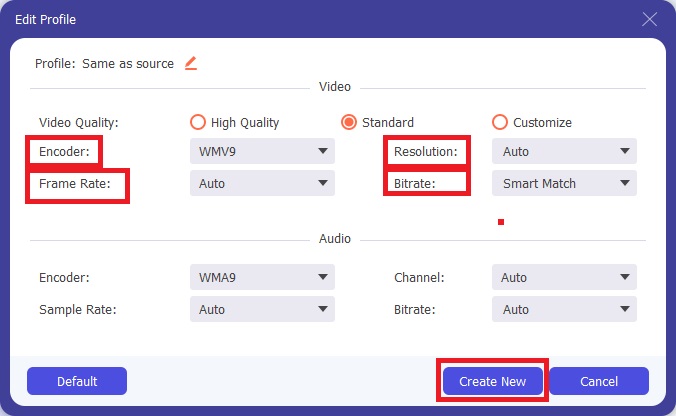
Step 4: To further edit your video, click on the gear icon on the right to show all the handy editing tools. From there, you can make all the necessary adjustments that best suit your needs. Just click the Create New button once you are finished.
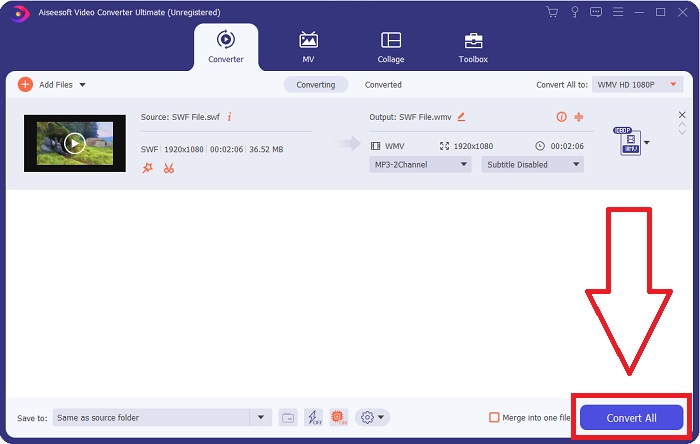
Step 5: Finish the conversion process by finally clicking the Convert All button on the window's bottom right corner and waiting for it to finish.
חלק 2. טיפ נוסף להמרת SWF ל-WMV באינטרנט
FVC Free Video Converter הוא תמיד בחינם ואינו דורש רישום. כמה ממירי וידאו מקוונים בחינם מגבילים את מסגרות זמן ההמרה או את גודל הקובץ. אם השתמשת בכל זמני ההמרה החינמיים שלך או שהקובץ שלך עצום מדי, תצטרך לקנות תוכנית, גם אם אתה ממיר סרטונים לעתים רחוקות. אבל ל-FVC Free Video Converter אין הגבלות כאלה והוא יכול להמיר סרטונים בכל עת.
יתר על כן, שירות זה אינו זקוק לרישום כדי להמיר קבצים גדולים יותר, בניגוד לרוב ממירי הווידאו המקוונים דורשים רישום כדי להמיר סרטונים גדולים מ-1GB. להלן השלבים שעליך לבצע עבור הכלי הפנטסטי הזה:
Step 1: To go to the website, click this link. Then, download the launcher quickly by clicking the Add Files to Convert button and waiting for it to finish.
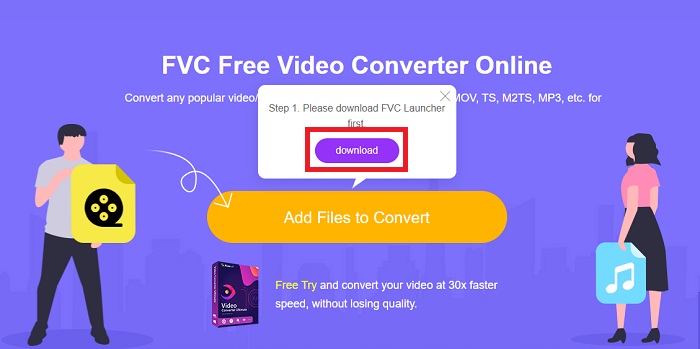
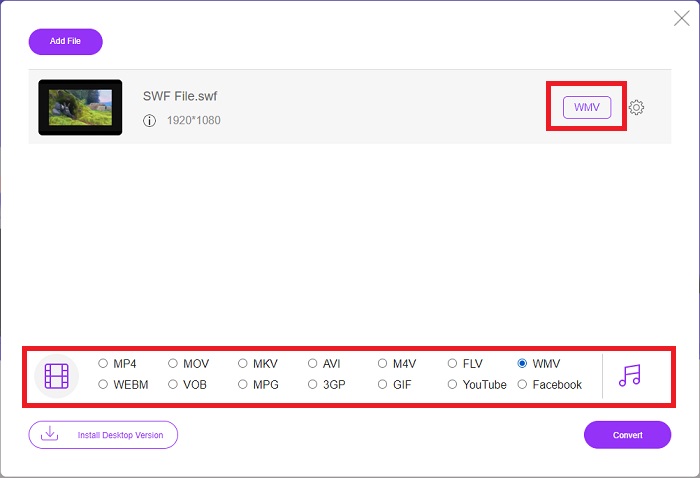
Step 2: Click the said button again, and this time, it will allow you to upload the video file you wish to convert. After that, select WMV among all the available formats.
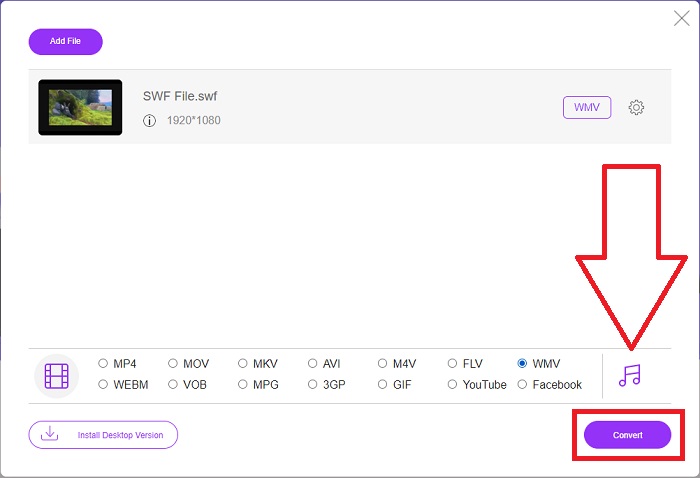
Step 3: You can still use handy editing tools like the software itself. Just click the gear icon, and it will show you all the adjustments you can make. To save the changes made, click OK and once you finish adjusting, click Convert to start the process.
קשור:
חלק 3. ידע נרחב על פורמטי SWF ו-WMV
אם אתה רוצה לדעת יותר על שני הפורמטים, המשך לקרוא את המאמר הזה. אנו מספקים את כל המידע הדרוש והחיוני שאתה עשוי להזדקק לו כרקע.
Adobe משתמשת בפורמט קובץ SWF כדי לאחסן סרטים ואנימציות מבוססות וקטורים. Small Web Format הוא הקיצור; עם זאת, הוא ידוע גם בשם ShockWave Format. הוא משמש בדרך כלל לשידור וידאו דרך האינטרנט, במיוחד משחקים מבוססי דפדפן. לרוע המזל, אדובי הצהירה שהיא תפסיק לתמוך בפורמט הפלאש עד סוף 2020 עקב בעיות ביצועים ואבטחה.
מצד שני, קובץ WMV הוא קובץ Windows Media Video שיכול לדחוס באמצעות אחד או יותר מתבניות דחיסת הווידאו של מיקרוסופט. זהו פורמט אחסון וידאו פופולרי ב-Windows, וזו הסיבה שהוא מנוצל על ידי אפליקציות צד שלישי מסוימות עבור דברים כמו אנימציות קצרות. זה תוכנן לעבוד עם נגני מדיה של Microsoft כמו Windows Media Player וסרטים וטלוויזיה. לשימוש עם מערכות Digital Rights Management (DRM), קבצי WMV עשויים להיות מוצפנים.
| פורמט אינטרנט קטן | Windows Media Video | |
| סיומת קובץ | .swf | .wmv |
| מפתח | Adobe Systems Incorporated | מיקרוסופט |
| תוכניות תומכות | ◆ Adobe Flash Player ◆ Adobe Flash ◆ CC מקצועי ◆ נגן GOM ◆ Adobe Dreamweaver 2020 | ◆ נגן מדיה VLC ◆ MPlayer ◆ נגן מדיה קלאסי ◆ Windows Media Player |
חלק 4. שאלות נפוצות על המרת SWF ו-WMV
מה השימוש בקבצי WMV?
קובצי וידאו WMV הם הפורמט הטוב ביותר למכירת חומרי וידאו באינטרנט או באמצעות HD DVD ותקליטורי Blu-ray.
מה השימוש בקובץ SWF?
קובצי Flash, או קבצי SWF, משמשים לעתים קרובות להפצה יעילה של מידע מולטימדיה דרך האינטרנט.
האם ניתן לערוך קבצי SWF?
Adobe Flash הוא פורמט קובץ המשמש את Adobe. שלא כמו קבצי מולטימדיה אחרים, וקובץ SWF דורש את הפלאגין Flash Player כדי להציג דפדפן אינטרנט. יתר על כן, משתמשים אינם יכולים לערוך ישירות קבצי SWF.
סיכום
FVC Video Converter Ultimate הוא האפשרות המושלמת עבורך אם אתה חדש או פשוט חובבן בכל הנוגע להמרת וידאו. אתה לא ממיר פורמטים של וידאו בתדירות גבוהה. היתרונות שלו, כמו המרת פורמט וידאו מתמדת, המרת קבצי וידאו מהירה בהשוואה לתוכניות דומות, פעולה פשוטה, תמיכה בפורמטים שונים וכן הלאה, עוזרים לו להפוך לממיר הווידאו הטוב ביותר שקיים. כשמדובר בהמרת וידאו, Video Converter Ultimate והמקבילה המקוונת שלו הן האפשרויות המקובלות ביותר.
-
 [2 פתרונות] כיצד להמיר קבצי SWF ל-GIF בקלות בחינם
 כאשר אינך מצליח לייצא פורמט GIF באמצעות תוכנת Flash, תוכל לנסות לשמור את הקבצים בפורמט SWF בהתחלה. אז אתה יכול ללמוד 2 דרכים קלות להמיר SWF לקבצי GIF ממאמר זה.
-
 5 ממירי SWF ל-AVI הטובים ביותר בחינם [מבוסס אינטרנט ושולחן עבודה]
 האם אתה רוצה לדעת איך להמיר את קובץ ה-SWF שלך ל-AVI? אז אם לא, קרא את המאמר הזה מכיוון שאנו מספקים פתרון להמרה שלך לבעיית SWF.
-
 [חינם וקל] כלים יוצאי דופן לשימוש בהמרת SWF ל-MOV
 האם ניסית להמיר SWF ל-MOV כי אינך יכול לערוך סרטונים? מי אשם בחוסר התאימות של עורך הווידאו שלך? המשך לקרוא לפתרון שלך.
