


 ממיר וידאו אולטימטיבי
 מקליט מסך
 תיקון וידאו
גלה מהם 3 ממירי FLV ל-MKV הטובים ביותר להמרת קבצי FLV ל-MKV
האם נמאס לך לחרוש את האינטרנט בחיפוש אחר הדרך הטובה ביותר להמיר FLV ל‑MKV בחינם? אולי זה צירוף מקרים, אבל היום מצאנו את ממירי ה‑FLV הטובים ביותר שתוכל להשתמש בהם; כמובן, בחרנו רק את הטובים ביותר. כדי להפוך את חוויית החיפוש שלך להרבה יותר קלה, עליך להמשיך לקרוא את המאמר למטה, כי תלמד בו הרבה על FLV ועל MKV ועל הממירים שאפשר להשתמש בהם.

חלק 1. 2 דרכים להמיר FLV ל-MKV בחינם
דרך 1. השתמש בממיר המקוון כדי להמיר FLV ל-MKV
ממיר מקוון זה הוא ללא ספק אחד מממירי הווידאו הגדולים להמרת FLV ל‑MKV אונליין. FVC Free Video Converter Online הוא ממיר פשוט וקל להבנה שאפשר להשתמש בו ברשת. אך הכלי הזה תלוי בחיבור אינטרנט, כלומר אם אין לך חיבור אינטרנט, זו כבר לא אפשרות עבורך להמרה. למרות שהכלי מבוסס אינטרנט, אין בו פרסומות בממשק שיכולות להרגיז אותך, והוא גם נקי מתוכנות זדוניות. כעת, אם אתה רוצה להתנסות באופן מעשי בכלי הזה, עליך לבצע את השלבים שלמטה.
שלב 1. לחץ על קישור זה כדי לפתוח את FVC Free Video Converter Online בלשונית חדשה.
שלב 2. לחץ על הכפתור Add Files to Convert כדי לפתוח את התיקייה במחשב שבו אתה משתמש. בחר את קובץ ה‑FLV שברצונך להמיר ולחץ על Open כדי להעלות את הקובץ.
הורד את גרסת הדסקטופ כדי להמיר קבצים במצב אצווה.
שלב 3. בחר את פורמט MKV מרשימת הפורמטים המוצגת למטה.
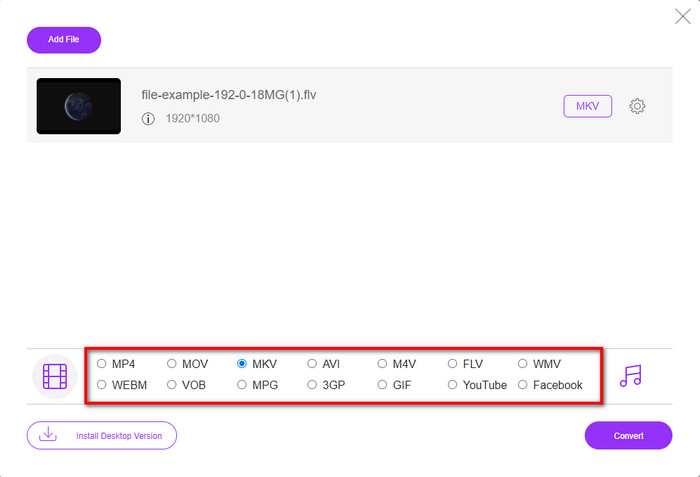
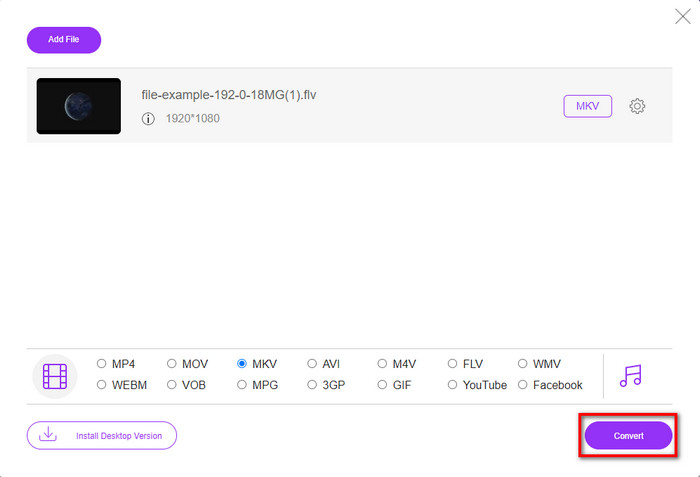
שלב 4. התחל את תהליך ההמרה על‑ידי לחיצה על הכפתור Convert, ולאחר מכן הקובץ שהומר יישמר אוטומטית בכונן המחשב שלך.
דרך 2. השתמש בממיר החינמי הזמין להורדה ב-Windows וב-Mac
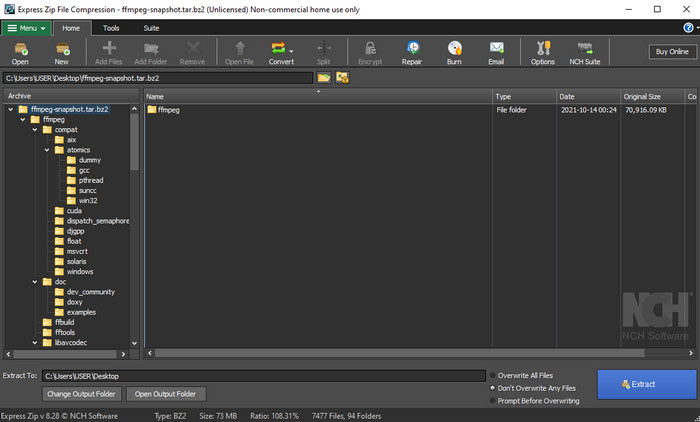
FFmpeg איננו הממיר הקלאסי שאתה רגיל להשתמש בו. אף על פי שהוא לא הממיר הרגיל, הוא עדיין יכול להמיר את קובץ ה‑FLV שלך. אז מה בעצם שונה בכלי הזה? הוא משתמש בממשק מבוסס שורת פקודה (CLI), כלומר לפני ההמרה עליך לתת לו פקודה באמצעות קידוד, או בפשטות – הקלדה. אם ממיר זה נראה לך מעניין, קרא את הפרטים למטה כדי להשתמש ב‑FFmpeg להמרת FLV ל‑MKV על‑פי השלבים הבאים.
שלב 1. הורד ופתח את FFmpeg.exe.
שלב 2. פתח את שורת הפקודה (Command Prompt) במחשב שלך.
שלב 3. אתר את קובץ ה‑FLV באמצעות CMD. לאחר מכן העתק את הקוד הזה והדבק אותו בשורת הפקודה: ffmpeg -i input.flv -vn -ar 44100 -ac 2 -b:a 192k output.mkv ואז לחץ על Enter במקלדת כדי להתחיל את התהליך.
חלק 2. המר FLV ל-MKV עם ממיר FLV ל-MKV הטוב ביותר ללא אובדן
דרך 3. השתמש בממיר המקצועי כדי להמיר FLV ל-WMV
עדיין לא מרוצה משני הממירים הראשונים? אם כך, עליך לנסות את FVC Video Converter Ultimate. למה? משום שהוא מספק תוצאה מקצועית גם בלי שתשקיע יותר מדי מאמץ בהמרה. בנוסף, הוא תומך בפורמטים רבים נוספים כך שתוכל להמיר את קובץ ה‑FLV שלך ל‑MKV, AVI, MOV, AVI, MP4 ועוד למעלה מ‑200 פורמטים אחרים. עדיין לא מתרשם? אולי אתה רוצה להוסיף קצת קסם לסרטון שלך? במקרה כזה, יש לך מזל עם הממיר הזה, מפני שהוא מספק יכולות עריכת וידאו מתקדמות שתוכל להשתמש בהן. חושש שהכלי עשוי להיות מורכב מדי בשבילך? אם כן, עקוב אחר השלבים הכתובים למטה כדי להתנסות וללמוד כיצד להשתמש בממיר FLV ל‑MKV הזה.
שלב 1. לפני השימוש בממיר הזה עליך להוריד אותו תחילה על‑ידי לחיצה על כפתור ההורדה למטה. לאחר ההורדה עקוב אחר הוראות ההתקנה ולאחר מכן הפעל אותו.
הורדה חינמיתל-Windows 7 ומעלההורדה מאובטחת
הורדה חינמיתל-MacOS 10.7 ומעלההורדה מאובטחת
שלב 2. כדי להוסיף את קובץ ה‑FLV שברצונך להמיר, לחץ על כפתור ה‑+. אתר את קובץ ה‑FLV בתיקייה שתופיע בממשק שלך ולחץ על Open כדי להמשיך לשלב הבא.
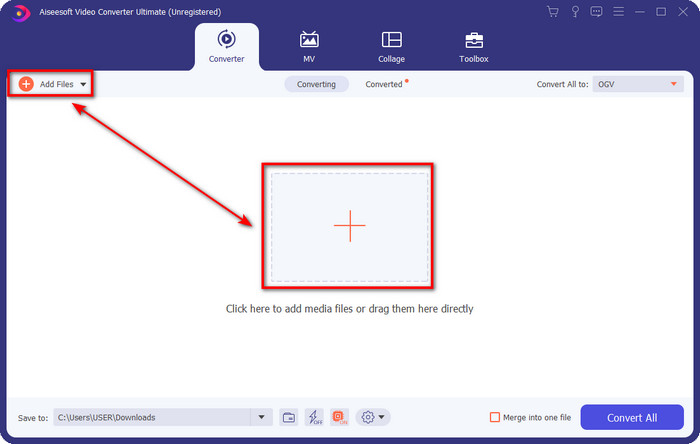
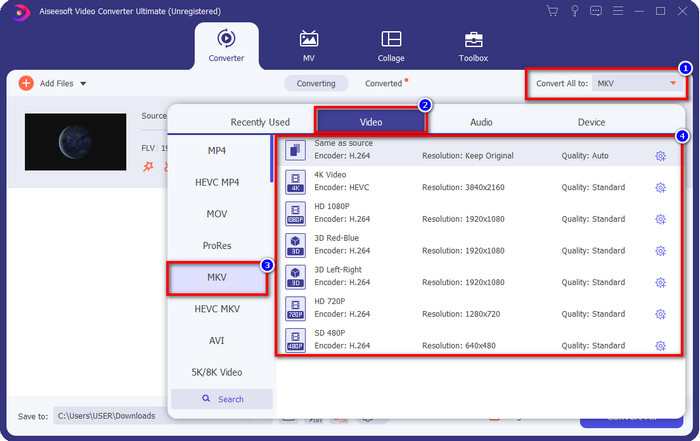
שלב 3. לאחר מכן, נשנה את הפורמט ל‑MKV על‑ידי לחיצה על כפתור ה‑drop-down בצד הימני העליון של ממשק המשתמש.
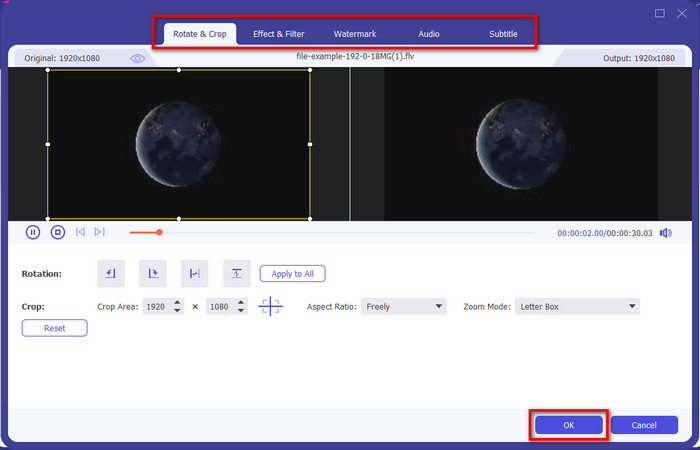
אופציונלי. אם אתה צריך לערוך את הווידאו, באפשרותך ללחוץ על כפתור ה‑wand אם תרצה. תופיע ממשק חדש, ובו תוכל לבצע Rotate, Crop, Effects, Filter, Watermark, Audio ו‑Subtitle. אל תגביל את הדמיון שלך, עשה כל מה שתרצה, וכדי להחיל את כל הקסם שיצרת לחץ על OK.
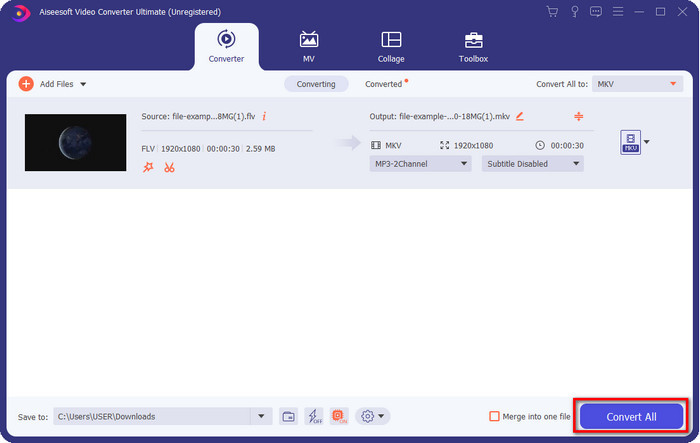
שלב 4. לבסוף לחץ על Convert All כדי להמיר את קובצי ה‑FLV לפורמט MKV. התהליך ייקח פחות מדקה, כך שאין צורך בהמתנה ממושכת. תיקייה תופיע על המסך שלך ובה קובץ ה‑FLV שהומר.
קשור:
חלק 3. מה ההבדל בין FLV ל-MKV
FLV ו- MKV ידועים בכך שהם בין הקונטיינרים הטובים ביותר שכולם מכירים. אבל לפני כל דבר אחר, בואו נשווה ונראה מידע מפורט יותר על שני הפורמטים.
FLV ידוע בכל אתרי האינטרנט מכיוון שהוא פופולרי בדפי אינטרנט, בעיקר בגלל ש-Adobe יצרה אותו. יתר על כן, .flv מנגן זרמי וידאו מקוונים מכיוון שהם הרבה יותר קלים לטעינה מהפורמט האחר. כמו כן, פורמט זה זקוק ל-plug-in-play לפני שתוכל לצפות או לצפות בסרטון בפורמט זה, או שתוכל להוריד בקלות את Flash Player. למרות שהפורמט מצוין, התוספות שבהן הוא משתמש כבר המריאו, מה שאומר שהפורמט הוא לא הבחירה הטובה ביותר. עם זאת, נגני מדיה רבים עדיין תומכים בפורמט זה ומשתמשים שעדיין משתמשים בו.
MKV ידוע בתור הפורמט הדומה ביותר לעתיד הקיים. פורמט זה לא יהיה כמו כל פורמט אחר במובן רב אם היינו עומדים להשוות אותו. לדוגמה, המבנה שנבנה בפורמט זה אינו זהה ל-MP4 או AVI, אך הוא שונה. העיצוב ואחסון קבצי המדיה הייחודיים שלו הופכים אותו למרשים יותר. כיום, קשה לבחור איזה פורמט מיושן, ואחד הוא ה-MKV.
אם נחפור יותר לפרטים, נמצא הרבה סיבות למה אתה צריך להמיר FLV ל-MKV. למרות ששני הפורמטים מכילים תוכן מדיה, MKV חזק יותר מ-FLV. לכן, אם אתה רוצה לקבל את הכוח הייחודי של MKV, עליך להמיר את הקובץ שלך לפורמט זה.
FLV לעומת MKV
Adobe Flash Player השתמש ב-FLV כדי לספק תוכן וידאו כמו סרטים ותוכניות טלוויזיה. כיום, Adobe כבר לא מפתחת את הנגן וממליצה למשתמשים להסיר אותו מטעמי אבטחה. עם זאת, אתה עדיין יכול להשתמש בפורמט FLV בתוכניות רבות שאינן Adobe/Macromedia.
פורמט מיכל המולטימדיה Matroska, שיצא בשנת 2002, הוא פורמט קוד פתוח שיכול לכלול מספר רצועות וידאו, אודיו, תמונה וכתוביות. אז אתה יכול להשתמש בו כדי לאחסן קטעי וידאו קצרים, תוכניות טלוויזיה וסרטים בקלות. זה די פופולרי עבור אוהדי אנימה.
חלק 4. שאלות נפוצות לגבי המרת FLV ל-MKV
האם זה בטוח להמיר FLV ל-MKV באינטרנט?
ובכן, המרת פורמט אמורה להיות בטוחה אם אתה משתמש בכלי אינטרנט. עם זאת, לא כל הממירים המקוונים בטוחים להמיר את פורמט הקובץ שלך. מכיוון שיש כמה נטיות, יהיו הרבה שגיאות בלתי צפויות כאשר אתה משתמש בממיר הלא נכון. לדוגמה, אובדן איכות הוא בעיה נפוצה, וירוסים בהורדת הקובץ לאחר המרה, מודעות קופצות מרובות, תוכנות זדוניות מדבקות ועוד רבים נוספים. לכן, אם ברצונך לקיים תהליך המרה בטוח באינטרנט, עליך להשתמש בממיר FVC Free Video Online במקום זאת.
האם המרת FLV תיקח זמן?
תהליך ההמרה יהיה תלוי בגורמים רבים, ואחד מהם הוא הכלי שבו אתה משתמש וגודל הקובץ. אם יש לך קובץ FLV גדול, עליך להשתמש ב-FVC Video Converter Ultimate, במיוחד במהירה. מכיוון שהכלי הזה מספק תהליך במהירות הבזק, לא תצטרך חיבור לאינטרנט כדי להשתמש בו. ועכשיו, אם אתה מחפש ממיר שיכול לעבד את הפורמט שלך מהר יותר, אז הכלי האולטימטיבי הוא הבחירה.
למה אני לא יכול לפתוח את קובץ ה-FLV שלי?
ישנן מספר סיבות מדוע אינך יכול לפתוח את קבצי ה-FLV שלך. לקחת הערה; הפרט הבא הוא אחת הסיבות המאה שאינך יכול לפתוח את קובץ FLV. קודם כל, אתה לא יכול לפתוח FLV אם הקובץ סדוק או שיש בו וירוס. שנית, הבעיה הנפוצה ביותר של קובץ הווידאו אינה נתמכת באפליקציה שבה אתה משתמש. שלישית, אם אתה מוריד קובץ FLV באינטרנט, יהיה מקרה שהקובץ יאבד מידע חיוני כדי להפעיל אותו. למרות שזו בעיה, אנו עדיין יכולים לסייע בכך על ידי המרת ה-FLV שלך לפורמט אחר. אבל זכור, אינך יכול לשחזר את ה-FLV על ידי שינוי הפורמט אם הוא פגום או לא שלם.
סיכום
למדנו את כל מה שצריך כדי להמיר FLV ל‑MKV בכמה דרכים שונות. הכלים שלמעלה מצוינים לשימוש כאשר אנו ממירים את הפורמט לגרסה חדשה. כעת, הבחירה בידיים שלך – באיזה כלי לבחור כדי לבצע את ההמרה המתאימה לך ביותר. כל אחד משלושת הכלים למעלה יוביל אותך להצלחה, אבל אם אתה רוצה תוצאה מקצועית ולהוציא את המיטב מקובץ הווידאו שלך, עליך לבחור ב‑FVC Video Converter Ultimate. אין צורך בהסברים – הכלי הזה ימלא עבורך את כל החסר.
-
 3 פתרונות כיצד להמיר FLV ל- PSP ללא הפסד
 כיצד להמיר FLV ל- PSP? כאן תקבל את המדריך שלב אחר שלב להמרת סרטוני פלאש לפורמטים הנתמכים ב- PSP (WMV, MP4, AVI, FLV וכו ') ב- Windows ו- Mac.
-
 2 שיטות להמרת FLV לאודיו WMA [חינם ומקוון]
 רוצה לחלץ אודיו WMA מסרטון FLV? להלן 2 מחליפי שמע WMA בחינם להמרת FLV (Flash Video) ל- WMA (Windows Media Audio) במהירות המרה מהירה ב- Mac OS X וב- Windows 10/8/7.
-
 [נפתר] כיצד להמיר סרטוני FLV לקובצי GIF מונפשים בחינם
 אם ברצונך ליצור קובצי GIF מקטעי הווידאו של FLV לשליחה טובה יותר, תוכל ללמוד עוד כיצד להמיר קטעי וידאו FLV לקבצי GIF בקלות ממאמר זה.

