


 ממיר וידאו אולטימטיבי
 מקליט מסך
 תיקון וידאו
[סקירה מלאה] 5 חותכי MP3 האחרונים הזמינים ב-Windows/Mac/Online
We often wish to cut the audio we listen to and set it as a ringtone, highlighting the vital part or trim the unnecessary detail of the sound. Although there are sets of cutters you can use on all platforms still some aren't trustworthy. So today, we will present to you the cutters we found on the market where you can trust because we try all of these tools ourselves to ensure that it is malware-free and reliable. Before we pick them out, we follow a strictly high standard for the audience who needs a dependable cutter. To make your browsing on the internet at full tilt, we presented below the five MP3 cutters we found ready to take the task of cutting any audio format.

חלק 1. 2 תוכנות חותך MP3 לא מקוונות Windows & Mac
1. Video Converter Ultimate - חותך MP3 הטוב ביותר [מומלץ בחום]
The best audio MP3 cutter in this list is the Video Converter Ultimate, which lets users cut any audio effortlessly. With the help of this ultimate tool, you can trim the sound to remove the unwanted audio, even merge multiple cut audio files into a single file and boost the audio if you feel that the sound is a bit low. Furthermore, this software provides an ultra-fast process while taking care of the original quality of the sounds.
שלא כמו כל חותכים, הכלי הזה תומך בספקטרום רחב של פורמטים, לא רק MP3 אלא גם FLAC, M4R, M4A, OGG, MKA, WAV, WMA ועוד, ואכן קובץ האודיו שלך נתמך כאן לחיתוך. אולי אתה לא יודע איך לחתוך את קובץ השמע שלך ולהשתמש בו לצרכים שלך עכשיו. היום הוא יום המזל שלך כי אנחנו נלמד אותך איך להשתמש בחותך MP3 ויצרן הרינגטונים בחינם על ידי ביצוע ההדרכה למטה.
Step 1. Download the audio cutter on your desktop by clicking the download button below. Pick whether you are using a Windows or Mac, install the software promptly, and launch it. Remember, you will need to be familiarized with the tool's interface to be easy for you to follow the following steps.
הורדה חינמיתל-Windows 7 ומעלההורדה מאובטחת
הורדה חינמיתל-MacOS 10.7 ומעלההורדה מאובטחת
Step 2. Drag the audio file you want to cut on the interface, or you can click Add Files and locate the audio on the computer folder that will show. Hit Open to proceed to the next step.
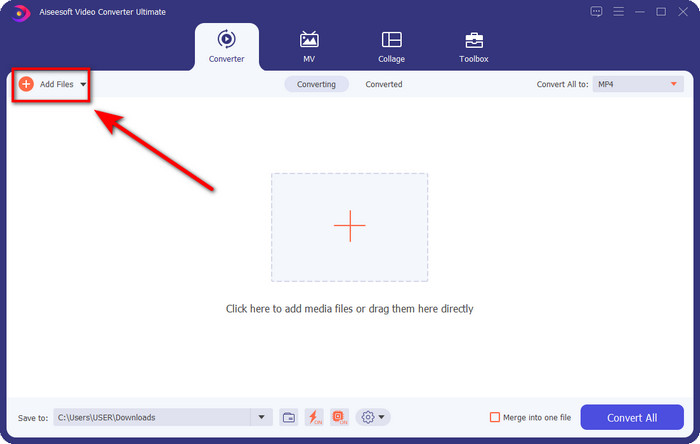
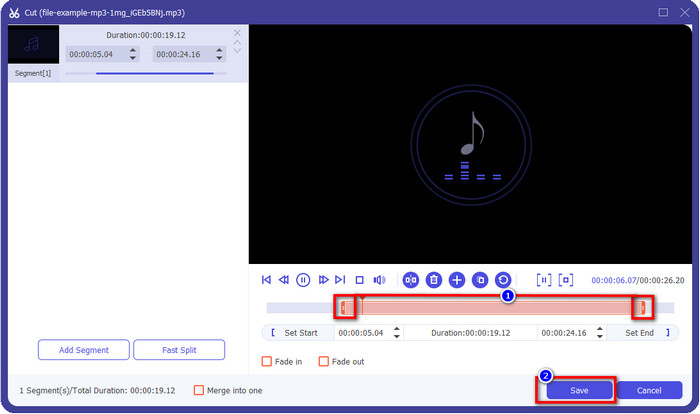
Step 3. After inserting the audio file, it is now time to click the scissor-like button. Drag the play in and out to your desired length of the audio you want. Remember that the highlighted audio in the middle of play in and out is the only audio kept. Then press Save to cut the audio.
Optional. Need to boost your audio? If that is the case, click the wand button, adjust the volume slider by dragging it up, and press OK to save.
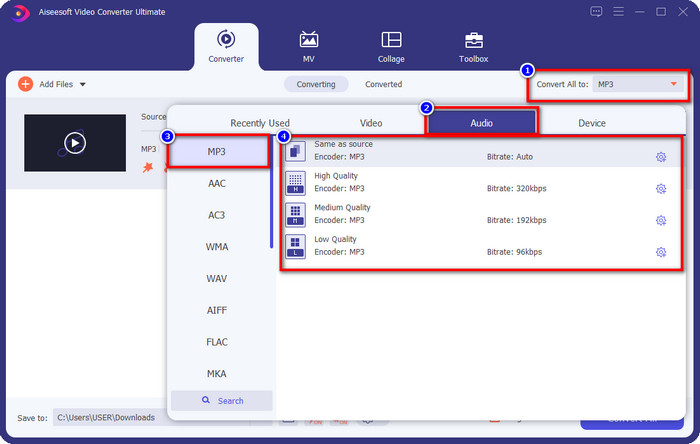
Step 4. Go to Convert All to, Audio and set the format to MP3. Although you aren’t converting, make sure that the name under Convert All to is MP3 or not another format to avoid changing the format to another format.
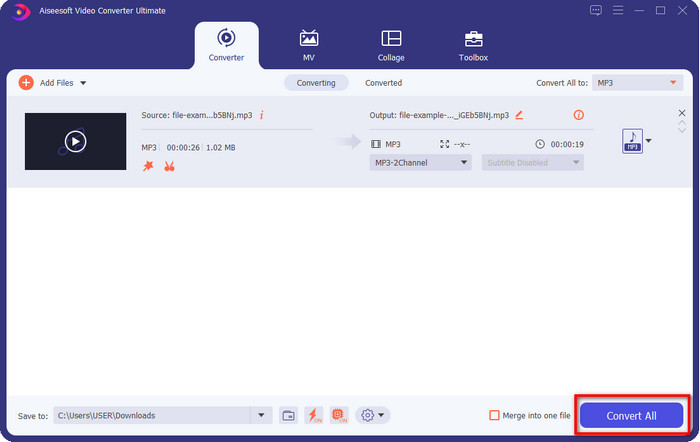
Step 5. By clicking Convert All, saving the audio cut will begin. You now have the audio cut with the best free MP3 cutter as easy as that.
יתרונות
- זה יכול לחתוך את האודיו שלך במהירות האפשרית ולעבד אותו תוך פחות משנייה.
- תכונות מתקדמות זמינות כדי לשפר את עוצמת הקול.
- זה תומך בכל מערכות ההפעלה כמו Windows או Mac.
- מיזוג קבצי אודיו מרובים אפשרי עם מיזוג האודיו של כלי זה.
חסרונות
- יש צורך ברכישת הכלי.
2. חוצפה
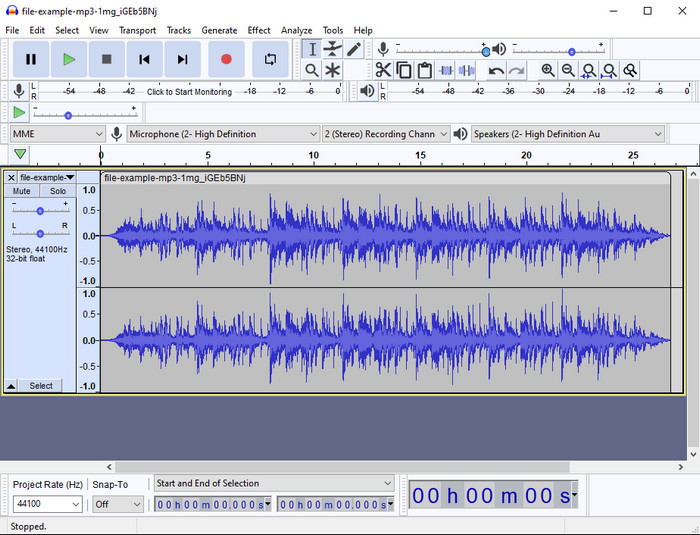
Audacity has provided pro editing features for your audio thru the years. This app is free to download and offers users do a multiple-track mixing. It is known to be used by podcasters to edit and record podcasts easily. However, some of its features are hard to understand, especially if you are not fond of using specialized software like this one.
למרות שאתה עדיין יכול ללמוד איך להשתמש בו, ייקח זמן לנצל את מלוא הפוטנציאל של גוזם אודיו MP3 זה, ולחיתוך אודיו, זה הוגן לומר שהוא חתך באופן מיידי וללא מאמץ אם אתה צריך את זה.
יתרונות
- חינם להורדה בכל התוכנות כמו Windows ו-Mac.
- עורכי אודיו מתקדמים ומקצועיים זמינים כדי לגרום לשמע שלך להישמע נהדר.
- זה הכי טוב להקלטת פודקאסטים ועוד.
חסרונות
- מתחרים רבים מספקים ממשק משתמש ידידותי למשתמש.
- לא הבחירה הטובה ביותר למתחילים לתוצאה מיידית של חיתוך ומטרות עריכה אחרות.
- דוחות מסוימים מראים שהנתונים שלך נאספים אם אתה משתמש בכלי זה, אך אין עדיין הוכחות מוצקות.
חלק 2. 3 חותכי MP3 מקוונים נגישים באינטרנט
1. mp3cut.net
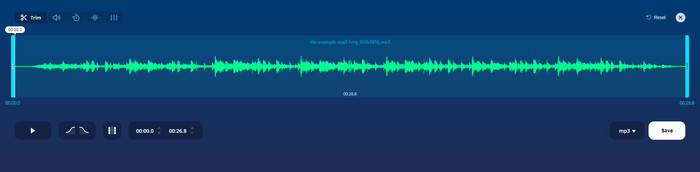
אתה יכול להשתמש ב-mp3cut.net אם אתה צריך חותך MP3 מקוון עבור העבודה. לאחר העלאת הקובץ בחותך מקוון זה, כעת תוכל להסיר את הצליל שברצונך לצייר על קובץ האודיו שלך. יתר על כן, לכלי יש גם כמה תכונות עריכה קלות כדי לשנות את המהירות והגובה של השמע אם אתה צריך.
למרות שיש לו סוג כזה של יכולת, הכלי קורס רוב הזמן ואינו יכול להשמיע את האודיו כדי להאזין אם חותכים אותו נכון. לכן, כדי להשתמש בו שוב, תצטרך לרענן את הדפדפן ולחזור על ההתאמה שביצעת שוב.
יתרונות
- ידידותי למשתמש ונגיש דרך האינטרנט.
- נכון, תכונות שיעזרו לך לחתוך אודיו.
- תכונות עריכה בסיסיות זמינות.
חסרונות
- יש לו מודעות בממשק האינטרנט.
- לפעמים הוא קורס וצריך לטעון אותו מחדש כדי להשתמש בו.
2. audiotrimmer.com
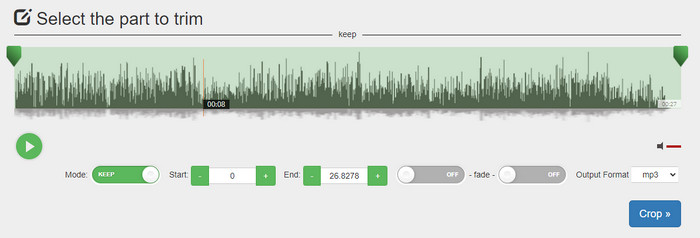
Another free mp3 cutter online is audiotrimmer.com. This tool provides easy-to-understand and straightforward trimming features; all of the function of this tool is on point. With it, you can choose whether you want to keep the audio or remove the audio. Also, it has a fade-in and out effect like the other trimmer mentioned here. However, when we did try to use the fade-in and out the effect, it didn't work; there were no added effects to our audio. But if you want to do easy cutting, this is a must-try web tool.
יתרונות
- חינם וזמין בכל הדפדפנים לגישה.
- קל לשימוש כדי לחתוך אודיו.
- יש לו אפקטים של דהייה והחוצה.
חסרונות
- הדה-אין והאאוט לא עובדים טוב.
- יש הרבה מודעות מטרידות אם אתה ניגש אליהן. לכן, היזהר לא ללחוץ עליהם.
3. קלידאו

One of the best online MP3 cutters and joiners you can use is the Clideo. Most users enjoy and prefer using this tool because of its editing capabilities. Moreover, you can also add fade in and out on your audio file if you need it. But after exporting it and listening to it, there is no fade in and out added to our audio file. We encounter one slight problem with this tool: uploading and downloading the file. Unlike the first-mentioned tool, uploading audio on its cutter takes time, and there are times that we failed to upload the audio file here because of unknown reasons.
למרות שאנו נתקלים בבעיות מסוימות, זה עדיין החותך הטוב ביותר באינטרנט, והוא גם בטוח לשימוש.
יתרונות
- החותך המקוון הטוב ביותר באינטרנט.
- ממשק משתמש מקצועי.
- קל לשימוש.
חסרונות
- תהליך ההעלאה וההורדה ייקח יותר מדי זמן.
- הדהייה והחוצה עובדת אבל לא טובה.
חלק 3. שאלות נפוצות על חותכי MP3
מהו גוזם ה-MP3 הטוב ביותר ב-Mac?
FVC Video Converter Ultimate is available on Mac as well. So, if you need to trim your audio on Mac, you better download the ultimate tool to handle your audio file appropriately. The ultimate tool presents not only best for cutting your audio, but you can also enhance the audio by boosting it. Moreover, if you need help in converting, merging, syncing the audio, etc. ultimate tool is to the rescue. If you need to know more about the ultimate tool, you better read the details presented above.
האם חיתוך השמע מפחית את גודלו?
גודל הקובץ של האודיו מצטמצם לאחר גזירתו. כשהשווינו את קובץ השמע המקורי לקובץ החתוך, ראינו כמה שינויים בגובה. אז זה אומר שככל שקובץ השמע קצר יותר, הגודל שלו קטן יותר, אבל אם קובץ השמע שלך ארוך מאוד, צפו שגם הגודל משמעותי.
האם אני יכול להשתמש ב-Audacity כדי למזג מספר אודיו?
Yes, you can, Audacity supports merging multiple-audio tracks into one file. However, it is hard, especially if you don't have a relevant tutorial to follow. So, if you need to merge audio via Audacity, you can click this link and learn from it.
סיכום
The MP3 cutters presented here already pass the standards we set to provide only the best trimmer for you. This article shows how important to choose the right and suitable cutter based on your needs. Even though the trimmers here do the same function, the FVC Video Converter Ultimate provides a much more efficient cutting audio. According to our research, the ultimate tool surpasses all the standards we set. So, if you want to have a top cutter on your hand, this is the best choice among the rest cutters available on the market. Too good to not believe? Well, you better download the tool and test it out yourself.
-
 כיצד לגזור ולמזג שירים ברשת - 4 הדרכים הטובות ביותר שכדאי להכיר
 כשרוצים לחתוך ולמזג שירים באופן מקוון ליצירת קטע מוסיקה, תוכלו ללמוד עוד על 4 הכלים המקוונים הטובים ביותר לקליפ השירים ולשלב קבצים מתוך המאמר.
-
 גלה את גוזם MP4 הטוב ביותר עם נוהל ומידע
 האם אתה רוצה ללמוד איך לחתוך סרטונים כמו הוולוגים שבהם אתה צופה? לאחר מכן המשך לקרוא את הפוסט הזה כדי לדעת באילו גוזמי MP4 אתה יכול להשתמש.
-
 הורדת נגן MP3 - 10 נגני המוזיקה MP3 החינמיים הטובים ביותר של 2025
 מהו נגן ה- MP3 הטוב ביותר? כיצד ניתן לשים מוסיקה בנגן MP3? כיצד ניתן להוריד את נגן המוזיקה MP3? פוסט זה נותן לך סקירה מפורטת של 10 נגני MP3 הטובים ביותר בחינם עבור Windows PC ו- Mac.
