


 ממיר וידאו אולטימטיבי
 מקליט מסך
 תיקון וידאו
עורך MKV Metadata הטוב ביותר להוספה/שינוי/הסרה של מטא נתונים ב-MKV
אין מגוון רחב של עורכי מטא־דאטה ל‑MKV בשוק משום שפורמט MKV אינו נתמך באופן נרחב. אבל זה לא אומר שאי‑אפשר לערוך את התגיות בקובצי ה‑MKV שלנו, כך שאין סיבה להיות קודרים. כדי לגלות מהו עורך המטא־דאטה הטוב ביותר שתומך ב‑MKV, אפשר לקרוא את המאמר המלא שבו נסקור כלים שונים. למה אתם מחכים? המשיכו לגלול, כי לא ייקח לכם יותר מ‑7 דקות למצוא עורך תגיות מתאים.

חלק 1. עורך תגיות MKV הטוב ביותר המומלץ עבור Windows ו-Mac: FVC Video Converter Ultimate
FVC Video Converter Ultimate הוא עורך המטא־דאטה הפופולרי ביותר ל‑MKV ב‑Windows וב‑Mac. הכלי הזה עומד בשמו ובציפיות ממנו, ולכן הורדת התוכנה לצורך עריכת המטא־דאטה היא הבחירה הטובה ביותר שתעשו. הפיצ’רים והפונקציות העוצמתיים שלו יטפלו במשימה בקלות, כאילו הייתה משחק ילדים. בנוסף, הכלי תומך בפורמטים נוספים להעלאה, כגון MP4, AVI, MOV, FLV, WMV ועוד למעלה מ‑1000 פורמטי מדיה, בלי לקודד מחדש את הקובץ – לחוויית עבודה נוחה יותר.
מה עוד? נניח שאתה מוריד את הכלי. יהיה לך הכלי המהיר ביותר להוספת המטא נתונים ב-MKV ואת ה-GUI היפה ביותר של עורך המטא נתונים שהכלי השני לא יכול להציע. אם אתה מעוניין להשתמש בעורך, המשך בקריאת חלק 2 כפי שאנו מסבירים כיצד לערוך את הנתונים של קבצי MKV.
חלק 2. כיצד לערוך מטא נתונים של MKV עם עורך המטא נתונים של MKV המומלץ
בצע את השלבים בהתאם, החל מהורדת הכלי וכן הלאה. אז בואו נתחיל להשתמש בעורך המטא נתונים הטוב ביותר של MKV שתוכל להוריד ב- Windows או macOS שלך.
שלב 1. לחצו על כפתור ההורדה שמופיע למטה ובחרו את מערכת ההפעלה שבה אתם משתמשים כעת. התקינו מיד לאחר שהקובץ ירד, עקבו אחר תהליך ההתקנה, ואנו מבטיחים שלא תטעו, ואז פתחו את התוכנה להמשך. לפני שנתחיל, כדאי להכיר מעט את הכלי כדי שתהליך העבודה עם עורך התגיות ל‑MKV יהיה חלק וזורם.
הורדה חינמיתל-Windows 7 ומעלההורדה מאובטחת
הורדה חינמיתל-MacOS 10.7 ומעלההורדה מאובטחת
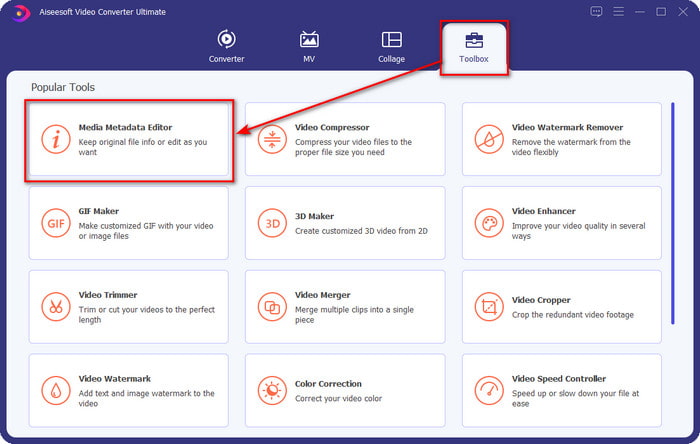
שלב 2. פתחו את ה‑Toolbox, חפשו את Media Metadata Editor והקישו עליו כדי לפתוח.
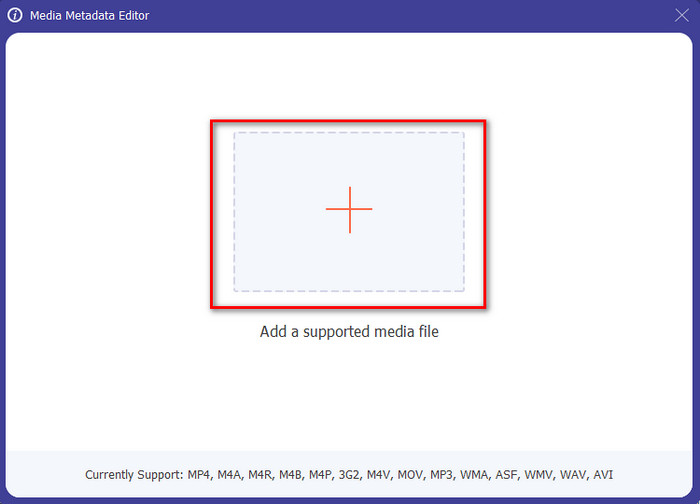
שלב 3. העלו את קובץ ה‑MKV שלכם על‑ידי לחיצה על סמל ה‑+. תיפתח תיקיית קבצים, בחרו את קובץ ה‑MKV ולחצו על Open.
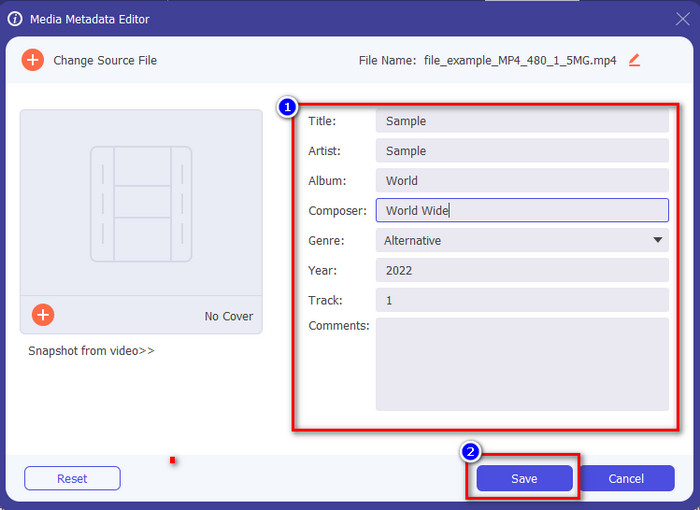
שלב 4. ערכו את המטא־דאטה ב‑textbox; תוכלו למלא את השדות או להסיר אותם – עשו כל מה שתרצו עם המטא־דאטה. לאחר שסיימתם, לחצו על Save כדי להחיל את השינויים שביצעתם קודם. כך, ערכתם כעת את התגיות של קובץ ה‑MKV.
חלק 3. 3 עורכי תגיות MKV בחינם שכדאי להכיר זמינים ב-Windows, Mac ומקוון
GROUPDOCS.Metadata [חינם באינטרנט]
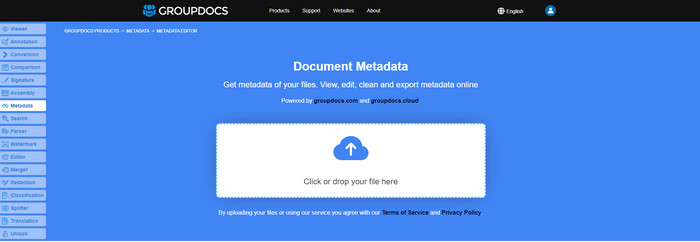
אם אתם רוצים להשתמש בעורך מטא־דאטה ל‑MKV בחינם ישירות ברשת, אנו ממליצים בחום לנסות את GROUPDOCS.Metadata. זוהי הבחירה הטובה ביותר לצפייה ועריכה של המטא־דאטה בקובצי MKV, משום שהוא פועל על כל הפלטפורמות, כלומר הוא גמיש ומתאים כמעט לכל מצב. בנוסף, הוא יכול לשלוט בקלות בחיפוש ובעדכון התגיות לפי המאפיינים הדרושים לכם, ואם צריך להסיר אותם – הוא יעשה זאת אוטומטית. עם זאת, הכלי עלול להיות מאתגר לתפעול במשימות מסוימות, כמו עדכון התגיות של הקובץ. כדי להתרגל לעבוד עם הכלי המקוון, תצטרכו להשתמש בו לעיתים קרובות יותר, וכך לשפר את היכרותכם עם פונקציות האתר ולהקל על התפעול.
מאפיינים ב-Windows [עורך מובנה ב-Windows]
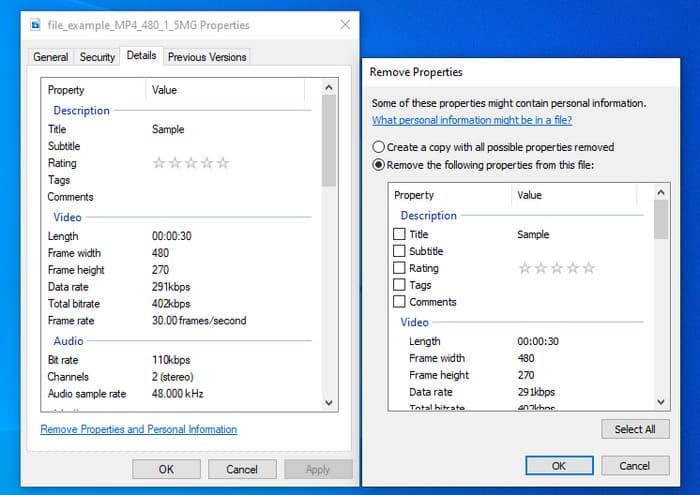
לא רוצה להוריד כלי לשינוי מטא נתונים של MKV ומעוניין להשתמש בפונקציה המובנית ב-Windows כדי לערוך את המטא נתונים? אז זה יהיה הכי טוב אם תשתמש במאפיינים ב-Windows. פונקציה זו זמינה בכל מחשבי Windows, ולא תצטרך להוריד שום כלי או אינטרנט כדי להשתמש בה. אתה יכול להציג במהירות את המטא נתונים ולערוך אותם בהצלחה עם התכונה החינמית הזו. עם זאת, ישנם כמה דיווחים על התגים החסרים לאחר שניסו להשתמש בתכונה זו. לפי משתמשים, זה יכול להסיר אוטומטית את התגים בקובץ שלך. במקום להשתמש בתכונה זו, הם מתכוונים להוריד את הכלי הנכון לבזבז מאמץ על התגים שהם כוללים ב-MKV או בקובץ המדיה שלהם. אבל אם אתה רוצה לראות איפה הפיצ'ר הזה, פשוט לחץ לחיצה ימנית על הקובץ, בעיקר בחלק התחתון.
iFlicks [עבור Mac]
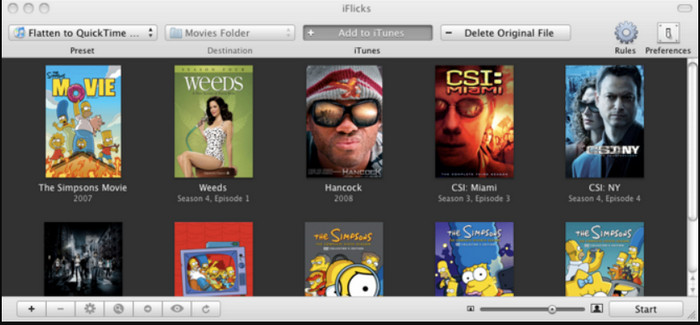
iFlicks יכול לעזור לך להמיר את ה-MKV לפורמט שניתן לשחק בו או ללמד אותך כיצד לערוך מטא נתונים של MKV ב-Mac. כלי זה מקיים אינטראקציה טובה עם iTunes מכיוון שהוא מספק מטא נתונים מפורטים על כל קובץ מדיה. בעזרת תוכנה זו, אתה יכול להוסיף מידע שונה על הקובץ שלך, כגון קו תיוג, ז'אנר, תאריך. דירוגים, רזולוציות ואחרים נאספים במאגרי המידע באינטרנט. יתר על כן, תוכנה זו אוספת מטא נתונים על המקום שבו אתה יכול להוריד אותם ולהחיל אותם אוטומטית על הקבצים. עם זאת, הניסיון בחינם יכול להימשך רק שבעה ימים, כך שאם תרצה להשתמש בכלי שוב, תצטרך לשלם עבור דמי המנוי שלו.
חלק 4. שאלות נפוצות על MKV Metadata Editor
האם MKV ניתן לשחק ב-Mac?
ניתן להפעיל קובצי MKV ב‑Mac אם משתמשים בכלי צד שלישי, כגון Blu-ray Player. אבל אם תנסו לנגן את הווידאו ישירות ב‑QuickTime, זה לא יעבוד משום שהפורמט אינו נתמך. לכן, אם אתם רוצים לצפות בקובצי MKV ב‑Mac, אנו ממליצים בחום להשתמש בנגן Blu-ray צד שלישי, או שתוכלו להמיר את פורמט MKV ל‑MOV בעזרת FVC Video Converter Ultimate.
האם אני צריך להמיר MKV לפני עריכת המטא נתונים?
אם הכלי שבו ברצונך להשתמש אינו תומך בהעלאת פורמט MKV, אנו ממליצים לך להמיר את הפורמט תחילה לפורמט תואם. אבל עם האגרה שהזכרנו למעלה, לא תצטרך להמיר את הקובץ לפורמט נתמך. עם זאת, אין הרבה אפשרויות או כלים לעריכת תגי MKV מכיוון שהפורמט אינו ידוע. למרות שקשה לחפש, עשינו כמיטב יכולתנו לחפש בכל העורכים שבהם אתה יכול להשתמש כדי לעדכן או לשנות את המטא נתונים התומכים בפורמט MKV.
מדוע קבצי MKV גדולים מדי בגודלם?
הסיבה העיקרית לכך שקובצי MKV גדולים היא שהם יכולים להכיל תכנים מרובים של וידאו, אודיו וכתוביות עם מקודדים ואלמנטים שונים. ואם מוסיפים לקובץ גם מטא־דאטה, גודל הקובץ נעשה גדול עוד יותר. לכן, הדרך הטובה ביותר לחסוך במקום אחסון ובכל זאת לשמור קובץ MKV בכונן היא לדחוס אותו מבלי להרוס את האיכות או לאבד מידע מהקובץ. לחצו על קישור זה כדי ללמוד עוד על דחיסת קובצי וידאו.
סיכום
למרות שיש מספר מצומצם של עורכי מטא־דאטה ל‑MKV בשוק, עדיין קיימים כלים חזקים שניתן לסמוך עליהם, הזמינים בפלטפורמות שונות. לאחר שסקרנו תוכנות שונות שניתן להשתמש בהן, הבחירה הסופית בידיים שלכם – באיזה כלי תעדיפו להשתמש כדי לשנות את המטא־דאטה של קובץ ה‑MKV שלכם. אכן, זו החלטה לא פשוטה, כי כל הכלים נוחים ועוצמתיים לשימוש. אם עדיין לא החלטתם מה להעדיף, אנו מציעים להשתמש ב‑FVC Video Converter Ultimate, משום שזו התוכנה הגמישה ביותר והיא מציעה פיצ’רים מתקדמים יותר שכולם יכולים להשתמש בהם. בלחיצה על כפתור ההורדה תקבלו את עורך התגיות הטוב ביותר שאפשר להשיג ל‑Windows ול‑Mac!
-
 5 הדרכים הקלות ביותר להסיר מטא נתונים בכל קבצי מדיה
 כיצד להסיר מטא נתונים? האם זה קשה לעשות את זה? האם עלי לרכוש או להשתמש בכלי חינמי להסרת תגים? לכל השאלות הללו יש תשובות במאמר זה.
-
 5 עורכי מטא נתונים MP4 המובילים ביותר [עודכן 2022]
 כיצד אוכל לשנות את המטא נתונים של MP4 שלי? הדרך הטובה ביותר לשנות את המטא נתונים של ה-MP4 שלך היא להשתמש בעורך תגים התומך בפורמט MP4 כמו הדוגמה שאנו מפרטים למטה.
-
 5 עורכי תגי הווידאו של AVI לבחירת המשתמשים לשנת 2022
 מהו עורך תגי ה-AVI הטוב ביותר שאני יכול להשתמש בו? שוק עורכי התגים עבור קבצי AVI רחב מדי. אז היום נציג את חמשת העורכים הנבחרים ביותר בשנת 2022.
