


 ממיר וידאו אולטימטיבי
 מקליט מסך
 תיקון וידאו
 הורדה מאובטחת
3 מעורכי המטא נתונים הטובים ביותר של FLAC שכדאי להכיר ב-2025
ידוע לנו כי FLAC הוא פורמט קובצי המוזיקה חסרי האובדן (lossless) הטוב ביותר, והוא פורמט אידיאלי לריפינג של אודיו מתקליטורי CD, מפני שאם תבחר בפורמט זה, לא מתבצע אובדן של האודיו הגולמי. מבין כל פורמטי האודיו חסרי האובדן, זהו הבחירה הטובה ביותר משום שהוא תואם כמעט לכל מכשיר. הוא משיג יחס דחיסה של 30 עד 50 אחוז מבלי לאבד מהאיכות המקורית. עם פורמט האודיו הזה באפשרותך לקבל מטא־דאטה, עטיפת אלבום ואפשרות דילוג מהיר – הכול יחד. לעיתים עלולות להתרחש תקלות, כמו תגיות שגויות בקובץ FLAC, משום שהפורמט איננו מושלם, כמו פורמטים אחרים. בפחות מחמש דקות תכיר את עורכי המטא־דאטה של FLAC ב‑Mac וב‑Windows שתוכל להשתמש בהם כדי לפתור את הבעיה.

חלק 1. עורך המטא נתונים הטוב ביותר של FLAC עבור Mac ו-Windows - FVC Video Converter Ultimate
FVC Video Converter Ultimate הוא התוכנה היעילה ביותר שכדאי לך להחזיק בכל הנוגע לבעיית עריכת המטא־דאטה הזו. כלי זה מספק ממשק משתמש מקצועי וקל להבנה, כדי לסייע לכל משתמש לעבור תהליך חלק של שינוי או תיקון מטא־דאטה בקלות. כמו כן, באפשרותך להוסיף מגוון רחב של פרטים או תגיות לקובץ ה‑FLAC שלך, כגון כותרת, שם המחבר, תאריך, עטיפת אלבום ועוד רבים נוספים. המתחרים בתחום עריכת המטא־דאטה מתמקדים בשינוי המטא־דאטה של מספר מצומצם של פורמטי אודיו ווידאו. אך עם תוכנה זו תוכל להעלות בלי קושי כל קובץ FLAC, MP3, WMA, WMV ועוד למעלה מ‑1000 פורמטים נוספים, ולערוך את המטא־דאטה שלהם במהירות, בתהליך פשוט כמו 1‑2‑3.
יתר על כן, כלי זה לא רק מסוגל לשנות, לתקן או למחוק את המטא נתונים; זה יכול גם להשתמש כפתרון לכל בעיה הקשורה לווידאו אודיו. ועם זה, אנחנו יכולים להבטיח לך שברגע שאתה משתמש בכלי, אין צורך לדאוג להיתקל שוב באותה בעיה כי קיבלת את הפתרון הטוב ביותר. האם אתה רוצה להשתמש בעורך המטא נתונים של FLAC מהשורה הראשונה ב-Mac וב-Windows? אם כן, המשך לקרוא את השלבים שלהלן מכיוון שאנו נותנים לך את המדריך הקל לביצוע ולסיים את המשימה ביעילות.
שלב 1. באפשרותך להתקין את התוכנה האולטימטיבית על שולחן העבודה שלך; לחץ על מערכת ההפעלה המתאימה כדי להוריד את הכלי הנכון. המשך בתהליך ההתקנה על‑ידי פתיחת הקובץ שהורדת ולחיצה על Start Now כדי להמשיך.
הורדה חינמיתל-Windows 7 ומעלההורדה מאובטחת
הורדה חינמיתל-MacOS 10.7 ומעלההורדה מאובטחת
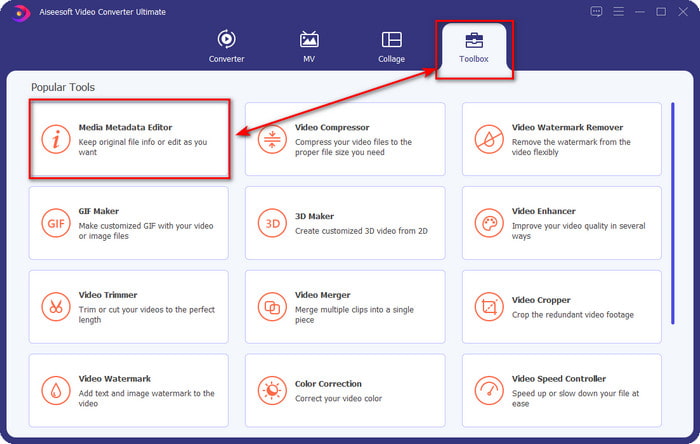
שלב 2. לחץ על Media Metadata Editor כדי לפתוח את תכונת עורך התגיות שבקטע Toolbox.
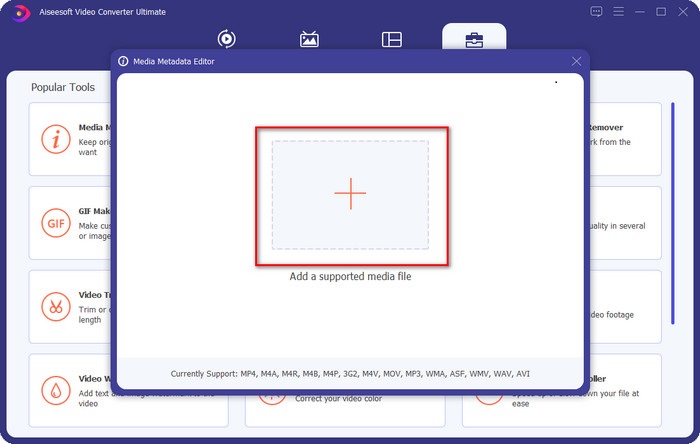
שלב 3. עליך ללחוץ על הכפתור + כדי להוסיף קובץ, לחפש אותו בתיקייה שתופיע, וללחוץ על Open כדי להוסיף את קובץ ה‑FLAC בהצלחה.
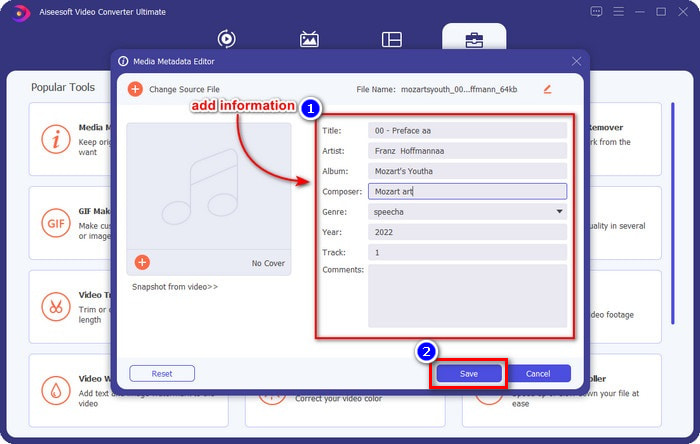
שלב 4. בחלון זה תוכל כעת לשנות את המטא־דאטה של קובץ ה‑FLAC שלך בכל תיבת טקסט. לאחר מכן לחץ על Save כדי לשמור את העדכונים שביצעת בתוכנה. פשוט כך, הוספת תגיות לקובץ ה‑FLAC ותיקנת אותן ביעילות בעזרת כלי אולטימטיבי.
יתרונות
- זוהי הבחירה הטובה ביותר לעריכת מטא נתונים ב-FLAC, MP4, WMA, WAV, TTA, OGG ועוד 1000 פורמטים נוספים.
- הוא תומך במספר תכונות עריכה שבהן תוכל להשתמש בקטע ארגז הכלים.
- ממשק משתמש גרפי אינטואיטיבי, וקל לשימוש.
- ניתן להורדה במערכות הפעלה Windows ו-Mac.
חסרונות
- רכישת הכלי היא חובה כדי להשתמש בתכונות המדהימות בעלות נמוכה.
חלק 2. אחר 2 העורכים הטובים ביותר בחינם FLAC Metadata עבור Windows
פריגטה 3
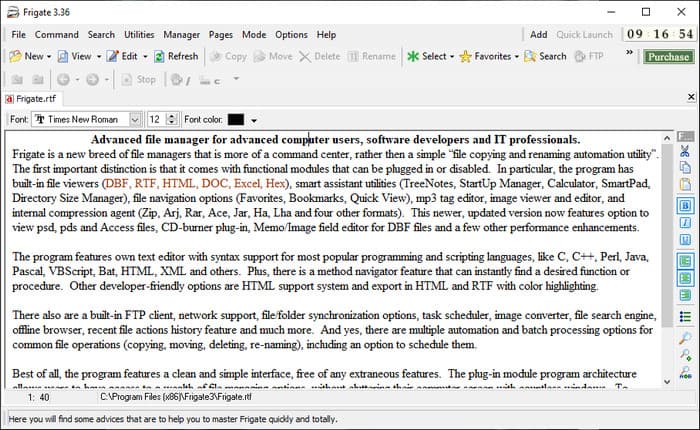
Frigate3 הוא עורך מטא־דאטה ל‑FLAC שוודאי תאהב להשתמש בו ב‑Windows. עם כלי זה תוכל בקלות להתאים את התגיות שיש לך על שולחן העבודה. אך לפני שתוריד את הכלי, עליך לבדוק את שתי האפשרויות שהוא מציע – גרסת ה‑Standard וגרסת ה‑Pro. גרסת ה‑Standard של הכלי כוללת רק את התכונות הבסיסיות הזמינות בשימוש שוטף. אם הורדת את גרסת ה‑Standard, גודל הקובץ יהיה קטן יותר מזה של גרסת ה‑Pro.
אמנם, אם הורדת את גרסת המקצוענים שלה במקום זאת, יהיו לך את כל התכונות שהתוכנה הזו מספקת שאינן על התקן, אבל גודל הקובץ גדול בהרבה מהסטנדרט. למרות היותה תוכנת Windows חינמית, אנו עדיין יכולים לראות שהכלי קצת נוקשה להבנה, והממשק ה-GUI שלו לא נראה כל כך טוב כמו התוכנות האחרות בשוק. למרות שזו בעיה, היא עדיין נחשבת לכלי יעיל להתמודדות עם משימה זו.
יתרונות
- חינם להורדה ב-Windows.
- הוא תומך בגירסאות הסטנדרטיות והמקצועניות של הכלי.
- מסוגל להוסיף תוספים.
חסרונות
- ה-GUI אינו טוב כמו עורך המטא נתונים האחר.
- לפעמים קשה להפעיל את הכלי.
- הרשת אינה מאובטחת כאשר אתה ניגש לאתר הרשמי של הכלי.
MusicBrainz PiCard
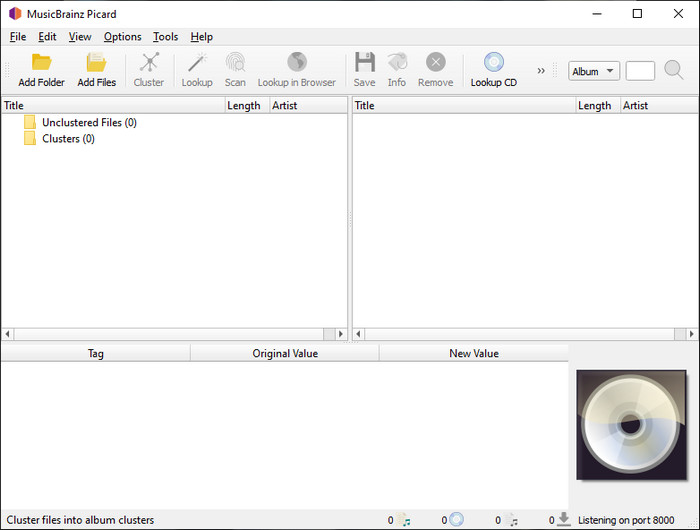
MusicBrainz Picard הוא עורך מטא־דאטה לקובצי FLAC המבוסס על Windows, שניתן להוריד בחינם למחשב כדי להשלים את הוספת המטא־דאטה. אם לקובץ האודיו יש רשומה בבסיס הנתונים, תוכל לשחזר את התגיות או לעדכן אותן בעזרת הכלי הזה. בשונה מכלים אחרים, תוכנה זו יכולה להוסיף פרטי מידע מעמיקים מרובים, כגון המבצעים והכלים שבהם נעשה שימוש ביצירה המוזיקלית. אך זכור שהתגיות ב‑MusicBrainz נאספות ומתוחזקות על‑ידי מתנדבים.
יתר על כן, תוכנה זו היא עורך תגי אודיו ייעודי, מה שאומר שהיא רק תומכת ברוב פורמטי האודיו, בין אם הם אובדים, חסרי אובדן או שניהם. למרות שזוהי אנציקלופדיה מקיפה של תגי מוזיקה והופכת אותה לשמישה לציבור, חלק מהתגים שהיא מספקת אינן אמינות, ולכן תצטרך להוסיף אותן באופן ידני. למרות זאת, הכלי ידידותי למשתמש וטוב יותר מה-Frigate3, אבל הוא לא טוב כמו הכלי האולטימטיבי.
יתרונות
- יש לו מסד נתונים מובנה עבור תגי אודיו.
- ממשק משתמש פשוט.
- קל ללמוד כיצד להשתמש בו.
חסרונות
- לפעמים המטא נתונים שנאספים במסד הנתונים אינם אמינים.
- זה מוגבל לקבצי שמע בלבד.
חלק 3. שאלות נפוצות על עורך מטא נתונים של FLAC
האם אני יכול להקליט FLAC באיכות גבוהה?
בהחלט כן, אפשר להקליט אודיו בפורמט זה, אך זכור שלא כל מקליטי האודיו תומכים בפורמט הזה, ולא כולם מסוגלים להקליט פלט אודיו באיכות גבוהה. לכן, אם אינך יודע כיצד להקליט באיכות גבוהה באמצעות מקליט FLAC חסר אובדן, עליך ללחוץ על קישור זה כדי ללמוד עוד על הנושא.
מהי התוכנה הטובה ביותר להמרת FLAC?
ללא כל ספק, ממיר הווידאו של FVC הוא ממיר ה-FLAC הטוב ביותר שתוכל להשתמש בו כדי להפוך את ה-FLAC לתואם לשאר המכשירים מבלי לאבד את האיכות המקורית. עם הכלי הזה, אתה יכול להמיר מספר FLAC בו זמנית, אבל זכור, אם אתה רוצה יותר מהורדת ממיר, הכלי האולטימטיבי הוא חובה.
האם תזכיר קולי תומך ב-FLAC כפלט אודיו?
האפליקציה Voice Memo משתמשת ב‑M4A במקום FLAC לצורך שמירת אודיו מוקלט. אם ברצונך לדעת יותר על Voice Memos, תוכל לקרוא את הסקירה המלאה והמפורטת שערכנו על האפליקציה המובנית; קרא אותה בעיון כדי לברר אם זהו מקליט האודיו הטוב ביותר במכשירי iOS, על‑ידי לחיצה על קישור זה.
סיכום
FLAC איננו רק פורמט אודיו, אלא הוא אחד מפורמטי האודיו הטובים ביותר שעליך להשתמש בהם לצורך אחסון אודיו באיכות גבוהה על המכשירים שלך. לכן, אם ברצונך לסדר את קובצי .flac בספרייה שלך, הכלים שסקרנו יכולים לסייע לך לבצע את המשימה ביעילות. אם אתה משתמש Windows, אנו ממליצים לקרוא את פרק 2, שבו הצגנו תוכנות להוספת מטא־דאטה ב‑Windows. אבל אם אתה מעוניין בכלי אמין ומקצועי יותר להוספת מטא־דאטה ל‑FLAC, אנו מציעים להשתמש ב‑FVC Video Converter Ultimate. עם כלי כזה תוכל לבצע עריכה מקצועית של תגיות, ברמה שכלי ה‑Windows האחרים שהצגנו אינם מסוגלים להציע. לכן, אם אתה רוצה לדעת עוד על עורך המטא־דאטה הטוב ביותר ל‑FLAC ב‑Mac וב‑Windows, עליך להוריד אותו כדי לגלות את שאר הפונקציות.
-
 חמשת עורכי המטא-נתונים המובילים של וידאו לשנת 2025 [סקירה בלתי משוחדת]
 האם אתה רוצה להציג את המטא נתונים של הסרטון שלך? אם כן, קרא את הפרטים למטה כדי להבין את הנושא במלואו ולדעת איזה כלי מתאים לך ביותר.
-
 7 עורכי תגי מוזיקה פופולריים ב-Windows, Mac ומכשירים ניידים
 תגי מוזיקה פופולריים לשימוש עבור סידור המוזיקה בספרייה שלך לפי הנתונים שבפנים. מה אם אתה רוצה לשנות את זה? קרא את הפרטים למטה כדי לדעת יותר.
-
 5 עורכי המטא נתונים המובילים ביותר של MP4 [עודכן 2025]
 כיצד אוכל לשנות את המטא נתונים של MP4 שלי? הדרך הטובה ביותר לשנות את המטא נתונים של ה-MP4 שלך היא להשתמש בעורך תגים התומך בפורמט MP4 כמו הדוגמה שאנו מפרטים למטה.
