


 ממיר וידאו אולטימטיבי
 מקליט מסך
 תיקון וידאו
 הורדה מאובטחת
למד כיצד להסיר תיירים מתמונות ללא מאמץ
בעת טיול, אנשים תמיד רוצים להצטלם בנופים יפים, להצטלם עם המשפחה, ולהצטלם לבד עם נוף מרהיב. אך מכיוון שהנוף כל‑כך יפה, הרבה אנשים נוספים מצלמים בו‑זמנית יחד אתכם. התוצאה היא שתיירים אחרים מופיעים בתמונה שלכם. אז אם אתם רוצים להוציא מהתמונה המדהימה שלכם את כל אותם תיירים לא רצויים, אתם זקוקים לכלי שיסייע לכם לעשות זאת. למרבה המזל, מצאנו את הכלים המושלמים שיעזרו לכם להסיר אובייקטים לא רצויים מהתמונה. קראו את המאמר הזה כדי לדעת כיצד להסיר תיירים מתמונות בקלות.

חלק 1. כיצד להסיר תיירים מתמונות באמצעות מסיר סימני מים בחינם
חיפוש אחר מסיר סימני מים בחינם באינטרנט הוא די מאתגר מכיוון שרק מספר מסירי סימני מים הם בחינם. למרבה המזל, מצאנו כלי מקוון בחינם שאתה יכול לגשת אליו בקלות. כמו כן, בחלק זה, סיפקנו שלבים כיצד להשתמש בכלי כדי להסיר תיירים מהתמונה שלך.
FVC Free Watermark Remover הוא אחד מכלי הסרת סימני המים הפופולריים ביותר שניתן לגשת אליהם אונליין. מסיר סימני המים המקוון הזה לא מסיר רק סימני מים; הוא גם מאפשר לכם להסיר אובייקטים לא רצויים מהתמונה. לכן, אם אתם רוצים להסיר "פוטובומר" מהתמונה שלכם, הכלי הזה יעזור לכם לעשות זאת בקלות. בנוסף, FVC Free Watermark Remover תומך ברוב פורמטי התמונות הסטנדרטיים, כמו PNG, JPG, JPEG, BMP ועוד. כמו כן, בזכות ממשק המשתמש הפשוט והכפתורים הברורים שלו, תוכלו להסיר בקלות כל סימן מים או אובייקט שמקלקל את התמונה. אנשים גם אוהבים את הכלי הזה משום שאינו דורש הרשמה והוא בטוח לשימוש.
יתרונות
- זהו כלי ידידותי למשתמש.
- יש לו אפשרויות להסרת סימני מים (פוליגונל, לאסו, מברשת)
- יש לו תכונת מחיקה.
- אתה יכול לגשת אליו כמעט בכל דפדפני האינטרנט, כמו גוגל, מוזילה פיירפוקס וספארי.
חסרונות
- זה תלוי באינטרנט.
כיצד להסיר תיירים מתמונות באינטרנט באמצעות מסיר סימני מים בחינם של FVC:
שלב 1. בדפדפן שבו אתם משתמשים, חפשו FVC Free Watermark Remover. או שפשוט לחצו על הקישור כדי לעבור ישירות לאתר שלהם.
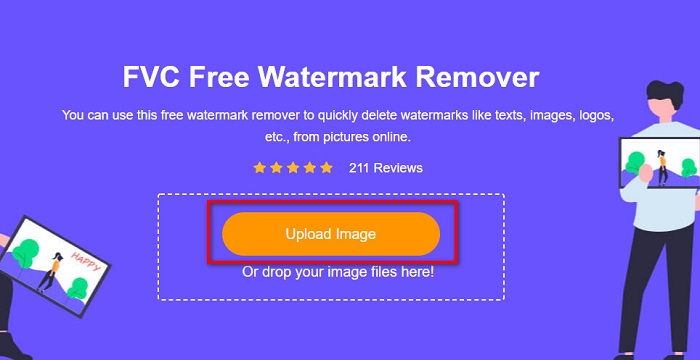
שלב 2. לאחר מכן, לחצו על הכפתור Upload Image בממשק הראשי של התוכנה. תיקיות המחשב שלכם ייפתחו, ושם תבחרו את התמונה ותעלו אותה.
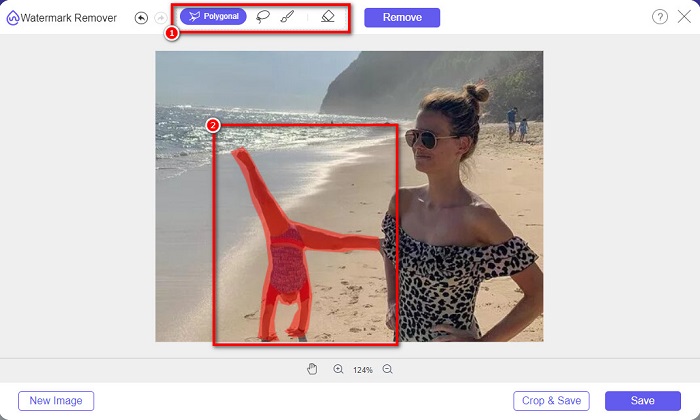
שלב 3. לאחר העלאת התמונה, בחרו כלי הסרה שמתאים לכם. תוכלו לבחור בין Polygonal, Lasso או Brush. ואז סמנו בעזרת כלי ההסרה את האזור שבו נמצאים התיירים.
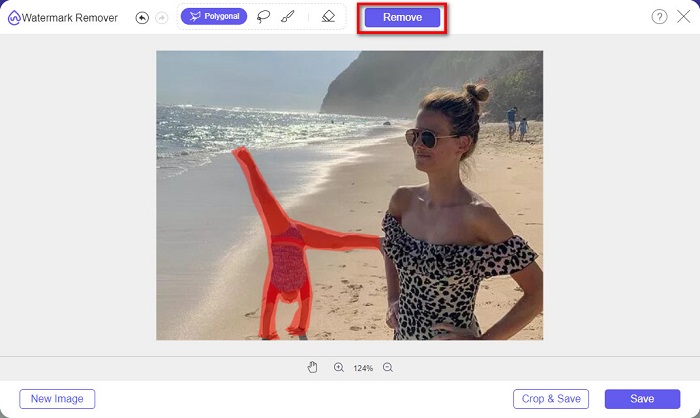
שלב 4. לאחר מכן, לחצו על הכפתור Remove כדי להסיר מהתמונה את אזור התייר הלא רצוי.
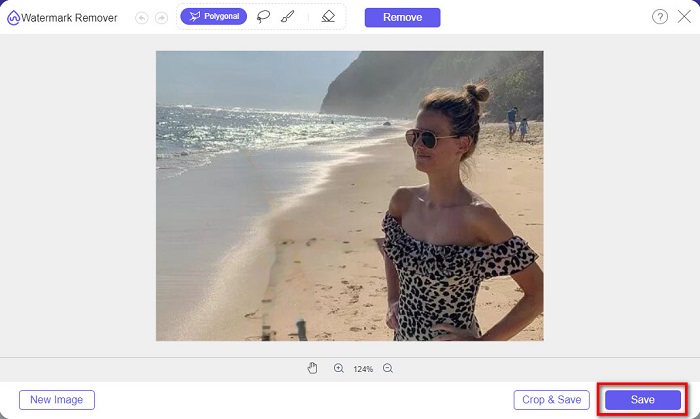
שלב 5. כעת תראו שהתייר בתמונה נעלם. לחצו על הכפתור Save כדי לשמור את התמונה במכשיר שלכם. וזהו!
חלק 2. כיצד להסיר תיירים מתמונות בפוטושופ
נניח שאתה רוצה לצלם אטרקציה תיירותית נהדרת, אבל הרבה אנשים נמצאים שם. אנו נלמד אותך מה לעשות כדי שהתמונה שלך תראה כאילו אין תייר בתמונה שלך. קרא חלק זה באופן מקיף כדי ללמוד כיצד.
Adobe Photoshop הוא תוכנת העריכה המפורסמת ביותר שבה משתמשים רבים מהמקצוענים. מריטוש תמונות, יצירת לוגואים, עיצוב באנרים מרהיבים לאתר שלכם ועד שיפור התמונה – אפשר לעשות את הכול ב‑Photoshop. בנוסף, יש בו כלים רבים שבעזרתם תוכלו לערוך את התמונה באופן מקיף. למרות שממשק המשתמש שלו אינו פשוט ללמידה, הוא עדיין מציע שפע פונקציות ופיצ'רים שמאפשרים לערוך את התמונה באופן מקצועי. מעבר לכך, ניתן גם להסיר כל סימני מים ואובייקטים לא רצויים מהתמונה.
כיצד להסיר תיירים מתמונות Photoshop:
שלב 1. הורידו את Adobe Photoshop למכשיר שלכם ולאחר מכן הפעילו את האפליקציה.
שלב 2. עליכם לצלם את הסצנה מספר פעמים; העבירו את המצלמה למצב ידני (Manual), ואז צלמו שוב ושוב מאותה נקודה. נדרשות כ‑10–20 תמונות.
שלב 3. לאחר מכן עליכם להחיל את העריכות שלכם על קבצי ה‑RAW. אחר‑כך סנכרנו אותם כדי שהתמונות יהיו זהות זו לזו. ואז, באמצעות Lightroom, עקבו אחר התהליך הבא:
1. סמנו את כל התמונות שצילמתם בתוך ה‑Library. 2. השתמשו בלוח ה‑Quick Develop כדי לבצע את עריכות ה‑RAW. כל שינוי בלוח Quick Develop יחול על כל התמונות שסימנתם.
שלב 4. לאחר מכן, ייצאו (Export) את התמונות בעזרת Lightroom לתיקיות שבמחשב.
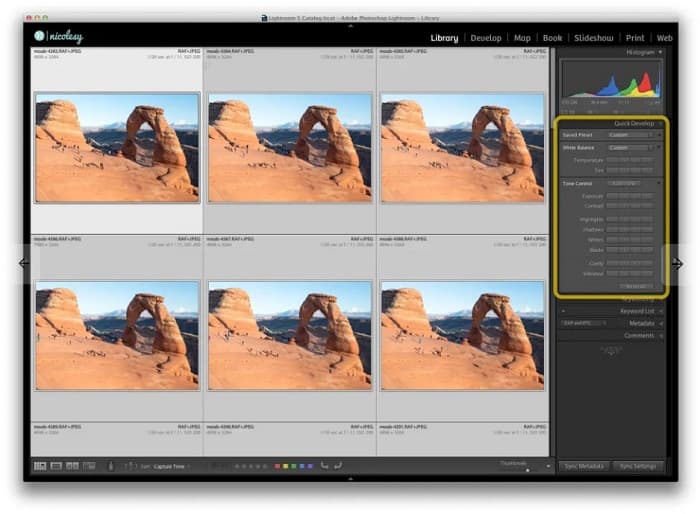
שלב 5. כעת נסיר את התייר מהתמונות. עברו אל File>Scripts>Statistics.
1. בחרו Median מתפריט הבחירה הנפתח בחלקו העליון של החלון. 2. השתמשו בכפתור Browse כדי לבחור את התמונות. 3. סמנו את התיבה Attempt to Automatically Align Source Images. 4. לחצו על OK. ואז Photoshop יישר את התמונות ויבצע עבורכם את תהליך ההעלמה.
Apowersoft Online Watermark Remover היא עוד תוכנה שמאפשרת להסיר תיירים מתמונות. נוח להשתמש בה להסרת כל סימני המים, כמו לוגואים, טקסטים או אובייקטים לא רצויים מהתמונות. ניתן גם לבצע עיבוד בקבוצה (Batch) כדי להסיר סימני מים ממספר תמונות בו‑זמנית. מרשים אף יותר – יש בה גם מסיר סימני מים לוידאו, להסרת סימני מים מסרטונים. בנוסף, יש לה ממשק פשוט, מה שהופך אותה לכלי ידידותי למתחילים.
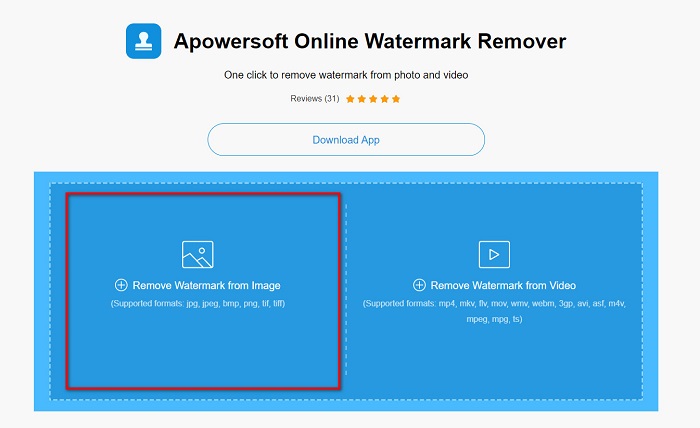
שלב 1. חפשו Apowersoft Online Watermark Remover בדפדפן שלכם ואז עברו לעמוד הבית שלהם. בממשק המשתמש הראשי של התוכנה תראו שתי אפשרויות. לחצו על Remove Watermark from Image.
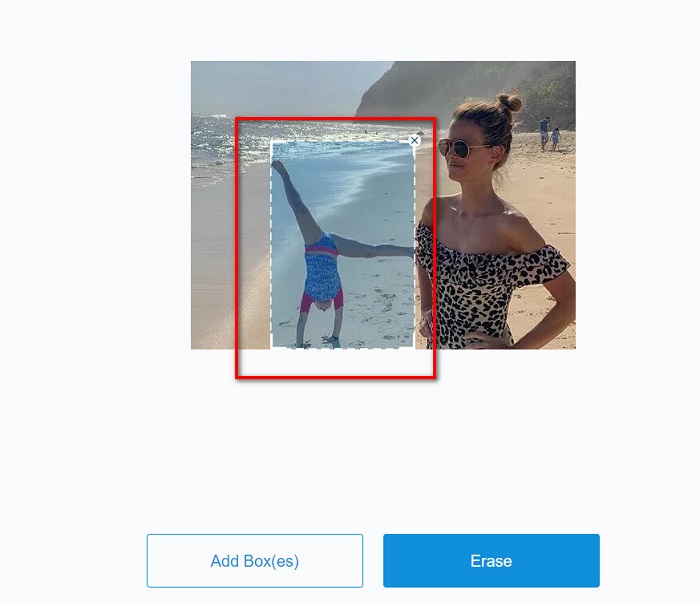
שלב 2. בממשק הבא תראו את תיבת ההסרה; גררו והחזיקו אותה מעל התייר שתרצו להסיר.
אופציונלי. אם יש שניים או יותר תיירים בתמונה, לחצו על הכפתור Add Box(es) כדי להוסיף תיבות הסרה נוספות.
חלק 3. כיצד להסיר תיירים מתמונות באמצעות מסיר סימני מים מקוון של Apowersoft
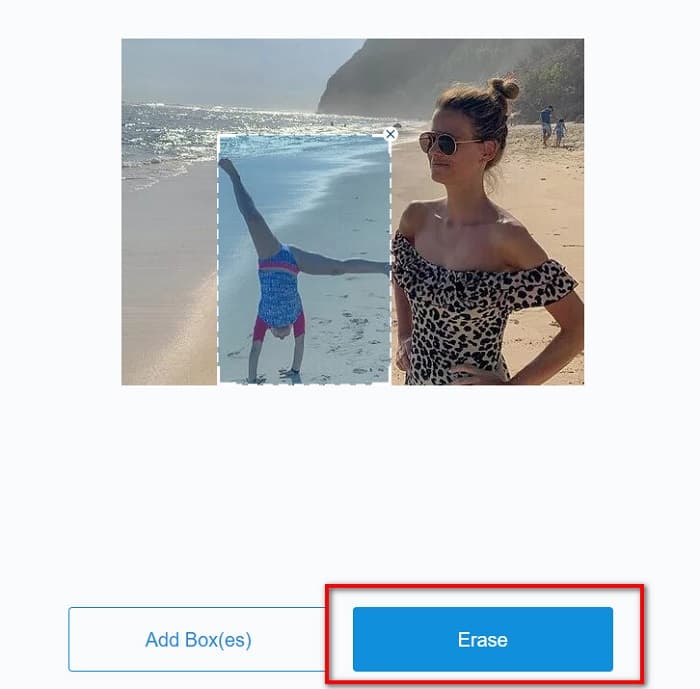
שלב 3. לאחר שסימנתם את אזור האובייקט הלא רצוי שברצונכם להסיר, לחצו על הכפתור Erase.
ואם אתה רוצה לגשת אליו במצב לא מקוון, ל-Apowersoft Online Watermark Remover יש אפליקציה להורדה. עם זאת, זהו כלי תלוי אינטרנט, כך שאתה עשוי להיתקל בתהליך טעינה איטי.
כיצד להסיר תיירים מהתמונה שלך באמצעות Apowersoft Online Watermark Remover:
כיצד להסיר סימן מים של Weibo מסרטונים ומתמונות בקלות.
למדו כיצד להסיר סימן מים של Movavi בחינם [חובה להכיר!].
כעת, כאשר אתם יודעים כיצד להסיר תיירים מתמונות בעזרת הכלים השונים האלה, הבחירה באיזה כלי להשתמש נתונה בידיכם. למרות שיש להם תכונות שונות וממשקי משתמש שונים, כולם יעילים להסרת סימני מים או אובייקטים לא רצויים מהתמונות שלכם. אבל אם אתם רוצים ממשק תוכנה שקל להשתמש בו וכלי שקל לגשת אליו, השתמשו ב‑FVC Free Watermark Remover.
דירוג: 4.2 / 5 (מבוסס על 126 הצבעות).
קשור אל:
How to Remove the Weibo Watermark on Videos & Images Easily
Learn How to Remove Movavi Watermark for Free [Must Have!]
חלק 4. שאלות נפוצות לגבי הסרת תיירים מתמונות
האם אתה יכול להסיר סימני מים של טקסט מהתמונה שלך?
כן. באמצעות הכלים שהוזכרו לעיל, אתה יכול להסיר כל סימן מים, כגון לוגו, טקסטים ותמונות על התמונה שלך.
האם יש אפליקציה מחנות האפליקציות שיכולה להסיר אובייקטים לא רצויים מהתמונה שלך?
אחת האפליקציות הטובות ביותר מחנות האפליקציות שיכולות להסיר סימני מים מהתמונה שלך היא Photo Retouch. אפליקציה זו מאפשרת לך לגרום לחפצים להיעלם, להסיר חפצים או אנשים לא רצויים ועוד.
האם אתה יכול להסיר סימני מים מפוטושופ בחינם?
Adobe Photoshop היא לא אפליקציה חינמית. לכן, תחילה עליך לרכוש את האפליקציה לפני השימוש בה. למרות שאתה יכול להוריד אותו באמצעות קראק, זה לא מומלץ כי זה לא בטוח.
סיכום
Now that you know how to remove tourists from photos using these different tools, what tool you will use is in your hands. Despite having different features, and different interfaces, they are an effective tool for removing any watermarks or unwanted objects from your photo. But, if you want to use an easy-to-use software interface and an easy-to-access tool, use FVC Free Watermark Remover.
-
 כיצד להסיר סימן מים של Coub עם שלבים פשוטים
 למד כיצד להסיר סימן מים של coub בסרטונים שלך באמצעות מסירי סימני מים פופולריים אלה. קרא את המאמר הזה כדי להכיר את הכלים המדהימים האלה וכיצד להשתמש בהם.
-
 דרכים קלות להסיר סימן מים מתמונות סיום הלימודים
 רוצה לדעת מהן הדרכים הטובות ביותר להסיר סימני מים מתמונות סיום הלימודים? על ידי קריאת מאמר זה, תוכל לדעת כיצד להסיר סימני מים בתמונות גראד בקלות.
-
 כיצד להסיר את סימן המים של Lumion ב-Windows ו-Mac בקלות
 צריך להסיר את סימן המים של לומיון לצורך הצגתו בצורה מקצועית? ובכן, ישנם כלים שתוכלו להשתמש בהם כדי לעזור לכם להיפטר מסימן המים שהוא משאיר.
