


 ממיר וידאו אולטימטיבי
 מקליט מסך
 תיקון וידאו
 הורדה מאובטחת
כיצד להסיר את סימן המים של WOW Slider בחינם
WOW Slider הוא אחד מכלי יצירת המצגות הפופולריים ביותר, שבעזרתו ניתן ליצור מצגות תמונות מרהיבות. ניתן להוריד את היישום בחינם והוא כמעט שאינו תופס מקום אחסון במכשיר שלך. בנוסף, לממשק המשתמש שלו יש עיצוב אינטואיטיבי, מה שמקל על יצירת מצגות. בשונה מפלטפורמות תמונות אחרות, WOW Slider אינו משתמש ב‑Flash ואינו דורש תוספים. עם זאת, WOW Slider מטביע סימן מים על המצגת שאתה יוצר. לכן, משתמשים רבים מחפשים דרך להסיר את סימן המים של WOW Slider בחינם. המשך לקרוא כדי ללמוד כיצד להסיר את סימן המים של WOW Slider בחינם.

חלק 1. כיצד להסיר את סימן המים של WOW Slider מבלי לרכוש
אתה יכול להסיר את סימן המים באמצעות האפליקציה אם רכשת את ה-WOW Slider. אבל אם לא, אתה יכול להשתמש בכלים כדי להסיר את סימן המים של WOW Slider במצגת השקופיות שלך. לכן, קרא את החלק הזה באופן מקיף כדי ללמוד כיצד להסיר את ה-WOW Slider מבלי לרכוש.
מסיר סימני מים חינם FVC
FVC Free Watermark Remover הוא אחד מכלי הסרת סימני המים המקוונים הפופולריים ביותר, הזמין בכל הדפדפנים, כמו Google, Firefox ו‑Safari. כלי מקוון זה בטוח, חינמי ואינו דורש מנוי. בנוסף, הוא ידידותי למתחילים בזכות ממשק המשתמש האינטואיטיבי שלו. כמו כן, הוא תומך בפורמטי תמונה רבים, כולל PNG, JPG, JPEG, BMP ועוד. מה שמרשים בכלי זה הוא שאתה יכול לבחור מבין כלי בחירה שונים כדי להסיר את סימן המים מהתמונה שלך. אם כן, אם ברצונך להשתמש במסיר סימני המים החינמי הזה, עקוב אחר השלבים הבאים.
כיצד להסיר סימן מים של WOW Slider באמצעות מסיר סימני המים בחינם של FVC:
שלב 1. תחילה, פתח את הדפדפן שלך וחפש FVC Free Watermark Remover. לגישה מהירה, לחץ על הקישור שסופק.
שלב 2. לאחר מכן, לחץ על הכפתור Upload Image כדי להעלות את תמונת ה‑WOW Slider שממנה ברצונך להסיר את סימן המים.
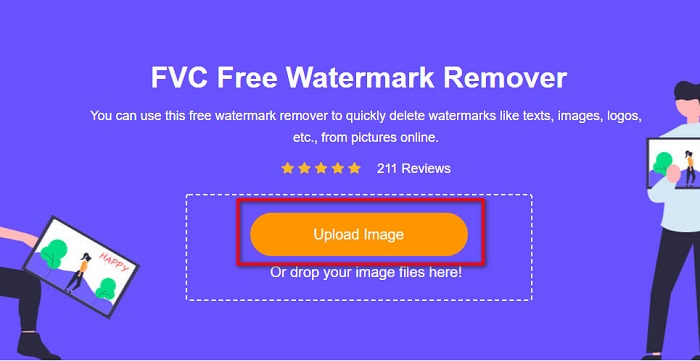
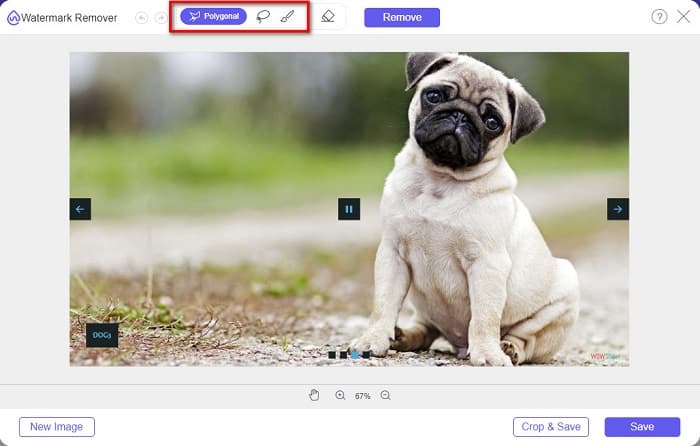
שלב 3. לאחר העלאת התמונה, בחר את כלי הבחירה שבו תרצה להשתמש כדי להסיר את סימן המים. באפשרותך לבחור בין Lasso, Polygonal או Brush.
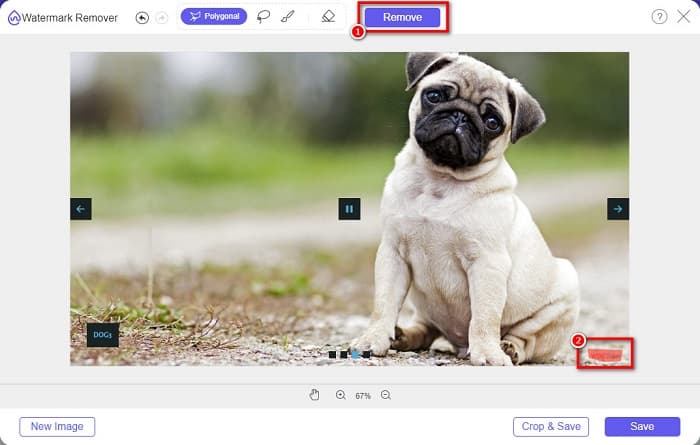
שלב 4. לאחר מכן, סמן את האזור שבו נמצא סימן המים של WOW Slider. לאחר מכן לחץ על Remove כדי למחוק את סימן המים מהתמונה שלך.
שלב 5. לבסוף, לחץ על הכפתור Save כדי לשמור את התמונה במחשב שלך.
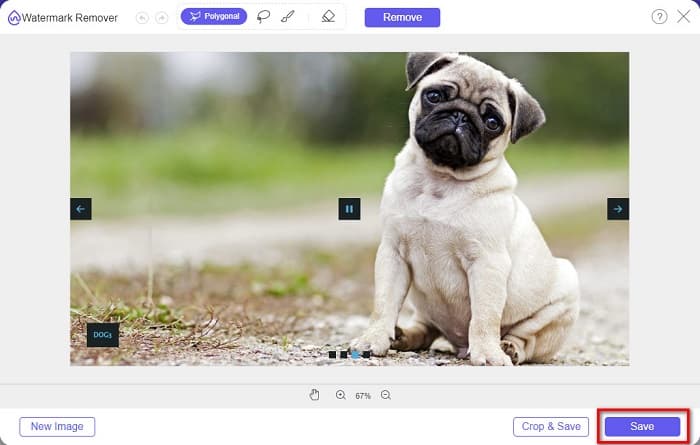
וזה הכל! כעת תוכל להציג את תמונת ה-WOW Slider שלך ללא סימן המים של WOW Slider.
מומחה לסימני מים של Bitwar
Bitwar Watermark Expert הוא מסיר סימני מים שיכול להסיר את סימן המים של WOW Slider מהמצגת שלך. למסיר סימני מים לא מקוון זה יש ממשק פשוט, מה שהופך אותו לכלי ידידותי למתחילים. בנוסף, הוא מאפשר לך להסיר או להוסיף סימני מים לתמונות או לסרטונים שלך. בגרסת ה‑VIP שלו, ניתן לעבד באצווה סרטונים שברצונך להסיר מהם את סימן המים. ניתן להוריד את תוכנת המחשב הזו למחשב Windows שלך. עם זאת, עליך לרכוש את היישום לפני שתוכל לגשת לשאר הפונקציות שלו. למרות זאת, Bitwar Watermark Expert הוא כלי מצוין להסרת סימני מים ממצגת ה‑WOW Slider שלך.
מחק את סימן המים של WOW Slider במצגת השקופיות שלך באמצעות Bitwar Watermark Expert:
שלב 1. הורד את Bitwar Watermark Expert למכשיר שלך, ולאחר סיום ההורדה פתח אותו.
שלב 2. בממשק הראשי של התוכנה תראה ארבע אפשרויות. לחץ על Photo Watermark Remover.
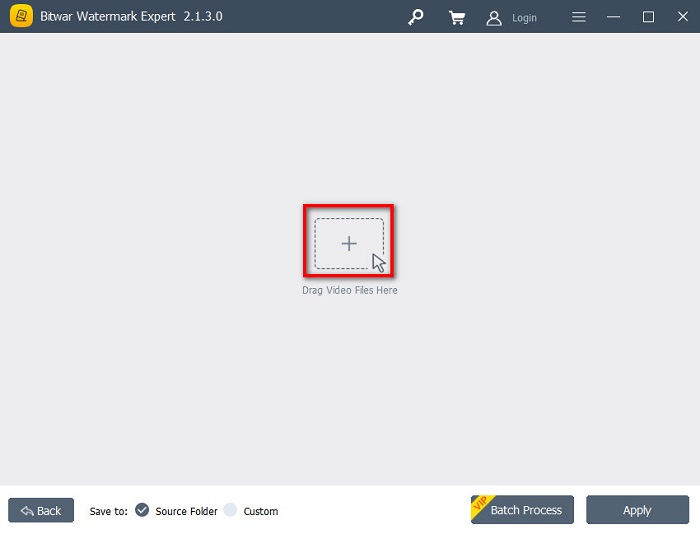
שלב 3. לאחר מכן, לחץ על כפתור הסימן + שבמרכז המסך כדי להעלות את תמונת ה‑WOW Slider.
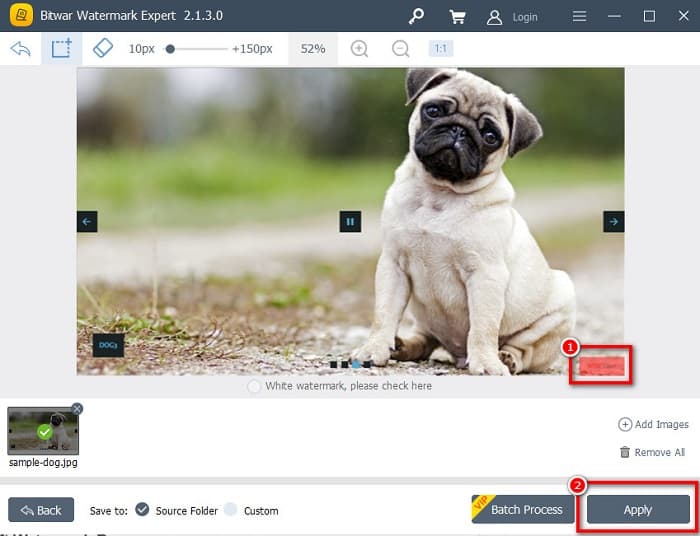
שלב 4. אחר כך, בחר כלי בחירה שבו תרצה להשתמש כדי להסיר את סימן המים מהתמונה שלך. לאחר מכן סמן את אזור סימן המים בתמונה.
שלב 5. לבסוף, לחץ על כפתור Apply כדי להסיר את סימן המים ממצגת ה‑WOW Slider שלך. באמצעות שלבים אלה, באפשרותך גם להסיר סימני מים מ‑Placeit.
Apowersoft מסיר סימני מים
מסיר סימני מים לא מקוון נוסף שבו ניתן להשתמש הוא Apowersoft Watermark Remover. מסיר סימני מים זה מאפשר הסרה קלה של כל סוגי סימני המים (לוגו, טקסט, תמונה) מהסרטונים שלך. ניתן להוריד אותו כמעט לכל הפלטפורמות, כולל Windows ו‑Mac. בנוסף, יש לו יכולת להסיר ולהוסיף סימני מים לתמונה שלך. יש בו גם שלושה כלי בחירה לסימני מים, שבעזרתם ניתן להסיר את סימן המים של WOW Slider מהמצגת שלך. נוסף על כך, זהו כלי ידידותי למשתמש בעל ממשק תוכנה פשוט לשימוש. החיסרון של כלי זה הוא שיש בו מעט פונקציות עריכה.
כיצד להסיר את לוגו סימן המים של WOW Slider באמצעות Apowersoft Watermark Remover:
שלב 1. הורד למכשיר שלך את Apowersoft Watermark Remover. עקוב אחר תהליך ההתקנה ולאחר מכן פתח את היישום.
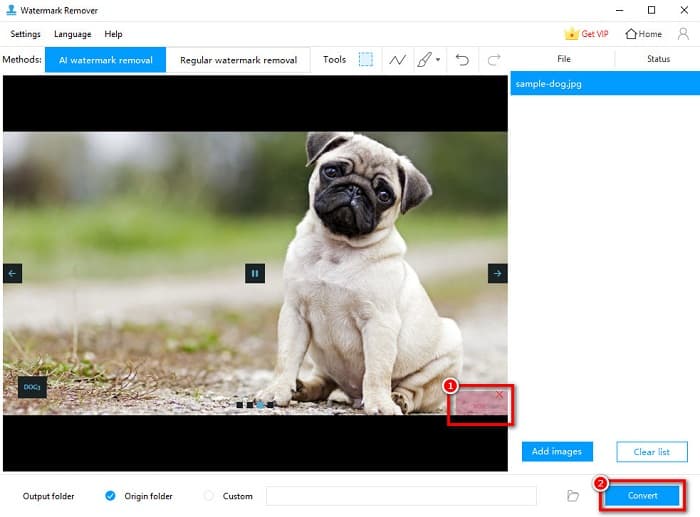
שלב 2. לאחר מכן, לחץ על האפשרות Remove watermark from the image. לאחר מכן גרור ושחרר את התמונה שממנה ברצונך להסיר את סימן המים.
שלב 3. תראה את כלי הסרת סימני המים בלשונית Tools. לחץ על כלי הבחירה שבו תרצה להשתמש. לאחר מכן סמן או בחר את סימן המים בתמונה שלך.
שלב 4. כשסיימת, לחץ על כפתור Convert כדי לשמור את הקובץ הסופי.
חלק 2. כיצד להסיר סימן מים מ-WOW Slider על ידי רכישה
אולי תרצה לקרוא את החלק הזה אם אתה מחפש כיצד להסיר את סימן המים מ-WOW Slider.
באמצעות WOW Slider, תוכלו ליצור מצגות מדהימות באיכות מדהימה. עם ממשק התוכנה הקל לשימוש שלו, אתה יכול להפיק מצגות שקופיות באיכות גבוהה שתוכל לשתף עם חבריך. יתר על כן, אם אתה רוצה ליצור מזכרת לחבר הכי טוב שלך, יצירת מצגת באמצעות WOW Slider היא רעיון טוב.
החיסרון בשימוש ב‑WOW Slider ליצירת מצגת הוא שהוא מטביע סימן מים על התוצאה שלך. אך אם רכשת את יישום WOW Slider, לא תצטרך עוד להסיר סימני מים, משום שהתוצרים שלך לא יכילו את סימן המים של WOW Slider. לכן, נדריך אותך כיצד להסיר את סימן המים באמצעות רכישה.
שלב 1. הורד את WOW Slider למכשיר שלך, ומיד לאחר ההורדה ודא שאתה משלם ומזין את קוד הרישיון שלך כדי להירשם.
שלב 2. לאחר הרישום, כבה את סימן המים דרך Menu panel > Slider > Properties.
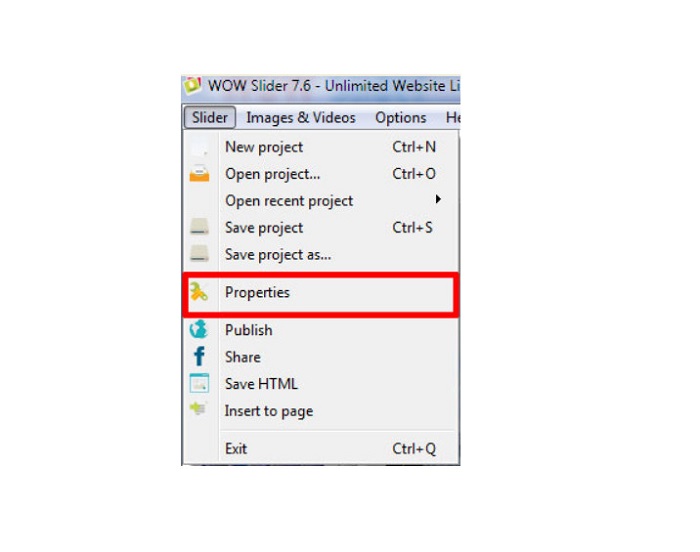
שלב 3. יופיע חלון מאפיינים, ולאחר מכן לחץ על Design. אוֹפְּצִיָה.
שלב 4. בלשונית Design תראה תיבת סימון בשם Watermark. הסר את סימון התיבה כדי לבטל את סימן המים במצגת שלך.
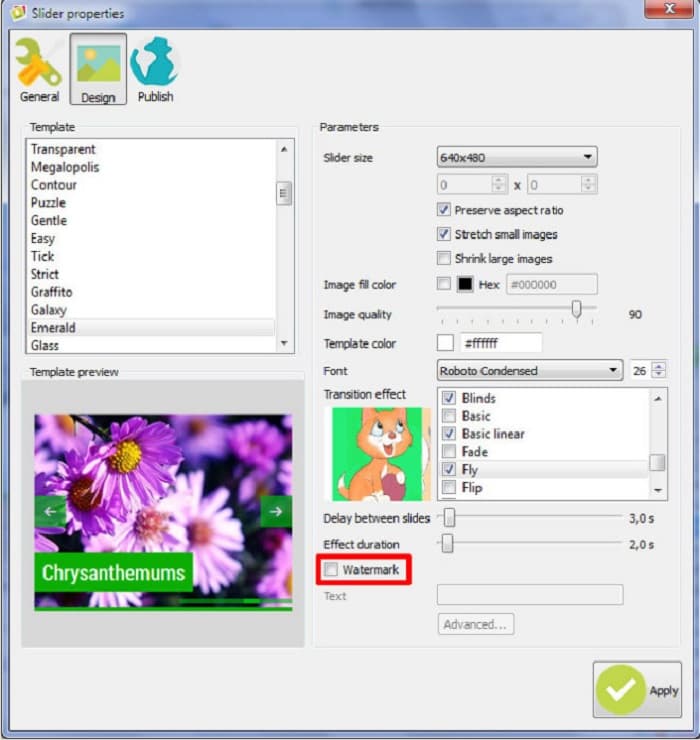
שלב 5. כעת תוכל לפרסם את המצגת באתר שלך ללא סימן המים של WOW Slider.
חלק 3. שאלות נפוצות לגבי הסרת סימן המים של WOW Slider
מדוע WOW Slider שם סימני מים על מצגות שקופיות שהופקו?
WOW Slider מטמיע סימן מים על פלטי המצגת שלהם כך שמשתמשים יעודדו את הגרסה נטולת סימני מים. האפליקציה לא תשאיר סימן מים על הפלט שלך אם תרכוש את האפליקציה.
האם אתה יכול להסיר סימני מים מרובים מהסרטון שלך?
כן. מסירי סימני מים מאפשרים לך להסיר שניים או יותר סימני מים מהסרטון שלך. אם אתה רוצה להסיר סימני מים מרובים מהסרטון שלך, השתמש ב-FVC Video Converter Ultimate.
מהו מסיר סימני המים המקוון הטוב ביותר לשימוש?
ישנם מסירי סימני מים מקוונים רבים שניתן למצוא באינטרנט. אך רבים ממליצים על FVC Free Watermark Remover משום שהוא בטוח וחינמי.
סיכום
כעת הבעיה שלך לגבי כיצד להסיר את סימן המים של WOW Slider נפתרה! באמצעות מסירי סימני המים שהוזכרו לעיל, תוכל להסיר בקלות את סימן המים של WOW Slider מהמצגת שלך. אך אם אתה רוצה יישום מקוון חינמי ובטוח לשימוש, השתמש ב‑FVC Free Watermark Remover.
-
 דרכים חינמיות להסיר את סימן המים של VideoShop בסרטונים [ללא מאמץ]
 כדי להסיר את סימן המים של VideoShop, המכשיר שלך יצטרך מסיר סימן מים. כדי לדעת מה הם, קרא את המאמר הזה.
-
 3 גישות להסרת סימן המים של Viva Video בסרטונים [הדרך המהירה ביותר]
 תזדקק למסיר סימן מים ייעודי כדי להסיר את סימן המים של Viva Video בסרטונים. קרא את המאמר הזה כדי לדעת יותר על זה!
-
 כלים אולטימטיביים להסרת סימן מים מסרטונים מיוצאי Renderforest
 כדי להסיר את סימן המים מ-Renderforest תזדקק למסיר סימני מים במכשיר שלך, כל הכלים שבהם תוכל להשתמש נמצאים כאן.
