


 ממיר וידאו אולטימטיבי
 מקליט מסך
 תיקון וידאו
 הורדה מאובטחת
הסר את סימן המים של Dreamstime עם 4 הדרכים שאתה צריך לדעת
אם אתה צריך תמונות מוכנות לשימוש עבור המצגת או הפרויקט שלך, לעולם לא תוכל להשתבש בבחירת Dreamstime. אפליקציה זו יכולה לתת לך תמונות מלאי ללא תמלוגים מוכנות לשימוש בכל עת. זה כבר עוזר למשתמשים שמחפשים תמונה ספציפית עם פלט באיכות גבוהה במחיר נמוך. למרות שאתה יכול להוריד 15 תמונות בחינם כאן, מוצר זה משאיר סימן מים כדי לקדם את האפליקציה כאשר אתה משתמש בתמונה שאתה מוריד כאן.
אי אפשר להתווכח עם כך שהשמישות שלו מצוינת והמחירים של התמונות בו נמוכים, אבל לא כולנו יכולים להרשות לעצמנו לרכוש בו קרדיטים. אין צורך לדאוג יותר! כי דאגנו לכם: המידע שנביא בהמשך מציג דרכים שתוכלו להשתמש בהן כדי להסיר את סימן המים של Dreamstime שנשאר על קובץ התוצאה הסופי.

חלק 1. כיצד להסיר סימן מים של Dreamstime על ידי רכישת הקרדיטים
לא ניתן להשאיר את אפשרות הרכישה מאחור מכיוון שזו האפשרות היעילה ביותר להסרת סימני מים של Dreamstime שבה אתה יכול להשתמש. לפני שנמשיך, תצטרך לדעת שה-Dreamstime צריך שיהיה לך כדי שתוכל לרכוש תמונה ללא סימן מים. השם קרדיט הוא מטבע Dreamstime; הוא משתמש בכסף אמיתי וממיר אותו לדיגיטלי שה-Dreamstime מקבל. נניח שאין לך קרדיט ב-Dreamstime. במקרה כזה, אתה יכול לבצע את השלבים הבאים למטה כדי לרכוש זיכוי להורדה ולקבל את התמונה ללא שום לוגו של המוצרים שנותר.
שלב 1. היכנסו לאתר הרשמי של Dreamstime, ואז עליכם ליצור חשבון לפני רכישת קרדיטים ב‑Dreamstime. אם כבר יש לכם חשבון, עליכם להתחבר קודם כדי להשתמש בו כראוי.
שלב 2. לאחר שנכנסתם לחשבון שלכם ב‑Dreamstime, לחצו על Price and Download Plans, ואז עברו אל Credit Package כדי לראות אילו תעריפים זמינים כלולים בו.
שלב 3. מלאו במלואם את הפרטים המבוקשים, ואז לחצו על Complete Checkout כדי לעבד את התשלום שביצעתם בכלי. כך בפשטות תוכלו כעת לרכוש קרדיטים המשמשים כמטבע לרכישת התמונות ב‑Dreamstime.
חלק 2. כיצד להסיר סימן מים Dreamstime בחינם באינטרנט
מסיר סימני מים בחינם FVC באינטרנט
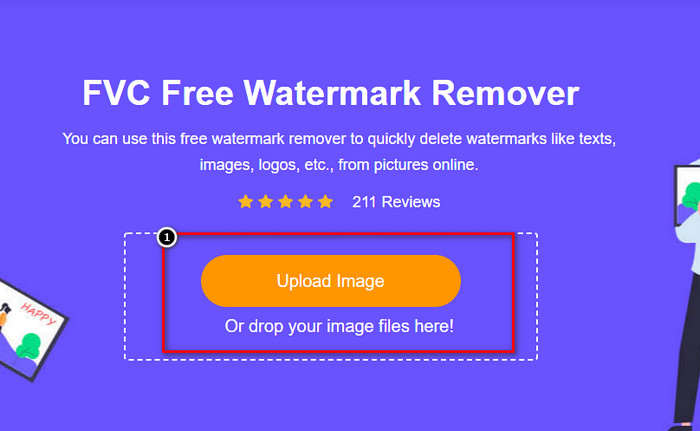
אחד ממסירי סימני המים המוכרים ביותר של Dreamstime באינטרנט שבהם אתה יכול להשתמש הוא לא אחר מאשר מסיר סימני המים בחינם FVC Online. אתה יכול לנצל את הכלי הזה כדי להסיר את סימן המים שבתמונה שיש לך. מבחינת ביצועים הכלי המקוון הזה מסוגל יותר למה שאתה חושב, במיוחד בהסרת הלוגו, סימן המים, החותמות, התאריכים, האובייקט וכו' מהתמונה. האם אתה עדיין לא מטיל ספק בכלי הזה? במקרה זה, קרא את השלבים שהוספנו למטה, ותוכל לעקוב אחריהם גם כדי להסיר את סימן המים שהוסיף Dreamstime.
שלב 1. בלחיצה על קישור זה, ייפתח לשונית חדשה בדפדפן שלכם.
שלב 2. לחצו על Upload Image כדי לייבא את התמונות שייצאתם מ‑Dreamstime עם סימן מים.
שלב 3. תוכלו להשתמש בכלים כדי לעקוב אחרי סימן המים, בחרו אחד מהם ואז סמנו בעזרתו את סימן המים.
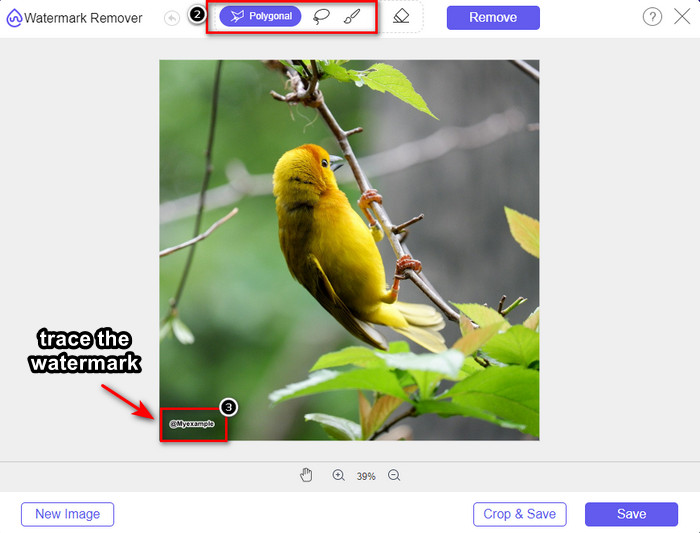
שלב 4. לחצו על סמל Remove לפני שאתם ממשיכים לייצוא התמונה.

שלב 5. לבסוף, לחצו על Download כדי לשמור את התמונה ללא סימן המים המשובץ שסימנתם כאן.

WatermarkRemover.IO

WatermarkRemover.io הוא כלי מקוון להסרת סימן המים מתמונות של Dreamstime שאפשר להשתמש בו ברשת ויכול לסייע לכם במשימה הזאת. הכלי הזה חינמי לשימוש, כמו מסיר סימני המים המקוון שהוזכר ראשון. אין צורך לדאוג להרשמה לכלי הזה, מפני שהוא זמין לשימוש בכל דפדפן. הוא גם משתמש בטכנולוגיית בינה מלאכותית כדי להסיר את סימן המים מהתמונות כאשר אתם משתמשים בו. כדי לעזור לכם לבצע זאת, המשיכו לקרוא את המידע המופיע בהמשך.
שלב 1. פתחו את האתר הרשמי של מסיר סימני המים הזה על‑ידי חיפוש שלו בדפדפן שלכם.
שלב 2. לחצו על סמל Upload Image כדי להעלות את התמונה עם סימן המים שברצונכם להסיר.
שלב 3. לאחר שסיימתם להעלות את התמונה עם סימן המים, לחצו על Download Image, משום שהכלי יסיר אוטומטית את סימן המים מהתמונה שלכם.
חלק 3. כיצד להסיר סימן מים של Dreamstime בסרטונים באמצעות הפתרון האולטימטיבי
אפשר להוריד מסיר סימן מים של Dreamstime עבור סרטונים, כמו FVC Video Converter Ultimate האולטימטיבי. זהו הכלי הגמיש ביותר, מוכן לעבודה ומסיים את המשימה בכל עת. הכלי מטפל בבעיות שעלולות להופיע בסרטונים שלכם, כמו איכות שמע נמוכה, רזולוציה, חוסר תאימות פורמט וסימן מים מטריד. בהשוואה לתוכנות אחרות שניתן להתקין להסרת סימן מים, כלי זה מצטיין באופן יוצא דופן בביצועים, במהירות העיבוד ובשמישות. המשיכו איתנו, כי נציג לכם כעת כיצד להסיר את סימן המים מהווידאו שלכם בצעדים מפורטים.
שלב 1. לפני הכול עליכם להוריד את התוכנה למחשב השולחני שלכם על‑ידי לחיצה על כפתור ההורדה המופיע למטה. בחרו את הגרסה הנכונה להתקנה, עברו על תהליך ההתקנה המהיר והפעילו את התוכנה.
הורדה חינמיתל-Windows 7 ומעלההורדה מאובטחת
הורדה חינמיתל-MacOS 10.7 ומעלההורדה מאובטחת
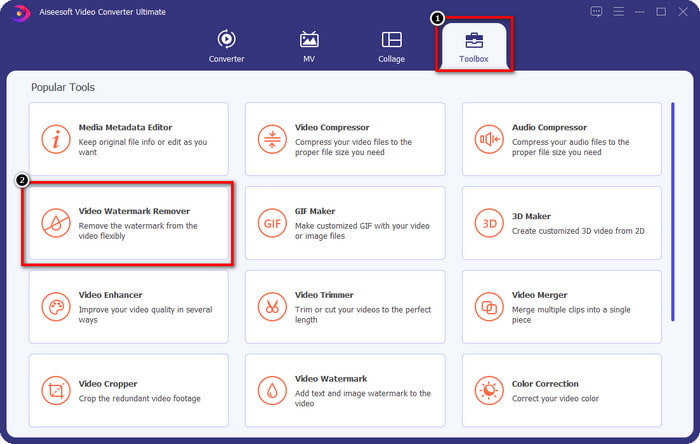
שלב 2. פתחו את Toolbox הרב‑תכליתי שיש בתוכנה, ואז בחרו Video Watermark Remover.
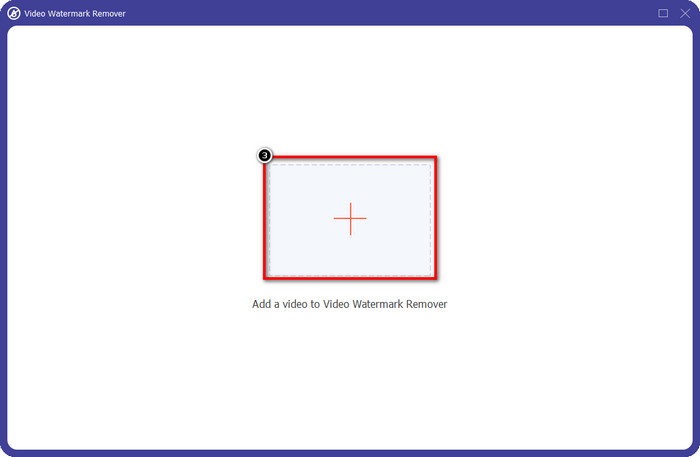
שלב 3. לאחר מכן, לחצו על סמל + כדי להעלות את הווידאו שהורדתם ולהתחיל להסיר את סימן המים של Dreamstime.
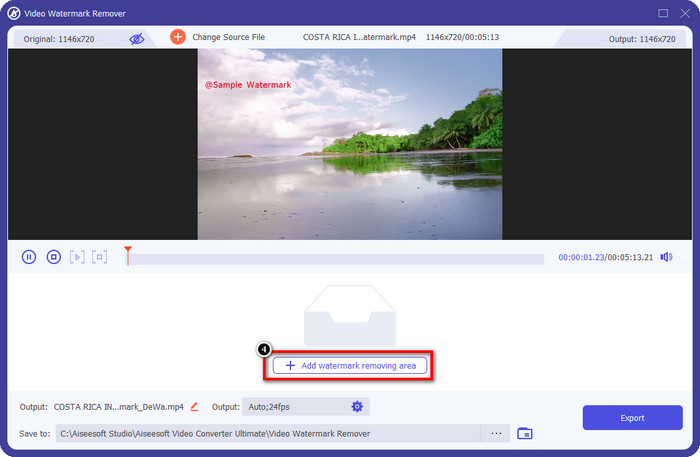
שלב 4. ואז לחצו על Add Watermark Removing Area כדי למקם את תיבת הבחירה על סימן המים.
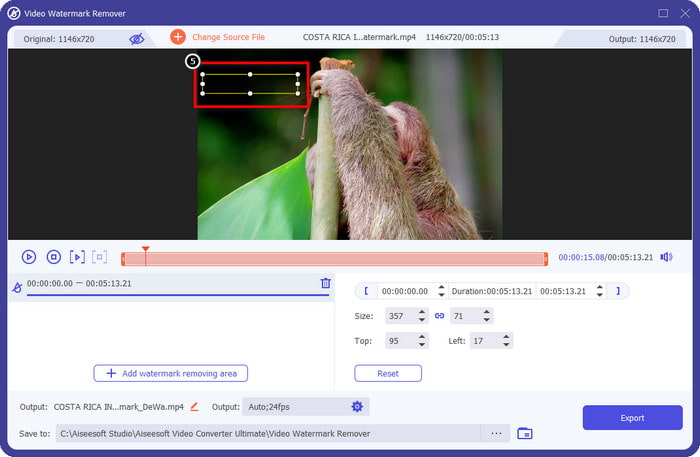
שלב 5. לאחר הלחיצה על Add Watermark Removing Area, תופיע על המסך צורה מלבנית; מקמו אותה על סימן המים כדי להסיר אותו.
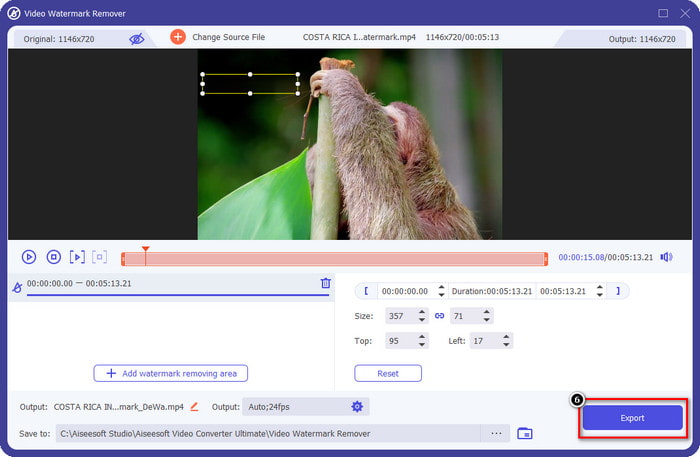
שלב 6. לחצו על כפתור Export כדי להוריד את הווידאו ללא סימן המים של Dreamstime.
קשור:
חלק 4. שאלות נפוצות על איך להסיר סימן מים Dreamtime
האם אוכל להסיר ללא הגבלה את סימן המים ב-Dreamtime לאחר רכישתו?
אתה לא יכול אם כן רכשת זיכוי, אבל אתה יכול להמשיך ולגלול עוד קצת למטה, ותראה שיש גישה בלתי מוגבלת לתמונות שאתה יכול להיעזר בה אם אתה משתמש בזה באופן קבוע. המחיר שלו אינו זהה באזורים או מקומות שונים ברחבי העולם.
באיזה סוג כרטיס תומך Dreamstime?
כעת, לאחר שהחלטת לרכוש כאן אשראי או דמי מנוי, תוכל להשתמש בכרטיסי מאסטר קארד, ויזה, AMEX וכרטיסי אשראי גדולים אחרים; אתה יכול לבדוק את זה באתר הרשמי כדי להכיר את האחרים.
האם אוכל להשתמש בקרדיטים ב-Dreamstime כדי לרכוש סרטונים ללא סימן מים?
אתה יכול להשתמש באשראי כדי לרכוש את הסרטון או כל מוצר שיש לפלטפורמה הזו. מטרת הקרדיט היא לא רק לתמונות וסרטונים; אתה יכול גם להשתמש בו כדי לרכוש אודיו כאן.
סיכום
כיצד להסיר את סימן המים של Dreamstime? ובכן, אתם כבר יודעים איך להתמודד עם סימן המים בתמונות שלכם עם שני הכלים שאנו מגייסים והסרטון עם מסיר סימן המים האולטימטיבי שתוכלו להשתמש בו. אז אם יש לך בעיה בסימן מים בסרטונים או בתמונות, אתה יכול להשתמש בחופשיות בתוכנה לעיל ולעקוב אחר המדריך שהוספנו. אל תגידו שלום לבעיה כי היא נפתרה!
-
 2 דרכים להסיר סימן מים VSDC ב-Windows ו-Mac במהירות
 האם אתה מחפש דרך להסיר סימן מים VSDC מהסרטונים שלך? במאמר זה אנו מספקים כלים שתוכלו להשתמש בהם כדי להיפטר מסימן המים.
-
 הסר את סימן המים של אנימוטו בסרטונים בקלות וביעילות
 כיצד להסיר את סימן המים של אנימוטו בסרטון? המשך לקרוא מאמר זה מכיוון שסיפקנו הדרכה מלאה כיצד לעשות זאת.
-
 כיצד להסיר סימן מים מהסרטון באמצעות Final Cut Pro [מדריך שלם]
 יש לך בעיה עם סימן המים בסרטונים? לא אמרנו יותר, כי סיפקנו מדריך כיצד להסיר סימן מים מהסרטון באמצעות Final Cut Pro.
