


 ממיר וידאו אולטימטיבי
 מקליט מסך
 תיקון וידאו
 הורדה מאובטחת
כיצד להסיר את סימן המים מגרף המקור ביעילות על הגרף
ייתכן שתצטרך להשתמש ב‑Origin Graph כדי ליצור תבנית לנתונים מתמטיים או מדעיים שמורכבים מדי כדי לתאר אותם במילים. התוכנה הזו כבר סייעה לסטודנטים, חוקרים, מרצים, אנשי עסקים ואחרים שצריכים ליצור גרף משלהם. בעזרת מערך התבניות שניתן לבחור מתוכן, תוכל ליצור גרף נאה לעין שימשוך את תשומת לב הצופים. הבעיה שבה סביר שתיתקל אם תשתמש בגרסת החינם היא שהיא מוסיפה סימן מים טקסטואלי על התוצאה הסופית. מתקשה להתמודד עם סימן המים? אין צורך לדאוג! אנחנו כאן כדי לעזור. כאן נציג טיפים מועילים להסרת סימן המים מ‑Origin Graph ואז להשתמש בגרף בוורד או במצגת PowerPoint שלך.

חלק 1. כיצד להסיר סימן מים מגרף המקור עם מסיר סימני המים המקוון של תמונה
FVC Free Watermark Remover Online הוא מסיר סימני מים טקסטואליים מהשורה הראשונה, שבו תוכל להשתמש כדי להסיר את סימן המים של Origin Graph. הכלי הזה הוא היעיל ביותר להסרת כל אובייקט מהתמונות שלך, כדי לגרום להן להיראות מקצועיות עוד יותר לאחר הסרת סימן המים. בעזרתו, אנו יכולים להבטיח שזהו מסיר סימני מים ייעודי שניתן להשתמש בו ולסמוך עליו כאשר מתעוררת בעיה כזו. תוהה אם הכלי הזה קל לשימוש? אין צורך לדאוג! מפני שהשלבים שהוספנו למטה הם השלבים שתוכל לעקוב אחריהם כדי להיפטר מסימן המים הטקסטואלי על התמונה שמוסיף Origin Graph.
שלב 1. באפשרותך ללחוץ על קישור זה כדי לפתוח אונליין את מסיר סימני המים מהתמונות; ייפתח ישירות כרטיסייה חדשה שבה תוכל לגשת לכלי.
שלב 2. לחץ על Upload Image כדי להוסיף לכאן את התמונה עם סימן המים, אתר את קובץ התמונה בתיקייה, ולחץ על Open כדי להעלות אותה בהצלחה.
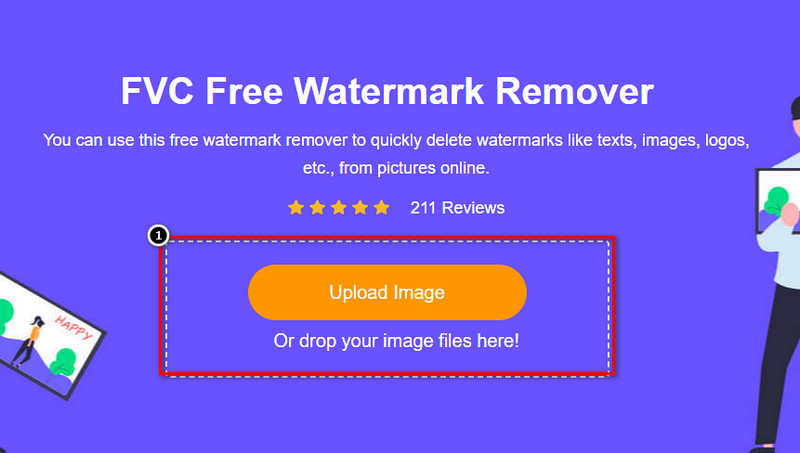
שלב 3. תוכל להשתמש בשלושה כלים כדי לסמן את אזור סימן המים; אף על פי שהם פועלים באופן שונה, היעילות שלהם זהה. בחר כלי אחד, ואז סמן את האזור בתמונה שבו מופיע סימן המים.
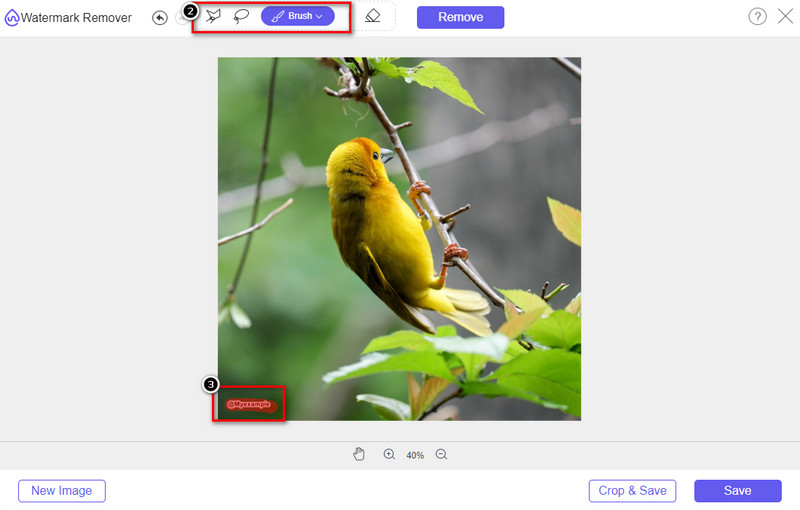
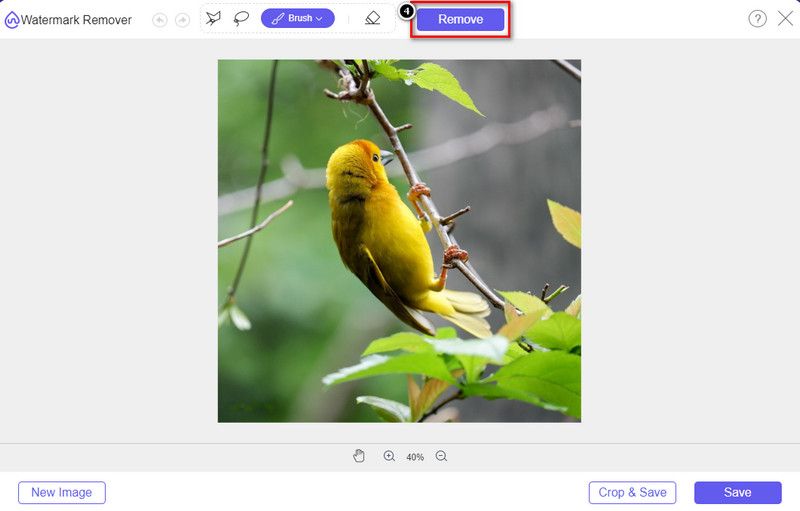
שלב 4. ודא שאתה לוחץ על סמל ה‑Remove לאחר שסימנת את סימן המים בעזרת הכלי. שלב זה חיוני כדי שכאשר תייצא את התמונה, היא תהיה ללא סימן המים.
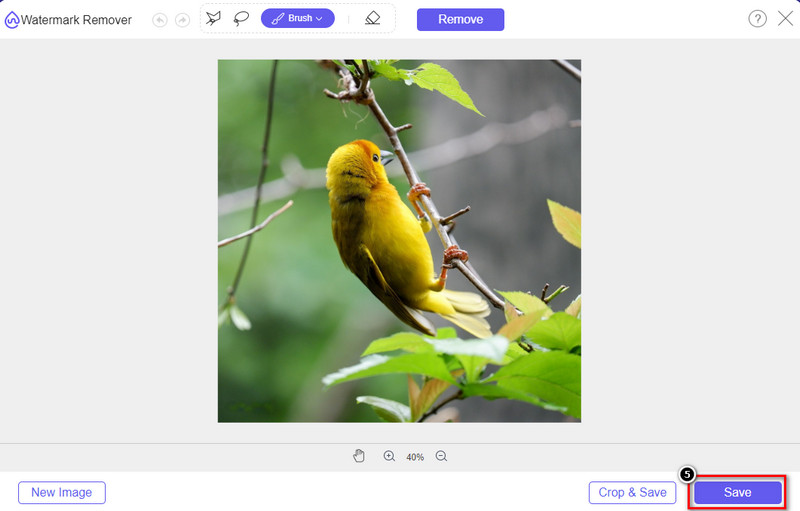
שלב 5. כדי להתחיל בתהליך הייצוא, תוכל כעת ללחוץ על כפתור ה‑Save. המתן לסיום התהליך, ואז תוכל לבדוק את התמונה כאשר סימן המים של Origin Graph כבר אינו נראה באזור.
יתרונות
- מסיר סימני מים בחינם מבוסס אינטרנט שתוכל לגשת אליו.
- זה עובד ביעילות על הסרת סימן המים עם תמיכה ב-AI-Technology.
- הוא תומך במגוון רחב של פורמטים של תמונות שיש לך בכונן המקומי שלך.
- לא נוסף סימן מים על תמונות מיוצאות.
חסרונות
- צריך קישוריות לאינטרנט כדי לתפקד.
- ההתמקדות שלו היא בהסרת סימן המים ותו לא.
חלק 2. כיצד להעתיק גרפים ממקור ל-Word או PowerPoint ללא סימן המים
בחלק זה של המאמר, ניתן לך את ההליך שתצטרך לדעת כדי להוסיף את הגרף שיצרת ב-Origin Graph ללא סימן המים. עקוב אחריו בהתאם כדי להוסיף בהצלחה את הגרף שאתה עושה ב-Microsoft Word ו-PowerPoint ללא סימן מים.
תצטרך לפנות לפחות 1.9GB בגלל גודל הקובץ העצום שלו. בקובץ 1.9GB תוכל לקבל את העזרה הדרושה לך, אבל אם אינך רוצה עזרה, תוכל להוריד את גרסת ה-652 מגה-בייט שלו דרך .zip או .exe.
שלבים כיצד ליצור גרף על גרף מקור ללא סימן המים:
שלב 1. ראשית, הורד את Origin Graph למערכת ההפעלה שלך על‑ידי כניסה לאתר הרשמי שלו. פתח את הכלי כדי להתחיל ליצור את הגרף הרצוי לך.
שלב 2. לאחר הפעלת התוכנה, הוסף את הערכים של הטבלה הנחוצה. כאן תוכל להוסיף עוד משתנים וכמספר זהה של גרפים.
נוסף: תוכל ללחוץ על Plot כדי לראות גרפים נוספים לשימוש, כמו Basic 2D, גרפים עמודתיים (Bar), סטטיסטיים ועוד.
שלב 3. לחץ על File ואז על Save כדי לייצא את הגרף שיצרת כאן.
שלב 4. תוכל לעקוב אחר השלבים שהוספנו בחלק 1 ולפעול לפי המדריך להסרת סימן המים מ‑Origin Graph בעזרת FVC Free Watermark Remover Online.
כיצד להשתמש בגרף ב-Word ללא סימן מים:
שלב 1. פתח את אפליקציית Word בשולחן העבודה, ולאחר מכן לחץ על מסמך ריק (Blank Page). אם כבר יצרת מסמכי Word, פתח את הקובץ הזה.
שלב 2. עבור אל לשונית Insert, ואז לחץ על Pictures. חפש את קובץ הגרף בכונן המקומי שלך, לחץ עליו פעם אחת ולאחר מכן לחץ על Open כדי להעלות אותו ל‑Word.
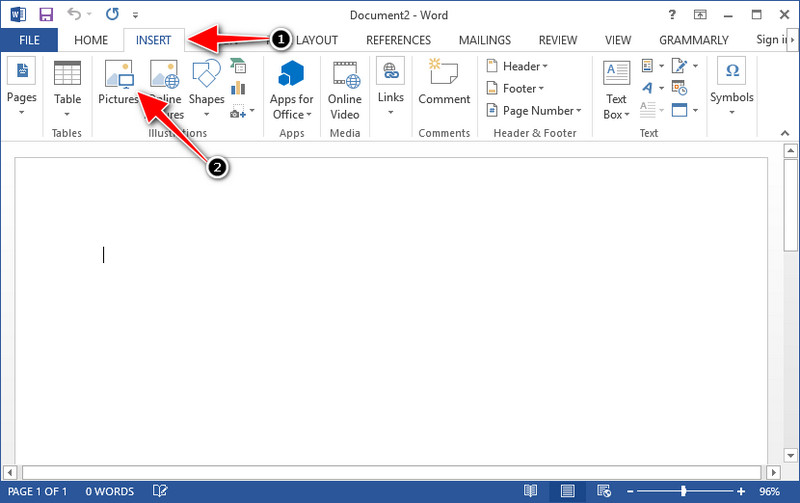
שלב 3. הגרף ייטען אוטומטית במסמך ה‑Word שפתחת או יצרת; כעת תוכל למקם את הגרף על‑ידי לחיצה וגרירה שלו במסמך.
כיצד להשתמש בגרף ב-Powerpoint ללא סימן מים:
שלב 1. הפעל את PowerPoint במחשב ולחץ על מצגת ריקה (Blank Presentation). באפשרותך גם לעיין במצגות האחרונות שיצרת בצד שמאל. אם יש קובץ שאליו עליך להוסיף את הגרף, לחץ עליו כדי לפתוח אותו.
שלב 2. לחץ על Insert ואז על Picture כדי להוסיף את תמונת הגרף שיצרת ב‑Origin Graph.
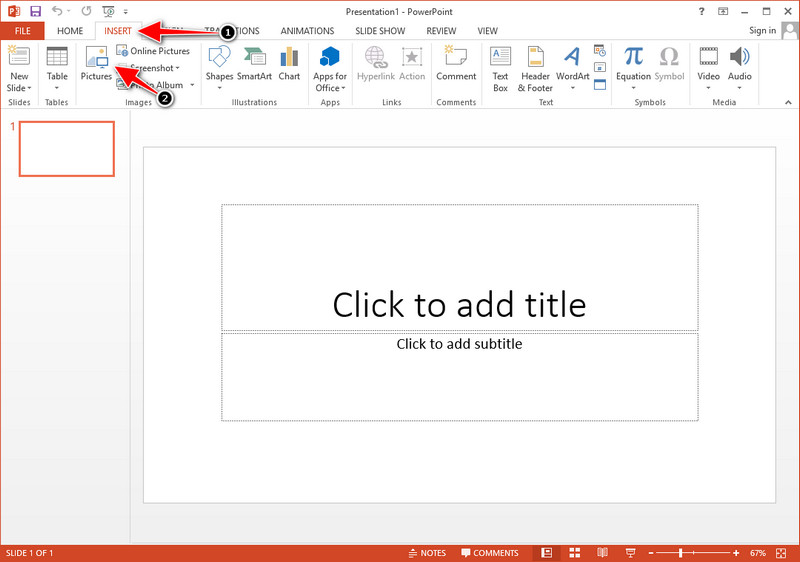
שלב 3. התאם את גודל תמונת הגרף ומקם אותה בשקופית.
לקריאה נוספת:
כיצד להסיר סימן מים של B612 מהתמונות שלך
כיצד להסיר בחינם את סימן המים של WOW Slider
חלק 3. שאלות נפוצות על איך להסיר סימן מים מגרף המקור
כמה עולה ה-Origin Pro?
עבור המשתמשים הבודדים, אתה יכול לקבל את גרסת הפרימיום של Origin Graph עבור $435 החל. אתה יכול לבקר בחנות הרשמית שלה ב-Origin Lab.
היכן אוכל להוריד באופן רשמי את גרף המקור?
בקר במעבדת Origin כדי להוריד את גרף המקור. לפני שתוכל להוריד את התוכנה על שולחן העבודה שלך, היא תשאל שאלות. לאחר מכן, יהיו שתי אפשרויות להוריד את הקובץ, אם אתה רוצה להוריד אותו בעזרת עזרה או לא, בצורה של .exe או zip.
האם Excel ו-Origin זהים?
ל- Excel ול-Origin יש ממשק משתמש דמוי גיליון אלקטרוני לסידור הנתונים, חישוב והגדרת תוויות. עם זאת, Excel מתמקד בהכילת עמודות ושורות רבות שבהן תוכל להשתמש. אבל עם Origin, זה מיועד לסידור תכונות המשתמשות בנוסחת עמודות ולא בנוסחת תא כמו מה ש-Excel תומך.
סיכום
כעת, לאחר שלמדת כיצד להסיר את סימן המים מ-Origin Graph, זה הזמן שלך להשתמש בגרף שיצרת ולהציג אותו בצורה מקצועית. אם המטרה שלך היא להשתמש בו ב-Word או Powerpoint, אתה יכול לקרוא את חלק 2 כדי ללמוד כיצד לעשות זאת. הסרת סימן המים עם הכלי הזה היא ללא ספק המבוקשת ביותר על ידי כל מי שרוצה להסיר את סימן המים בתמונות. הבעיה נפתרת עם הכלי הזה. אם מאמר זה אכן עזר לך, אנא השאר 5 כוכבים למטה.
-
 כיצד להסיר סימן מים עם Pixlr בשלבים מפורטים [יעיל]
 רוצה לדעת כיצד להסיר סימן מים עם Pixlr? אם כן, המשך לקרוא להלן כדי לדעת כיצד לעשות זאת ואת החלופות בהן תוכל להשתמש.
-
 הסר סימן מים של Animotica בסרטונים מיוצאים עם 3 דרכים מוכחות
 האם אי פעם תהיתם אם אפשר להסיר את סימן המים של Animotica מסרטונים שייצאתם? מאמר זה מספק איך לעשות.
-
 דרכים חינמיות להסיר את סימן המים של VideoShop בסרטונים [ללא מאמץ]
 כדי להסיר את סימן המים של VideoShop, המכשיר שלך יצטרך מסיר סימן מים. כדי לדעת מה הם, קרא את המאמר הזה.
