


 ממיר וידאו אולטימטיבי
 מקליט מסך
 תיקון וידאו
 הורדה מאובטחת
כיצד להסיר במהירות תמונה עם 3 הפתרונות הטובים ביותר לשימוש
ביטול פיקסול של תמונה הוא הפתרון שאתה צריך כדי לבצע מייקאובר לתמונה שהתבררה כמפוקסלת, או אם התמונה שלך נראית כמו ביטמאפ עם ריבועים קטנים. משתמשים רבים חושבים ששינוי, כוונון, תיקון ושיפור של התמונה הוא עניין מטריד; האמת היא שזה אכן היה כך, אבל זה כבר שייך לעבר. עם הטכנולוגיה המתקדמת שזמינה לנו כיום, המשימה הזו נעשתה קלה לפתרון כשמשתמשים בכלי הנכון.
אין לך את הכלי המתאים להסיר את הפיקסלציה בתמונה שלך? למרבה המזל, מאמר זה יביא לכם את שלוש התוכנות הטובות ביותר שמצאנו שיכולות לעזור לכם לערוך את הפיקסלציה של התמונה ומדריך על כל אחת מהן כדי לפתור את הבעיה.

חלק 1. כיצד לבטל פיקסלים של תמונה באינטרנט עם עורך התמונות הטוב ביותר [מומלץ]
FVC Free Image Upscaler הוא כלי מקוון, אוטומטי לחלוטין, שאפשר להשתמש בו כדי לבטל פיקסול של תמונות ברשת בחינם. ניתן לפתוח אותו בכל דפדפן אינטרנט זמין לך – אין צורך להוריד משגר כדי להפעיל אותו, כך שתוכל להשתמש בכלי מיד לאחר הגישה אליו. למרות שהתוכנה זמינה באינטרנט, העוצמה והביצועים שלה בביטול פיקסול של תמונות משתווים לאלו של עורך תמונות מקצועי מהשורה הראשונה, בין אם מקוון ובין אם לא. אולי נדמה לך שיהיה קשה להשתמש בכלי הזה, אבל זה לא המצב. עדיין לא משוכנע? אם כך, תוכל לקרוא או לעקוב אחר המדריך המפורט למטה, שייתן לך הסבר צעד־אחר־צעד על אופן השימוש בכלי בקלות.
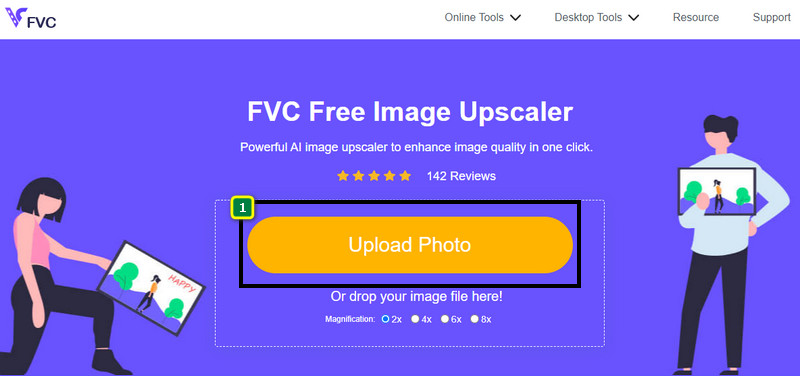
שלב 1. אפשר לגשת לכלי האינטרנט הזה בכל דפדפן שיש לך במכשיר, על‑ידי חיפוש שמו או לחיצה על קישור זה כדי לפתוח את האתר הראשי שלו.
שלב 2. ברגע שנמצאים בכלי המקוון, לחץ על Add Image כדי להעלות את התמונה המפוקסלת. חלון תיקיות קבצים יופיע על המסך; כעת תוכל לאתר את התמונה השמורה בכונן המקומי שלך, ואז ללחוץ על Open כדי להעלות אותה.
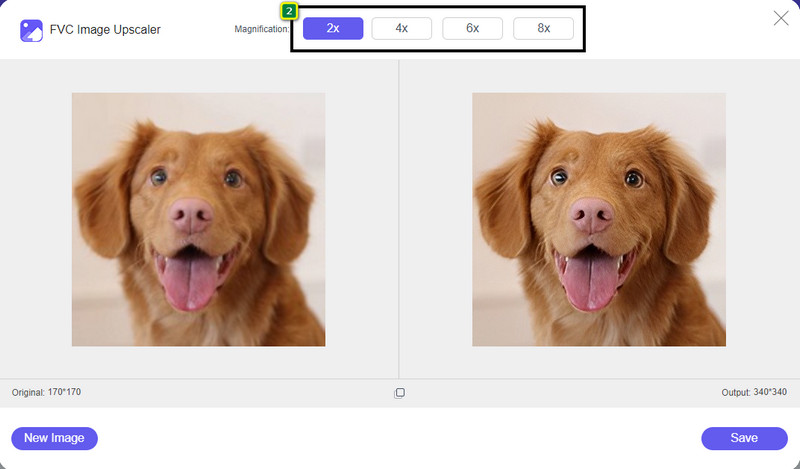
שלב 3. לאחר מכן, בחר את אפשרות ההגדלה שברצונך להחיל על התמונה, כדי להחליק את המראה שלה כך שלא תיראה עוד כביטמאפ עם ריבועים קטנים.
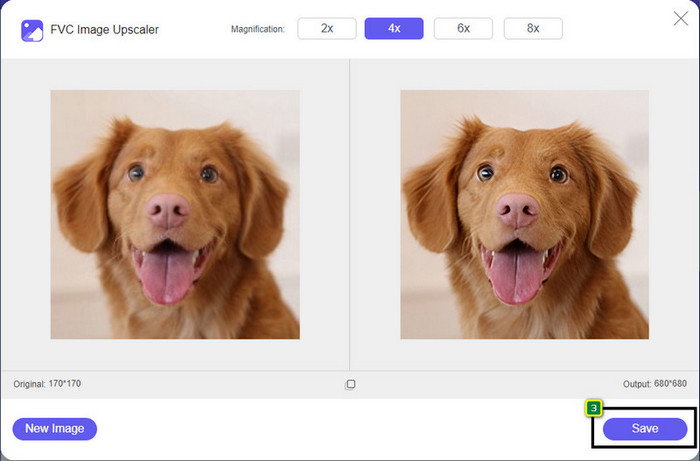
שלב 4. פשוט כך – לחץ על Save כדי להוריד את הגרסה הלא‑מפוקסלת אל הכונן המקומי שלך.
חלק 2. כיצד לבטל פיקסלים של תמונה במצב לא מקוון באמצעות 2 דרכים ב-Windows ו-Mac [קל]
Pixbim - ביטול פיקסלים של תמונות ב-Windows
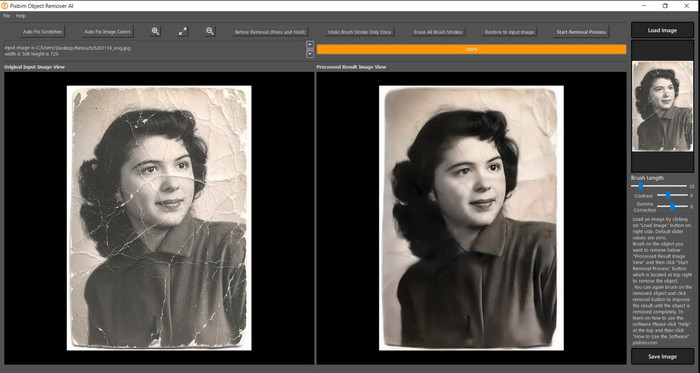
Pixbim הוא אחד מכלי ביטול הפיקסול החזקים ביותר, הנתמכים ב‑AI, שניתן להוריד למערכת ההפעלה Windows כדי לפתור את הבעיה הזו. העורך הזה ראוי לאזכור במאמר משום שהוא מטפל בתמונות מפוקסלות במהירות וביעילות. בעזרתו, הבינה המלאכותית מכוונת את הפרמטרים בשבילך, כך שלא תיתקל בסיבוכים בשימוש בתוכנה. בשל התכונות והיכולות שלו, עליך לרכוש מפתח רישיון כדי להמשיך להשתמש בו לאחר תקופת הניסיון החינמית. ייתכן שהמחיר יהיה גבוה עבור רבים שמעוניינים בתוכנה על המחשב האישי שלהם.
שלב 1. לאחר שהורדת את התוכנה, עליך להפעיל אותה כדי שנוכל לעבור לשלב הבא.
שלב 2. לחץ על Load Image כדי להוסיף לכאן את התמונה המפוקסלת שאתה מעוניין לשפר.
שלב 3. לאחר מכן, כוון את הפרמטרים על‑ידי גרירת המחוונים בהתאם לערכים שברצונך להשיג.
שלב 4. כשסיימת לכוונן את התמונה, שמור כעת את התוצאה כדי לייצא אותה.
Movavi Photo Editor [Windows ו-Mac]
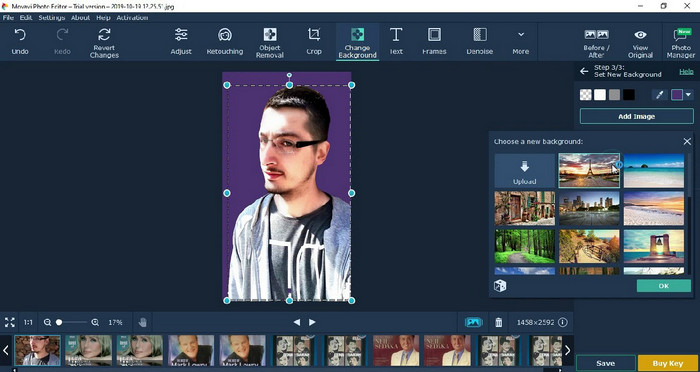
משתמשים רבים כבר ניסו את Movavi Photo Editor בזכות הרב‑תכליתיות שלו בעריכת תמונות. בדומה ל‑Pixbim, הוא יכול לשחזר את הפיקסלים החסרים בתמונה בעזרת רשתות נוירונים של ה‑AI שלו. כשעורך זה בידיך, תוכל לבצע עריכה בסיסית ומתקדמת של המראה, כגון חיתוך, סיבוב, הוספת פילטר, תיקון פיקסלים ועוד. עם זאת, לא תוכל ליהנות מכל האפשרויות אם לא תרכוש את הגרסה הפרימיום למחשב השולחני שלך.
יש לו מחיר כמעט דומה לפיקסבים, שהוא די יקר עבור רבים. אבל אם יש לך תקציב לרכישת עורך, זה עשוי להיות האחד שאתה צריך. למד כיצד לבטל פיקסלים של תמונות עם אפליקציה זו על ידי ביצוע השלבים.
שלב 1. הורד את היישום ל‑Windows או ל‑Mac OS.
שלב 2. הפעל את התוכנה ואז העלה לכאן את התמונה שברצונך לבטל בה את הפיקסול.
שלב 3. עכשיו, לאחר שהעלית את התמונה, לחץ על Magic Enhance כדי לעבד את התמונה אוטומטית בעזרת ה‑AI.
שלב 4. ייצא את התמונה ותיהנה מהתוצאה.
חלק 3. שאלות נפוצות על איך לשדרג תמונה
מדוע יש סימן מים על התמונה המיוצאת ללא פיקסל?
כאשר אתה משתמש בגרסת ניסיון בחינם של היישום, יש סיכוי שהיא משאירה סימן מים בעת ייצוא. לכן, אם ברצונך לייצא תמונה ללא סימן המים, תוכל לרכוש את רישיון האפליקציה או להשתמש ב-FVC Free Image Upscaler, שכן הוא לא ישאיר סימן מים על התמונה המיוצאת.
מה ההבדל בין מטושטש לפוקסל?
מאמרים רבים הוכיחו כי המטושטשים והמפוקסלים אינם זהים בגלל כמה גורמים. תמונות מטושטשות הן הסיבה שאתה מצלם תנועה במהירות גבוהה או מצלם תמונה עם מצלמה רועדת. בזמן פיקסל, כשאתה מגדיל תמונת מצב, הוא יתחיל פיקסלציה, ותראה מפת סיביות עם ריבוע זעיר.
מהו הגורם שהופך את התמונה לפוקסלת?
כמה סיבות הופכות תמונות לפיקסלים; סיבה נפוצה היא כאשר אתה מגדיל תמונת רסטר. פורמטים של רסטר, כגון PNG, JPG, GIF ועוד, מורכבים מריבועים קטנים הבונים את מראה האובייקט המאוחסן במיכלים אלו. בדרך כלל, כאשר אתה מגדיל את התמונה, אתה תראה שיש ריבועים, המכונים פיקסלים, המכילים נתוני צבע שמוצגים ויזואלית. זה יכול להיות בעיה עבור עורכים רבים, במיוחד כאשר מתרחש פיקסלציה.
איך אני יכול לתקן את רעשי התמונה?
זוהי עוד בעיה שכיחה שאתה עלול להיתקל בה בתמונות שצילמת, והפתרון שאתה זקוק לו עשוי להימצא במאמר זה. לחץ על קישור זה כדי לקרוא, לפתור וללמוד בקלות כיצד להסיר רעש מתמונה.
סיכום
בפשטות כזו, כעת תוכל לבטל בקלות פיקסול בתמונה בעזרת עורך התמונות הטוב ביותר שניתן להוריד או להשתמש בו ברשת. המקרה הזה נפתר! לכן, אם תיתקל אי‑פעם בבעיה של פיקסול, תוכל להסתמך על מאמר זה שיסייע לך. הכלי הטוב ביותר שאתה עשוי להזדקק לו נמצא כאן ומוכן לעזור לך, כמו FVC Free Image Upscaler. עדיף לבצע התאמה על‑ידי תיקון הפיקסול במראה, כך שהוא לא יוצג באופן בולט לעיני כולם. אמור שלום לפיקסול כאשר אתה משתמש בעורך התמונות המקוון הזה.
-
 7 תמונות יוקרה שתוכל להשתמש בהן כדי לשפר ולשפר כל תמונה [2022]
 האם אתה זקוק לשיפור התמונה? למרבה המזל, מאמר זה מכסה את התוכנה הטובה ביותר שתוכל לגשת ולהוריד על שולחן העבודה שלך.
-
 5 מגבירי רזולוציה של תמונה שאתה חייב להשתמש ב-2022 [הבחירות האחרונות]
 לא יודע באיזה משפר רזולוציית תמונה כדאי להשתמש? קרא את המאמר הזה כשאנחנו סוקרים חמישה כלים לשימוש ולשיפור הרזולוציה של תמונות.
-
 4 אפליקציות להגברת רזולוציית התמונה במכשירים הניידים שלך [הבחירה הטובה ביותר]
 תזדקק לאפליקציות כדי להגדיל את רזולוציית הצילום שלך אם אתה רוצה להשיג 1080p, 4k או משהו כזה. עם הרשימה למטה אתה יכול לעשות את זה בקלות!
