


 ממיר וידאו אולטימטיבי
 מקליט מסך
 תיקון וידאו
 הורדה מאובטחת
טיפים וטריקים להסרת סימן המים של Powtoon בסרטונים ביעילות
האם אי־פעם יצרת אנימציה מושלמת, וכשייצאת אותה Powtoon הוסיפה סימן מים? מצבים כאלה נוטים לקרות בעיקר אם את/ה משתמש/ת בגרסת החינם של האפליקציה. האם סימן המים קלקל לך את הסרטון? אין צורך לדאוג יותר! כאן אפשר ללמוד איך להסיר את סימן המים של Powtoon בעזרת הגישות השונות שאספנו כאן.

חלק 1. כיצד להסיר סימן מים של Powtoon ללא מנוי [בחירת העורך]
FVC Video Converter Ultimate הוא הרבה יותר מפתרון מלא שניתן להוריד ל‑Windows או ל‑Mac שלך כדי להסיר את סימן המים של Powtoon. גם אם אין לך ניסיון בהסרת סימני מים מכל סרטון שאת/ה יוצר/ת, עדיין תוכל/י לבצע זאת כאן. נוח ומהיר – זו החוויה ש‑FVC רוצה להציע לך בשימוש בתוכנה, והם הצליחו בכך היטב. לכן, אם ברצונך להתנסות בהסרת סימן המים, אפשר לעקוב אחר השלבים שהוספנו כאן.
שלבים להסרת סימן המים של Powtoon באמצעות FVC Video Converter Ultimate:
שלב 1. באפשרותך לקבל את אחת מתוכנות העריכה המרשימות ביותר ל‑Windows ול‑Mac על‑ידי לחיצה על כפתור ההורדה למטה. לאחר מכן התקן/י את התוכנה, בצע/י הגדרה מהירה ופתח/י את התוכנה.
הורדה חינמיתל-Windows 7 ומעלההורדה מאובטחת
הורדה חינמיתל-MacOS 10.7 ומעלההורדה מאובטחת
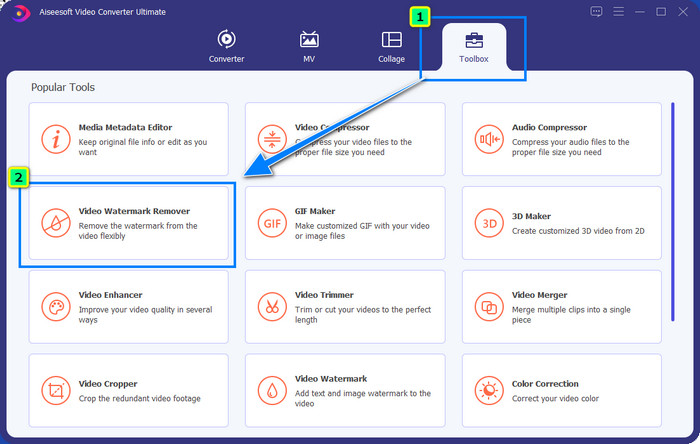
שלב 2. בארגז הכלים (Toolbox) לחץ/י על Video Watermark Remover כדי להסיר את סימן המים ש‑Powtoon מוסיפה לסרטון הערוך שלך.
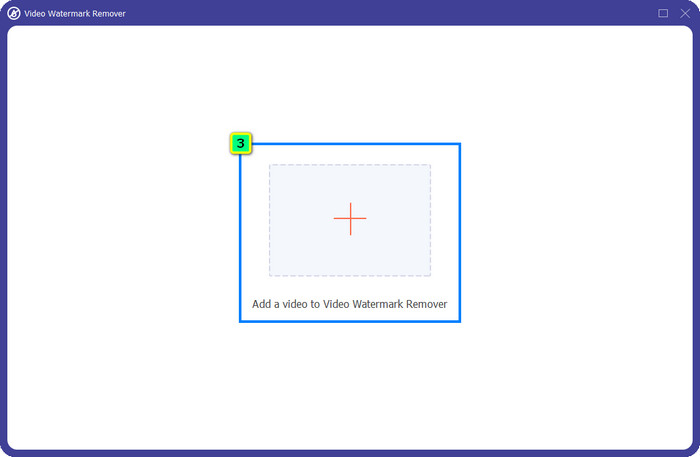
שלב 3. לחץ/י על סמל ה+ כדי להעלות את הסרטון שברצונך לערוך, בחר/י את קובץ הווידאו בתיקייה שתופיע ולחץ/י על Open.
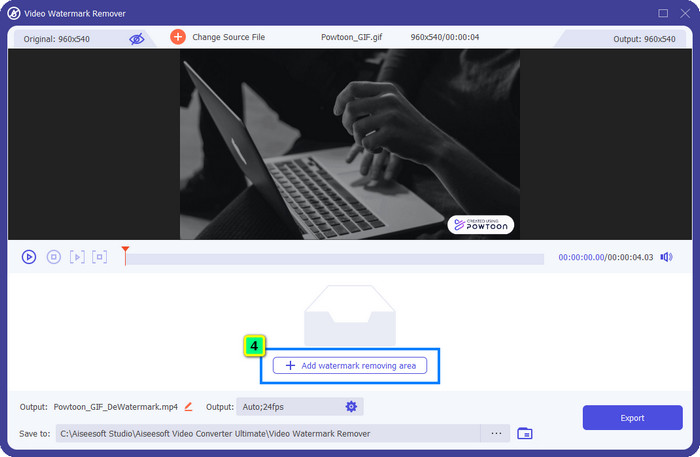
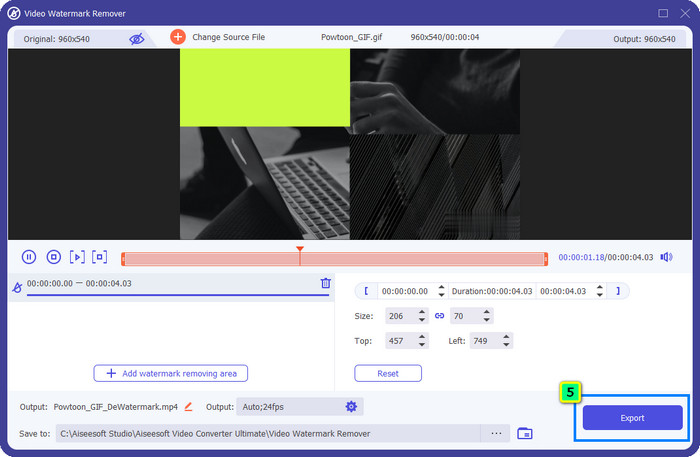
שלב 4. לחץ/י על Add Watermark Removing Area והציב/י את תיבת הבחירה על סימן המים; ניתן להתאים אותה לפי הצורך.
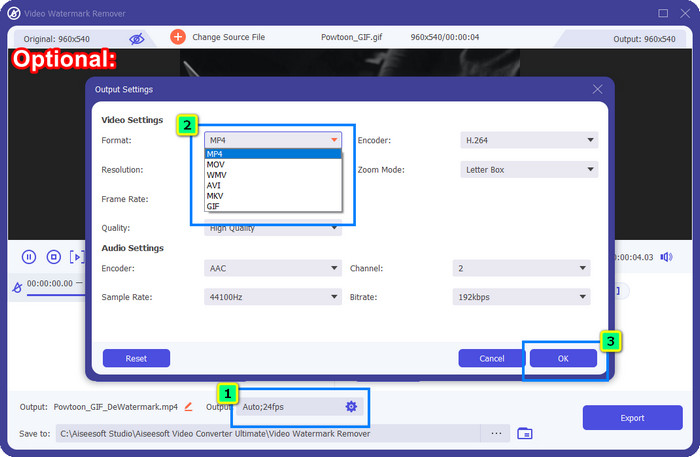
רשות: רוצה לשמור את התוצר הסופי בפורמט חדש? לחץ/י על Output ואז על Format, ובחר/י את פורמט הווידאו החדש הרצוי. אפשר גם לכוונן הגדרות וידאו ואודיו נוספות ואז ללחוץ על OK כדי לשמור את השינויים.
שלב 5. לחץ/י על כפתור הExport כדי להוריד את הסרטון שממנו הסרת את סימן המים.
חלק 2. כיצד להסיר סימן מים של Powtoon עם מנוי [מבוסס על תוכנית]
האם ל-Powtoon יש סימן מים? כן, זה מוסיף סימן מים כשאתה משתמש בגרסה החינמית. אבל אם אתה רוכש את Pro או Pro+, אתה יכול לייצא את הפלט הסופי ללא סימן המים. לכן, אם אתה רוצה לדעת איך לקנות את התוכנה כדי ליהנות מהסרטון שערכת ללא סימן המים, בצע את השלבים הבאים.
שלבים לרכישת תוכנית Powtoon Pro ו-Pro+:
שלב 1. פתח/י את האתר הרשמי של Powtoon ולחץ/י על Pricing כדי לראות את המחירים לגרסת הפרו.
שלב 2. בחר/י את התכנית המועדפת עליך, Pro או Pro+, ולחץ/י על Get Plan.
שלב 3. מלא/י את פרטי החיוב הנדרשים, המשך/י לאמצעי התשלום ולחץ/י על Make Secure Payment.
חלק 3. כיצד להסיר סימן מים של Powtoon באינטרנט בחינם [שירות אינטרנט]
1. Media.io - Watermark Remover
Media.io - Watermark Remover מסוגל להסיר את סימן המים של Powtoon בחינם. הוא זמין בכל דפדפן, כלומר אין צורך להוריד את האפליקציה כדי להשתמש בו. למרות שמסירי סימן המים כאן חינמיים, עדיין יש צורך בחיבור אינטרנט יציב כדי לעבוד. תהליך ההעלאה וההורדה לוקח יותר זמן בהשוואה למסיר סימן המים הראשון שהצגנו כאן. עם זאת, התוכנה הזו היא בחירה מצוינת עבורך, ואם ברצונך לדעת כיצד להשתמש בה, עקוב/י אחר השלבים הבאים.
שלבים להסרת סימן המים של Powtoon באמצעות Media.io:
שלב 1. פתח/י את דף האינטרנט ולחץ/י על Choose File כדי להוסיף את הסרטון שממנו ברצונך להסיר את סימן המים. המתן/י לתהליך הטעינה, שכן הוא עלול לקחת זמן רב, בהתאם לחיבור האינטרנט.
שלב 2. לחץ/י על Add Area והנח/י את אזור הסרת סימן המים במקום שבו מופיע סימן המים.
שלב 3. לחץ/י על Export כדי לשמור את סרטון ה‑Powtoon הערוך בכונן המקומי שלך – פשוט כך.
2. Kapwing
Kapwing הוא כלי שירות מקוון נוסף המתמחה בכך שהוא יכול להסיר סימן מים מהסרטון על‑ידי חיתוך האזור שבו הוא מופיע. בנוסף, הוא מציע אפשרויות עריכה נוספות שעשויות לעזור לך ליצור סרטון מרשים, כמעט כמו ב‑Powtoon. בשונה מפתרונות סימן המים האחרים שהצגנו, התוכנה הזו משנה את ממדי הווידאו משום שאת/ה חותך/ת את אזור סימן המים. אם אינך מוטרד/ת מצמצום גודל הסרטון, עקוב/י אחר השלבים הבאים כדי להיפטר מסימון המים של Powtoon.
שלבים לחיתוך סימן המים של Powtoon באמצעות Kapwing:
שלב 1. באמצעות הדפדפן שלך, חפש/י את התכנית ופתח/י אותה.
שלב 2. לחץ/י על Add Media כדי לייבא את הסרטון שברצונך לחתוך כאן.
שלב 3. לאחר שהצבת את קטע הווידאו, לחץ/י על Crop כדי להתאים את היחס על‑פי הגודל המועדף עליך.
שלב 4. אם ברצונך לשמור את התוצר הסופי, לחץ/י על Done Cropping.
חלק 4. שאלות נפוצות על איך להסיר סימן מים של Powtoon
מהי הפלטפורמה הטובה ביותר להגדלת רזולוציית הווידאו ב-Powtoon?
יש אינספור דרכים לשפר את הרזולוציה של סרטון Powtoon שלך. אולם, חלקן אינן פועלות כמצופה. במקום לבחון את מזלך, אנחנו נעשה עבורך את העבודה הקשה, וכל מה שעליך לעשות הוא להקדיש כמה דקות לקריאת המאמר הזה. בחר/י איזו מבין 8 תוכנות להמרת רזולוציית וידאו מתאימה ביותר לצרכים שלך.
כיצד להוסיף סימן מים לסרטון?
הדרך הטובה ביותר להוסיף סימן מים לסרטון היא בעזרת תוכנה, בין אם מדובר בטקסט, לוגו, חותמת, תאריך ושעה וכדומה. אם יש לך מעט זמן פנוי, אפשר לקרוא ולהבין כיצד להוסיף סימני מים בפלטפורמות שונות בקלות.
למה Powtoon יקר?
Powtoon הפך ליקר בגלל עריכת האנימציה שהיא מספקת שאתה לא יכול להשתמש בעיקר בעורך וידאו אחר, בין אם מקוון או לא מקוון. זה גם בדרכים, כך שלא תצטרך להתקין משגר כדי להתחיל להשתמש בו. עם זאת, המחיר של זה לא ניתן להשגה עבור רבים. במקום להשתמש בגרסה החינמית של Powtoon ובעל סימן מים, נסה להשתמש בחלופה הטובה ביותר של עורך הווידאו, FVC Video Converter Ultimate. הוא מציע שפע של תכונות ופונקציות שבהן אתה בוודאי יכול ליהנות מהשימוש.
סיכום
אפשר לשמור סרטונים מ‑Powtoon ללא סימן מים, אך לשם כך צריך לרכוש תכנית כדי לשמור את הסרטון הערוך בלי שום סימן מים. לא מתחבר לך הרעיון של רכישת תכנית? נסה/י להשתמש במסירי סימן המים המקוונים שהצגנו. חיבור האינטרנט איטי? במקרה כזה מומלץ להשתמש ב‑FVC Video Converter Ultimate כדי להסיר את סימן המים מהווידאו במהירות ובצורה מקצועית. בהשוואה למגוון עצום של תוכנות אחרות, עורך הווידאו FVC מציע את הפתרון המקיף ביותר להסרה של כל דבר מהסרטון שלך. אפשר גם להתאים את הסרטון באמצעות הפונקציות והיכולות שהתוכנה הזו מספקת.
-
 הסר בקלות סימן מים מ-PDF בעזרת שלבים פשוטים
 הסר סימן מים מ-PDF על ידי ביצוע שלבים פשוטים אלה. למד כיצד להסיר בקלות סימני מים מקובץ ה-PDF שלך באמצעות הכלים המדהימים האלה.
-
 דרכים קלות להסיר סימן מים מתמונות סיום הלימודים
 רוצה לדעת מהן הדרכים הטובות ביותר להסיר סימני מים מתמונות סיום הלימודים? על ידי קריאת מאמר זה, תוכל לדעת כיצד להסיר סימני מים בתמונות גראד בקלות.
-
 כיצד להסיר סימן מים מהסרטון באמצעות Final Cut Pro [מדריך שלם]
 יש לך בעיה עם סימן המים בסרטונים? לא אמרנו יותר, כי סיפקנו מדריך כיצד להסיר סימן מים מהסרטון באמצעות Final Cut Pro.
