


 ממיר וידאו אולטימטיבי
 מקליט מסך
 תיקון וידאו
 הורדה מאובטחת
4 השיטות היעילות ביותר להמרת TS ל-3GP
המאמר מתמקד בשאלה כיצד להמיר TS ל‑3GP. בימינו, טלפונים ניידים פופולריים מאוד. זהו אחד הדרכים לצפות בסרטונים האהובים עליך. אך למרבה הצער, ישנם מצבים שבהם קובץ TS אינו נתמך על‑ידי טלפונים ניידים. פורמט נפוץ שבו ניתן להשתמש לצפייה בסרטונים בטלפון הוא פורמט הקובץ 3GP. לכן, הפתרון היחיד הוא להמיר את קובץ ה‑TS שלך לפורמט 3GP. אם זה המצב, מאמר זה יכול לענות על הצורך שלך. קרא את המאמר כדי ללמוד כיצד להמיר TS ל‑3GP.

חלק 1: יישומים להורדה בחינם להמרת TS ל-3GP
ממיר וידאו אולטימטיבי
אם אתה מחפש תוכנה ניתנת להורדה בחינם לשימוש ב‑Windows וב‑Mac כדי להמיר TS ל‑3GP בקלות, Video Converter Ultimate מיועדת עבורך. תוכנה זו מאפשרת לך להמיר TS ל‑3GP בקלות ובמהירות. נוסף על כך, היא מאפשרת להמיר קבצים רבים בלחיצה אחת. בנוסף, באפשרותך להמיר את הקבצים שלך במהירות, משום של‑Video Converter Ultimate יש תהליך המרה מהיר במיוחד, מהיר פי 30 מממירים אחרים. כל המשתמשים יכולים להשתמש ביישום זה, משום שיש לו ממשק ידידותי ושיטות עבודה פשוטות. מעבר לכך, לממיר הזה יש יותר תכונות ממה שאתה מדמיין. הוא יכול גם להמיר פורמטי קובצי תמונה, כגון JPG, PNG, BMP, TIFF ועוד. כמו כן, אם ברצונך לסובב את הווידאו שלך, תוכל להמשיך להישען על יישום זה. באפשרותך להיפוך (flip) את הווידאו אופקית ואנכית. ראה את הפרטים להלן כדי לגלות תכונות נוספות.
תכונות
◆ המר פורמטי וידאו, כגון MP4, M4V, 3GP, FLV, AVI, MOV, MKV ועוד.
◆ אמין ביצירת קולאז' נפלא.
◆ מציע תהליך המרת אצווה.
◆ יוצר סרטוני מוזיקה זמין.
◆ זה יכול להתאים את מהירות הווידאו מ-0.125x עד פי 8 מהר יותר.
◆ מציע כלי עריכה, כגון משפר וידאו, מדחס, מיזוג, גוזם וכו'.
יתרונות
- טוב גם בהמרת קבצי תמונה.
- אין צורך בחיבור לאינטרנט.
- מושלם למתחילים ויש לו ממשק פשוט.
- יש לו את היכולת להתאים אישית סרטוני 3D מ-2D.
חסרונות
- רכוש את גרסת המקצוענים כדי לחוות תכונות נהדרות.
כדי להמיר קובץ TS לפורמט 3GP, נשתמש בVideo Converter Ultimate לפי ההנחיות המפורטות שלהלן.
שלב 1: לחץ על כפתור ההורדה שלהלן כדי להוריד את Video Converter Ultimate בחינם ל‑Windows או ל‑Mac שלך. לאחר מכן התקן אותו והפעל את הממיר.
הורדה חינמיתל-Windows 7 ומעלההורדה מאובטחת
הורדה חינמיתל-MacOS 10.7 ומעלההורדה מאובטחת
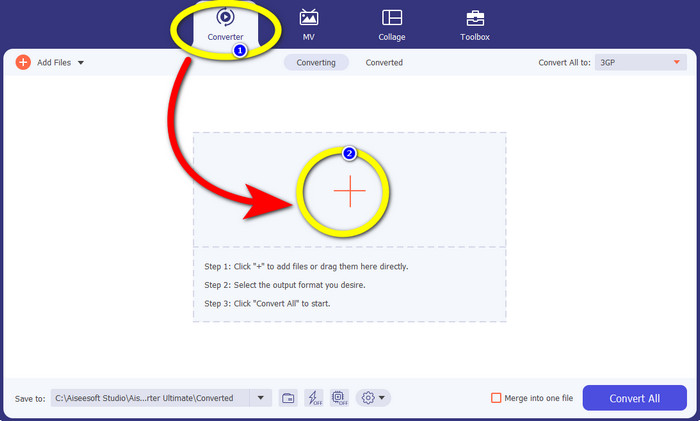
שלב 2: בחר בלשונית Converter ולחץ על סימן ה+ כדי לייבא את קובץ ה‑TS שברצונך להמיר לפורמט 3GP.
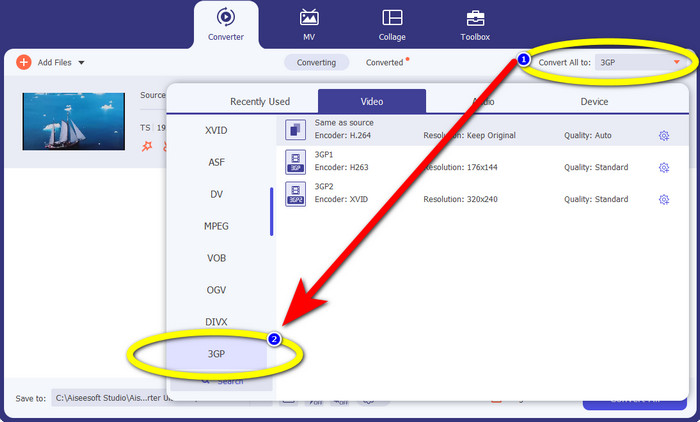
שלב 3: לאחר ייבוא קובץ ה‑TS, לחץ על כפתור Convert all to. אפשרויות הפורמט יופיעו, ואז לחץ על פורמט הקובץ 3GP.
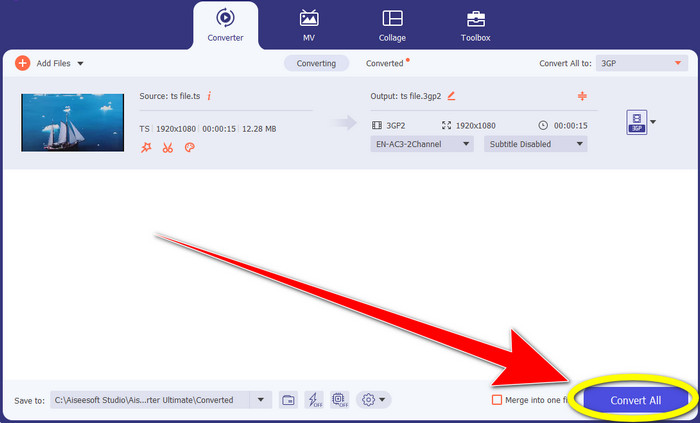
שלב 4: בשלב הסופי, לחץ על כפתור Convert All. תהליך ההמרה אורך רק כמה שניות, ותוכל כבר לשמור את הווידאו הסופי שלך במחשב ה‑Windows או ה‑Mac.
ממיר וידאו של HitPaw
כלי חינמי נוסף הניתן להורדה להמרת TS ל‑3GP הוא HitPaw Video Converter. ממיר זה מצוין גם להמרת קבצים שונים, כגון MKV, M4V, VOB, WEBM, FLV, XVID, M2TS, TS, 3GP ועוד. בנוסף, תוכל להמיר פורמטי אודיו בקלות באמצעות כלי זה. נוסף על כך, יש בו כלים רבים לעריכה, כגון גזירה, מיזוג, חיתוך וסיבוב, הוספת סימן מים, שינוי מהירות, פילטרים ועוד. מעבר לכך, HitPaw Video Converter מאפשר להוריד סרטונים מ‑1000+ אתרים כמו YouTube, Bili Bili, Facebook ועוד. עם זאת, אף על פי שזו אפליקציה להורדה בחינם, התכונות בה מוגבלות, ולכן עדיין יש לרכוש את היישום כדי ליהנות מכולן. כמו כן, תהליך ההורדה וההתקנה ל‑Windows ול‑Mac מורכב, ויש לא מעט שלבים שצריך לבצע. עקוב אחר השלבים שלהלן אם ברצונך להשתמש ב‑HitPaw Video Converter כדי להמיר TS ל‑3GP.
שלב 1: הורד את HitPaw Video Converter ל‑Windows או ל‑Mac שלך. עקוב אחר תהליך ההתקנה ופתח אותו.
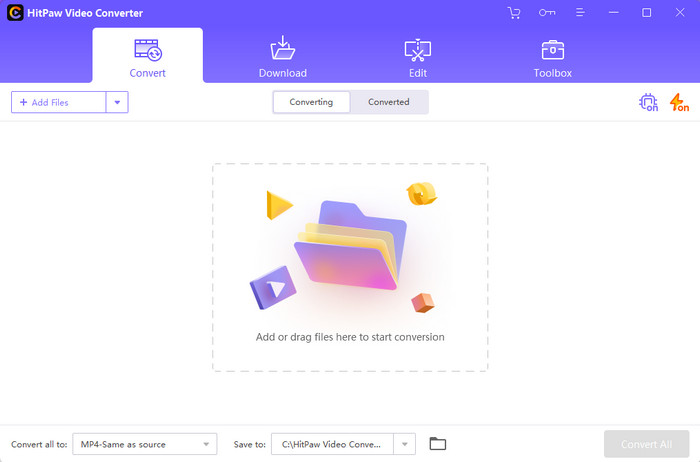
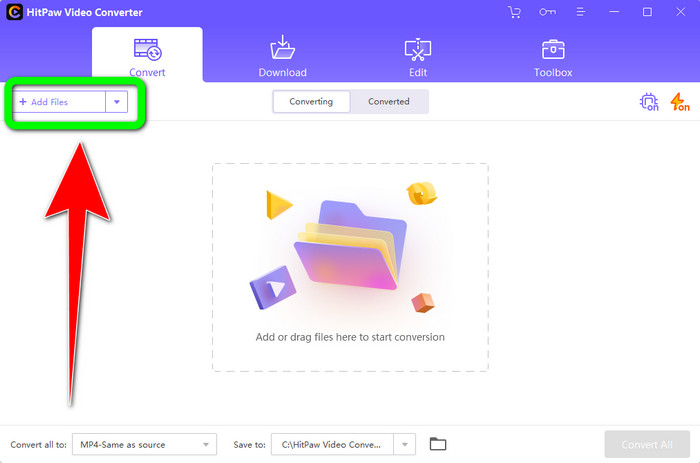
שלב 2: לחץ על כפתור Add Files כדי להעלות את קובץ ה‑TS.
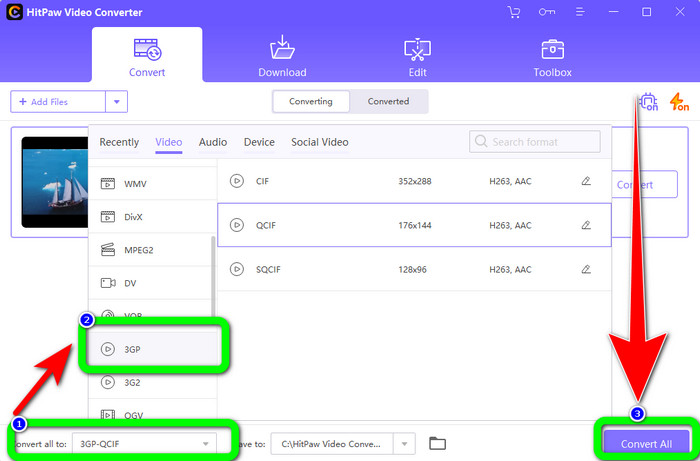
שלב 3: לחץ על כפתור Convert All to. לאחר מכן, אפשרויות הפורמט יופיעו על המסך. בחר בפורמט הקובץ 3GP ולחץ על כפתור Convert All כדי להמיר ולשמור סופית את הווידאו שלך.
חלק 2: ממירי TS ל-3GP מדהימים באינטרנט
FVC ממיר וידאו חינם באינטרנט
בכל הנוגע לממירים מקוונים, קיים FVC Free Video Converter Online. יישום זה יכול להמיר TS ל‑3GP בקלות ובצורה חלקה. הוא יכול גם לסייע לך להמיר קבצים נוספים, כגון MP4, AVI, WMA, TS, M2TS, XVID, FLV ועוד. נוסף על כך, ממיר זה פשוט לשימוש ומתאים לכל המשתמשים. יתרה מזו, באפשרותך להשתמש בתוכנה המקוונת החינמית הזו גם ב‑Windows וגם ב‑Mac. היא זמינה כמעט בכל הדפדפנים, כמו Google, Mozilla Firefox, Microsoft Edge ועוד. עקוב אחר השלבים הפשוטים האלה כדי להמיר TS לפורמט 3GP באמצעות FVC Free Video Converter Online.
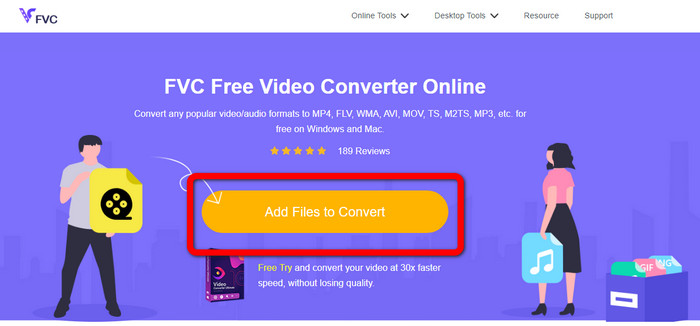
שלב 1: עבור לאתר של FVC Free Video Converter Online. לחץ על התיבה הכתומה במרכז כדי להעלות את קובץ ה‑TS.
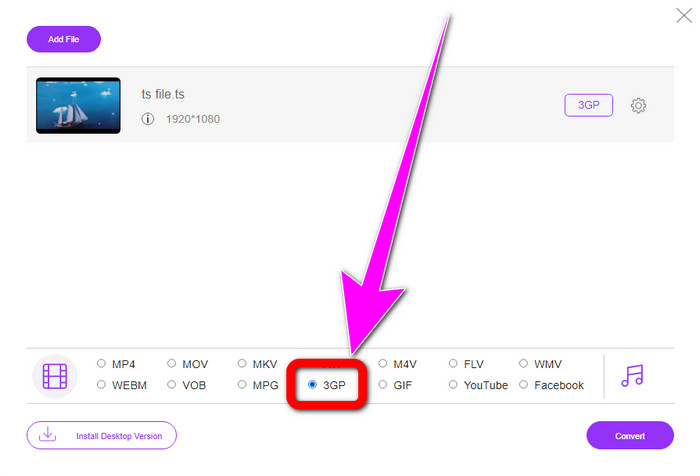
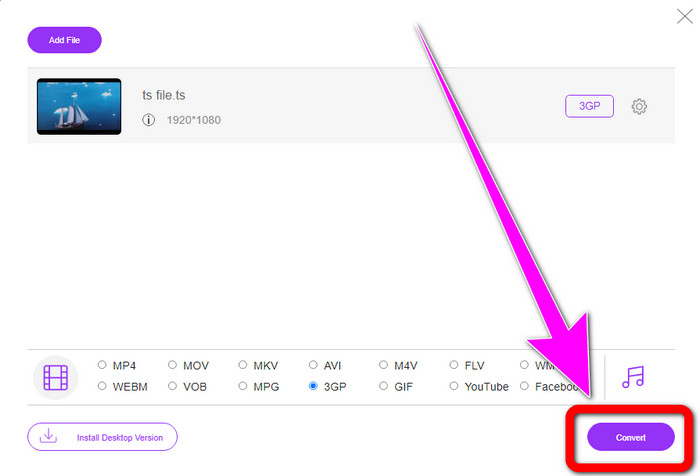
שלב 2: לאחר העלאת קובץ ה‑TS, תראה אפשרויות פורמט רבות בחלק התחתון של הממשק. לאחר מכן בחר את פורמט הקובץ הרצוי שלך, שהוא פורמט 3GP.
שלב 3: לאחר שסיימת לבחור את פורמט 3GP, לחץ על כפתור Convert. לאחר מכן הורד ושמור את קובץ הווידאו הסופי שלך.
המרה
Convertio הוא כלי מקוון נוסף להמרת TS ל‑3GP. בדומה ליישומים שלעיל, ממיר זה קל לשימוש, משום שהוא דורש רק שלוש לחיצות כדי להמיר קבצים שונים, כגון MOV, AVI, FLV, MKV, MPG, MP4 ועוד. מעבר להמרת וידאו, Convertio הוא גם ממיר אודיו, מסמכים ומצגות. אך יש לו חיסרון, במיוחד בשימוש בגרסה החינמית של הכלי. יש לו גודל קובץ מרבי של 100Mb, כך שלא ניתן להמיר קבצים ללא הגבלה. עליך להשתמש בגרסה בתשלום כדי ליהנות מביצועים מיטביים של היישום. המשך לשלבים שלהלן כדי להמיר TS לפורמט 3GP.
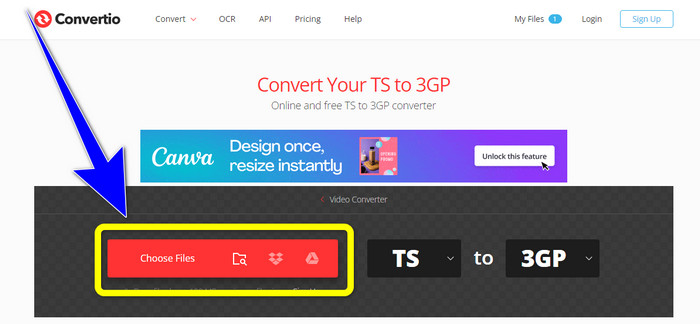
שלב 1: בקר באתר של Convertio. לאחר מכן לחץ על כפתור Choose Files כדי להוסיף את קובץ ה‑TS שלך.
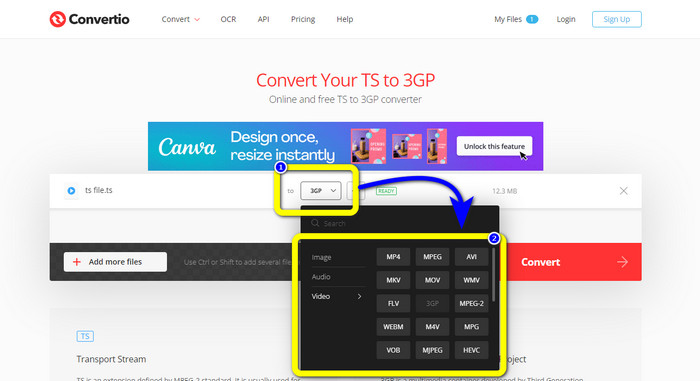
שלב 2: לחץ על אפשרויות הפורמט ובחר בפורמט הקובץ 3GP.
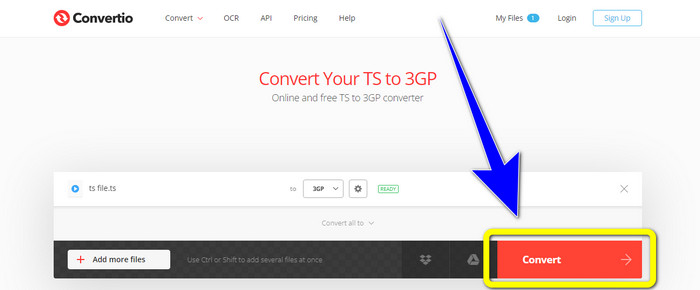
שלב 3: בשלב האחרון, לחץ על כפתור ההמרה (convert). המתן לסיום התהליך ולאחר מכן שמור את הפלט. ניתן גם להשתמש בכלי זה כדי להמיר TS ל‑FLV.
חלק 3: TS מול 3GP
| קוֹבֶץ | TS | 3GP |
| סיומת קובץ | .ts | .3gp |
| תיאור | מפרט MPEG-2 מגדיר את TS כהרחבה. בדרך כלל, הוא משמש לשידור, הזרמת מדיה באינטרנט ואחסון מוזיקה ווידאו ב-DVD. כאשר מתרחשת תקלה בהעברת נתונים, הזרמים היסודיים של מיכל המדיה הזה נשמרים בצורה המאפשרת השמעה מהירה וסנכרון אודיו/וידאו. | עבור טלפונים מבוססי GSM (מערכת גלובלית לתקשורת ניידת), פרויקט השותפות של הדור השלישי יצר את מיכל המולטימדיה 3GP בשנת 1998. המיכל מושלם לטלפונים ניידים מכיוון שהוא משתמש בפחות נתונים, רוחב פס ואחסון. זהו מיכל נפוץ לקובצי MMS (שירות הודעות מולטימדיה). |
| פותח על ידי | קבוצת מומחי התמונות הנעות | פרויקט שותפות דור שלישי |
| תוכניות משויכות | QuickTime Player, Windows Movies ו-TV נגן מדיה VLC | Windows Meda Player, VLC Media Player |
חלק 4: שאלות נפוצות על המרת TS ל-3GP
האם TS טוב יותר מ-MP4?
גם לקבצי MP4 וגם לקבצי TS יש אותה איכות וידאו. ההבחנה העיקרית בין קבצי TS ו-MP4 היא שקובצי TS שטוחים, אך קבצי MP4 מתחילים באינדקס. מצד שני, סיביות הווידאו בתוך הקבצים זהים. לכן, קבצי TS, M2TS ו-MP4 כולם בעלי אותה איכות וידאו.
האם אוכל להעלות קבצי TS ליוטיוב?
למרבה הצער, לא. אתה יכול להעלות קבצי TS לפייסבוק אבל לא ליוטיוב. התוכנית הטובה ביותר לפתיחת קבצי TS היא נגן המדיה VLC.
מה הם MPEG TS ו-PS?
TS הוא Transport Stream, המשמש ליישומי תקשורת ושידור. PS הוא Program Stream, שיכול לשמש ליישומי אחסון כמו תקליטורי DVD.
סיכום
אלו הן ארבע השיטות היעילות המובילות להמרת TS ל‑3GP. אך יש יישומים שניתן להשתמש בהם במלואם רק לאחר רכישת הגרסה בתשלום. אם אתה מעוניין בממיר חינמי ללא מגבלות, השתמש ב‑FVC Free Video Converter Online.
-
 TS ל- GIF: כיצד להפוך קובץ TS ל- GIF מונפש
 למד כיצד לשנות את קבצי ה-TS לפורמט GIF בעזרת כתיבה זו. הרשימה למטה מציינת רעיונות שונים לגבי TS ו-GIF וכיצד להמיר TS ל-GIF.
-
 כיצד להמיר DIVX ל-3GP ב-Windows, Mac ומקוון
 כיצד להמיר DIVX ל-3GP? אם אתה מחפש תשובה, קרא את המאמר הזה. אנו נראה לך נהלים נהדרים בעזרת ממירים שונים.
-
 4 הדרכים הטובות ביותר להמיר SWF ל-3GP ב-Windows, Mac & Online
 להלן השיטות השימושיות ביותר להמרת SWF ל-3GP באופן מיידי. כמו כן, פוסט זה יראה לך כמה כלים יעילים של Windows ומקוונים שבהם אתה יכול להשתמש.
