


 ממיר וידאו אולטימטיבי
 מקליט מסך
 תיקון וידאו
 הורדה מאובטחת
דרכים מקצועיות כיצד להמיר תמונות לוקטור
The best graphics format for logos and drawings is vector graphics. It is a result of their distinct curves and lines. Additionally, instead of using pixels, equations are used to construct them. It can use any size to rescale vectors without sacrificing clarity. The user needs to be able to convert photos to vectors. The good news is that you are able to learn everything you need to know online, thanks to the abundance of tools and lessons available. Designers and marketers must learn how to work with the widespread file type known as vector pictures. After all, billboards and other forms of advertising favor this format. There are numerous techniques for transforming images into vectors. If you want the best way to convert images to vectors, then there is a reason for reading this guide post.

חלק 1. מהו וקטור תמונה?
תמונת מחשב עם נקודות, קווים ועיקולים מכונה תמונה וקטורית. בהתבסס על משוואות מתמטיות, הוא משמש ליצירת צורות שונות. לכל משוואה מתמטית יש איכויות ייחודיות כמו צבע, עובי, עקומה ועוד. בשל כך, ניתן להגדיל תמונה וקטורית ולהגדיל אותה או להקטין אותה מבלי לאבד את פרטי התמונה. זה מרמז שהקווים, העקומות והנקודות נשארים חלקים ללא קשר לגודל או מידת ההתקרבות בתמונה. לעולם לא יהיו קצוות מטושטשים או מרופטים ביצירות האמנות. לוגו הם לרוב קבצים וקטוריים. בנוסף, צבעים מחולקים לצורות שונות. פשוט כמו לחיצה על כפתור מפשט את שינוי הצבעים של הגרפיקה הזו.
חלק 2. הדרך הטובה ביותר לעצב תמונה
כיצד לעשות וקטור תמונה באילוסטרייטור
If you want to vectorize your images, then you can use Illustrator. This program allows you to vectorize an image perfectly. It has complete tools and options that you need. Also, it supports almost all the most common image formats to add any images. You can add JPG, BMP, PNG, EPS, TIFF, and more. However, you must purchase the program if you want to use it daily. Illustrator can only offer you a few days free trial version. Also, it has a confusing installation process. You will find it hard to operate if you are a beginner. You need to ask for assistance for advanced users if you want to vectorize your images on Illustrator. Additionally, the program has complicated options. It is necessary to study the program first before using it. Also, when vectorizing an image, it has lots of processes. See the procedure below to learn how to vectorize an image.
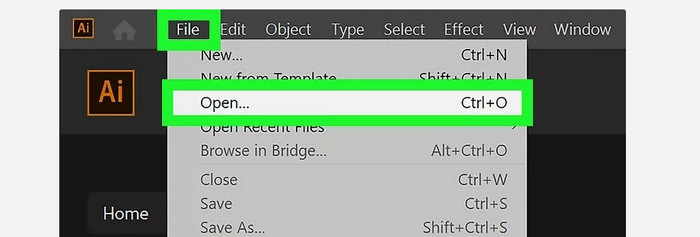
Step 1. Download Illustrator on your desktop. You can use the free trial version if you want. After the installation process, launch the program. Go to the File > Open menu to add the image you want to vectorize.
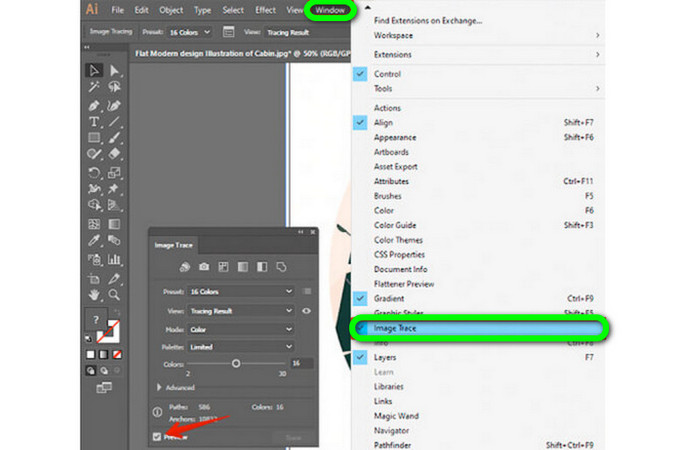
Step 2. In a newly appeared window, check the Preview box to view your image in vector format in real-time.
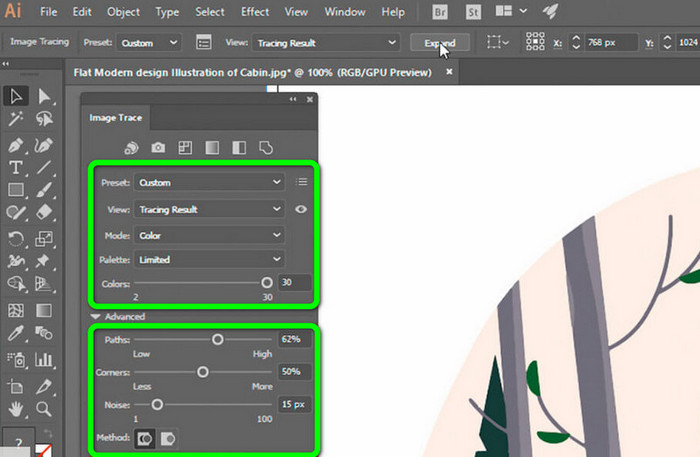
Step 3. Selecting the mode is the next step in understanding how to vectorize in Illustrator. Locate the Mode drop-down option in the Image Trace panel, then select the mode that best fits your design from the list. Grayscale, black and white, or color are all possible modes.
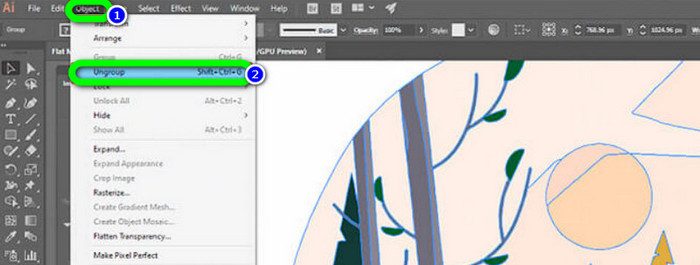
Step 4. Right-click on your image after that. Choose Ungroup from the dropdown menu on the Object tab. Shift+Ctrl+G/Shift+Cmd+G key combinations can also be used if you prefer shortcuts for easier access. Your color shapes will be divided into parts due to this operation.
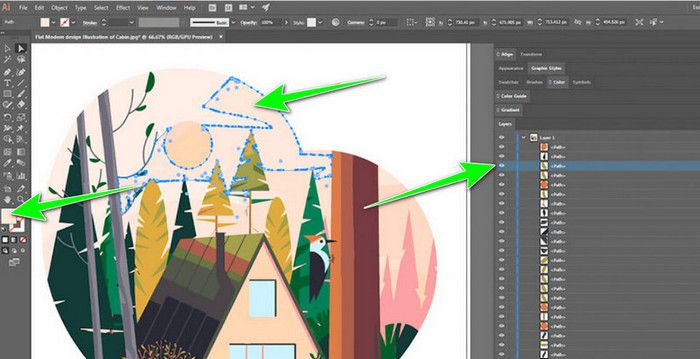
Step 5. You can freely alter the image once your conversion is finished. Select > Same > Fill Color after clicking on a shape to delete any color groups you'd want.
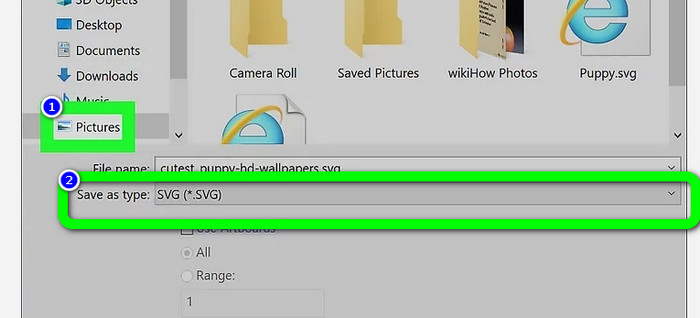
Step 6. Lastly, save your image as a vector file. Go to the File > Save as option. Then, select the SVG file format.
איך לעשות וקטור תמונה בפוטושופ
Adobe Photoshop is good at vectorizing an image. It has effective methods making it easy for all users. Also, you can vectorize an image with a few steps. In addition, Photoshop is also capable of editing images. If you want to edit images before saving them, you can do so. However, Photoshop has some drawbacks. It only offers a 7-day free trial. Then, after the trial version, you must pay for the subscription plan. The installation process is also time-consuming.
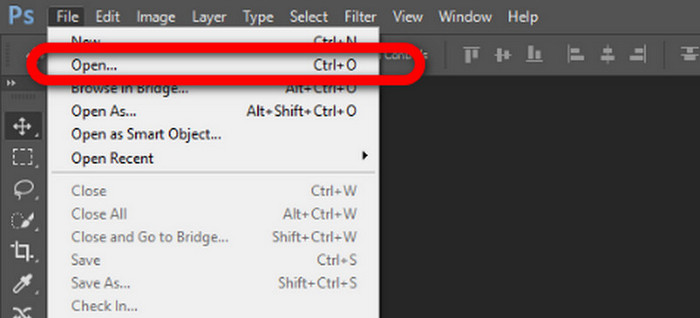
Step 1. Launch Adobe Photoshop on your computer. Then, go to the File menu and select the Open option to add the image you want to vectorize.
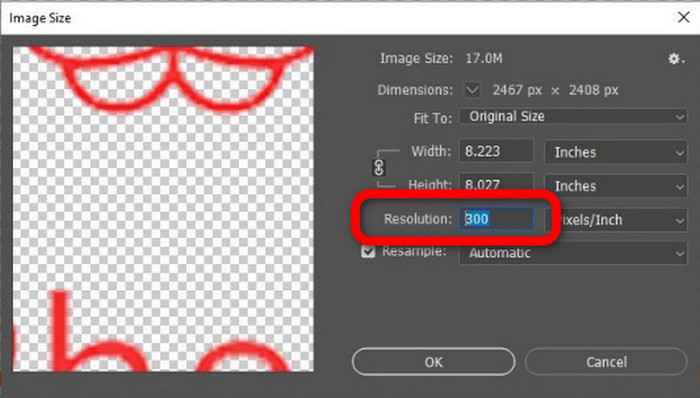
Step 2. Press the Ctrl + Alt + I on your keyboard to see the Image Size window and turn the resolution to 300.
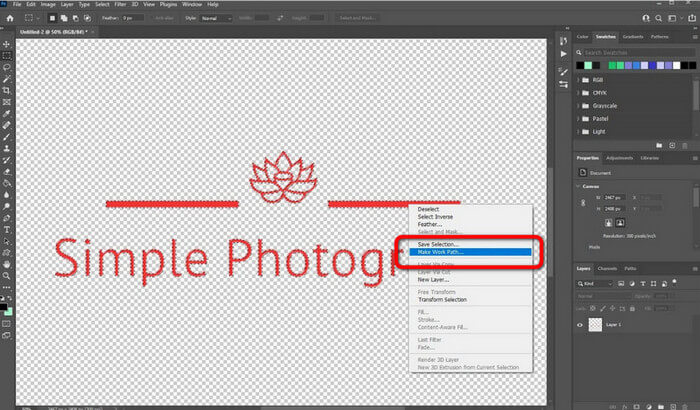
Step 3. Move the cursor above the selection, choose the Marquee Tool from the tools panel, and right-click. Choose the Make Work Path option from the menu after that.
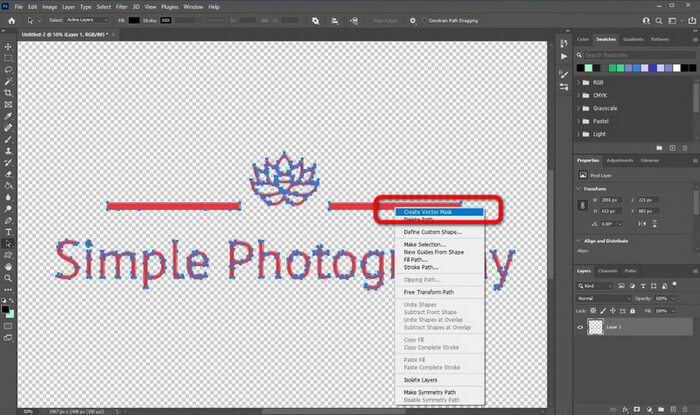
Step 4. Then, press the Ctrl + A on the keyboard to switch on the Direct Selection tool. After that, right-click the image and select the Create Vector Mask option. This way, it will create a vector mask over the layer.
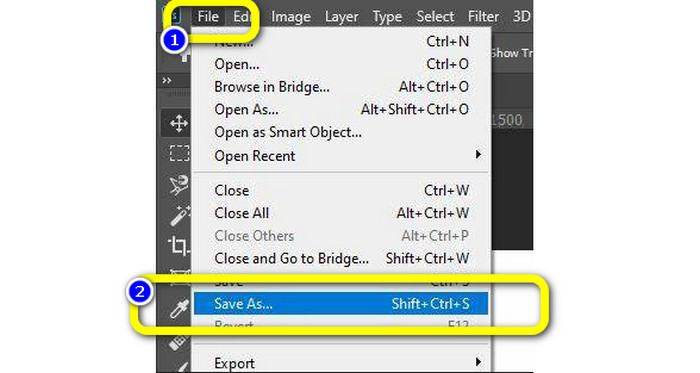
Step 5. To save the vectorized image, navigate to the File menu and select the Save as option.
חלק 3. כיצד להמיר תמונות וקטוריות
An excellent online image converter is FVC Free Image Converter. It can convert vector graphics into other formats like JPG and PNG. The user interface is excellent. You can concentrate on file conversion because it contains no distracting ads. Additionally, installing this converter is not necessary. It is directly controllable through your browser. Additionally, the image quality will be the same as the original file after conversion. It provides an easy-to-follow UI and instructions, which is ideal for users. Also, it is possible to convert several image files. This picture converter has the capability of batch conversion. Moreover, you can download numerous converted files with a single click. Also, it accepts input files in various extra formats, such as PNG, BMP, TIFF, and GIF. This tool's lack of annoying advertisements is one of its positive aspects. Doing so can ensure that your end product is pleasing to use and view. Using FVC Free Image Converter, your privacy is protected. It won't save your data after saving the image.
Step 1. Go to the website of FVC Free Image Converter. Go to the convert option and select your desired output format.
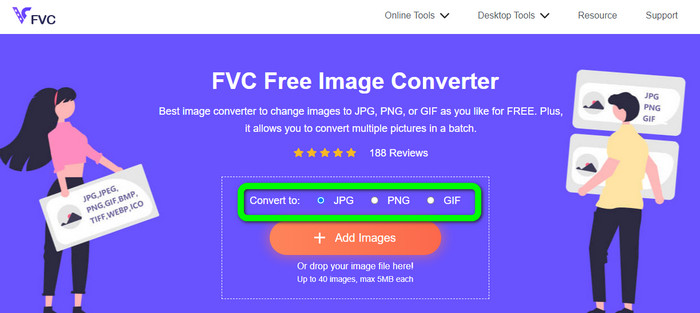
Step 2. Click the Add Images button to upload the vector image. You can drop the image into the box.
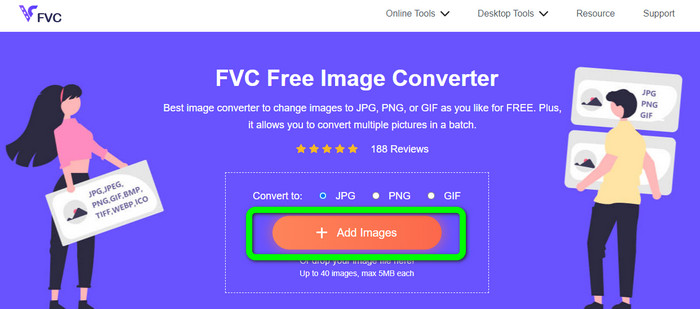
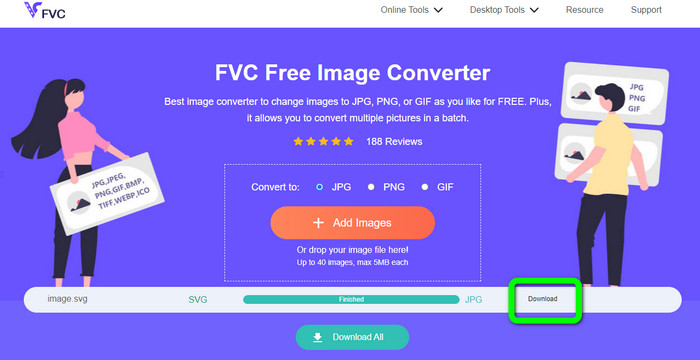
Step 3. After uploading the vector image, the tool will convert the image automatically. Then, after the conversion process, click the Download button.
קשור ל:
שיטות פשוטות להמרת תמונות לשחור־לבן
Best Ways on How to Convert Images to Links [Full Methods]
חלק 4. שאלות נפוצות לגבי המרת תמונות לוקטור
1. מהם השימושים השונים בתמונות וקטוריות?
יש הרבה סיבות למה אתה צריך להשתמש בקבצי וקטור. אם אתם מתכננים להדפיס תמונות, עדיף לשים את התמונה בקובץ וקטור. מלבד הדפסה, הוא גם מושלם לאנימציה. משתמשים משתמשים בזה עבור תמונות מסגרת-למסגרת הדורשות פחות כוח מחשוב. כמו כן, כמה מעצבים משתמשים בתמונות וקטוריות עבור שלטי חוצות ופרסומות.
2. מהם הסוגים העיקריים של פורמטים של תמונות וקטוריות?
הפורמטים העיקריים של התמונה הווקטורית הם Scalable Vectors Graphics (SVG), Windows Metafile (WMF), Adobe Illustrator Artwork (AI), Encapsulated PostScript (APS) ו-Portable Document Format (PDF).
3. האם אני צריך תמיד קובץ וקטור אם ביצעתי עבודת עיצוב?
לא תמיד. ישנן דרכים להשתמש בפורמטים שונים של קבצים. אבל האם אתה זקוק לקבצי וקטור או לא תלוי בסופו של דבר בסוג העבודה שעשית. בסופו של דבר, אם ביצעת עבודת עיצוב, שוחח על פורמטי הקבצים שלך עם המעצב שלך. בדרך זו, אתה יכול לאסוף או ליצור את הקבצים המתאימים אם אינם זמינים.
4. איך להמיר כל תמונה לצללית וקטורית שחור-לבן?
כדי להמיר את התמונה לשחור-לבן, ניתן להשתמש בפוטושופ. עבור לתפריט קובץ ובחר באפשרות פתח כדי להוסיף את התמונה. לאחר מכן, בממשק העליון, לחץ על תפריט תמונה. בחר התאמות > סף. לאחר מכן, חלון הסף יופיע. לאחר מכן, לחץ על אישור.
סיכום
Vector images are great when using it for commercials, billboards, and more. Because of that, the article taught you the best methods on how to vectorize an image. Also, you learned how to convert vector images to other formats like JPG and PNG. If you want to vectorize an image and convert images to other formats, use FVC Free Image Converter.
-
 דרכים קלות להבנה להמרת PSD ל-PNG או JPG
 פוסט זה ייתן לך שלבים ניתנים לניהול להמרת PSD ל-JPG או PNG. ישנם ממירים שונים שבהם אתה יכול להשתמש כדי להמיר את הקבצים שלך. קרא עוד כדי לגלות.
-
 דרכים נבדקו להמיר TGA ל-PNG בקלות אך מקצועית
 עיין במדריכים אלה כדי ללמוד כיצד להמיר TGA ל-PNG באמצעות ממירי תמונה מקוונים. לחץ על המאמר כדי לגלות את הפרטים המלאים של המרת תמונה.
-
 מדריכים שאין דומה להם להמרת תמונות לפורמט SVG
 האם ברצונך להמיר את התמונות שלך לפורמט קובץ SVG? אז הפוסט הזה ייתן לכם ממירים מצוינים שתוכלו להשתמש בהם באופן מקוון, לא מקוון ובמכשירים ניידים.
