


 ממיר וידאו אולטימטיבי
 מקליט מסך
 תיקון וידאו
 הורדה מאובטחת
שיקוף סרטונים באינטרנט כדי לשנות את חווית הצפייה שלך בווידאו
צפייה בסרטונים שהופכים או הפוכים עלולה להיות מתסכלת. כן, זה יכול להיות מתסכל ללכוד רגע מושלם רק כדי לגלות שצריך להפוך את הסרטון או לסובב אותו. אבל אל תפחד. היפוך סרטונים באינטרנט הוא פתרון קל ונוח!
בינתיים, תוכן וידאו ברשתות חברתיות או באתרי שיתוף וידאו הופך במהירות לאחד המרכיבים המרכזיים של האינטרנט. ובצדק: סרטונים קל מאוד לשתף ולקבל עליהם משוב מהקהל שלך – וניתן להשתמש בהם כדי לבנות מודעות למותג ולהעלות את מידת המעורבות של הקהל שלך. בפוסט הבלוג הזה נעבור על הדרכים השונות שבהן אפשר להפוך סרטונים אונליין בחינם.

חלק 1. דרכים שונות להעיף סרטונים באינטרנט
כאן נדבר על סנפירי הווידאו ותוספי מראת הווידאו הטובים ביותר שבהם אתה יכול להשתמש כדי לשנות את הכיוון של סרטון. לא משנה אם הסרטון מועלה מהכונן המקומי שלך או שהסרטון הוא ישירות מאתר שיתוף וידאו, הכלים האלה יכולים לטפל בהם.
1. מראה וידאו
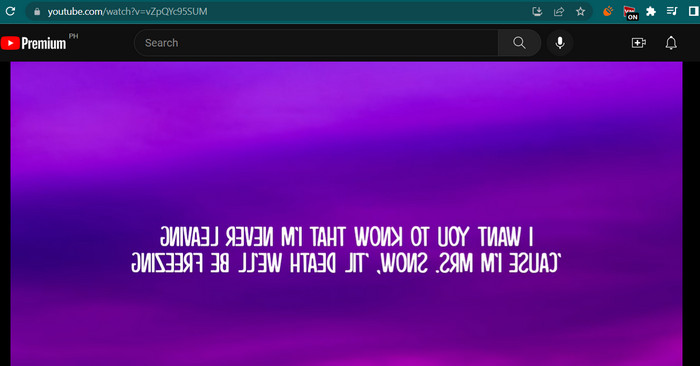
תוסף Video Mirror Chrome הוא כלי רב עוצמה וידידותי למשתמש שמקל על שיקוף הסרטונים שלך לחוויית צפייה משופרת. בלחיצה אחת, אתה יכול להפוך ולשקף את הסרטונים שלך כדי לתקן עיוותים וליהנות מהם בכיוון הנכון. התוסף תואם למגוון רחב של פורמטי וידאו ועובד בצורה חלקה עם נגני הווידאו הפופולריים ביותר. בנוסף, התוסף קל להתקנה ולשימוש, עם פקדים אינטואיטיביים וממשק פשוט. אם ברצונך להעיף וידאו אופקי באינטרנט באמצעות כלי זה, בצע את השלבים הבאים:
שלב 1. פתח בדפדפן האהוב עליך והתקן את ההרחבה Video Mirror לכרום מ־Chrome Web Store.
שלב 2. לאחר ההתקנה, נווט אל הסרטון שברצונך להפוך בדפדפן שלך. תוכל להיכנס לאתרי שיתוף וידאו כמו YouTube, Netflix ועוד.
שלב 3. כעת לחץ על הסמל של Video Mirror הממוקם בשורת הכלים. הסרטון יתהפך ויישוקף אופקית. לצערנו, לא ניתן לשקף סרטונים אנכית באמצעות כלי זה.
2. קאפווינג
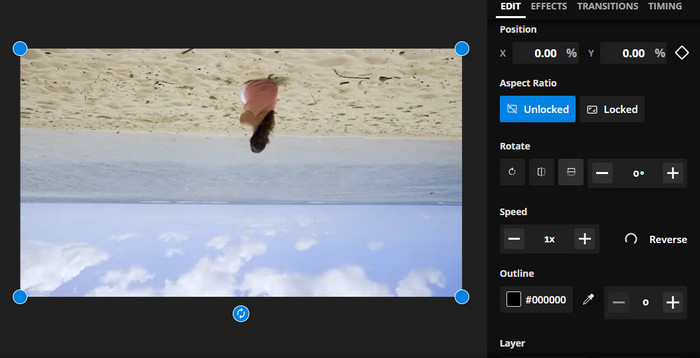
Kapwing היא פלטפורמת עריכת וידאו מקוונת חזקה התומכת במגוון רחב של כלים ותכונות שיעזרו לך ליצור ולערוך סרטונים במהירות ובקלות. עם Kapwing, אתה יכול לחתוך, לשנות גודל, להוסיף טקסט ותמונות, ואפילו להוסיף אפקטים ומעברים לסרטונים שלך. אחד המאפיינים המרתקים של Kapwing הוא היכולת שלו להעיף סרטונים באינטרנט. ניתן להעיף סרטונים אופקית או אנכית, ניתן לתקן עיוותים ותוכל לצפות בהם בכיוון האידיאלי.
שלב 1. כדי להתחיל לעבוד עם הכלי, פתח את הדפדפן המועדף עליך ועבור לאתר הרשמי של Kapwing.
שלב 2. לאחר שיש לך חשבון, לחץ על הכפתור Create New Project ואז על Upload כדי להעלות את הסרטון שברצונך להפוך אונליין.
שלב 3. לאחר שהמדיה נוספה לכלי המקוון, כלי העריכה בצד ימין יופיעו אוטומטית. כעת עבור ללשונית EDIT וחפש את חלק ה־Rotate. לאחר מכן לחץ על הסמל Flip Horizontally או Flip Vertically.
שלב 4. כשתהיה מרוצה, לחץ על הכפתור Export Project בפינה הימנית העליונה של הממשק. בשלב זה תוכל להפוך סרטונים אונליין אופקית וגם אנכית.
3. קלידאו
Clideo הוא כלי מצוין לעריכת וידאו מקוון המפשט את תהליך עריכת הווידאו לכולם. מה שטוב בתוכנית הזו הוא שהיא מגיעה עם כלים ייעודיים לכל מטרה. כלי שימושי אחד הוא סרטון היפוך. אתה יכול להעיף סרטונים אופקית או אנכית ללא הגדרות מסובכות. כמו כן, הכלי מאפשר למשתמשים לבחור את הפורמט המועדף עליהם לאחר היפוך הסרטון. לכן, הפוך את הסרטון ב-90 מעלות באינטרנט באמצעות השלבים הבאים:
שלב 1. היכנס לאתר Clideo באמצעות דפדפן הזמין במחשב שלך. לאחר מכן מצא את האפשרות Flip Video מתוך מבחר הכלים בעמוד הראשי.
שלב 2. כעת לחץ על הכפתור Choose file כדי להעלות וידאו מכונן המחשב המקומי. אם ברצונך להטמיע קובץ מאחסון ענן, באפשרותך לעשות זאת על־ידי לחיצה על כפתור התפריט הנפתח ובחירת שירות האחסון הרצוי.
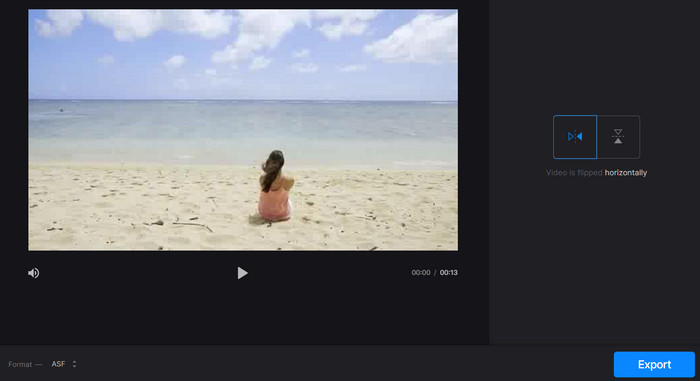
שלב 3. לאחר מכן תוכל לשנות את כיוון הווידאו לאחר שהוספת אותו לתוכנית. לחץ על הכפתורים המתאימים כדי להתאים את הכיוון לצרכים שלך.
שלב 4. אם ברצונך לשנות את פורמט הווידאו, לחץ על Format ואז על הכפתור Export כדי לשמור את הווידאו במחשב שלך. לאחר ביצוע ההוראות תוכל להפוך סרטונים אונליין בחינם וללא סימן מים.
חלק 2. גישה נהדרת להעיף סרטונים במצב לא מקוון
ברבים מהמקרים אין חיבור לאינטרנט, במיוחד אם אתה כל הזמן בתנועה. לכן, תוכנה לא מקוונת כמו FVC Video Converter Ultimate יכולה לעזור מאוד. כלי עריכת הדסקטופ מציע מגוון רחב יותר של אפשרויות עריכה מאשר אפליקציות אונליין להפיכת וידאו. עבור גם מחשבי PC וגם Mac, FVC Video Editor הוא תוכנת עריכת הווידאו המקצועית ביותר הזמינה. זהו עורך הווידאו הטוב ביותר מכיוון שהוא מאפשר לך להמיר, לסובב, להפוך, לגזור, לקצר ולהוסיף סימן מים לסרטונים בחופשיות.
שלב 1. הורדה והתקנת התוכנה
לחץ על כפתור Free Download למטה כדי להוריד עותק של קובץ ההתקנה של התוכנית. לאחר מכן התקן אותו בעזרת אשף ההתקנה. מיד לאחר מכן הפעל אותו במחשב שלך והתחל להתרגל לממשק.
הורדה חינמיתעבור Windows 7 או גרסה מאוחרת יותרהורדה מאובטחת
הורדה חינמיתעבור MacOS 10.7 או גרסה מאוחרת יותרהורדה מאובטחת
שלב 2. הפעלת כלי ההיפוך של הווידאו
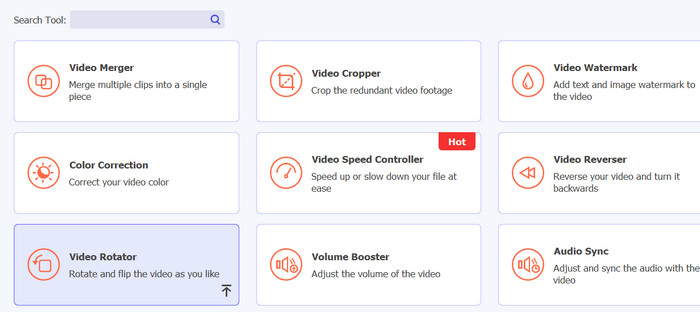
לאחר הפעלת היישום, תראה ארבע לשוניות בממשק הראשי. בחר Toolbox > Video Rotator מהרשימה הנפתחת. תוכל גם לחפש את הכלי באמצעות תיבת החיפוש כדי למצוא אותו במהירות.
שלב 3. העלאת קובץ וידאו
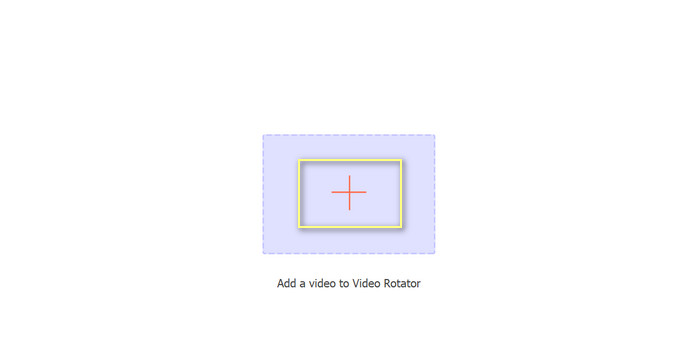
ניתן לבחור את סימן הפלוס כדי להעלות את הסרטון הרצוי בלוח ההעלאה של Video Rotator. לאחר מכן יוצג הממשק להיפוך.
שלב 4. היפוך הווידיאו
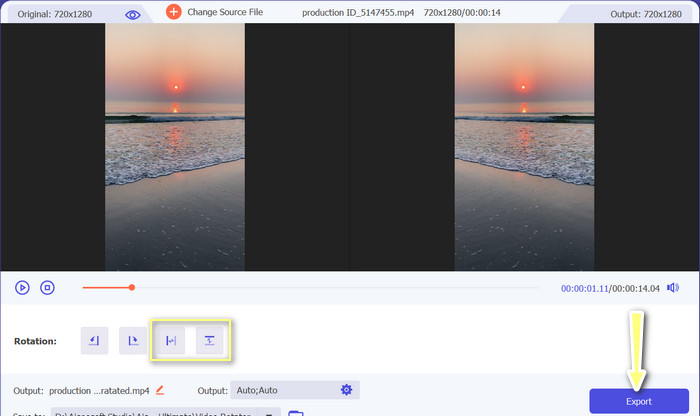
לאחר שממשק ההיפוך מוצג, ניתנת גישה לכפתורי ההיפוך שלו. ניתן לבחור לסובב את הסרטון אופקית או אנכית. בחר בכפתור המתאים ולאחר מכן לחץ על כפתור Export כדי להשלים את התהליך.
לקריאה נוספת:
דרכים מצוינות כיצד לחתוך וידאו אונליין בנוחות
איך להפוך כיוון של וידאו כמו מקצוען כדי ליצור סרטון קולנועי מצוין
חלק 3. שאלות נפוצות על היפוך סרטונים באינטרנט
מה המשמעות של שיקוף סרטון באינטרנט?
שיקוף סרטון פירושו להפוך אותו אופקית או אנכית כך שהצד השמאלי יהפוך לצד ימין ולהיפך. זה שימושי לתיקון צילומים שהוקלטו בזווית לא נוחה או בעת יצירת סוגים מסוימים של תוכן.
האם זה חוקי לשקף סרטון של מישהו אחר?
בדרך כלל, זה לא חוקי לשקף סרטון של מישהו אחר ללא רשות או ייחוס מתאים. לפני שיקוף סרטון כלשהו, ודא שיש לך את הזכות להשתמש בו ושאינך מפר חוקי זכויות יוצרים.
האם אני יכול לשקף סרטון בטלפון שלי?
כן, אתה יכול לשקף סרטון בטלפון שלך באמצעות אפליקציית עריכת וידאו. אפליקציות רבות לעריכת וידאו פופולריות, כגון InShot, VideoShow ו-KineMaster, מציעות אפשרויות שיקוף. כל שעליך לעשות הוא להעלות את הסרטון שלך לאפליקציה, לבחור באפשרות השיקוף ולשמור את הגרסה החדשה שהושקפה.
סיכום
שיקוף סרטונים אונליין מעולם לא היה פשוט יותר, הודות למגוון הרחב של כלי עריכת וידאו מקוונים הזמינים כיום. עם ריבוי האפליקציות לשיקוף וידאו אונליין, חשוב לבחור בכלי עריכת וידאו מקוון אמין ואיכותי המתאים לצרכים הספציפיים שלך.
-
 [4 דרכים] כיצד להאיץ בקלות את הסרטונים שלך באינטרנט
 האם אתה רוצה להאיץ סרטון באינטרנט? קרא מאמר זה כדי לדעת יותר על זירוז סרטון בדרכים שונות אפשריות.
-
 כיצד ליצור סרטון Time Lapse באייפון בצורה מושלמת
 האם אתה רוצה לדעת איך ליצור סרטון זמן-lapse באייפון שלך? אתה יכול ליצור זמן-lapse וידאו מושלם באייפון שלך על ידי ביצוע השלבים הפשוטים הבאים למטה.
-
 5 הממיר המקוון הטוב ביותר עבור GIF לכל פורמט וידאו בחינם ובפרימיום
 אם קובצי GIF אינם נתמכים בפלטפורמה, עדיף להמיר את ה-GIF שלך לכל פורמט וידאו מקוון. ושמרו גם על תוכן ה-GIF.
