


 ממיר וידאו אולטימטיבי
 מקליט מסך
 תיקון וידאו
 הורדה מאובטחת
סקירת מקליט המסך של CamStudio: כל התשובות עבורך
כיום, הרבה תוכנות להקלטת מסך הן טובות, אבל מחיר המנוי שלהן אינו נמוך, וממשק המשתמש עלול גם להפוך למסובך יותר ויותר ככל שהפונקציות מתרבות. אז האם יש מוצר בתעשייה שהוא גם במחיר סביר וגם יחסית שלם מבחינת הפיצ’רים? התשובה היא CamStudio, תוכנה שיכולה לעזור לך ללכוד את מסך המחשב בחינם, והיא קלה מאוד לשימוש. אנחנו ממליצים בחום לנסות אותה, ונראה מדוע בסקירת CamStudio Screen Recorder זו. תלמד כיצד היא עובדת עבור משתמשים, מה היא יכולה לעשות עבורנו, ולמי היא מתאימה במיוחד. מתוך הבנה שאין תוכנה מושלמת, נציג גם באופן מציאותי את הבעיות שקיימות ב‑CamStudio.
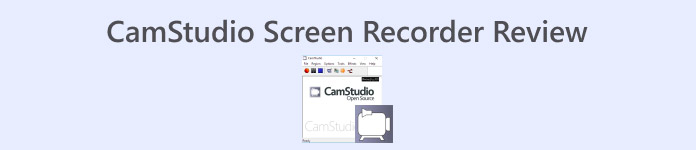
חלק 1. סקירת תוכנת CamStudio
CamStudio היא תוכנת הקלטת מסך עם היסטוריה ארוכה, שיצאה לראשונה בשנת 2001. עד היום, המפתחים שלה לא הפסיקו לתחזק ולעדכן אותה. התוכנה היא בקוד פתוח לחלוטין ועוזרת למשתמשים ללכוד תמונות סטילס, סרטוני תנועה על המסך או אודיו מהמיקרופון והרמקולים. CamStudio משמשת בדרך כלל ליצירת סרטוני הדרכה, סרטוני משחקים בפעולה ומצגות מקוונות. נסקור את התכונות העיקריות שלה בכמה נקודות בסעיף זה.

תכונות CamStudio
• הקלט בקלות כל מה שתרצה
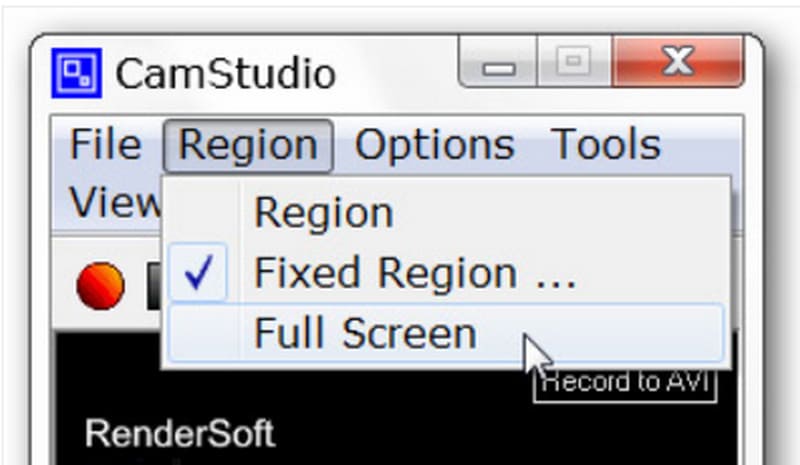
תוכנת CamStudio מעניקה לך את הגמישות לשלוט באזור שברצונך להקליט, כגון הקלטה במסך מלא, הקלטה בחלון יחיד או הקלטה של אזור ספציפי.
• שליטה דרך מקשי קיצור
קיצורי מקלדת יכולים להפעיל את CamStudio, כך שאין צורך לחפש תפריטים וכפתורים; פשוט לחצו על צירופי המקשים המתאימים.
• הדגשת פעילות עכבר ומקלדת
ניתן להשתמש בכל מקליט וידאו ליצירת סרטוני הדרכה. ניתן להקליט את מסך ההפעלה, פעולות לחיצה, פעילויות בחלונות קופצים ועוד. הוא מקליט סרטונים ללא עיכוב.
• פלט וידאו באיכות גבוהה
מקליט המסך החינמי של CamStudio משתמש בקודקים כגון H.264, H.265, HEVC, AVI, AAC, FLAC וכו', כדי להבטיח שהסרטון המוקלט שלכם יהיה קרוב ככל האפשר למקור ובעל סאונד יציב.
• התחשבות בצורך בהגדרות אישיות
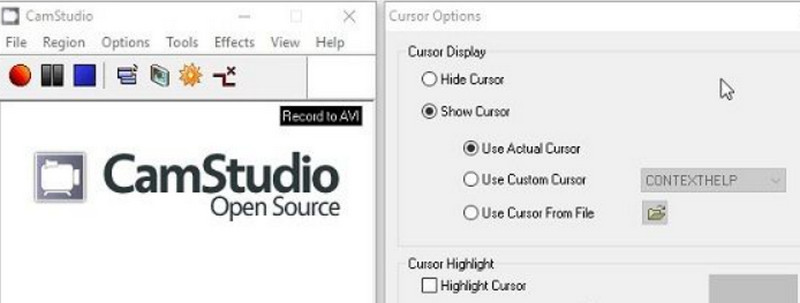
ניתן לשלוט בתהליך ההקלטה בצורה מדויקת, להסתיר את מצביע העכבר, להקליט גבולות ועוד. CamStudio מאפשרת גם להתאים את הרזולוציה וקצב הפריימים של הסרטונים.
• הוספת הערות
CamStudio החינמית מספקת כלי ביאורים וסימון רבים. בזמן ההקלטה, ניתן להדגיש אזור מסוים על המסך ולהוסיף סימני מים לצילומים כדי להגן על הקניין הרוחני שלכם.
יתרונות
- קוד פתוח וחינמי
CamStudio לא גובה עמלות, ואין הגבלה על מספר שעות ההקלטה. זהו כלי נהדר לאנשים עם תקציב מוגבל הזקוקים ליכולות הקלטת מסך בסיסיות. - פועל באור קל
לתוכנית זו מגוון קודקים מובנים, המאפשרים למשתמשים לדחוס קבצי וידאו לגודל הרצוי.
חסרונות
- מספר פורמטים נפוצים אינם נתמכים
CamStudio אינו תומך בפורמטים MOV ו-MKV, שניהם די פופולריים בתעשייה. אם תזדקקו להם, ייתכן שתזדקקו לממירי פורמט נוספים. - התכונות בסיסיות מדי
ל-CamStudio יש רק כמה הגדרות הקלטה והתאמה אישית בסיסיות יחסית, וחסרות לה כמה תכונות עריכת וידאו. - לא תומך במק
תוכנה זו מותאמת כרגע רק למערכת ההפעלה Windows ואינה תומכת במשתמשי Mac.
פסק דין למי זה הכי מתאים
הדבר הטוב ביותר ב‑CamStudio הוא שהיא חינמית ומציעה כלים רבים להוספת הערות, ולכן היא מושלמת ליצירת מדריכים, סרטוני הדרכה או סרטוני הדגמה.
אין מגבלות לפי תחום, כך שתלמידים, יוצרי תוכן שרוצים להכין מדריכים לשימוש במשחקים או בתוכנות, ומפתחים שרוצים להציג פיצ'רים של תוכנה – כולם מוזמנים להשתמש ב‑CamStudio. אין מחסומים טכניים לשימוש בה.
חלק 2. האם CamStudio חינמי?
כן, CamStudio היא תוכנה חינמית לחלוטין לשימוש. היא אינה גובה עמלות נוספות, ואין הגבלות על גודל קובץ ההקלטה או משך הסרטון. עם זאת, יש לה מעט תכונות והיא תואמת כרגע רק ל-Windows. משתמשי Mac עשויים לרצות לחפש תוכנה אחרת כחלופה.
חלק 3. למה ה-CamStudio שלי לא מקליט אודיו
הבעיה הנפוצה ביותר המדווחת על ידי משתמשי CamStudio היא חוסר היכולת להקליט אודיו. כיום מקובל לחשוב שגרסה לא נתמכת או לא מעודכנת של כרטיס הקול גורמת לבעיה זו. הנה כמה פתרונות שכדאי לנסות.
• השתמשו בקצב פריימים קבוע בעת הקלטה, לדוגמה 30 פריימים לשנייה.
• עדכן את מנהלי ההתקן של כרטיס הקול שלך לגרסה העדכנית ביותר.
• סגור יישומים אחרים שעלולים להפריע להקלטה שלך.
• הגבל את גודל קובץ ההקלטה ונסה לבצע זאת עם איכות הקלטה נמוכה יותר.
• אל תצלמו סרטון ארוך מדי בבת אחת. נסו לחלק אותו לקטעים קצרים.
חלק 4. מדריך למקליט CamStudio
הנה מדריך איך להקליט עם CamStudio.
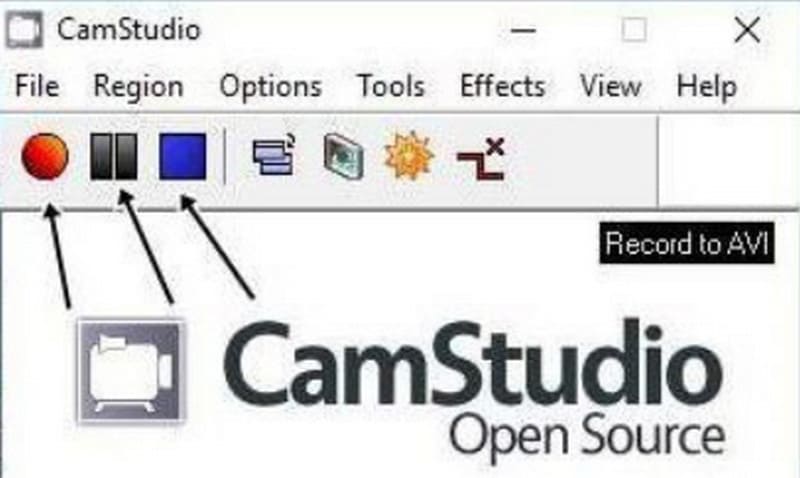
שלב 1. הורד והתקן את CamStudio Recorder במחשב שלך. פתח אותה ובחר Options. כאן תוכל לסיים להגדיר את הווידאו, האודיו והסמן. לאחר מכן בחר Program Options > Output directory כדי להגדיר את נתיב השמירה של סרטון ההקלטה שלך.
שלב 2. עבור ללשונית Region ובחר את האזור שברצונך להקליט, כגון חלון, מסך מלא או אזור נבחר.
שלב 3. לבסוף, לחץ על כפתור Record האדום כדי להתחיל להקליט. באפשרותך להפסיק או לסיים את ההקלטה על‑ידי לחיצה על הסמלים המתאימים שליד Record.
חלק 5. האלטרנטיבה הטובה ביותר ל-CamStudio - מקליט מסך FVC
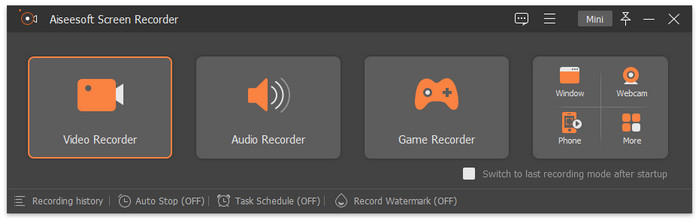
אם אתה מחפש חלופה ל‑CamStudio, אנו ממליצים על FVC Screen Recorder, שיש לו יותר אפשרויות הקלטה ותכונות עריכת וידאו מקיפות. תוכל ללכוד כל דבר שעל המסך, ושום פרט לא יוחמץ. FVC Screen Recorder תומכת במספר פורמטי פלט, כולל MP4, MKV, MOV, AVI ועוד. בזמן ההקלטה תוכל תמיד לצלם צילומי מסך ולצייר סימונים על המסך כדי להוסיף הדגשות. תוכל אפילו לתת לעוזר הזה לעזור לך להקליט את המסך בטלפון שלך, כל עוד תוכל לחבר אותו למחשב.
הורדה חינמיתעבור Windows 7 ומעלההורדה מאובטחת
הורדה חינמיתעבור MacOS 10.7 ומעלההורדה מאובטחת
חלק 6. שאלות נפוצות על סקירת CamStudio
האם CamStudio בטוח לשימוש?
כן, CamStudio בטוח ואינו מכיל רכיבים מזיקים כמו וירוסים. עם זאת, חלק מהמשתמשים הגיבו כי התקנתו עלולה להוריד תוכנות לא רצויות.
מה יותר טוב מקאם סטודיו?
אם אתה זקוק יותר מכל למקליט משחקים, אנו ממליצים על OBS Studio, אך הממשק שלו מעט מסובך יותר. אם אתה רוצה תוכנה מקיפה ובו‑בזמן פשוטה לשימוש, אל תפספס את FVC Screen Recorder.
האם ל- CamStudio יש סימן מים?
CamStudio היא קוד פתוח לחלוטין וחינמית. אין דמי מנוי או הגבלות על שעות הקלטה, והווידאו אינו כולל סימני מים. עם זאת, באפשרותך להוסיף סימן מים לסרטונים שלך דרך CamStudio, אם תרצה לסמן את העבודה שלך.
סיכום
בעזרת סקירת CamStudio Screen Recorder זו נגלה שהתוכנה מתאימה בצורה מושלמת למשתמשי Windows שאינם רוצים להוציא כסף נוסף אך יש להם משימות הקלטת מסך פשוטות על בסיס יומי. היא קלה לשימוש; אולם היכולות שלה גם מוגבלות. אם אתה משתמש Mac שמחפש תוכנה דומה אך עם יכולות עריכה מקיפות יותר, שקול את FVC Screen Recorder.
-
 סנאגיט מול קמטסיה: איזו מהן הכי טובה בשבילך
 אם אינכם יודעים איזה מקליט מסך לבחור, קראו את הפוסט הזה על Snagit מול Camtasia. ננתח את ההבדלים ביניהם מכל הזוויות ונעזור לכם להחליט.
-
 5 אפליקציות הקלטת האודיו הנבחרות ביותר באנדרואיד וב-iOS [עדכון 2025]
 לא יודע באיזו אפליקציית מקליט אודיו כדאי להשתמש? אם כן, מאמר זה יעזור לך לבחור איזו אפליקציה תעזור לך במשימת הקלטת האודיו שלך.
-
 7 של מקליט הקול המפואר נגיש בכל הפלטפורמות
 האם אתה רוצה ללמוד איך לעשות הקלטת אודיו? לאחר מכן, עבור למאמר זה כאשר אנו מדברים על מקליט האודיו הטוב ביותר שיכול להתאים לצרכים שלך.
