


 ממיר וידאו אולטימטיבי
 מקליט מסך
 תיקון וידאו
 הורדה מאובטחת
הדרכים המהירות ביותר להמרת FLAC ו-WAV (לא מקוון / מקוון)
Free Lossless Audio Codec, המוכר בדרך כלל כ-FLAC, הוא פורמט קובצי שמע הדומה מאוד ל‑MP3. הוא מספק למשתמשים איכות שמע מצוינת תוך שהוא תופס נפח יחסית קטן על שטח הדיסק שלכם. נוסף על כך, סוג פורמט זה הוא חסר אובדן, כלומר חלק גדול מנתוני השמע שלכם נשמר גם לאחר תהליך הדחיסה. מצד שני, ישנם מקרים שבהם תצטרכו להמיר קובצי FLAC לפורמט אחר כמו WAV אם ברצונכם להביא את חוויית ההאזנה שלכם לרמה מיטבית ואיכותית במיוחד. האם עליכם לבחור בין השניים? גלו למטה כיצד תוכלו ליהנות משניהם בעזרת כלי ההמרת FLAC ל‑WAV הטובים ביותר הקיימים.

חלק 1. המר FLAC ו-WAV לא מקוון
Video Converter Ultimate הוא כלי מוביל להמרת קבצים לכל פורמט שמע, כולל WAV ו‑FLAC. התוכנה מציעה יכולת המרה באצוות, המאפשרת לכם להמיר אוסף של קובצי שמע בפעם אחת. נוסף על כך, תוכלו למקסם את האיכות של כל שיר שברצונכם לעבוד עליו, מאחר שהתוכנה מאפשרת למשתמשים להתאים הגדרות טכניות של הפלט, כגון קצב הדגימה וקצב הסיביות (bitrate). אם ברצונכם לבצע המרה באצוות מ‑WAV ל‑FLAC או להפך, קראו את המדריך הקצר שהכנו להלן.
שלב 1. הפעילו את התוכנה במכשירכם על‑ידי בחירת לחצן ההורדה בחינם המתאים שלמטה. לאחר מכן, עקבו אחר ההוראות שעל המסך כדי להפעיל את התוכנה. לאחר ההתקנה תוכלו להתרגל לממשק שלה בקלות.
הורדה חינמיתל-Windows 7 ומעלההורדה מאובטחת
הורדה חינמיתל-MacOS 10.7 ומעלההורדה מאובטחת
שלב 2. לחצו על סמל ההוספה במסך הראשי וייבאו את קובץ השמע שבו תרצו לעבוד. לאחר מכן תועברו למסך תצוגה מקדימה של הקובץ שיובא. תוכלו להעלות תיקייה אם ברצונכם להמיר כמות גדולה בבת אחת. בחרו בספרייה שלכם את התיקייה שמכילה את כל קובצי השמע הדרושים לכם.
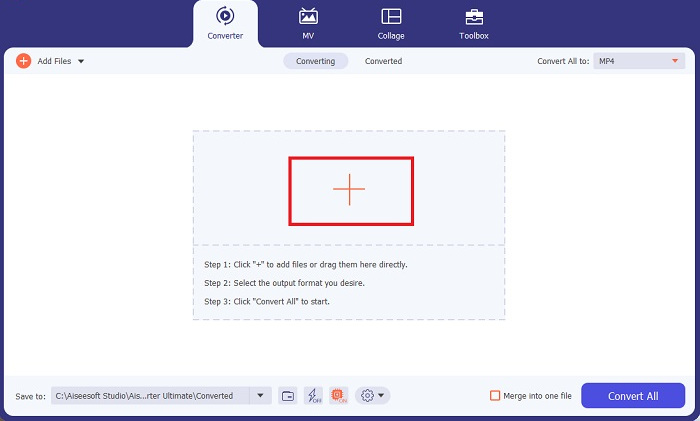
שלב 3. כעת תוכלו לשנות את פורמט הפלט על‑ידי לחיצה על כפתור הConverter בחלק העליון של מסך התוכנה. משם, בחרו ב‑WAV בכרטיסיית הבחירה Audio Output. במקביל, תוכלו להתאים את קצב הדגימה ואת קצב הסיביות של קובץ הפלט כך שיתאימו לאיכות המועדפת עליכם.
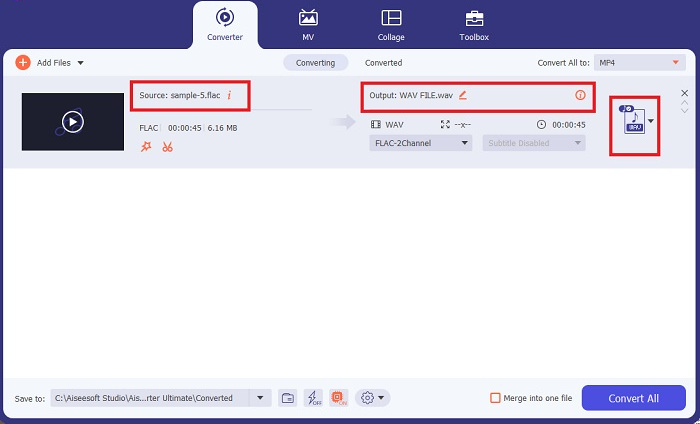
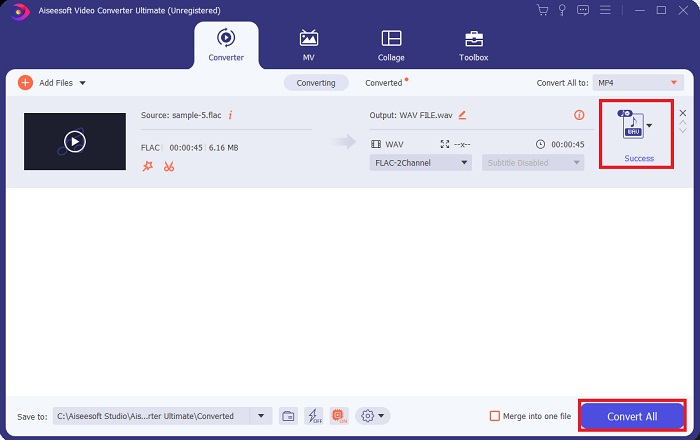
שלב 4. בשלב הסופי, התחילו את תהליך ההמרה על‑ידי לחיצה על כפתור Convert All שבתחתית. לאחר מכן התוכנה תפתח באופן אוטומטי את תיקיית הפלט כדי שתוכלו לבדוק את הפורמט החדש של הקובץ שלכם.
יתרונות
- זה יכול להמיר באצווה FLAC לפורמט קובץ שמע WAV.
- התוכנית עובדת היטב עם Windows ו-Mac OS.
- יש לו מהירות המרה מהירה.
חסרונות
- זה דורש דמי מנוי בתשלום לאחר הניסיון בחינם.
- התוכנית אינה פועלת על התקני מערכת ההפעלה Linux.
חלק 2. המר FLAC ל-WAV או WAV ל-FLAC באינטרנט
אמנם מנוע החיפוש שלכם עשוי להציג לכם שלל ממירים מקוונים מ‑FLAC ל‑WAV או מ‑WAV ל‑FLAC, אך הנה מה שאנו יכולים לעשות כדי להקל עליכם. Free Audio Converter Online הוא אפשרות מצוינת שמייתרת את הצורך בהתקנת תוכנת שולחן עבודה. ממיר מקוון זה פועל בצורה חלקה, ומספק הגנה ובטיחות לנתונים האישיים שלכם תוך כדי ביצוע ההמרה. נוסף על כך, תוכלו לנצל את יכולת ההמרה באצוות של התוכנה, ממש כאילו הייתם משתמשים בתוכנת שולחן עבודה.
שלב 1. לחצו על הקישור שלמעלה כדי להגיע לאתר הראשי של Free Online Video Converter. בחרו ב‑Add Files to Convert במסך הראשי והעלו את קובץ השמע שלכם.
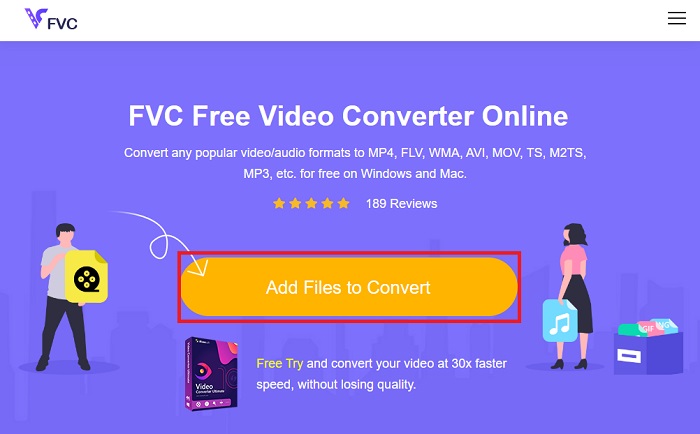
שלב 2. תצוגה מקדימה של הקובץ המקורי שלכם תופיע על המסך. מאותו חלון, גללו מטה ובחרו את פורמט הפלט הרצוי לכם.
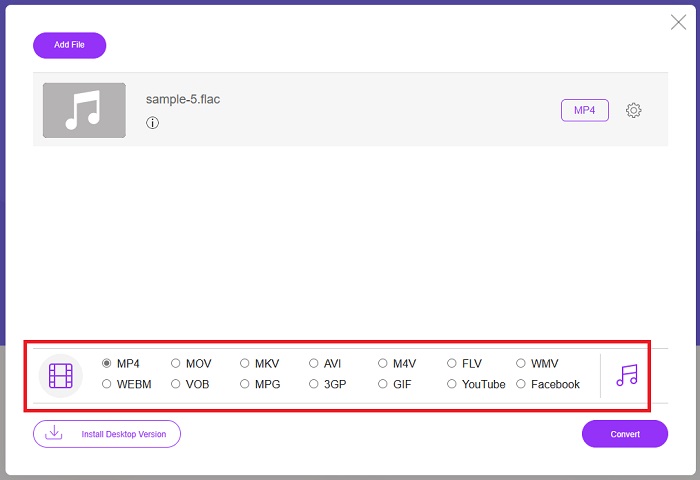
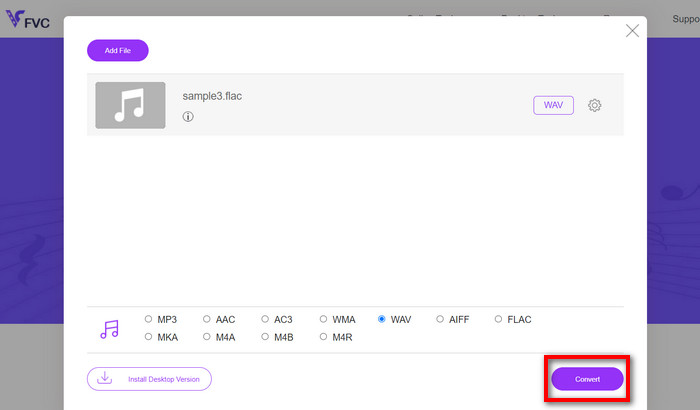
שלב 3. לחצו על כפתור ה‑Convert כדי להמיר את פורמט FLAC ל‑WAV. אם ברצונכם להמיר קובץ נוסף, חזרו על מדריך זה מן ההתחלה.
יתרונות
- זה עובד על כל מנוע חיפוש כמו Google Chrome, Safari, Firefox ועוד.
- הוא מציע מגוון פורמטים פופולריים של קבצי שמע כמו MP3, AAC ו-WMA.
- משתמשים יכולים ליהנות מהמרות ללא הגבלה ליום.
חסרונות
- מהירות ההמרה תלויה בחוזק החיבור לאינטרנט.
לקריאה נוספת:
המרת FLAC ל‑MP3 לשימור איכות השמע
צעדים קלים להמרת WAV ל‑OGG לגודל שמע אופטימלי
חלק 3. שאלות נפוצות על המרת FLAC ו-WAV
האם המרת קובץ מ-FLAC ל-WAV תרד באיכות?
המרת קבצי האודיו שלך מ-FLAC ל-WAV לא תיפגע באיכות מכיוון שהרזולוציה שלו אינה דחוסה. עם זאת, נניח שאתה ממיר קובץ מ-WAV ל-FLAC. במקרה כזה, אתה עשוי להבחין בשינויים קלים, במיוחד עבור אלה שאוזניהם די בפרטים. אם אתה צריך סיוע להחליט איזה מהם לשמור, הנה פיסת פרספקטיבה שאתה יכול להסתכל עליה; פורמטי אודיו FLAC הם בחירה טובה לאחסון מאגר של שירים, בעוד שגודל קבצי WAV גדול יותר אך מתאים לעריכת אודיו.
האם WAV הוא פורמט האודיו ברזולוציה הגבוהה ביותר?
WAV הוא קיצור Waveform Audio File Format שפותח על ידי IBM ו-Microsoft. פורמט זה נחשב לפורמט בעל הרזולוציה הגבוהה ביותר בתעשיית המוזיקה הדיגיטלית מכיוון שהוא מכיל תדרי שמע גולמיים ובלתי מתפשרים.
מהו ממיר FLAC לWAV המקוון הטוב ביותר?
ללא ספק, FVC Free Online Video Converter הוא ממיר ה-FLAC לWAV החינמי הטוב ביותר באינטרנט. אינך צריך לרכוש מיומנות טכנית כדי להפוך קבצי וידאו ואודיו כלשהם באמצעות התוכנה. זה יכול לעשות את העבודה שלך ביעילות מכיוון שהוא ידידותי למשתמש ובעל מהירות המרה שאין שני לה. יתר על כן, תוכנית מקוונת זו מספקת, אם לא את כולם, אלא את רוב פורמטי האודיו הפופולריים שאנו מכירים.
סיכום
המרה יכולה להתבצע לשני הכיוונים, מ‑FLAC ל‑WAV וגם מ‑WAV ל‑FLAC. מאחר ששני פורמטי הקבצים נפוצים מאוד במוזיקה דיגיטלית כיום, הבחירה באיזה להשתמש עשויה תלות במשימה שלשמה אתם זקוקים להם. בעזרת הכלים שצוינו למעלה תוכלו לעבור הלוך ושוב בין הפורמטים בכל עת. עקבו אחר השלבים שהוזכרו לעיל כדי להמיר FLAC ל‑WAV או WAV ל‑FLAC, ולא צפויות לכם כל בעיות.
-
 למד כיצד להמיר MP3 לפורמט WAV
 האם אתה רוצה לדעת איך להמיר MP3 ל WAV? קבע איזה מהכלים מייצר את ההמרה האיכותית ביותר שאתה יכול לקבל.
-
 נגן WAV - חמשת אפליקציות הנגן WAV המובילות לאנדרואיד, אייפון, PC ו- Mac
 איך מנגנים קבצי WAV בטלפון אנדרואיד? איזה שחקן יכול לשחק WAV? פוסט זה משתף 5 נגני WAV בחינם הטובים ביותר עבור Android, iPhone, Mac ו- PC.
-
 3 עורכי המטא נתונים המובילים של FLAC ב-Mac ו-Windows [עודכן 2023]
 האם ברצונך לשנות מטא נתונים של FLAC? במקרה זה, עליך לקרוא מאמר זה מכיוון שאנו מספקים ידע מספיק על עורך המטא נתונים העדכני ביותר של FLAC שניתן להשתמש בו.
