


 ממיר וידאו אולטימטיבי
 מקליט מסך
 תיקון וידאו
 הורדה מאובטחת
תיקון קוד שגיאה 224003: כל מה שאתה צריך לדעת
המעט שאדם רוצה לחוות הוא שיראה את הופעת קוד השגיאה 224003 על המסך שלו. הבנת הסיבות הנפוצות לקוד השגיאה 224003, כגון בעיות רשת, תאימות דפדפן ותוכנה מיושנת, היא חיונית לפתרון בעיות יעיל. הכרת הכלים הנכונים היא הכרחית כאשר עוסקים בנושא כזה, מה שמצריך קבלת החלטות כדי להבטיח שלא תהרוס את קובץ הווידאו לחלוטין.
This article will delve into step-by-step solutions, addressing each potential cause and providing practical tips to resolve the error. By the end of this guide, you'll be equipped with the knowledge to navigate the complexities of Error Code 224003 and ensure a seamless digital experience. Whether you're encountering this error for the first time or have faced it repeatedly, our guide aims to empower you with the tools to troubleshoot, fix, and prevent Error Code 224003 in the future. Be sure to read the whole article today so that you might know how to deal with it for future occurrences.

חלק 1. הבנת קוד שגיאת וידאו 224003
קוד שגיאה 224003 יכול להתבטא בצורות שונות, ולעתים קרובות מצביע על תקלה או בעיה במערכת. משתמשים עלולים להיתקל בשגיאה זו בעת שימוש ביישומים ספציפיים, שירותי סטרימינג או דפדפנים, מה שיוביל לאי נוחות משמעותית. כדי לטפל בשגיאה זו ולפתור אותה ביעילות, חשוב להבין את הסיבות הפוטנציאליות שלה, המפורטות להלן.
סיבות נפוצות לקוד שגיאה 224003
◆ Network Issues: Poor or unstable internet connection can trigger Error Code 224003, especially when streaming content online. This is also the reason for Error code 232404.
◆ Browser Compatibility: Certain browsers may not be fully compatible with the application or service, leading to the error.
◆ Outdated Software: Obsolete software, including browsers and applications, can be a factor in the occurrence of this error.
◆ Corrupted Cache or Cookies: Accumulated cache or corrupted cookies in your browser may interfere with the proper functioning of the application, resulting in Error Code 224003.
באילו מצבים מתרחש קוד השגיאה
◆ Issues with Streaming Platform: Problems on the server side of the streaming platform, such as maintenance, technical issues, or high traffic, can result in error code 224003. In such cases, the user has limited control over resolving the issue and may need to wait for the platform to address it.
◆ Hardware Acceleration: Hardware acceleration in your browser settings may sometimes lead to compatibility issues with certain video content, resulting in error code 224003. Disabling hardware acceleration could be a potential solution in such cases, and other video playback issues like video in green screen, video freezes, and more.
◆ Incompatibility with Device: Certain devices or operating systems may not be fully compatible with the video content, causing errors during playback.
◆ Network Firewall or Security Software: Certain security software or firewalls may block streaming specific video content, resulting in the display of Error Code 224003.
◆ Browser Extensions Interference: Certain browser extensions or add-ons may interfere with the proper functioning of online video players, leading to Error Code 224003.
חשוב להבין שהתנאים הספציפיים שהביאו לקוד השגיאה 224003 עשויים להיות שונים; לפיכך, גם אמצעי פתרון הבעיות עשויים להיות שונים. זיהוי הסיבה הבסיסית תלוי בהקשר שבו מתרחשת השגיאה כדי לתקן את הבעיה כראוי.
חלק 2. מדריך שלב אחר שלב לפתרון שגיאה 224003
Aiseesoft תיקון וידאו
Error 224003 can happen to anyone at any time and any video file, and when this error occurs, you may see a message like Error 224003: The video file cannot be played. Aiseesoft Video Repair is a reliable tool to fix issues like corrupted or damaged video files like the error 224003. It can repair videos in various formats, including MP4, MOV, AVI, WMV, MKV, and FLV. It also supports repairing videos damaged by viruses, malware, and other factors. Follow this step-by-step guide to resolve your problem using Aiseesoft Video Repair and get your videos back in pristine condition.
Steps on Resolving Error 224003 Using Aiseesoft Video Repair:
Step 1. Visit Aiseesoft's website, download Video Repair, and follow the installation instructions.
Free DownloadFor Windows 7 or laterSecure Download
Free DownloadFor MacOS 10.7 or laterSecure Download
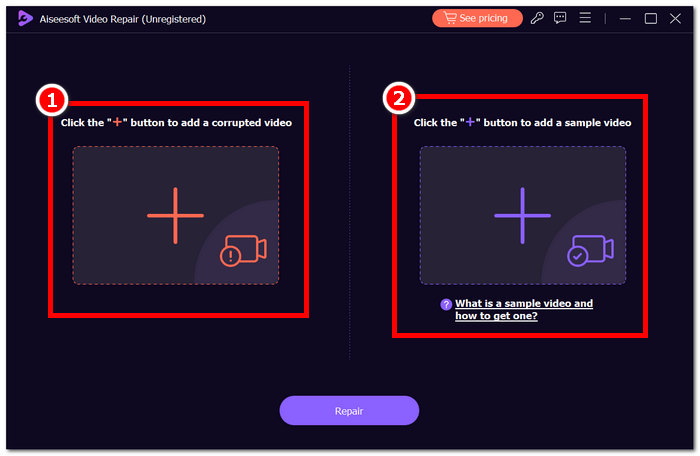
Step 2. Open Aiseesoft Video Repair and add the video experiencing the error code 224003 on the red + symbol. Click the purple + symbol on the right to add your sample video.
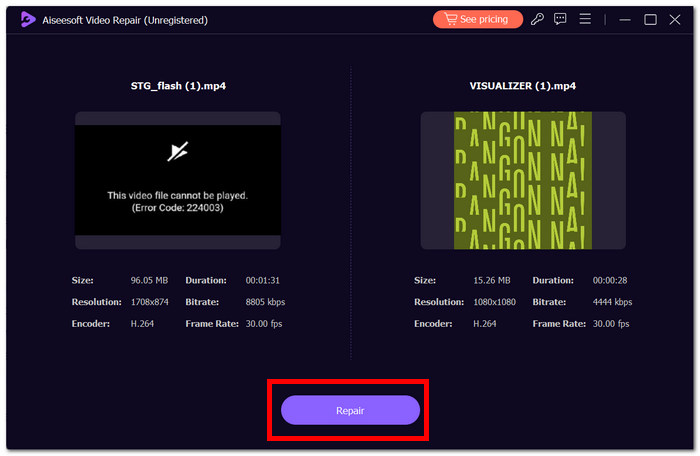
Step 3. Click Repair, and the software will analyze and fix the video.
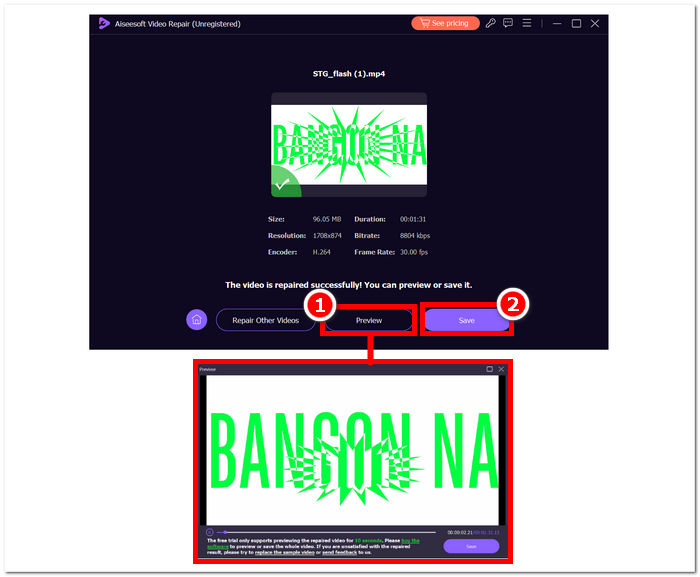
Step 4. After repair, click Preview to verify. Click Save to have it download the repaired video, and open it with your media player to check if Error 224003 is fixed.
Additional Tips:
◆ שמור גיבוי של קובץ הווידאו המקורי לפני שתנסה לתקן.
◆ ודא שאתה משתמש בגרסה העדכנית ביותר של Aiseesoft Video Repair לביצועים מיטביים.
על ידי ביצוע קפדני של הוראות שלב אחר שלב אלה, אתה יכול להשתמש ביעילות ב-Aiseesoft Video Repair כדי להתמודד ולבטל את שגיאה 224003, ולהחזיר את קובצי הווידאו שלך למצב פונקציונלי ומהנה. זכור לשמור את הסרטון המתוקן במיקום המועדף עליך וליהנות מצפייה ללא הפרעה ללא התסכול של שגיאה 224003. אם אתה נתקל באתגרים כלשהם במהלך התהליך, עיין בתיעוד של Aiseesoft Video Repair או בקש עזרה ממשאבי התמיכה שלהם לקבלת הדרכה נוספת.
חלק 3. שאלות נפוצות על קוד שגיאה 224003
מדוע פיירפוקס כל הזמן אומר קוד שגיאת וידאו 224003?
שגיאת וידאו 224003 של Firefox עשויה להופיע עקב בעיות בקישוריות לרשת, אי התאמות בהגדרות הדפדפן או חוסר תאימות לתוכן הווידאו. כדי לטפל בשגיאה זו, התחל על ידי אימות יציבות חיבור האינטרנט שלך, ודא שהדפדפן שלך מעודכן וניקוי המטמון והעוגיות של הדפדפן שלך. בנוסף, הסרה זמנית של תוספים מהדפדפן שלך יכולה לעזור באיתור ופתרון התנגשויות תאימות, מה שעלול לבטל את התרחשות השגיאה 224003 במהלך הפעלת וידאו.
האם תיקון קובץ הווידאו מוריד את איכות הווידאו?
תיקון קובץ וידאו יכול להתבצע מבלי לפגוע באיכות אם מבוצע כראוי. תהליך זה מתייחס בעיקר לחששות כמו שחיתות או שגיאות עיצוב בתוך הקובץ. חיוני להסתמך על כלי תיקון וידאו מהימנים, וכאמצעי זהירות, ליצור גיבוי של קובץ הווידאו המקורי לפני תחילת הליכי תיקון כלשהם.
האם אתה יכול לתקן קוד שגיאה של וידאו מקוון?
כדי לטפל בקוד שגיאת וידאו מקוון כמו 224003, רענן את הדף, בדוק את החיבור לאינטרנט ועדכן את הדפדפן. אם הבעיה נמשכת, שקול לנסות דפדפן אחר לצורך תאימות. אם כל השאר נכשל, פנה לפורום התמיכה או הקהילה של הפלטפורמה לקבלת סיוע בפתרון השגיאה ושיחזור הפעלת וידאו חלקה.
סיכום
Error Code 224003 can be irritating, but you can overcome it with the right information and troubleshooting procedures. You can easily fix this error and restore a flawless digital experience by identifying and correcting potential causes such as network issues, browser compatibility, and outdated software. If you encounter Error Code 224003 again, please see our tutorial for a step-by-step solution. With these insights, your tech-related frustrations will be a thing of the past, allowing you to enjoy uninterrupted digital activities easily.
-
 מהי שגיאת 0xc10100bf בווידאו וכיצד לתקן אותה
 האם הסרטון שלך לא מתנגן בגלל שגיאה 0xc10100bf, ואתה מחפש דרכים לתקן את זה? במאמר זה תלמדו מה זה וכיצד לתקן את זה.
-
 פתרונות מהירים לתיקון לא ניתן לנגן וידאו שגיאה 150
 האם נתקלת פעם בחוסר היכולת המתסכל להפעיל שגיאת וידאו 150 במהלך חווית הצפייה שלך בווידאו? אל תדאג כי סידרנו לך איך לתקן את זה.
-
 [מדריך מפורט] כיצד לתקן וידאו של Google Drive שאינו מופעל במחשב
 סרטונים ב- Google Drive אינם פועלים עם השגיאה "הייתה בעיה בהפעלת הסרטון הזה". זה יכול להיגרם על ידי כונן Google עצמו או בעיות כרום. מאמר זה יציג 6 פתרונות בפירוט.
