


 ממיר וידאו אולטימטיבי
 מקליט מסך
 תיקון וידאו
 הורדה מאובטחת
סקירה של חמשת נגני ה- DVD המובילים בחינם עבור Mac
כונן DVD הוא סוג של פונקציה ישנה שננטשה על ידי רוב המחשבים המודרניים כולל Mac. מלבד ה- MacBook Pro ללא תצוגת רשתית הרשת, לכל מחשבי Mac חדשים אין כבר SuperDrives DVD פיזיים. לכן, תרגיש קשה לנגן תקליטורי DVD או תקליטורים ב- Mac.
במקרה כזה, חשוב מאוד למצוא נגן DVD אמין כדי לנגן סרטי DVD או בלו-ריי בחינם על מק. האם ישנו נגן DVD חינמי למק?

במאמר זה בחרנו 5 נגני DVD למק להורדה בחינם שנחשבים לטובים ביותר. תוכלו לראות את התכונות המרכזיות של כל נגן DVD ואז לבחור את זה המועדף עליכם כדי לצפות ב‑DVD במק שלכם.
חלק 1. נגן DVD רשמי עבור Mac - נגן DVD של אפל
Apple DVD Player הוא נגן ה‑DVD החינמי המובנה והרשמי של אפל למק. הוא מסוגל לנגן באופן אוטומטי את סרט ה‑DVD ברגע שאתם מכניסים את הדיסק למק. מאחר שלמק שלכם אין כונן DVD מובנה, עליכם לחבר כונן DVD חיצוני, כמו SuperDrive. זו טכנולוגיית הקריאה והכתיבה של דיסקים אופטיים של אפל.
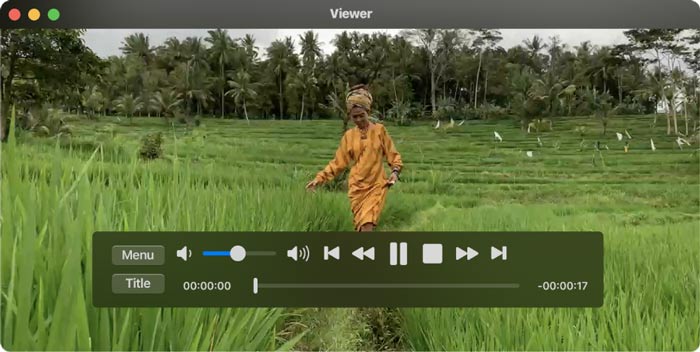
בדרך כלל אפליקציית Apple DVD Player תתחיל לנגן את הדיסק באופן אוטומטי לאחר הכנסתו. אם לא, תוכלו ללחוץ על מקש הרווח לאחר שהדיסק זוהה. נגן ה‑DVD החינמי הזה למק יכול גם לנגן תיקיות DVD. ניתן ללחוץ על File בסרגל התפריטים העליון, לבחור באפשרות Open DVD Media ואז לבחור את תיקיית VIDEO_TS המכילה את סרט ה‑DVD שברצונכם לנגן. במהלך ניגון ה‑DVD תוכלו להשתמש בלחצנים שעל המסך כדי לשלוט בכל תהליך הניגון.
חלק 2. נגן DVD בחינם למחשבי Mac ו- Windows 10/8/7
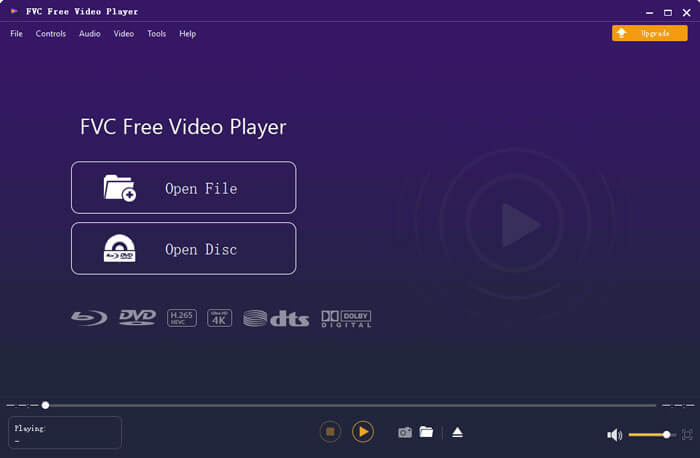
FVC Free DVD Player הוא נגן DVD מקוון חינמי המאפשר לכם לצפות בדיסקי DVD, בתיקיות DVD ובקבצי דמות ISO על מק ועל מחשבי Windows. כאשר תרצו לנגן סרטי DVD, תוכלו להיכנס לאתר הנגן החינמי ולהתחיל לנגן. הוא תואם לכל הדפדפנים הנפוצים, כולל Safari, Chrome, IE ו‑Firefox.

נגן ה‑DVD החינמי הזה למק מצויד בטכנולוגיית קידוד וידאו מתקדמת המבטיחה ניגון DVD באיכות גבוהה. בנוסף, הוא תומך גם ב‑DTS-HD וגם ב‑Dolby TrueHD כדי לספק צליל ללא אובדן איכות. כדי לנגן תיקיית DVD, ניתן פשוט ללחוץ על כפתור Play Now ולהוריד בחינם קובץ משגר קטן. לאחר מכן תוכלו ליהנות בקלות מסרטי ה‑DVD שלכם. עבור דיסקי DVD יש לחבר גם כונן DVD חיצוני.
חלק 3. נגן DVD קוד פתוח עבור Mac להורדה בחינם - נגן מדיה VLC
VLC media player הוא כלי פופולרי מאוד לניגון וידאו ואודיו שגם כולל יכולת לנגן DVD. בתור נגן DVD חינמי, הוא מציע גרסאות שונות לצפייה בסרטי DVD על מחשבי מק, Windows ולינוקס. תוכלו להיכנס לאתר הרשמי שלו, לבחור את הגרסה המתאימה למערכת שלכם ואז להתקין אותו בחינם על המחשב. VLC media player מסוגל לנגן DVD, VCD ותקליטורי שמע (Audio CD) על המק שלכם.
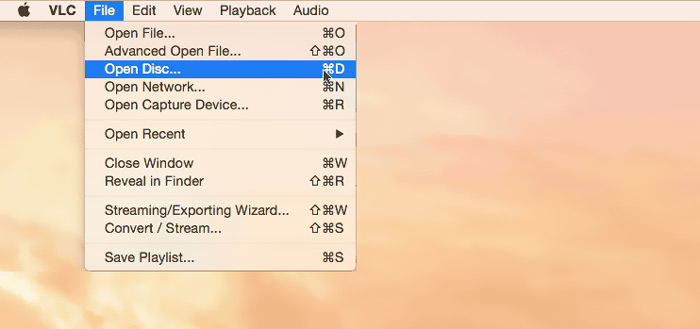
נגן ה‑DVD החינמי הזה למק יכול לגשת בקלות לתפריטי DVD, פרקים ותכנים קשורים נוספים. הוא מעניק לכם שליטה מלאה על ניגון ה‑DVD. בנוסף, VLC media player מאפשר לכם לצלם צילום מסך כדי לשמור רגע מסוים כקובץ תמונה. מעבר להיותו נגן DVD חינמי בלבד, VLC יודע גם לנגן דיסקי Blu-ray.
חלק 4. תוכנת נגן DVD בחינם עבור Mac - KMPlayer
KMPlayer הוא נגן מולטימדיה קוד פתוח נוסף שיכול לנגן DVD על מק. נגן ה‑DVD החינמי הזה למק מתוכנן עם יכולת פענוח מרובה־ליבות כדי לנגן כל סרט DVD באיכות גבוהה ובשימוש מינימלי בזיכרון ובמעבד. יש לו גם פונקציית ניגון בתלת‑ממד, המציעה חוויית קולנוע ביתי בתלת‑ממד.
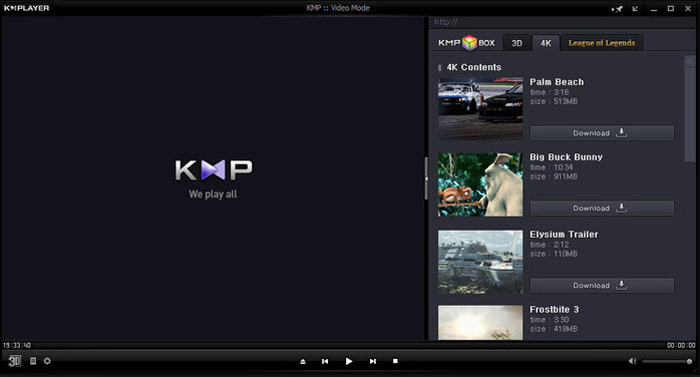
KMPlayer יכול לעזור לך לנהל בקלות את אוסף ה- DVD שלך. בזמן שסרט ה- DVD פועל ב- Mac, הוא מאפשר לך להתאים את תפריטי ה- DVD, לבחור רצועות שמע וכתוביות, אפקטים של וידאו מותאם אישית ולעשות הגדרות נוספות. דבר אחד שעליך לדעת הוא שייתכן שתראה בקלות כמה מודעות קופצות תוך שימוש בתוכנת נגן DVD זו בחינם.
חלק 5. נגן DVD חופשי לאזור עבור Mac - PowerDVD
PowerDVD הוא נגן מולטימדיה פרימיום, כולל‑הכול, המאפשר לכם לנגן מגוון רחב של קובצי מדיה, סרטי DVD וסרטי Blu-ray באיכות גבוהה. נגן ה‑DVD הזה למק משתמש בטכנולוגיית TrueTheater החזקה, שמסוגלת להציע פרטים חדים יותר וניגון חלק. הוא מאפשר לכם לנגן דיסקי Ultra HD Blu-ray ותכני HDR על המק שלכם.
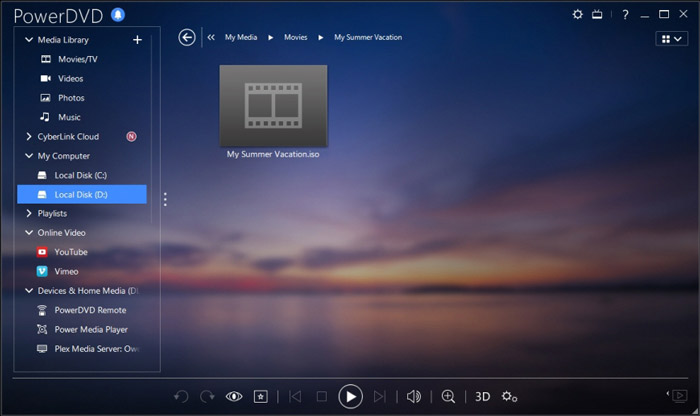
PowerDVD מגיע עם הפעלת דיסקי HD ומצב חיסכון בחשמל למחשב שלך. אבל אתה צריך לדעת את זה, זה לא כלי נגן חופשי לחלוטין. חלק מהפונקציות מוגבלות בתקופת הניסיון בחינם. למרות זאת, PowerDVD היא עדיין אפשרות טובה ליהנות מ- DVD ב- Mac.
חלק 6. שאלות נפוצות על תוכנת נגן DVD בחינם עבור Mac
שאלה 1. כיצד להשתמש בנגן DVD חיצוני עם ה- Mac שלי?
פשוט חבר את הכונן החיצוני ל- Mac שלך ותוכל להשתמש בו בדיוק כמו כונן אופטי מובנה. כשרוצים להשמיע דיסק DVD, תוכלו להכניס אותו לכונן החיצוני. האפליקציה הרלוונטית להפעלת המדיה תשיק ותנגן את ה- DVD באופן אוטומטי.
שאלה 2. האם תוכל לחבר נגן DVD ישן לטלוויזיה חדשה?
כדי לחבר נגן DVD ישן לטלוויזיה חדשה, עליך לבדוק את יציאות ה- HDMI. אם הטלוויזיה החדשה מצוידת ביציאת HDMI נכונה, תוכלו ליצור בקלות את החיבור בין נגן DVD לטלוויזיה.
שאלה 3. כיצד לקרוע DVD לווידיאו MP4 דיגיטלי?
אם ברצונכם לשמור DVD כקובץ וידאו דיגיטלי בפורמט MP4 או MOV, תוכלו להוריד ממיר DVD כדי להמיר את ה‑DVD לקובץ וידאו בלי לאבד מאיכות התמונה.
שאלה 4. כיצד לשנות אזור כונן DVD בנגן DVD ב- Mac?
כאשר קוד אזור ה- DVD אינו תואם את קוד האזור הנוכחי של כונן ה- DVD שלך, תתבקש לשנות קוד להפעלת ה- DVD. אתה יכול לבחור אזור מתאים שתואם את אזור ה- DVD. עליך לדעת שאזור 0 ניתן לשחק בכל האזורים ואזור 1 ניתן לשחק בקנדה, ארצות הברית ובשטחי ארה"ב.
סיכום
במאמר זה התמקדנו בעיקר בנושא נגן DVD חינמי למק. המלצנו על 5 נגני DVD מצוינים לצפייה בסרטי DVD על המק שלכם. תוכלו לבחור את הנגן המועדף עליכם כדי להפעיל את ה‑DVD. אם יש לכם המלצות אחרות לנגני DVD, נשמח אם תשתפו אותן בתגובות עם שאר הקוראים.
-
 סקירה של 10 נגני הווידאו הטובים ביותר של WMV בשנת 2025 (מחשב וטלפון)
 כיצד אוכל להפעיל סרטון WMV? האם VLC משחק WMV? איזו אפליקציה מנגנת קבצי WMV? פוסט זה מכין רשימה של 10 נגני הווידאו הטובים ביותר עבור WMV כדי שתוכלו לשחק WMV ב- Mac, Windows PC, Android ו- iPhone.
-
 10 נגני HD הטובים ביותר לצפייה בסרטי HD ב- Windows / Mac / iOS / Android
 זוהי סקירת נגן הווידיאו HD האחרונה שלך. אתה יכול לקבל יתרונות וחסרונות משוחדים של 10 נגני HD המובילים בשוק. פשוט קרא ובחר את נגן HD הטוב ביותר שלך עם כל התמיכה בפורמטים.
-
 DivX Player - סקירה של 5 נגני ה-Codec DivX הטובים ביותר בשנת 2025
 לשם מה משמש נגן DivX? מהו נגן DivX הטוב ביותר עבור אנדרואיד? קבל סקירה של 5 נגני DivX הטובים ביותר מפוסט זה.
