


 ממיר וידאו אולטימטיבי
 מקליט מסך
 תיקון וידאו
 הורדה מאובטחת
2 שיטות יעילות למיזוג קבצי WebM מבלי לאבד איכות
כיצד למזג קבצי WebM? כאשר אתה מוריד סדרה של סרטונים שהועלו מאחרים באופן מקוון ורוצה להשמיע אותה שוב ושוב כדי לקבל חווית צפייה טובה יותר, תוכל לשקול למזג סרטוני WebM אלה לאחד. עם זאת, בגלל האיכות הגבוהה והגודל הקטן שלה, כדאי לך להצטרף לקבצי WebM ל- MKV כדי לשמור על האיכות הגבוהה בגודל קטן יחסית. לפיכך ישנן שתי דרכים יעילות לעזור לך למזג WebM כקבצי MKV.

חלק 1: כיצד למזג קבצי WebM בחינם באופן מקוון ללא הפסד
ממזג הווידאו המקוון החינמי FVC הוא כלי חיבור רב־תכליתי שמאפשר לשלב כל פורמט קובץ, כולל מיזוג קובצי WebM בחינם אונליין. אין צורך להוריד תוכנה, כך שתוכלו פשוט להעלות את קובצי ה־WebM בדפדפן ולמזג אותם בכמה לחיצות.
- 1. קליקים פשוטים כדי למזג כל כמות של קבצי וידיאו של WebM לכדי אינטרנט אחד לגמרי בחינם.
- 2. תמיכה לייצוא בעיקר של פורמטי וידאו פופולריים כולל פורמט MKV באיכות גבוהה.
- 3. אין סימן מים להעלאה ישירה של הסרטונים ביוטיוב, בפייסבוק או בפלטפורמות אחרות.
- 4. מחק לצמיתות את הקבצים שהועלו תוך 24 שעות כדי להגן על פרטיותך.
שלב 1: עברו אל ממזג הווידאו המקוון החינמי FVC ופעלו לפי ההוראות כדי להתקין את התוסף בתוך כמה שניות. לאחר מכן לחצו על הכפתור Upload the Videos to Merge כדי לבחור אחד מקובצי הווידאו מסוג WebM הרצויים.

שלב 2: לחצו על סמל הפלוס כדי להוסיף קובצי וידאו נוספים מסוג WebM שברצונכם למזג. עליכם להוסיף את הסרטונים לפי הסדר שבו תרצו שיתמזגו. לאחר מכן בחרו את פורמט MKV ואת הרזולוציה 1920*1080 כדי לשמור על איכות וידאו גבוהה.

שלב 3: לחצו על הכפתור Merge Now ולאחר בחירת התיקייה המקומית, הוא יתחיל למזג את קובצי הווידאו מסוג WebM באופן אוטומטי.
חלק 2: הדרך המקצועית ביותר להצטרף לקבצי WebM ליצירת חדש
הממזג המקוון החינמי יכול לעזור לכם לשלב קובצי WebM בקלות. אבל אם תרצו למזג חלקים מסוימים מקובצי WebM יחד כדי ליצור קובץ חדש, עליכם להשתמש בכלי המקצועי – Video Converter Ultimate, שלא רק מחבר קובצי WebM אלא גם מאפשר לערוך את הסרטונים לפני המיזוג.
- 1. מיזג קבצי וידאו של WebM לאחד עם פורמטים שונים כולל MKV.
- 2. מסוגל לשמר את האיכות המקורית של קטעי הווידאו, כולל 1080p HD ו- 4K.
- 3. כלי עריכה קל לשימוש כדי לצלם את הסרטונים, להוסיף פילטרים, להתאים אפקטים של וידאו ולפצל קטעי וידאו.
- 4. מהירות מיזוג מהירה לשילוב מספר קבצי וידאו WebM תוך מספר דקות.
הורדה חינמיתל-Windows 7 ומעלההורדה מאובטחת
הורדה חינמיתל-MacOS 10.7 ומעלההורדה מאובטחת
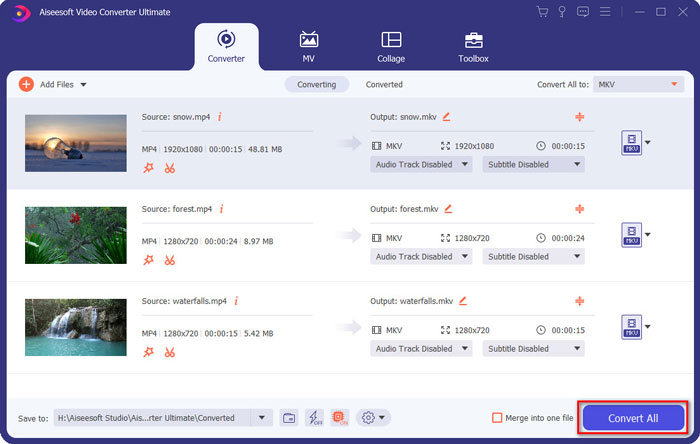
שלב 1: הורידו את Video Converter Ultimate והפעילו אותו. לחצו על הכפתור Add Files בפינה השמאלית העליונה כדי לבחור את כל קובצי ה־WebM שברצונכם למזג.

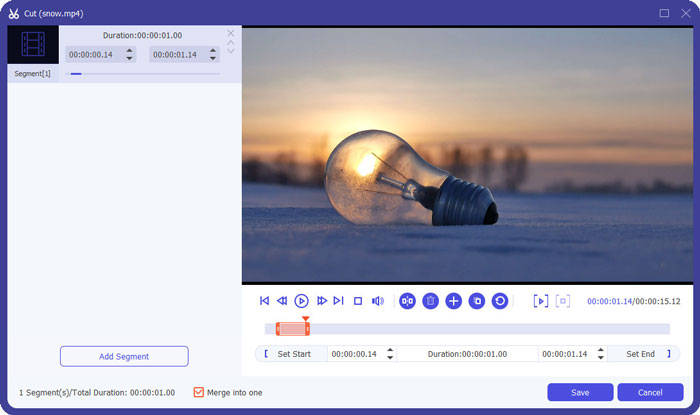
שלב 2: לחצו על הכפתור Cut כדי לחתוך כל וידאו אחד־אחד. גררו את ציר הזמן או הקלידו את נקודת הזמן המדויקת כדי לבחור את הקטעים הנדרשים. לאחר מכן לחצו על הכפתור Save כדי לשמור את ההגדרות.
שלב 3: לחצו על הכפתור Convert All to > Video > MKV ובחרו ב־Same as Source. למרות שהדבר יגדיל מעט את גודל קובצי ה־WebM, האיכות תישאר זהה לזו של הסרטונים המקוריים.

שלב 4: לאחר בחירת נתיב האחסון, סמנו את Merge into one file ולחצו על הכפתור Convert All כדי לשמור.
אולי תתעניינו גם: איך למזג סרטונים ב־iPhone.
חלק 3: שאלות נפוצות על הצטרפות לקבצי WebM
1. מה זה WebM?
WebM הוא סוג של פורמט וידאו המוצע על ידי גוגל. וסרטוני WebM משמשים תמיד באתר משום שהם ניתנים להפעלה שוטפת כמעט בכל הדפדפנים, כולל Google Chrome, Firefox וכו 'באיכות גבוהה ובגודל קטן.
2. האם מיזוג קבצי WebM יפחית את איכות הווידאו?
כן, זה יהיה, במיוחד כאשר תמזג מספר קבצי WebM לקובץ WebM אחד. הדרך הטובה ביותר לשמור על האיכות המקורית היא לצרף קבצי וידאו WebM יחד כקבצי MKV.
3. האם אוכל לשמור על פורמט WebM לאחר שילוב קבצי וידאו של WebM?
כן, אפשר. אבל עדיף להמיר את הפורמט ל־MKV, שהוא הפורמט המקורי ש־WebM מבוסס עליו. זאת משום שעל אף ש־WebM מסוגל לשמור על איכות גבוהה לצד גודל קובץ קטן, פורמט MKV בשימוש נפוץ יותר מ־WebM. אבל אם תרצו, תוכלו גם להמיר WebM ל־MP4.
סיכום
כאשר אתה רוצה למזג קבצי וידאו WebM שהורדו באתר כדי לקבל חווית צפייה שוטפת יותר, הדרך הקלה ביותר היא להשתמש במצטרף וידאו מקוון חינם שיעזור לך. עם זאת, אם ברצונכם ליצור סרטון חדש על ידי מיזוג קבצי וידיאו של WebM, עליכם לצלם את החלקים הדרושים לפני ההצטרפות. במקרה זה, הורדת ממיר הווידאו המקצועי - Video Converter Ultimate בכדי לקליפ ומיזוג קבצי WebM בו זמנית.
-
 למעלה 5 נגן WebM הטוב ביותר עבור Android / iPhone / Windows / Mac
 אם אתה רוצה לשחק ב- WebM בהצלחה במכשיר שלך, עליך ללמוד עוד על חמשת נגני ה- WebM הטובים ביותר עבור Android, iPhone, Windows, Mac ממאמר זה.
-
 דחיסת WebM - כיצד לדחוס קובץ WebM באופן מקוון
 כיצד לדחוס קובץ WebM באופן מקוון? מהי הדרך המהירה ביותר לדחוס קבצים גדולים? פוסט זה מציג שתי דרכים בחינם לדחיסת WebM.
-
 ממיר MP4 ל - WebM - 4 השיטות הטובות ביותר להמרת MP4 ל - WebM
 כשרוצים להמיר MP4 ל- WebM בחינם, תוכלו ללמוד עוד על 4 השיטות הנפוצות ביותר בכדי להשיג את הסרטונים הרצויים בחינם מהמאמר.
