


 ממיר וידאו אולטימטיבי
 מקליט מסך
 תיקון וידאו
 הורדה מאובטחת
2 הדרכים הטובות ביותר להצטרף לקבצי MKV לצפייה בסרט ללא הרף
בדרך כלל, הסרטים שאתה מוריד מהאינטרנט מופרדים ל -2 או 3 קבצי MKV מכיוון שקבצי הסרט הם תמיד גדולים במיוחד אלה באיכות גבוהה. וסדרות הטלוויזיה המועתקות מדיסק DVD מפוצלות תמיד למספר קבצי MKV. אם אתם חובבי סרטים, עליכם להיות סקרנים ללמוד כיצד להצטרף לקבצי MKV. יתכן וניסית לשנות את הקידוד המקורי כדי להצטרף לקבצי MKV בהתאם להוראות FFmpeg, אך זה מורכב מדי וקשה לנו ללמוד. במקרה זה, שני הכלים המקצועיים הבאים יעזרו לכם להצטרף לקבצי MKV בקלות וביעילות.

חלק 1: כיצד להצטרף לקבצי MKV בחינם באופן מקוון
ממזג הווידיאו המקוון החינמי FVC הוא הממזג היעיל ביותר שיעזור לך לשלב קובצי MKV בחינם אונליין. בתוך 3 שלבים תוכל לקבל קובץ סרט MKV מלא עם כתוביות לפי הסדר.
- 1. הצטרף לשני קבצי MKV או יותר לאחד עם שלושה שלבים פשוטים ברשת בחינם.
- 2. השתמש בכל הפונקציות כולל הצטרפות לקבצי MKV מבלי להוריד שום תוכנה.
- 3. תמיכה בפורמטי קלט ופלט שונים כולל קבצי סרט MKV.
- 4. קבצים שהועלו יימחקו תוך 24 שעות כדי להגן על פרטיותך.
שלב 1: פתח את ממזג הווידיאו המקוון החינמי FVC ולחץ על כפתור Upload Files to Merge להפעלת התוסף, ולאחר מכן לחץ שוב על הכפתור כדי לבחור את קובצי ה־MKV שברצונך למזג.

שלב 2: לחץ על כפתור insert new כדי לבחור קובצי MKV נוספים. לאחר מכן בחר ברזולוציה 1920x1080 כדי לשמור על איכות גבוהה ובחר בפורמט MKV המקורי כדי לשמור על הקידוד המקורי, מה שיֵבטיח שהכתוביות יופעלו כשורה.

שלב 3: לחץ על כפתור Merge Now ובחר את התיקייה הרצויה לשמירה.

חלק 2: השתמש בממיר וידאו כדי להצטרף לקבצי MKV
ממזג מקוון חינמי יכול לענות על הצרכים שלך בכמה קליקים פשוטים, בלי להוריד תוכנה. עם זאת, אם אתה גם נתקל בבעיות של כתוביות לא מסודרות או איכות נמוכה, FVC Video Converter Ultimate מקצועי יותר מכלי אונליין לשילוב קובצי MKV עם איכות תמונה ושמע גבוהה. בנוסף, הוא תומך ברזולוציות גבוהות יותר, כולל HD 1080P, 4K ואפילו 8K.
- 1. שלב קבצי MKV מרובים לאחד מבלי לאבד את האיכות כדי לשמור על חווית הצפייה.
- 2. הצטרף לקבצי MKV לפורמט המקורי המקורי עם כל קידוד כולל H.264, HEVC ו- XVID.
- 3. בחרו כתוביות וערוצי שמע שונים המתאימים לכם.
- 4. תמיכה בעריכת קטעי וידאו MKV על ידי הוספת אפקטים, פילטרים, סימני מים וחיתוך האזור.
הורדה חינמיתל-Windows 7 ומעלההורדה מאובטחת
הורדה חינמיתל-MacOS 10.7 ומעלההורדה מאובטחת
שלב 1: הורד את FVC Video Converter Ultimate עבור Windows/Mac והפעל אותו. לאחר מכן לחץ על כפתור Add Files בכלי ההמרה כדי לבחור את כל קובצי ה־MKV שברצונך לשלב בסדר הנכון.

שלב 2: לחץ על החץ לצד Convert All to ובחר בפורמט MKV ברשימת הווידאו. לאחר מכן בחר בהגדרות same as source, שיישמרו את איכות התמונה והשמע המקורית. אם ברצונך להפעיל סרטוני MKV במכשירים אחרים, תוכל גם לבחור פורמטים תואמים נוספים, כגון MP4, AVI ועוד.
Encoder: עדיף לבחור במקודד H.264/HEVC בהגדרות כדי לוודא שהסרטים יפעלו היטב במחשבים או בטלוויזיות.
Subtitle and Audio Track: אם לקובצי סרט ה־MKV המקוריים יש כמה כתוביות ורצועות שמע, תוכל גם לבחור את השפה הרצויה בתחתית כל קובץ או להסיר כתוביות מ־MKV.
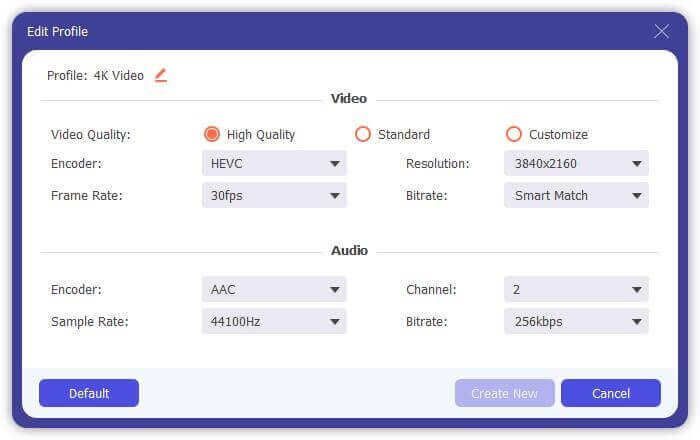
שלב 3: לחץ על כפתור העריכה (Edit) בתחתית הקבצים, שם תמצא 5 כלי עריכה, כולל סיבוב או חיתוך סרטונים והוספת אפקטים ופילטרים. כך תוכל ליצור סרט טוב יותר עם אפקטים מיוחדים. ארגז הכלים שלו יכול לדחוס קובצי MKV, לערוך מידע מטא־דטה עבור MKV, להמיר MKV מ־2D ל־3D ועוד.
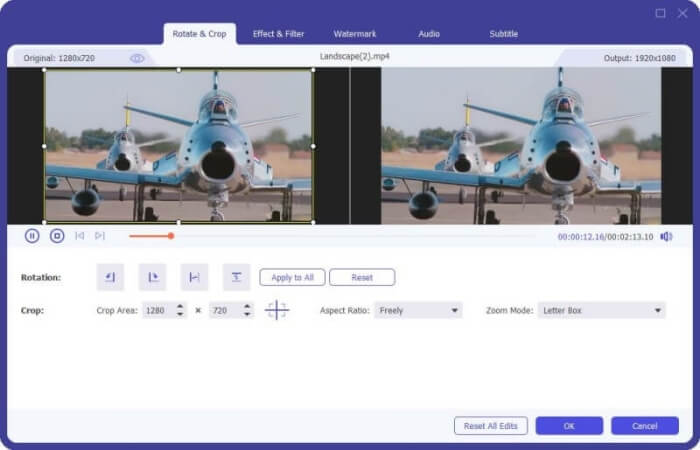
שלב 4: לפני שילוב כל סרטוני ה־MKV יחד, תוכל לגרור את קובצי הווידאו למעלה ולמטה ולהניח אותם במיקום הנכון כדי להתאים את הסדר. לאחר מכן סמן את התיבה Merge into one file ולחץ על כפתור Convert All כדי לחבר את קובצי ה־MKV ולשמור אותם בנתיב האחסון שנקבע.
חלק 3: שאלות נפוצות בנושא הצטרפות לקבצי MKV
1. מה זה MKV?
בדרך כלל אומרים ש- MKV הוא סוג של פורמט וידאו, אך למעשה, MKV הוא פורמט מיכל מולטימדיה שיכול לשלב קבצי שמע, וידאו וכתוביות עם קוד שונה לקובץ יחיד. לפיכך, כמעט כל הסרטים נשמרים בקבצי פורמט MKV.
2. האם אוכל להשתמש בבלם יד כדי להצטרף לקבצי MKV?
לא, אתה לא יכול. בלם יד הוא רק סוג של תוכנה להמרת וידאו להמרת קבצי MKV. אם אתה רוצה להצטרף לקבצי MKV, אתה יכול לנסות להשתמש במצטרפי וידאו מקוונים בחינם או ממירי וידאו אחרים כדי לפתור את הבעיה שלך.
3. איזה נגן וידאו תומך בקבצי סרטים של MKV?
סרטים בפורמט MKV אינם זקוקים לנגני וידאו מיוחדים בכדי שינגנו. עם זאת, עליך להתקין את התוסף המקביל לפענוח MKV. באופן זה, כמעט כל נגני הווידיאו כולל נגן הווידאו המקורי במחשב שלך יכולים לנגן קבצי סרט MKV.
סיכום
כאשר אתה מוריד סרט לצפייה אך מגלה שקבצי הסרט MKV האלה מופרדים למספר קבצים. על מנת לצפות בו ללא הרף, תוכלו להשתמש במצטרף וידאו לשילוב קבצי MKV בחינם באופן מקוון. יתר על כן, שימוש בממיר וידאו יכול גם לעזור להצטרף לקבצי MKV בעלי איכות תמונה ושמע גבוהה. מוזמן להשאיר את השאלות שלך לגבי מיזוג קבצי MKV למטה.
-
 כיצד למזג קבצי WebM לאחד ללא הפסד במחשב
 כאשר ברצונך למזג קבצי וידאו של WebM לצפייה בסרטונים באופן רציף או שברצונך ליצור סרטון חדש בהתאם לקבצי ה- WebM, ישנן שתי דרכים יעילות להצטרף לקבצי WebM מבלי לאבד את האיכות.
-
 8 שחקני MKV המובילים להשמעת קבצי MKV עם הכתובית הרצויה
 כאשר ברצונך להפעיל את הווידיאו MKV עם הכותרת הרצויה, תוכל ללמוד עוד על 8 נגני הקבצים המובילים ביותר עבור PC / Mac ולבחור את הרצוי בהתאם לדרישתך.
-
 MKV ל- MOV - כיצד להמיר MKV ל- MOV
 כיצד ניתן להמיר MKV ל- MOV ב- Mac? האם iMovie יכול לקרוא MKV? מה הפירוש של פורמט MOV? פוסט זה מספר שתי דרכים פשוטות לעזור לך להמיר MKV ל- MOV עם ממירי וידאו מקוונים ומקצועיים בחינם.
