


 ממיר וידאו אולטימטיבי
 מקליט מסך
 תיקון וידאו
 הורדה מאובטחת
Canva AI Video Generator 2026 Review: Transform Text to Cinematic Clips
In the fast-paced world of digital content, video is no longer just "nice to have"—it is the baseline. However, traditional video production is expensive and time-consuming. This is where the Canva AI video generator steps in. By 2026, Canva has evolved from a simple graphic design tool into a powerhouse of generative AI, allowing anyone to turn a simple sentence into a high-quality video clip.
Whether you are a social media manager looking for "scroll-stopping" content or a small business owner on a budget, understanding how to use Canva AI video generator is a game-changer for your creative workflow.

כיצד אנו בודקים ומסקרים
- Prompt Fidelity: How accurately does the AI translate a complex text prompt into visual elements?
- Motion Quality: Does the video look fluid and realistic, or is it plagued by "AI warping" and glitches?
- Speed & Efficiency: How long does AI Video Generator in Canva take to render a clip, and does the interface remain responsive?
- Accessibility: We test both the Canva free AI video generator limits and the Pro features to determine the true value for money.
Detailed Review: Canva’s AI Video Suite
Can Canva generate AI videos? Sure. But how long does it go? We will tell you in the following content.
1. Canva AI Text to Video Generator (Magic Media)
At the heart of the platform is Magic Media. By 2026, this tool has integrated the advanced Google Veo-3 model, significantly closing the gap between Canva and standalone tools like Sora or Runway.
The Experience: Simply type a prompt like "A futuristic cyberpunk city in the rain, neon lights reflecting on puddles, cinematic 4K style." And it will convert the text into video without manual effort.
The Verdict: Motion consistency has seen a massive upgrade. The AI now generates 8-second clips with fluid movement and synchronized ambient audio, virtually eliminating the "AI warping" common in earlier versions.
2. Magic Design for Video
If you have a folder full of raw footage but no time to edit, Canva AI Video Generator is your best friend.
How it works: You select at least three media files and describe the vibe (e.g., "A high-energy recap of my summer vacation with upbeat music").
The Verdict: It’s a massive time-saver for YouTubers and TikTokers. It automatically handles the "Beat Sync," ensuring your clips change exactly when the music drops.
3. AI Avatars & Third-Party Apps
Canva’s marketplace now hosts apps like Neiro AI and הייג'ן, allowing you to create AI-generated "talking head" videos directly inside your Canva project. This is perfect for corporate training or educational content where you don't want to be on camera yourself.
Canva AI Video Generator: Free vs. Pro
A common question among beginners is: Is there a Canva AI video generator free version? Yes, the free version only lasts 30 days, then you will be automatically charged for $20/month and applicable tax.
| תכונה | Canva Free | Canva Pro / Business |
| גִישָׁה | Limited "Lifetime" Credits | Monthly Refilling Credits |
| סימני מים | Often present on AI clips | No Watermarks |
| איכות פלט | Standard Definition | High Definition / 4K |
| Magic Media Uses | ~5-10 total uses | Up to 500+ uses/month |
| מחיר | ניסיון חינם ל-30 יום עם חיוב אוטומטי של $20 לחודש בתוספת מסים חלים. |
While the Canva free AI video generator is great for testing, serious creators will find the Pro plan necessary due to the higher usage limits and the ability to export without watermarks.
Step-by-Step: How to Use Canva AI Video Generator
Ready to create? Follow this simple workflow:
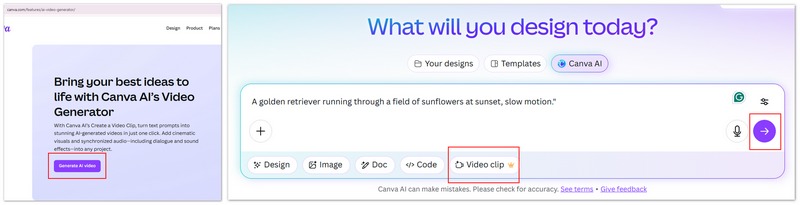
Step 1. Go to www.canva.com/features/ai-video-generator/ and click "Generate AI video".
Step 2. Enter your prompts, be specific! Instead of "a dog," try "A golden retriever running through a field of sunflowers at sunset, slow motion."
Step 3. You can click "Video clip" and there are also choices for generating "Design", "Image", Doc", "Code", etc.
Step 4. Click the "Submit" button to generate.
Pros and Cons: A Balanced Review
Canva’s AI video tools are impressive, but not magic. Here is a granular look at what’s actually working and what’s still a headache.
יתרונות
- קלות שימוש מדהימה: אין צורך בכישורים טכניים.
- תזרים עבודה הכולל הכול: צרו, ערכו ופרסמו לרשתות החברתיות מבלי לצאת מהאפליקציה.
- ספריית נכסים עצומה: שלבו וידאו שנוצר ב‑AI עם מיליוני תמונות סטוק ורצועות מוזיקה.
- עבודה שיתופית: צוותים יכולים לערוך את הווידאו שנוצר ב‑AI בזמן אמת.
- סנכרון אודיו (Beat Sync): האופן שבו הוא חותך אוטומטית את הצילומים לפי מקצבי התופים של השיר הוא שינוי משחק מוחלט עבור TikTok ו‑Reels.
חסרונות
- מגבלות רזולוציה: חלק מהקליפים שנוצרים מוגבלים ל‑1366 × 768 פיקסלים לפני שדרוג הרזולוציה.
- קרדיטי שימוש: אפילו בתוכניות Pro קיימת הגבלה חודשית על כמות ההפקות של "Premium AI".
- שליטה יצירתית: עדיין אי אפשר "לביים" תנועות ספציפיות בתוך הקליפ; אתם נתונים לחסדי הפקודה הטקסטואלית.
- בעיות עקביות: אם תרצו שאותו דמות תופיע בשלושה קליפים שונים – בהצלחה. ה‑AI מתקשה לשמור על "דמות מתמשכת" שנראית בדיוק אותו דבר בין כמה הפקות.
- עיבוד טקסט: אל תצפו שה‑AI ייצור וידאו של מישהו שמחזיק שלט עם הכיתוב "Happy Birthday" בצורה נכונה. האותיות בדרך כלל יוצאות כקשקוש.
מחפשים יותר כוח? אלטרנטיבה כבדה ועוצמתית יותר
If you find Canva’s cloud-based credits too restrictive or need more "hardcore" video processing, I highly recommend this powerhouse alternative: FVC Video Converter Ultimate.
Integrated AI Toolkit: This software goes far beyond simple conversion. It features a robust Text-to-Video engine that offers more stability and speed, especially for high-bitrate outputs
Picwand AI Synergy: Its Text-to-Image functionality seamlessly bridges to the Picwand platform. You can generate hyper-realistic AI images (characters, landscapes, or posters) in Picwand and then use FVC’s engine to breathe life into them as dynamic video assets.
Pro-Level Editing & Conversion: While Canva is great for "quick edits," FVC handles the heavy lifting. From 8K conversion to AI video enhancement and lossless compression, it’s a professional-grade tool for those who handle massive files.
Freedom from Subscriptions: If you prefer a tool that doesn't limit your creative flow with "per-use" credits, FVC offers a much more flexible environment for bulk content creation.
הורדה חינמיתל-Windows 7 ומעלההורדה מאובטחת
הורדה חינמיתל-MacOS 10.7 ומעלההורדה מאובטחת
FAQs about Canva AI Video Generator
האם Canva יכולה ליצור סרטוני בינה מלאכותית עם קול?
כן. עם עדכוני 2026 האחרונים, מחולל הווידאו מבוסס ה-AI של Canva (ובפרט הכלי "Create a Video Clip") יכול ליצור קטע וידאו באורך של עד 8 שניות עם אודיו מסונכרן, כולל אפקטים קוליים ומוזיקת רקע.
האם מחולל הווידאו מבוסס ה‑AI של Canva הוא בחינם?
Canva מציעה מספר קרדיטים מוגבל למשתמשים חינמיים כדי שיוכלו לנסות את הכלי. עם זאת, לשימוש קבוע ולהורדות ברזולוציה גבוהה נדרש מנוי Canva Pro או מנוי עסקי.
איך אפשר לקבל תוצאות טובות יותר עם כלי ההמרה מטקסט לווידאו?
The secret is in the "lighting" and "camera" keywords. Use terms like "Cinematic lighting," "Bokeh," "Drone shot," or "Handheld camera" to give the AI more context on how the video should look and move. Different AI video generators also performs different in each area, you can choose the most suitable one.
סיכום
The Canva AI video generator has democratized video production. While it might not yet replace a professional film crew for a Super Bowl commercial, it is the most efficient tool on the market for creators, educators, and marketers. By merging the Canva AI text to video generator with its world-class editing suite, Canva has ensured that the only limit to your content is your imagination.
-
 8 משפרי וידאו AI הטובים ביותר לשדרוג איכות הווידאו בשנת 2026 (סקירה מלאה)
 מדריך זה מציג את תוכנות שיפור הווידאו המובילות המבוססות על בינה מלאכותית. השוו תוכנות מקצועיות למחשב שולחני עם תוכנות שיפור מקוונות בחינם כדי להפוך צילומים ברזולוציה נמוכה ליצירות מופת מדהימות ברזולוציית 4K/8K.
-
 5 הכלים הטובים ביותר של YouTube Video Summarizer AI לקיצור תוכן
 צמצם אוטומטית סרטוני YouTube בפורמט ארוך כדי ליצור סיכומי תוכן ובחר בכלי YouTube Video Summarizer הטובים ביותר הזמינים לשימושך.
-
 כיצד ליצור סרטון מוזיקה באמצעות AI: מדריך ליצירה
 האם אתה מחפש מחולל סרטוני מוזיקה של IA כדי להעלות את העריכה שלך כמו מקצוען? ובכן, בפוסט זה, אנו ניתן פתרון לבעיה שלך. למד אותם עכשיו!
