


 ממיר וידאו אולטימטיבי
 מקליט מסך
 תיקון וידאו
 הורדה מאובטחת
4 חותכי מוזיקה מקוונים ומיזוגים לגיזום השיר ושילוב קטעי שמע
אם אתה רוצה ליצור מוזיקת רקע עבור טיקטוק או יוטיוב, איך אתה קוצץ וממזג שירים ברשת? כאשר ברצונך לשלב את קולך יחד עם המוזיקה המועדפת עליך או לקצץ את החלק הרצוי לסרטון, במיוחד קבצי האודיו הם בפורמטים שונים, תוכל ללמוד עוד על 4 מיטב החותכים והמיזוגים המקוונים הטובים ביותר. פשוט למד עוד על התכונות ובחר את התכונה הרצויה בהתאם לדרישתך.

חלק 1: 4 השיטות הטובות ביותר לגזירה ומיזוג שירים ברשת
שיטה 1: קלידאו
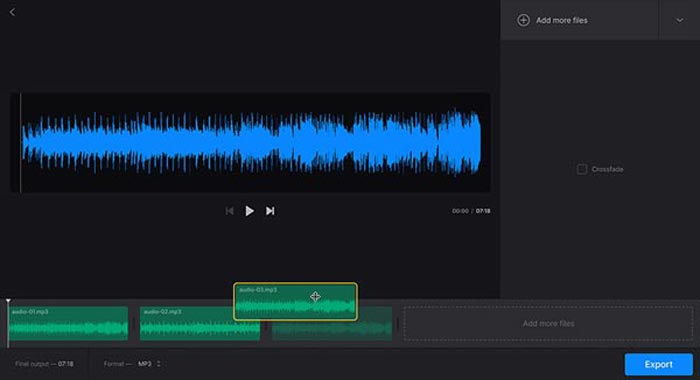
Clideo is one of the most popular methods to cut and merge songs online for MP3, WMV, and more other audio formats. It enables you to upload the audio files from your hard drive, Google Drive, Dropbox, and even URL. Moreover, you can apply crossfade effects for merging the music files.
Step 1: To cut and merge songs online, you can go to the audio joiner or audio cutter and select the audio files from different channels. Moreover, you can also select your file or paste it into the URL.
Step 2: Once you have uploaded the song, you can type in the period to crop the audio, or add more tracks to merge. Then, you can select the desired part to be combined or deleted.
Step 3: Just listen to the songs you have merged or trimmed, you can click the Download button to download the music to your computer or a cloud storage account.
שיטה 2: Soundtrap
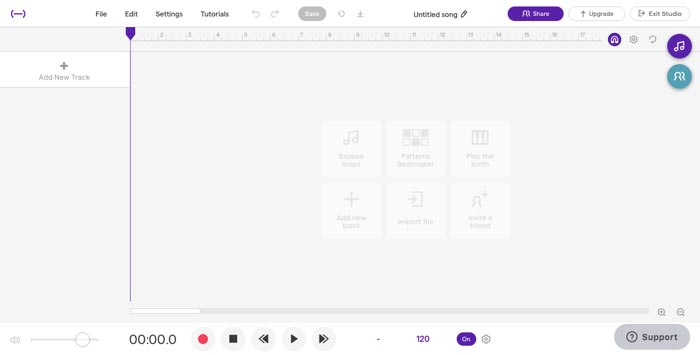
When you need to make stunning music files as a profession, Soundtrap is an excellent online cutter and merger to add voice, microphone, piano, keyboard, guitar, bass, drum, and more others. You can edit music online, in real-time, with your musician friends around the world.
Step 1: Once you have entered the Studio of Soundtrap, you can create a new project and click the Music button to import different audio clips to cut and merge songs online.
Step 2: Select the Edit menu and choose the Split region option, or the Merge region option to edit the music files. Moreover, it enables you to a mute region or an auto-tune the audio files.
Step 3: When you are satisfied with the audio file, you can adjust the audio quality and tweak MIDI settings. Preview the music file online before clicking the Save button to export the file.
שיטה 3: Audiotool
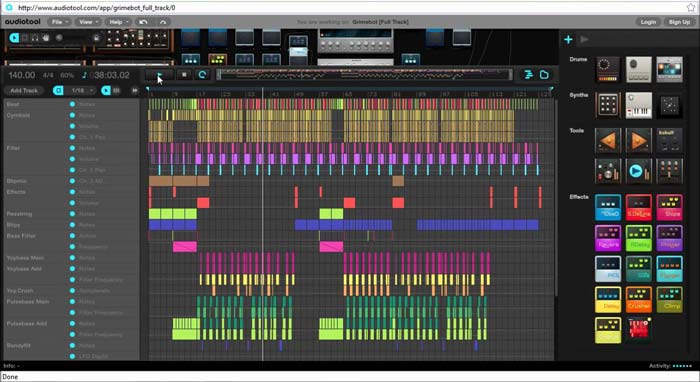
Audiotool has a unique and visually appealing user interface that enables you to cut and merge songs online. The collaborative online music production studio can spice up your music, combine songs, and even import the files right in your browser.
Step 1: When you import the audio files into the online music editor, you can go to the Project menu to create a new file by clicking the New button. After that, you can preview the audio within the program.
Step 2: Then you can choose the desired effects, select the suitable tool, add notes to the files, and more. After that, you can select the desired audio clip to trim and merge the songs online.
Step 3: Once you get the desired files, you can click the Publish option to export the songs to your computer, or share them to social media websites according to your requirements.
שיטה 4: TwistedWave
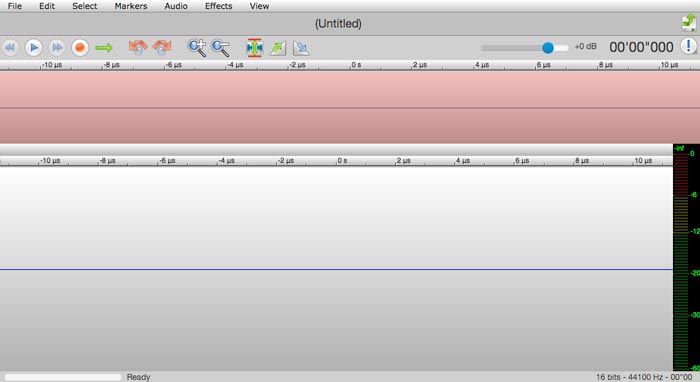
TwistedWave is a web-based audio editor, which not only enables you to cut and merge songs online but also records the audio file from YouTube. It has dozens of effects, such as VST effects, amplify, fade-in, fade-out, remove DC offset, or reverse the audio files.
Step 1: Go to the online music editor, you can import the audio files from Google Drive and more other cloud services. Then you can preview the audio files online directly.
Step 2: When you want to cut the desired part, you can grab and drag two arrows to move the audio in or out of the cut. Moreover, the two arrows are visible on each side of the cut.
Step 3: As for merging audio files online, by using the option or shift-option key combinations while double-clicking, you can add or remove whole channels from the current selection.
חלק 2: אלטרנטיבה הטובה ביותר לחיתוך מוסיקה מקוונת ומיזוג
What should you do if you combine the audio from a video? How to combine the different audio files with the best quality? If you want to cut and merge songs online with the best effect, FVC Online Video Converter is the desired audio converter. It enables you to convert the audio and video files, customize the video bitrate, sample, frame rate, as well as resolution.
- 1. להמיר את קטעי הווידאו וקבצי השמע לאותם תבניות שמע.
- 2. התאם את קצב סיביות השמע, קצב הדגימה, הרזולוציה, עוצמת הקול ועוד.
- 3. לספק לך פורמטי פלט שמע ווידאו לבחירה.
- 4. שום נתונים לא יאבדו במהלך תהליך ההמרה.
הורדה חינמיתל-Windows 7 ומעלההורדה מאובטחת
הורדה חינמיתל-MacOS 10.7 ומעלההורדה מאובטחת
חלק 3: שאלות נפוצות על אופן גזירה ומיזוג של שירים ברשת
1. האם ניתן לחתוך ולמזג מוזיקה מסרטון?
כן. אתה יכול פשוט לייבא את הווידאו לחותך המוסיקה המקוון ולהתמזג כדי לחלץ את קבצי השמע כאשר פורמטי הווידאו תואמים. כמובן, תוכלו להמיר מראש גם את קבצי הווידאו לפורמטי שמע.
2. מתי חותכים וממזגים שירים ברשת?
בשונה מעורכי מוסיקה מקצועיים, כגון Adobe Premiere Pro או Final Cut Pro, תוכלו לחתוך ולמזג שירים ברשת בצורה נוחה. אתה תמיד יכול להשתמש בתוכנית כשיש לך חיבור אינטרנט מוצק.
3. מהן האפליקציות הטובות ביותר ב- iOS / Android לקיצוץ ומיזוג מוזיקה?
כדי לחתוך ולמזג מוזיקה בתוך מכשיר אייפון או אנדרואיד, תוכל גם להשתמש ישירות באפליקציות מסוימות, כגון TonePad, Medly, GarageBand, Music Maker Jam, ועוד. ללא קשר לרמת המיומנות שלך, אתה תמיד יכול לערוך וליצור את המוסיקה שלך בצורה נוחה.
סיכום
כשרוצים ליצור כמה שירים מדהימים על ידי גזירה ומיזוג של שירים ברשת, תוכלו ללמוד עוד על 5 השיטות הטובות ביותר מהמאמר. אם ברצונך לערוך את המוסיקה כמקצוע, FVC Free Audio Convert הוא המלווה הטוב ביותר להמרה, התאמת קצב סיביות וידאו, מדגם, קצב פריימים, רזולוציה ועוד פרמטרים אחרים.
-
 MP3 לעומת MP4: מה ההבדל בין MP3 ל MP4
 MP3 או MP4, מה עדיף? מה ההבדל בין MP3 ו- MP4? מאמר זה ישווה MP3 עם MP4 מכל ההיבטים שתוכלו לדמות.
-
 כיצד להוסיף שמע ומוזיקה לווידיאו בחינם במחשב / טלפון
 מאמר זה מציג 4 דרכים קלות להוסיף אודיו לווידיאו בחינם. לא משנה איזה רצועת שמע תרצו להוסיף לסרטון שלכם, תוכלו לקבל תוצאות מספקות כאן.
-
 הדרכת בטון - כיצד למזג שני רצועות שמע בחוצפה
 חוצפה נהנית ממוניטין בעריכת שמע. הורדת את Audacity אך אינך יודע כיצד למזג רצועות שמע ב- Audacity? פוסט זה יגיד לך כיצד למזג מסלולים ב- Audacity.
