


 ממיר וידאו אולטימטיבי
 מקליט מסך
 תיקון וידאו
 הורדה מאובטחת
כיצד להגביר את עוצמת הקול של MP3 עבור צליל באיכות טובה יותר
When listening to an MP3 file, it’s important to have a better sound volume that is loud enough for us to hear everything clearly. This particular thing becomes integral in a way that we experience the content as it was intended, without straining to catch words or musical nuances. Low volume levels can detract from the enjoyment of music, podcasts, audiobooks, or any other audio content. But don’t fret! There are several effective methods to increase MP3 volume while maintaining or even improving their sound quality. This comprehensive guide will walk you through 4 methods to help you achieve better-sounding of your MP3s. Let’s dive in!

חלק 1: הגבר את עוצמת הקול של MP3 ללא אובדן עם מאיץ סאונד מקצועי
If you’re looking for a professional sound boost that can help you increase MP3 volume losslessly, the best tool for you is the FVC-picked Video Converter Ultimate. This tool is not your typical converter tool as it is infused with different features, and one of them is its ability to professionally increase MP3 volume. This sound booster tool is very easy to use. You just import the audio file, and then, with one slide, you can easily change the volume of your audio file.
Step 1. Download and install Video Converter Ultimate to your device.
הורדה חינמיתל-Windows 7 ומעלההורדה מאובטחת
הורדה חינמיתל-MacOS 10.7 ומעלההורדה מאובטחת
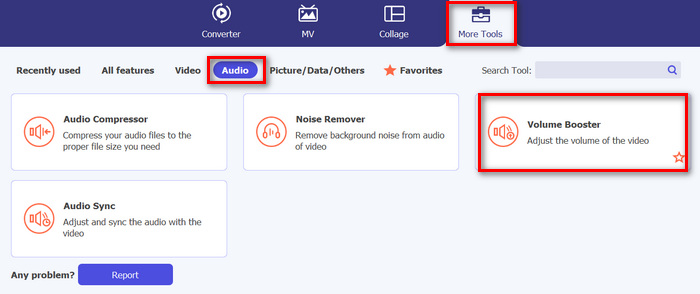
Once done, launch it and go to the Toolbox tab; from there, look for the Volume Booster and click on it.
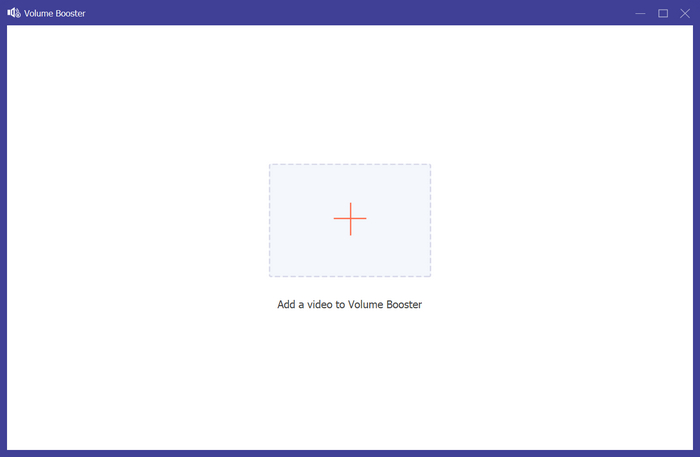
Step 2. Click on the Add a Video to Volume Booster button to import the MP3 file.
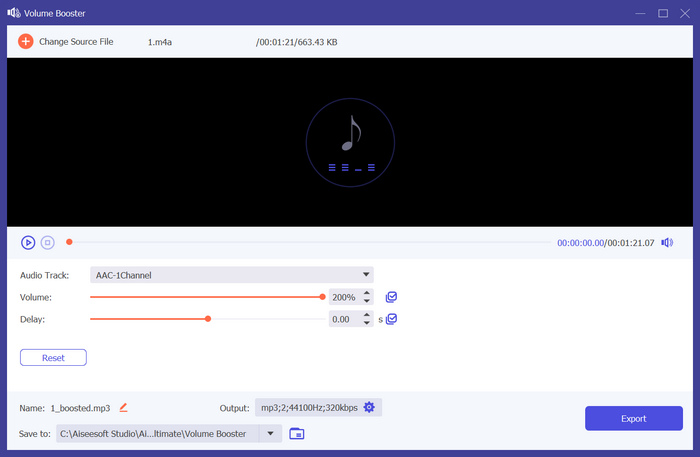
Step 3. After that, to increase the MP3 volume of your audio file, slide the bar in the volume section to the right or type in the percentage of your desired sound volume. This tool can enhance your audio volume up to 200%.
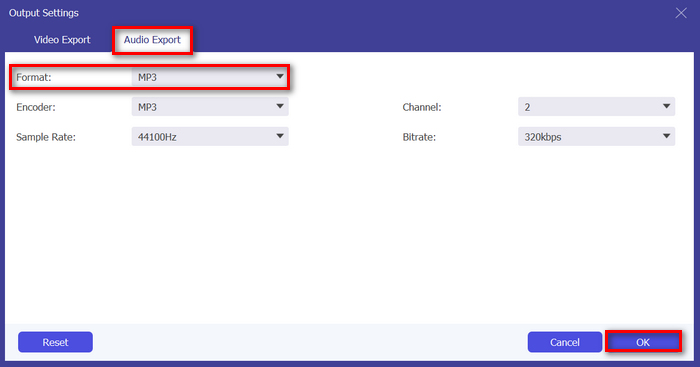
Step 4. Once done, click the Gear icon below to access the Output Setting. Choose the Audio Format tab, and in the format menu, choose the Audio format you prefer and click OK.
Step 5. Once complete, save the audio by clicking the Export button.
If you want to edit the MP3 metadata information, you can also switch to the Toolbox to make it.
Video Converter Ultimate הוא אכן החלום האולטימטיבי של כולם. מי היה מעלה על דעתו שיהיה כלי הכל-באחד לצרכי הווידאו והשמע שלך? עם תמיכה בפורמטי שמע שונים, זה מושלם לטיפול בקובצי מדיה שונים. הממשק הידידותי והאינטואיטיבי שלו הופך אותו לנגיש וקל למתחילים, והיכולת שלו להגביר את עוצמת הקול של MP3 ללא אובדן איכות מבטיחה תוצאות ברמה מקצועית. בסך הכל, כלי זה אידיאלי אם אתה מחפש פלט מקצועי וללא אובדן בהגדלת נפח קבצי ה-MP3 שלך.
חלק 2: הגבר את עוצמת הקול של MP3 ב-Premiere Pro
אם אתה משתמש ב-Adobe Premiere Pro במכשיר שלך או שאתה יודע איך להשתמש בו? החדשות הטובות הן שמלבד תכונות עריכת הווידאו החזקות שלה, אתה יכול להשתמש באפליקציית התוכנה הזו כדי להגביר את עוצמת הקול של MP3 בקלות.
כדי לעשות זאת, בצע את השלבים הבאים:
Step 1. First, use the Selection Tool to select the audio clip you want to increase the volume on.
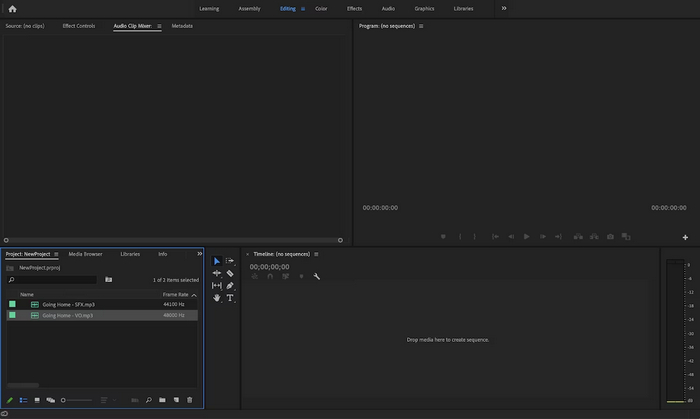
Step 2. Right-click the audio track, and then in the pop-up menu, choose the Audio Gain option.
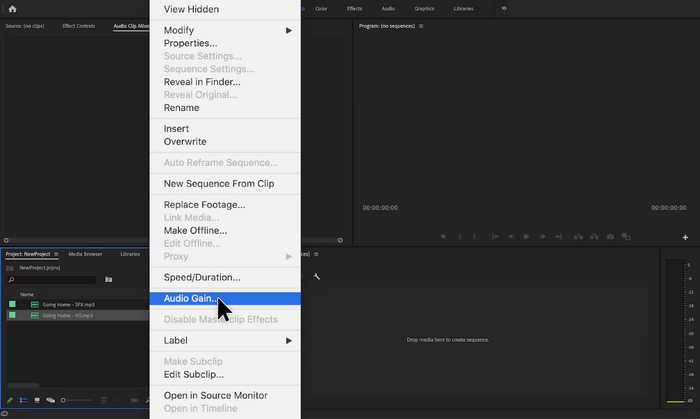
Step 3. Now, to increase your audio volume, adjust the dB using a positive number in the Audio Gain box.
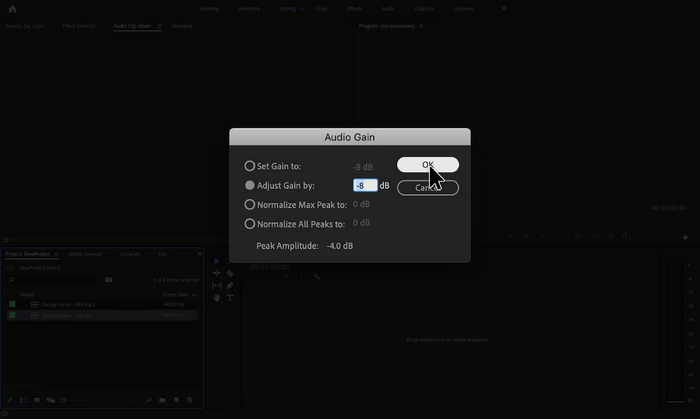
Step 4. Once done, just click OK.
Adobe Premiere Pro הוא אכן כלי רב עוצמה מכיוון שמעבר לעריכה, הוא יכול להיות שימושי להפליא עבור משתמשים שמשתמשים בו כדי להגביר את עוצמת הקול של MP3 בקלות. התהליך הוא פשוט ומהיר, ומאפשר למשתמשים להתאים את רמות עוצמת הקול בכמה לחיצות בלבד, והתוכנה מבטיחה התאמות באיכות גבוהה, תוך שמירה על הבהירות המקורית של השמע. בנוסף, למי שכבר משתמש ב-Premiere Pro לעריכת וידאו, נוח לנהל אודיו באותה פלטפורמה. עם זאת, יש כמה חסרונות. התוכנה יכולה להיות מהממת ועשויה להטיל עקומות למידה למתחילים, מה שהופך אותה לפחות ידידותית למשתמש עבורם. זה גם דורש מנוי, מה שעלול לעלות ביוקר למי שצריך אותו רק למשימות פשוטות.
חלק 3: הגבר את עוצמת הקול של MP3 עם Audacity
Audacity היא תוכנת אודיו חוצת פלטפורמות חינמית המאפשרת למשתמשים להקליט, לערוך ולתפעל קבצי אודיו, כולל הגדלת נפח קבצי MP3. תכונה זו שימושית במיוחד לשיפור בהירות האודיו והבטחת רמות צליל עקביות על פני מדיות שונות.
כדי להשתמש בכלי זה, בצע את השלבים הבאים:
Step 1. In the tool's main interface, go to File and choose Audio to import the MP3 file you want to increase the volume on.
Step 2. After that, go to the Select tab and click All to choose the Audio that you want to modify.
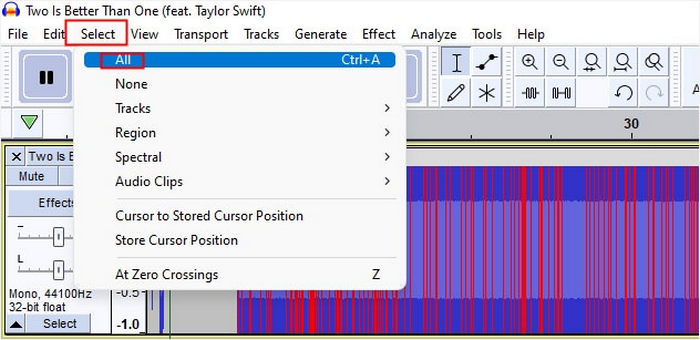
Step 3. Now, to modify the volume, go to the Effect menu and select the Amplify or Normalize effect. After that, adjust the settings of the effect. From there, you can increase the volume by putting or changing the decibel with a positive value.
If you have more audio tracks to handle and want to combine the multiple audio files, just put them into the timeline for further editing.
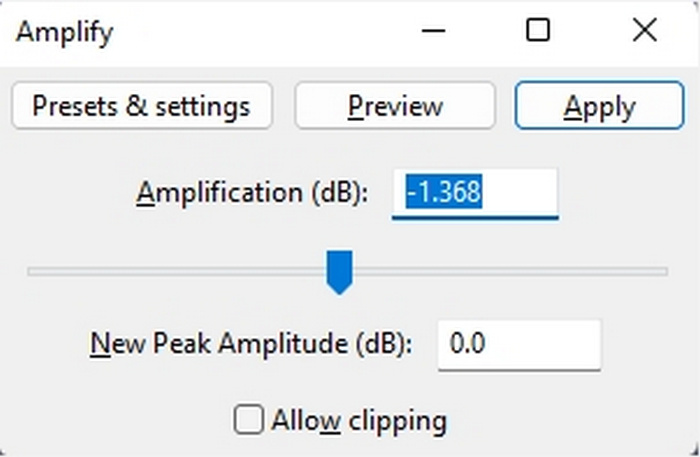
Step 4. If you want to hear the changes, if the volume has increased or not, you can preview it, and when it’s good, just click OK.
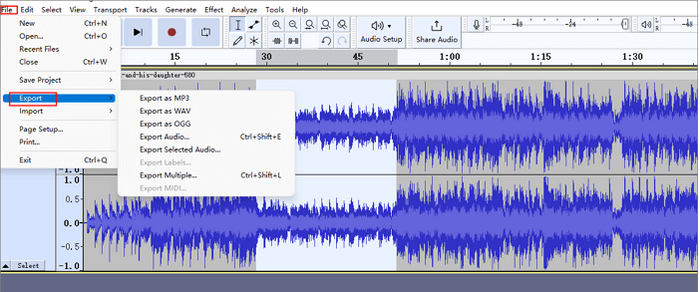
Step 5. Lastly, to save the file, Go to Export and export the file as an MP3.
לסיכום, Audacity היא פתרון מצוין וחסכוני להגברת עוצמת הקול של MP3 ולביצוע משימות עריכת אודיו שונות. עם זאת, יש כמה מגבלות שצריך לקחת בחשבון, כמו הממשק שלו עשוי להטיל אתגרים למשתמשים חדשים, במיוחד בניווט בכל התכונות. בנוסף, חסרים לו כמה תכונות ויכולות מתקדמות שנמצאות בתוכנת עריכת אודיו מקצועית. למרות אלה, כלי זה נותר כלי רב עוצמה ובעל ערך עבור צורכי עריכת אודיו רבים.
חלק 4: הגבר את עוצמת הקול של MP3 באינטרנט
MP3Louder הוא כלי מקוון חינמי המאפשר למשתמשים להגביר את עוצמת הקול של MP3 ישירות באינטרנט. הוא מספק את היכולת לכוונן את רמות עוצמת הקול של קבצי MP3, ומגביר אותם ביעילות כדי להפוך אותם לחזקים יותר.
כדי להשתמש בכלי זה, בצע את השלבים הבאים:
Step 1. In the web interface of MP3Louder, click on the Browser to import the audio file that you want to increase the volume.
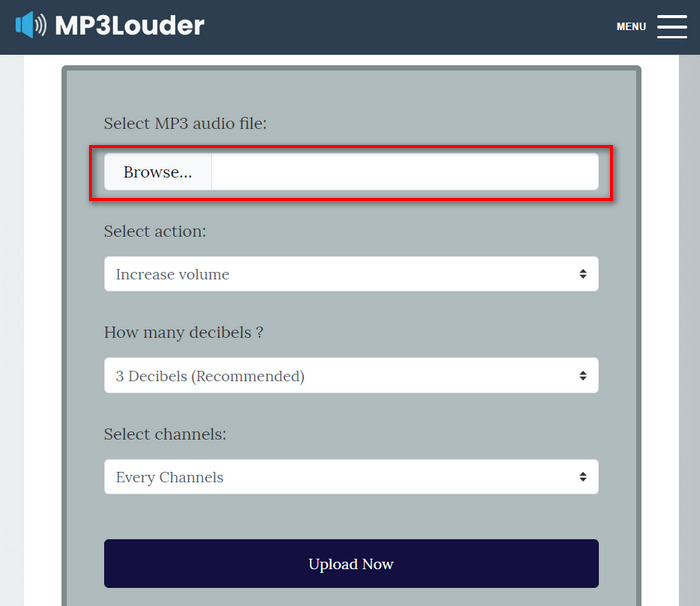
Step 2. After that, choose Increase Volume in the Select Action menu.
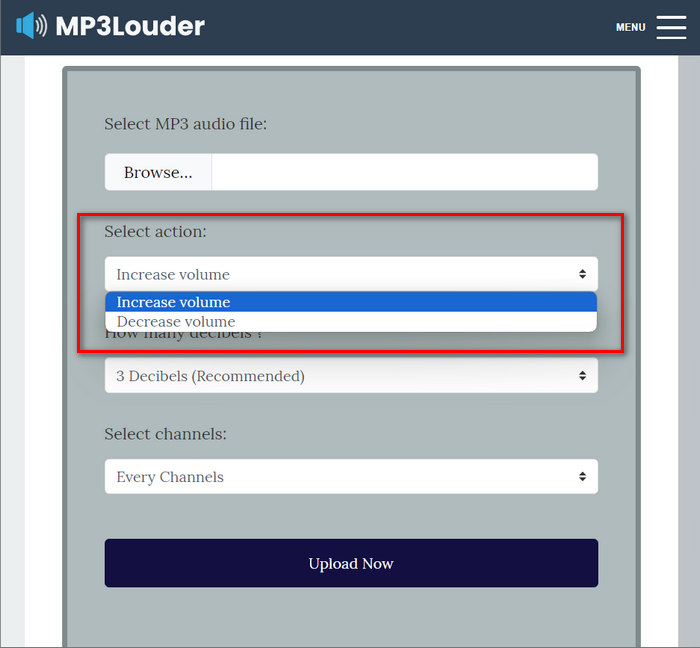
Step 3. Also, in the How Many Decibel menu, choose the one that you need. You can select from 1-50 decibels.
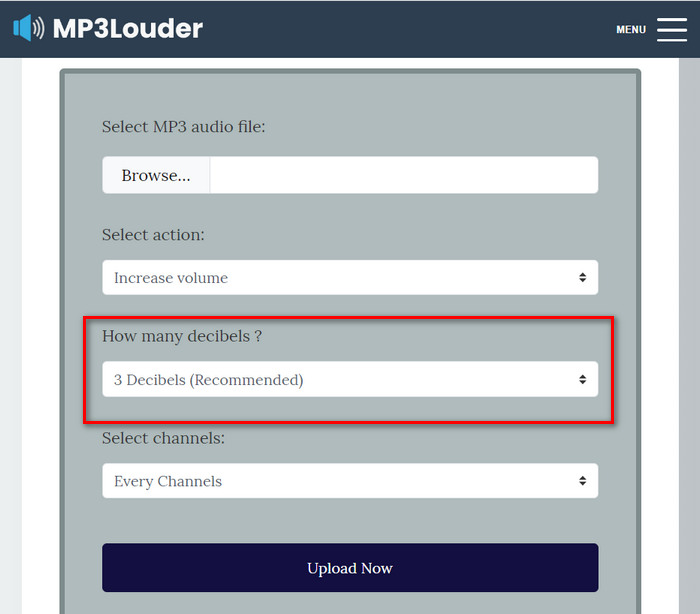
Step 4. In the Select Channel menu, choose the one that you prefer. You can choose Every channel, Left channel, or Right channel.
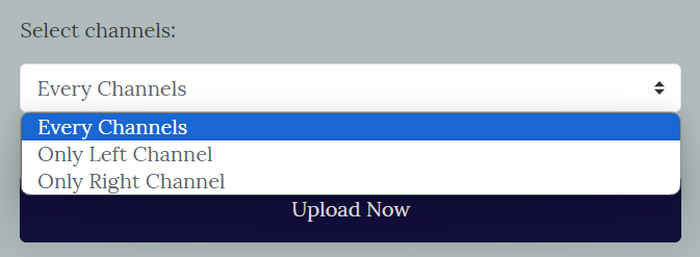
Step 5. Lastly, click Upload now to start the process. Once it's done, you can download the file.
MP3Louder מופיע כפתרון מקוון נוח למשתמשים המבקשים לשפר את עוצמת הקול של קבצי ה-MP3 שלהם ללא מאמץ. הממשק הפשוט שלו מאפשר ייבוא קל של קבצי אודיו, והאפשרות לכוונן את רמות הווליום במרווחי דציבלים הניתנים להתאמה אישית מספקת גמישות. עם זאת, ייתכן שלכלי זה חסרים הפונקציונליות המתקדמות והדיוק המצויים בתוכנת עריכת אודיו מקצועית. עם זאת, MP3Louder משמש ככלי מעשי להגברת נפח MP3 בקלות, במיוחד עבור משתמשים המחפשים פתרון מקוון בחינם ונגיש.
חלק 5: השוואה בין 4 השיטות להגברת נפח MP3
| מגביר עוצמת קול MP3 | מערכת הפעלה נתמכת (OS) | איכות קול | קלות שימוש | תכונות נוספות |
| ממיר וידאו אולטימטיבי | Windows ו-MacOS | גָבוֹהַ | קַל | הגדרות פלט הניתנות להתאמה אישית, שבהן המשתמשים יכולים לשנות את פורמט השמע, קצב הסיביות וקצב הדגימה. |
| פרמייר פרו | Windows ו-MacOS | גָבוֹהַ | לְמַתֵן | בקרת פידר ומיקסר קליפ. |
| חוּצפָּה | Windows, MacOS ולינוקס | גָבוֹהַ | לְמַתֵן | הפחתת רעש. |
| MP3 חזק יותר | מבוסס רשת | לְמַתֵן | קַל | אין תכונות אחרות. |
חלק 6: שאלות נפוצות לגבי הגברת עוצמת הקול של MP3
מהו מגבר הווליום הטוב ביותר?
מאיץ הווליום הטוב ביותר תלוי בצרכים וההעדפות הספציפיות שלך. כלי כמו Video Converter Ultimate מציע שיפורי אודיו שונים מעבר להגברת עוצמת הקול. זה הכי טוב בגלל הדרך הפשוטה שלו להגביר את עוצמת הקול של MP3, התאימות שלו לפורמטים שונים והגדרות הפלט הניתנות להתאמה אישית שלו.
האם אוכל לקבל נפח 200% ב-VLC?
כֵּן. נגן המדיה VLC מאפשר למשתמשים להגביר את עוצמת הקול עד 200%. פשוט כוונן את מחוון עוצמת הקול ב-VLC או השתמש בפקדי עוצמת הקול במכשיר שלך כדי להגביר את עוצמת הקול.
מהי הגבלת עוצמת הקול בנגן MP3?
The default maximum volume limit on an MP3 player is 85 decibels.
סיכום
In summary, the necessity to increase MP3 volume depends on the various needs of the user. But regardless of it there are different tools and methods to solve this problem. Whether you seek ease of use, compatibility with different formats, or customizable output settings, choose the tool that best fits your preferences. With options like Video Converter Ultimate, Premier Pro, Audacity, and MP3Louder also available, finding the perfect solution is just a click away. Boost your MP3 volume today and enjoy clearer, louder audio experiences.
-
 מדריך כיצד להוסיף תמונות אלבומים ל-MP3 ללא מאמץ ב-Breze
 האם אתה רוצה לדעת איך להוסיף תמונות אלבום ל-MP3? אם כן, קרא את הפרטים המלאים ומדריך לעריכת תמונות האלבום בקובץ שלך.
-
 5 חותכי MP3 לחתוך כל אודיו בקלות [2025 עודכן]
 האם אתה צריך חותך MP3 כדי לחתוך את האודיו? במקרה כזה, קרא את המאמר הזה מכיוון שאנו מספקים את הכלים שאפשר לסמוך עליהם לחיתוך אודיו קל.
-
 הדרכה מעשית כיצד להמיר סרטונים לפורמט MP3
 מתקשה להמיר סרטונים ל-MP3? לאחר מכן, עליך להסתמך על הכתבה הזו כאשר אנו בודקים איזה ממיר מספק את ההמרה הטובה ביותר.
