


 ממיר וידאו אולטימטיבי
 מקליט מסך
 תיקון וידאו
כיצד להמיר AMV ל-FLV בדרכים אמינות ואמינות
למי שאינם מכירים, AMV הוא קיצור של Anime Music Video. סיומת הקובץ .amv משתמשת בקובצי וידאו דחוסים. נגני מדיה ניידים שמיוצרים בסין הם ככל הנראה אלו שישתמשו בקובצי AMV. קובצי וידאו ברזולוציה נמוכה מותאמים למסך של נגן המדיה, שבו ניתן לצפות בקובץ הווידאו בעת ההפעלה. עם זאת, חברת Adobe Systems יצרה את פורמט הקובץ FLV (Flash Video File), שכולל כותרת קצרה, חבילות משולבות של אודיו, וידאו ומטא־דאטה, וכן נתוני אודיו ווידאו המאוחסנים בקובצי SWF. ניתן להטמיע זרמי וידאו באמצעות Flash Video ביישומי Adobe ובתוספי Flash. כעת, לאחר שלמדת מעט על שני הפורמטים האלה, היכנס לעולם הממירים. כדאי לך לשקול להמיר AMV ל‑FLV.

חלק 1. הממיר המצוין ביותר לשימוש בהמרת AMV ל-FLV
Video Converter Ultimate הוא תוכנה מקצועית שיכולה לטפל בהמרת הווידאו שלך. היא תומכת בהמרת FLV ל‑MOV ללא מאמץ וללא איבוד איכות גם במחשבי Windows וגם במחשבי Mac, והיא זמינה בחינם. בנוסף, הכלי יכול להמיר בין יותר מ‑100 פורמטים שונים, כולל קובצי וידאו באיכות גבוהה (HD). מוצע גם עורך וידאו מלא, שמאפשר לך לחתוך מסגרת (crop), לקצר (trim), לגזור (cut), להוסיף סימני מים ולהשתמש באפקטים מיוחדים. מעבר להמרת וידאו, Video Converter Ultimate תומך גם בהורדת וידאו, העברת וידאו ופונקציות נוספות. כדי ללמוד איך להשתמש בתוכנה הזו, עליך להכיר את ההוראות המובאות בחלק זה.
שלב 1: כדי לקבל גישה לתוכנה, עליך להוריד אותה תחילה למחשב שלך. כדי לעשות זאת, פשוט לחץ על כפתור Free Download הממוקם בחלק התחתון של שלב זה. כפי שאתה רואה, יש לך שתי אפשרויות בעת הורדת התוכנה: Windows או Mac. לאחר ההורדה התקן את התוכנה במחשב שלך ואז הפעל אותה.
הורדה חינמיתל-Windows 7 ומעלההורדה מאובטחת
הורדה חינמיתל-MacOS 10.7 ומעלההורדה מאובטחת
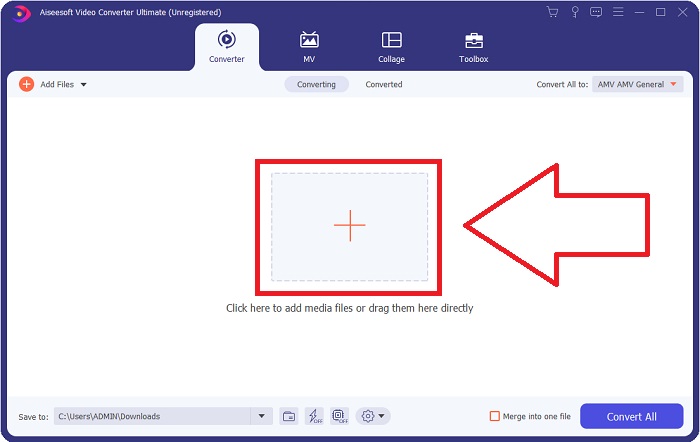
שלב 2: לאחר שתפעיל את התוכנה, יופיע חלון קופץ. ממשק הConverter יוצג על המסך שלך יחד עם אזור ההעלאה. לחץ על כפתור + או גרור כל קובץ וידאו משולחן העבודה שלך כדי להמשיך.
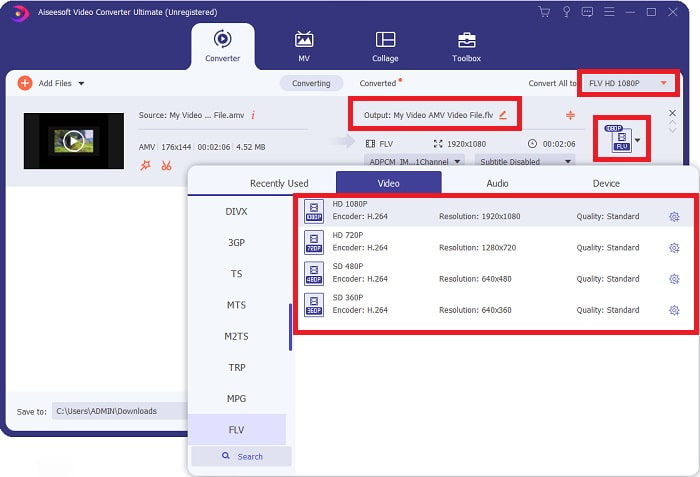
שלב 3: כדי להמיר פורמט וידאו AMV ל‑FLV, עליך לבחור את הפורמט הרצוי לאחר העלאת הקובץ בתוכנה, ולבחור בפורמט FLV. לאחר מכן באפשרותך גם לבחור כל איכות וידאו שתרצה.
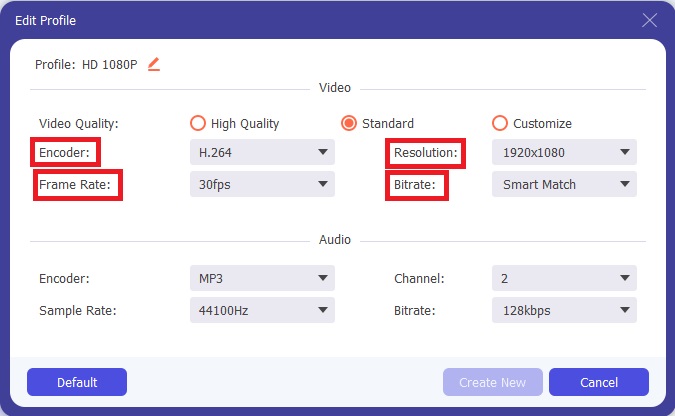
שלב 4: אם עליך להתאים אישית או ליצור איכות וידאו חדשה לפי העדפתך, תוכל ללחוץ על סמל הגלגל‑שיניים (האייקון של ההגדרות) לצד בחירת איכות הווידאו.
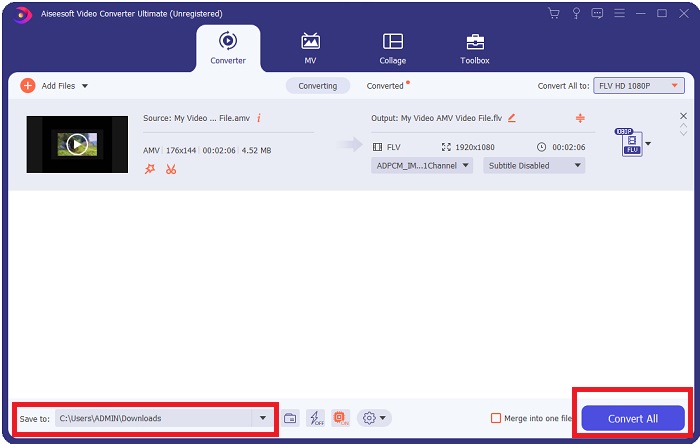
שלב 5: אתה כמעט מסיים! כעת, לאחר שקבעת את כל המפרטים וההתאמות לפי העדפתך, באפשרותך לבחור את מיקום הקובץ שהומר על‑ידי לחיצה על סמל התיקייה ליד השדה Save to בפינה התחתונה של החלון. כעת תוכל להמיר את קובץ הווידאו שלך על‑ידי לחיצה על הכפתור Convert All.
חלק 2. כלי מקוון שיש לשקול להשתמש בו בהמרת AMV ל-FLV
קל להשתמש בממירים מקוונים משום שאין צורך להוריד או להתקין תוכנה כלשהי. Free Video Converter Online הוא דוגמה מצוינת לתוכנית שיכולה להמיר AMV ל‑FLV במהירות ובקלות. בעזרת תוכנית זו אפשר להמיר מגוון רחב של פורמטי אודיו ווידאו, והיא חינמית לחלוטין. באפשרותך להעלות שני קבצים לתוכנית לצורך המרה, ולאחר סיום התהליך הקובץ שהומר יישמר אוטומטית בכונן הקשיח שלך. כעת אציג בפניך את כל השלבים שעליך להכיר כדי להשתמש בכלי המקוון המצוין הזה.
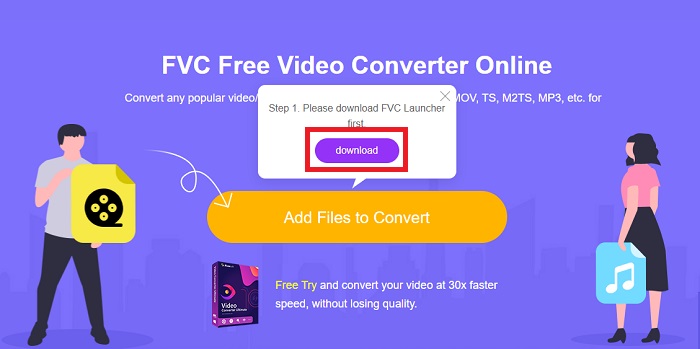
שלב 1: לחץ על הקישור הזה כדי להגיע לדף הראשי של הכלי המקוון. לאחר שתמשיך, התחל להמיר קובץ על‑ידי לחיצה על Add Files to Convert. לאחר מכן יופיע כפתור ההורדה בפינה העליונה של המסך שלך. לאחר שהמשגר (launcher) יסיים את ההתקנה, תוכל להתחיל להעלות קובץ מהמחשב שלך לכלי הזה.
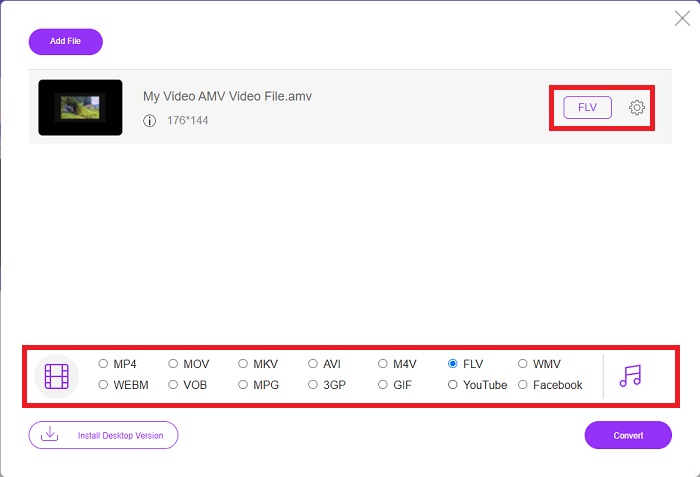
שלב 2: כעת, כשהקובץ המיובא שלך מוכן, לחץ על פורמט הווידאו FLV הממוקם למטה. כפי שניתן לעשות בתוכנה, גם כאן תוכל להתאים את כל מפרטי פלט הווידאו על‑ידי לחיצה על סמל הגלגל‑שיניים.
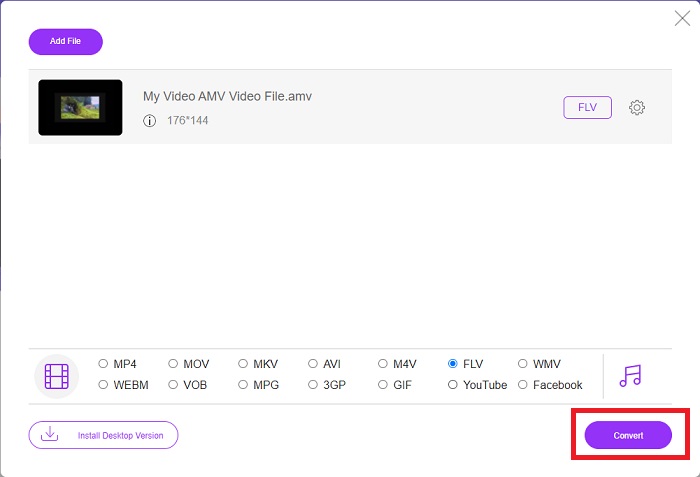
שלב 3: בסיום, לחץ על כפתור Convert כדי לשנות את קובצי ה‑AMV שלך לפורמט FLV.
קשור:
חלק 3. ידע מורחב על AMV & FLV
AMV מייעל נגני מדיה מגוונים עם מעבדים איטיים ומסכים קטנים, כמו נגן MP3 S1. קוד הווידאו הוא Motion JPEG עם טבלאות קוונטיזציה קבועות. Codec האודיו הוא IMA ADPCM, שבו 8 הבתים הראשונים של כל מסגרת הם המקור (16 סיביות), האינדקס (16 סיביות) וכמות הדגימות המוצפנות של 16 סיביות (32 סיביות). פענוח תקורה עבור רכיבי Codec מפושטים אלה הוא זניח. דחיסת הווידאו נמוכה (4 פיקסלים/בייט לעומת מעל 10 פיקסלים/בייט עבור MPEG-2), אבל גדלי הקבצים קטנים בגלל הרזולוציה המופחתת (96x96 גבוה או שווה ל-208x176) ו-fps (10, 12, או 16 פריימים/שניות). סרטון של 30 דקות דחוס ל-128x96 פיקסלים ו-12 פריימים לשנייה יהיה 80 מגה-בייט.
עם זאת, קובץ וידאו עם סיומת.flv שאתה יכול להשתמש בסיומת הקובץ FLV אם ברצונך להזרים וידאו או אודיו מ-Adobe Flash Player או Adobe Air דרך האינטרנט. במשך זמן רב, Flash Video היה פורמט הווידאו המוגדר כברירת מחדל עבור כמעט כל הסרטונים המקוונים, כולל אתרים כמו YouTube, Hulu ועוד אינספור אחרים. מסיבה זו, שירותי סטרימינג ומפתחי תוכנה אינם משתמשים יותר בפורמט הפלאש הקנייני של Adobe. עם כל ההשוואה הזו, הנה קצת עזרה בשבילך, מאמר זה סיפק לך טבלת השוואה:
| סיומת קובץ | AMV | FLV |
| שם קובץ | קליפ אנימה | קובץ וידאו פלאש |
| פותח על ידי | ג'ים קפוססטס | Adobe System Incorporated |
| יתרונות | ◆ AMV הוא אחד מסרטוני האנימה הפופולריים ביותר שנעשו על ידי מעריצים עד כה. ◆ גודל הקובץ קטן. | Adobe Flash עבור דפי אינטרנט דינמיים ואינטראקטיביים יכול להיות יתרון עצום. למרות שמדובר בתהליך פשוט, התוצאות עשויות להיות משמעותיות. פלאש היה פעם בחירה פופולרית גם למשחקי וידאו פשוטים. |
| חסרונות | ◆ לא תואם לרוב נגני המדיה וההתקנים; איכות נמוכה. | הירידה בפופולריות של FLV הייתה חיסרון. יצירת תוכן FLV עשויה להיות גוזלת זמן ויקרה. חוסר התמיכה ב-Flash במכשירי iOS מגביל מאוד את יכולתו למשוך משתמשים חדשים. |
| תוכניות התומכות בקובץ | ◆ נגן מדיה VLC ◆ iOrgsoft AMV ממיר | ◆ RealPlayer ◆ Apple QuickTime Player ◆ נגן מדיה VLC ◆ MPlayer |
חלק 4. שאלות נפוצות לגבי המרת AMV ל-FLV
מה המטרה של AMV?
סנכרון ואחדות ב-AMV יכולים להשיג סגנונות עריכת וידאו שונים. אפשר להגיע לעריכה גולמית עם התקרבות והקטנה פשוטה של 'אפקטים' ומעברי מעבר פשוטים. בין הדוגמאות הרבות הן כדלקמן.
איך מייצרים AMVs?
כדי ש-AMV יצליח, עליו להשתמש בשיר שקשור באופן הדוק לנושא ומתאר אותו כמעט בצורה מושלמת. כל מי שקורא את זה יכול להגיב באומרו, 'וואו, זה מדהים! השיר הזה הוא שלו, שיר הנושא שלה. בגלל זה, בחרת חתיכה טובה.
האם FLV איכותי יותר?
פורמט FLV ו-MP4 מסוגלים לאחסן קידוד דיגיטלי של וידאו ואודיו באיכות גבוהה. האיכות של קבצי FLV היא עניין של ויכוח, אבל היתרונות והחסרונות של FLV יכולים לדון בפורמט הקובץ. יחסי דחיסה גבוהים יותר ב-MP4 מביאים לאובדן איכות פחות.
סיכום
לסיום, תדע את החשיבות של בחירת הממיר הטוב ביותר בהמרת AMV ל-FLV. אחרים יפיקו סרטונים באיכות נמוכה ובלתי מסונכרנים לאחר שהסרטון עבר המרה. אבל שני הממירים שהמאמר הזה ממליץ עליו הם הממיר מהשורה הראשונה שלא צריך לדאוג לגבי האיכות שהוא ייתן.
-
 השיטה הטובה ביותר לשימוש בהמרת AMV ל-AVI [אושרה]
 האם אתה מתקשה להמיר את קובץ הווידאו שלך בפורמט AMV ל-AVI? הנה כמה טיפים בתנאי שתוכל למצוא רק במאמר זה.
-
 3 ממירי AMV החדשים ביותר זמינים להמרת AMV לפורמט MOV [2022]
 אינך יודע כיצד להמיר את קבצי ה-AMV שלך לפורמט MOV? אז מאמר זה מדבר על 3 ממירי AMV ל-MOV שבהם אתה יכול להשתמש באופן מקוון או לא מקוון.
-
 4 שיטות מאומתות להמרת TS ל- FLV בשולחן העבודה / מקוון
 אינך יכול לפתוח TS במחשב או בנייד כברירת מחדל. הדרך היחידה לצפות בקבצי הווידיאו היא להמיר TS ל- FLV או פורמטים אחרים בעזרת המדריך הקונקרטי שלנו.
