


 ממיר וידאו אולטימטיבי
 מקליט מסך
 תיקון וידאו
 הורדה מאובטחת
כיצד להמיר את קבצי הווידאו של DAT לפורמט FLV בחינם
Since there are so many video formats you might need to convert one format to the other. This article focuses on how to convert DAT to FLV on desktop and online for free. A file with the DAT extension is not a standard file but data file that stores information. Therefore, no specific program is responsible for opening DAT files. If a video file is being stored this way, a proper DAT to FLV converter can help you open it.

חלק 1: הדרכים החינמיות הטובות ביותר להמרת DAT ל- FLV
דרך 1: המרת DAT ל- FLV עם ממיר FLV חינם
FVC Free FLV Converter is a powerful video converter although it is freeware. It means that you can get the features similar to professional software without paying a penny.
Key Features of the Best Free DAT to FLV Converter
- 1. אצווה להמיר קבצי DAT במהירות לפורמט FLV.
- 2. הפק פלט באיכות גבוהה באמצעות טכנולוגיה מתקדמת.
- 3. כלול מגוון רחב של כלי בונוס, כמו עריכת וידאו.
הורדה חינמיתל-Windows 7 ומעלההורדה מאובטחת
הורדה חינמיתל-MacOS 10.7 ומעלההורדה מאובטחת
How to Convert DAT to FLV for Free
שלב 1: פתח קבצי DAT
Run the best free DAT to FLV converter once you install it on your computer. To keep your data safe, you’d better download it from the official website. Click the big Add File(s) button in the home interface, seek and select the DAT video files and open them. Then they will appear in the library area.

שלב 2: הגדר FLV כפורמט פלט
Head to the bottom area, click and expand the Output format option. Go to the General Video tab on the list, scroll down and select FLV or relative format. You can also reset the frame rate, resolution and other parameters by hitting the Gear icon on each title.

שלב 3: המרת DAT ל- FLV
Next, click the Open Folder button and change the destination directory based on your preference. By default, the DAT to FLV converter will save the output to your video library. Finally, click on the Convert button to begin converting DAT to FLV on your desktop immediately. It only takes a few minutes to complete converting.

דרך 2: כיצד להמיר DAT ל- FLV באמצעות VLC
VLC היא דרך נוספת להמיר DAT ל- FLV בחינם. נגן המדיה של קוד פתוח יכול לפתוח קובץ וידאו עם סיומת DAT ולהמיר אותו לקבצי וידאו סטנדרטיים. בהתחשב בהליך המסובך, אנו חולקים את השלבים הבסיסיים להלן.
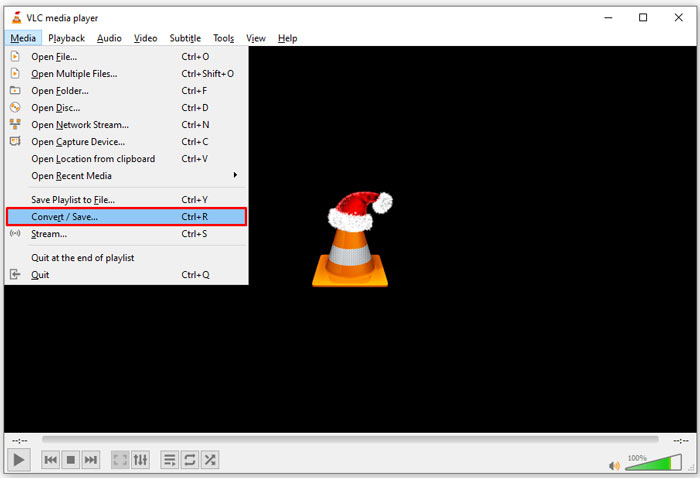
Step 1: Open VLC and click the Convert/Save open in the Media menu on the top ribbon. Then you will see the open-media dialog.
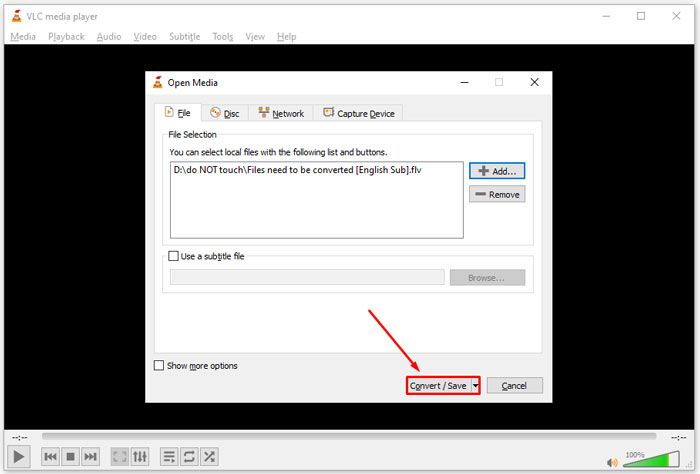
Step 2: Click the Add button and open the DAT video files into VLC. Hit the Convert/Save button to move on.
Step 3: Unfold the Profile drop-down list and set FLV as the output format. Click the Browse button to select an output folder in Destination section.
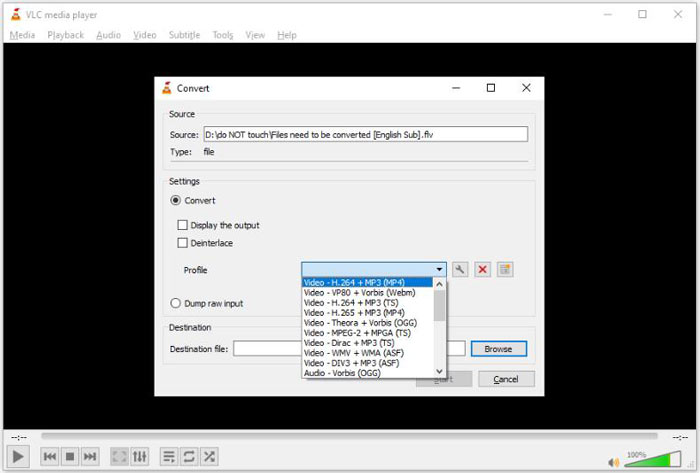
Step 4: Click the Start button to initiate DAT to FLV converting. It takes as long as your video file to convert it in VLC.
חלק 2: כיצד להמיר DAT ל- FLV מקוון
FVC Free Online Video Converter is an easy way to convert DAT to FLV online for free. Compared to other web video converters, it lets you do the job without any limit, like file size, registration, watermark, etc.
Step 1: Open a browser, and visit https://www.free-videoconverter.net/free-online-video-converter/. Click the Add Files to Convert button to download the launcher.

Step 2: Click the Add File button on the launcher and upload the DAT video files from your computer. Then head to the format section at the bottom and select FLV.

Step 3: Press the Convert button to initiate converting DAT to FLV online. When it is done, download the video files to your hard drive.
Here you may like:
Convert Your TS Files to FLV Format
חלק 3: שאלות נפוצות על DAT ל- FLV
האם אוכל להמיר קבצי DAT ל- FLV מ- Internet Explorer?
אם קבצי ה- DAT מ- IE מאחסנים תכני וידאו, תוכלו להמיר אותם לסרטונים רגילים. עם זאת, DAT לא מאחסן רק נתוני וידאו, אלא גם מידע אחר. לגבי נתונים אחרים, אינך יכול להמיר לסרטונים.
כיצד לפתוח קבצי DAT?
קובץ DAT הוא קובץ נתונים המכיל מידע אודות התוכנית שאליה הוא משויך. אתה יכול לנסות לפתוח קובץ DAT על ידי לחיצה כפולה עליו. המערכת שלך עשויה להפיץ את התוכנית המתאימה.
האם אוכל להמיר DAT ל- QuickTime?
זה תלוי במצב שלך. ראשית, על קבצי ה- DAT לאחסן נתוני וידאו. אז אתה צריך גם ממיר וידאו תומך ב- DAT וב- QuickTime.
סיכום
מדריך זה שיתף שלוש דרכים להמיר את ה- DAT ל- FLV בשולחן העבודה או באינטרנט. VLC היא דרך חופשית לבצע את העבודה ב- Windows, Mac ו- Linux. עם זאת, ממיר FLV חינם של FVC מציע יותר תכונות ברמה מקצועית עם בקשת תשלום כלשהו. אם יש לך שאלות אחרות, אנא השאיר הודעה מתחת לפוסט זה.
-
 MP4 ל- FLV | 3 הממירים המובילים בחינם (מקוונים / מק / חלונות)
 פוסט זה הוא המדריך המפורט להמרת MP4 ל FLV. אתה יכול לקחת את שלושת הממירים החינמיים המובילים כדי לשנות MP4 ל- FLV באופן מקוון, במחשב Windows או Mac בקלות.
-
 3 פתרונות להמרת MTS ל- FLV חינם ומקוון
 רוצה להמיר MTS ל- FLV? להלן 3 תוכנות ממיר MTS ל- FLV בחינם שתוכלו לנסות להמיר MTS ל- FLV ב- Mac OS X ו- Windows 10/8/7.
-
 4 הדרכים המובילות בחינם להמיר קטעי וידאו FLV ל MP4 בשולחן העבודה ובאינטרנט
 מדריך זה חולק ארבע שיטות חינמיות להמרת קבצי הווידאו של ה- FLV לפורמט MP4 ב- Windows 10/8/7 / XP וב- Mac OS X, כך שתוכלו ליהנות מהסרטונים בכל המכשירים.
