


 ממיר וידאו אולטימטיבי
 מקליט מסך
 תיקון וידאו
 הורדה מאובטחת
כיצד להמיר קבצי וידאו FLV ל- WMV מבלי לאבד איכות
קובצי FLV אינם נתמכים על ידי כל נגן מדיה או מכשיר נייד. לכן ייתכן שתרצה להמיר את הקובצי FLV שלך ל‑WMV או לפורמט אחר שתואם לנגן הווידאו שלך. הבעיה החדשה היא שאתה צריך כלי מתאים לביצוע העבודה על שולחן העבודה או אונליין. אל תבזבז זמן בחיפושים באינטרנט. ההדגמה הזו תלמד אותך איך להמיר את סרטוני ה‑FLV שלך ל‑WMV כדי שתוכל להמשיך בפרויקט שלך בקלות.

חלק 1: 2 שיטות קלות להמיר FLV ל- WMV בחינם
שיטה 1: המרת FLV ל- WMV עם ממיר FLV בחינם
FVC Free FLV Converter הוא דרך חזקה להמיר את קובצי ה‑FLV שלך ל‑WMV. למרות שאינו דורש תשלום או מוסיף סימן מים, תוכל למצוא בו שפע פונקציות הדומות לתוכנות מקצועיות. חשוב מכך, הוא קל מאוד לשימוש ואינו דורש כישורים טכניים.
התכונות העיקריות של ממיר ה- FLV הטוב ביותר
- 1. המר סרטוני FLV לפורמטים אחרים בלחיצה אחת.
- 2. אצווה מטפל במספר קבצי וידיאו FLV בו זמנית.
- 3. תומכים במגוון רחב של פורמטי מולטימדיה.
הורדה חינמיתל-Windows 7 ומעלההורדה מאובטחת
הורדה חינמיתל-MacOS 10.7 ומעלההורדה מאובטחת
כיצד להמיר FLV ל- WMV בחינם
שלב 1: ייבוא FLV
הורד והתקן את ממיר הווידאו החינמי הטוב ביותר ל‑FLV, ולאחר מכן הפעל אותו. ממיר הווידאו תואם ל‑Windows 10/8/7 ול‑Mac OS X. לחץ על תפריט Add File(s) בפינה השמאלית העליונה והוסף את כל קובצי ה‑FLV שברצונך להמיר. התוכנה מנצלת ריבוי־תהליכים (multi‑thread) כדי לעבד וידאו במצב אצווה.

שלב 2: הגדרת WMV כפורמט פלט
אתר את האזור התחתון לאחר טעינת הווידאו, לחץ ופתח את רשימת הבחירה Output format. עבור ללשונית General Video ובחר WMV. תוכל למצוא במהירות את פורמט הפלט על ידי חיפוש שלו בתיבת Search Profile.
אם אתה רוצה לערוך את הסרטונים שלך, לחץ על כפתור Edit ברצועה העליונה ופתח את חלון עורך הווידאו.

שלב 3: המרת FLV ל‑WMV
לחץ על כפתור Open Folder והגדר את תיקיית היעד בשדה Output folder. לבסוף, לחץ על כפתור Convert כדי להתחיל להמיר FLV ל‑AVI. על פי המחקר שלנו, לוקח רק כמה דקות להמיר עשרות קובצי FLV.

שיטה 2: כיצד להמיר FLV ל- WMV באמצעות VLC
אנשים רבים מעדיפים ממירי וידאו פתוחים. VLC, למשל, הוא לא רק נגן וידאו, אלא גם מסוגל להמיר FLV ל- WMV בחינם. עם זאת, משתמשים רבים התלוננו כי VLC קשה לשימוש. לכן, אנו מפרסמים להלן מדריך בסיסי.
שלב 1: הפעל את ממיר ה‑FLV ל‑WMV החינמי. תוכל להתקין אותו מהאתר הרשמי בלי לשלם אגורה.
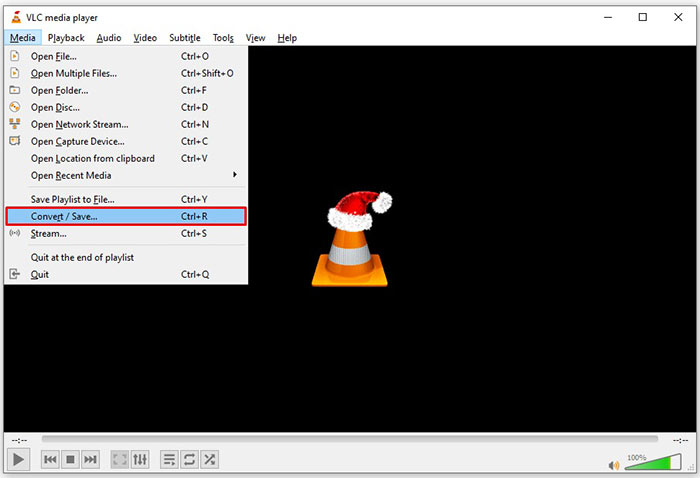
שלב 2: עבור לתפריט Media ובחר Convert/Save במחשב אישי (PC). אם אתה משתמש ב‑VLC על מק, בחר Convert/Stream מתפריט File.
שלב 3: לחץ על כפתור Add כדי להוסיף קובץ FLV שברצונך להמיר. כאשר מדובר במק, לחץ על כפתור Open media כדי לייבא את סרטון ה‑FLV.
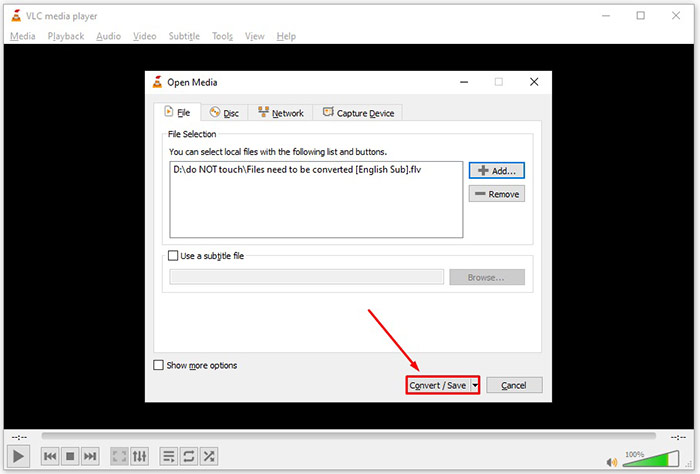
שלב 4: לחץ על כפתור Convert/Save כדי לעבור לחלון הבא. במק, גלול למטה אל החלק Choose Profile.
שלב 5: כברירת מחדל, VLC אינו תומך ביצוא ל‑WMV, אך ניתן להוסיף אותו ידנית. לחץ על כפתור Profile edit במחשב אישי או על כפתור Customize במק כדי לפתוח את תיבת הדו־שיח Profile edition.
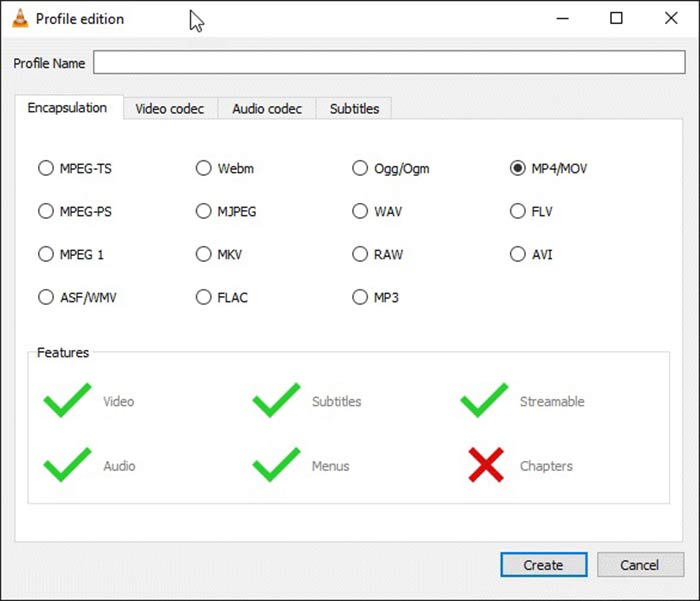
שלב 6: כתוב WMV בתיבת Profile Name, ובחר ASF/WMV. לחץ על כפתור Create וסגור את תיבת הדו־שיח. לאחר מכן פתח את רשימת הבחירה Profile ובחר WMV.
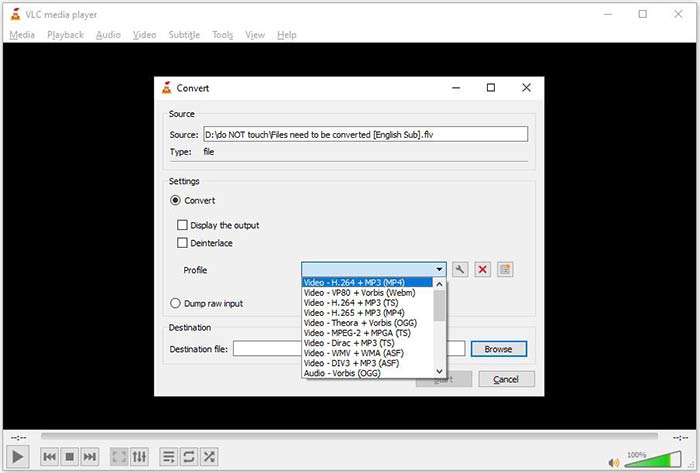
שלב 7: לחץ על כפתור Browse ובחר תיקייה מסוימת לשמירת קובץ ה‑WMV המתקבל. לבסוף, לחץ על כפתור Start כדי להתחיל מיד בהמרת FLV ל‑WMV. ההמרה אורכת זמן הדומה לאורך קובץ הווידאו, לכן עליך להתאזר בסבלנות.
חלק 2: כיצד להמיר FLV ל- WMV באופן מקוון
עבור אנשים שלא אוהבים להתקין תוכנות, יישומי רשת הם פתרון חלופי נייד לביצוע משימות שונות. FVC Free Online Video Converter, למשל, יכול לעזור לך להמיר קובצי FLV לפורמט WMV אונליין בחינם. בניגוד ליישומי רשת אחרים, הוא משתמש בטכנולוגיה מתקדמת להמרת וידאו אונליין ללא הגבלת גודל קובץ.
שלב 1: פתח את https://www.free-videoconverter.net/free-online-video-converter/ בדפדפן שלך כשאתה צריך להמיר FLV ל‑WMV. לחץ על כפתור Add Files to Convert כדי להוריד ולהתקין את המשגר.
הורד את גרסת הדסקטופ כדי להמיר קבצים במצב אצווה.
שלב 2: ברגע שההתקנה מסתיימת, המשגר יקפוץ. לחץ על כפתור Add File ולאחר מכן העלה את קובצי ה‑FLV שברצונך להמיר.
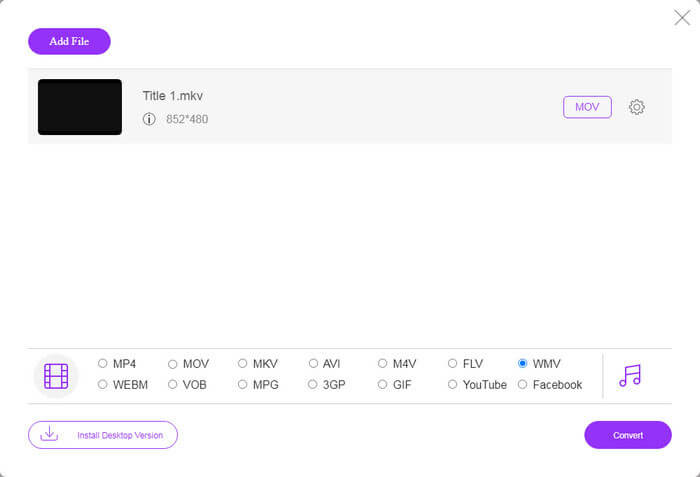
שלב 3: לאחר מכן בחר את אפשרות WMV בתחתית ולחץ על כפתור Convert. ההמרה אורכת זמן־מה. לאחר מכן הורד את קובצי הפלט לכונן הקשיח שלך.
אל תפספס:
FLV לעומת WMV
Adobe Flash Player השתמש ב-FLV כדי לספק תוכן וידאו כמו סרטים ותוכניות טלוויזיה. כיום, Adobe כבר לא מפתחת את הנגן וממליצה למשתמשים להסיר אותו מטעמי אבטחה. עם זאת, אתה עדיין יכול להשתמש בפורמט FLV בתוכניות רבות שאינן Adobe/Macromedia.
הופק על ידי מיקרוסופט, WMV היה אחד מפורמטי הווידאו הנפוצים ביותר בשנות ה-2000. ניתן לראות אותו דרך האינטרנט ולהפעיל אותו על ידי נגני מדיה שונים ב-Windows. וזה גם פורמט ברירת המחדל של קובץ הווידאו של Windows Media Player. אבל זה השתלט על ידי פורמטים אחרים לאחרונה.
חלק 3: שאלות נפוצות על FLV ל- WMV
האם אני יכול להמיר FLV ל- WMV ב- Windows 10?
אין תכונה מובנית ב- Windows 10 המסוגלת להמיר קבצי וידאו. כדי לבצע את העבודה, אתה צריך גם תוכנית ממיר וידאו או אפליקציה המותקנת במחשב האישי שלך.
מדוע FLV אינו משחק ב- Windows Media Player?
כידוע, FLV הוא פורמט שצבר פופולריות בהעברת סרטונים דרך האינטרנט. עם זאת, FLV אינו נתמך על ידי Windows Media Player. כאן יש לך שתי אפשרויות, השתמש בנגן מדיה אחר או התקן חבילת קודק ל- WMP.
האם זה בטוח להמיר FLV ל- WMV באופן מקוון?
קשה לענות על שאלה זו. למרות שרוב ממירי הווידיאו באינטרנט מבטיחים למחוק את הסרטונים שלך לאחר ההמרה, חלקם עשויים להעביר את הקבצים שלך לידיים אחרות. לכן, עליך להשתמש בכלי מהימן, כמו ממיר וידאו מקוון חינם FVC.
סיכום
מדריך זה שיתף שלוש דרכים להמיר FLV ל- WMV בשולחן העבודה ובאינטרנט. כשיש לך צורך כזה, תוכל לעקוב אחר המדריך הקונקרטי שלנו כדי לסיים את העבודה בקלות. ממיר FVC חינם FLV, למשל, אינו רק ללא תשלום, אלא גם להמיר את קבצי הווידאו שלך מבלי לפגוע באיכות. אם אתה נתקל בבעיות אחרות, ברוך הבא לפנות אלינו על ידי השארת הודעה מתחת לפוסט זה.
-
 כיצד להמיר קבצי וידיאו FLV ל MP4 מבלי לשלם אגורה
 מדריך זה חולק ארבע שיטות חינמיות להמרת קבצי הווידאו של ה- FLV לפורמט MP4 ב- Windows 10/8/7 / XP וב- Mac OS X, כך שתוכלו ליהנות מהסרטונים בכל המכשירים.
-
 כיצד להמיר את קטעי ה - FLV שלך לקובצי MP3 בשולחן העבודה ובאינטרנט
 כיצד להמיר FLV לקובץ MP3? כל שעליך לעשות הוא לקרוא בעיון את המאמר הזה, למצוא את השיטה המועדפת עליך ופעל לפי המדריך המפורט שלנו כדי לקבל את מה שאתה רוצה.
-
 3 הדרכים המובילות להמיר FLV ל- MOV
 כיצד להמיר FLV ל- MOV? כיצד ניתן להמיר FLV ל- MOV ב- Mac? האם יש דרך חופשית להמיר את YouTube FLV ל- MOV באופן מקוון? פוסט זה משתף 3 ממירי FLV ל- MOV כדי לשנות קבצי FLV ל- MOV.

