


 ממיר וידאו אולטימטיבי
 מקליט מסך
 תיקון וידאו
מדריך הדרכה שכדאי לשקול בהמרת M2TS ל-FLV [לא מקוון ומקוון]
קובצי מדיה כמו VOB, WMV ו‑MOV הם כולם דוגמאות ל‑M2TS. מה בעצם הוא M2TS? מתברר ש‑M2TS הוא קיצור של MPEG-2 Transparent Stream. סרטוני וידאו באיכות גבוהה על דיסקי Blu-ray, AVCHD וכו', יכולים להישמר בפורמט מכולה זה. לעומת זאת, FLV הוא קובץ שהסיומת שלו היא .flv, קיצור של Flash Video. סיומת הקובץ FLV מתייחסת לקובץ וידאו או אודיו שמועבר דרך האינטרנט באמצעות Adobe Flash Player או Adobe Air. שני סוגי קבצי הווידאו הללו אולי אינם מוכרים לך, אך כדי להמיר M2TS ל‑FLV עליך קודם להבין את השימוש של שני פורמטי הווידאו האלה ואת כל האפשרויות שכדאי לשקול בתהליך ההמרה. הכן את עצמך וקבל הארה מכל פיסת מידע שתקרא.

חלק 1. כיצד להמיר M2TS ל-FLV ב-Windows וב-Mac
עם Video Converter Ultimate, המרת M2TS ל-FLV גם ב-Windows וגם ב-Mac היא פשוטה. MP4/MOV/M4V/FLV/M4K/MTS/M2TS/ASF/MP3/VOB/AAC הם רק כמה מפורמטי הווידאו והשמע הפופולריים שבהם תומכת תוכנית רבת עוצמה זו. ניתן להמיר את סרטוני ה-HD שלך לפורמטים פופולריים כמו FLV תוך שניות תוך שמירה על איכותם המקורית. יש לו תכונת המרת אצווה המאפשרת לך להמיר קבצים רבים מבלי לאבד איכות. בהנחה שכבר הכרת את התוכנה, כעת תוכל ללמוד את כל השלבים הדרושים להמרה מוצלחת:
שלב 1: ראשית, לחץ על כפתור הורדה חינמית למטה כדי להוריד את התוכנה למחשב שלך. לאחר שסיימת להוריד את התוכנה, התקן אותה במחשב; תראה חלון קופץ על המסך שמודיע שהתוכנה מוכנה לשימוש. לחץ על Start Now כדי להפעיל את התוכנה.
הורדה חינמיתל-Windows 7 ומעלההורדה מאובטחת
הורדה חינמיתל-MacOS 10.7 ומעלההורדה מאובטחת
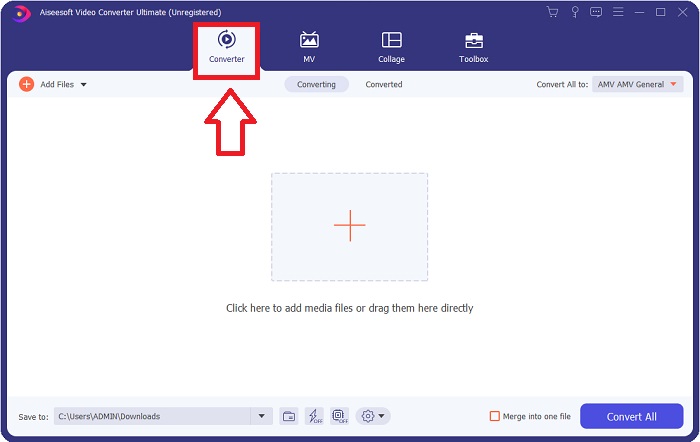
שלב 2: לאחר שהפעלת את התוכנה, תועבר לממשק הראשי שלה, תפריט ה‑Converter.
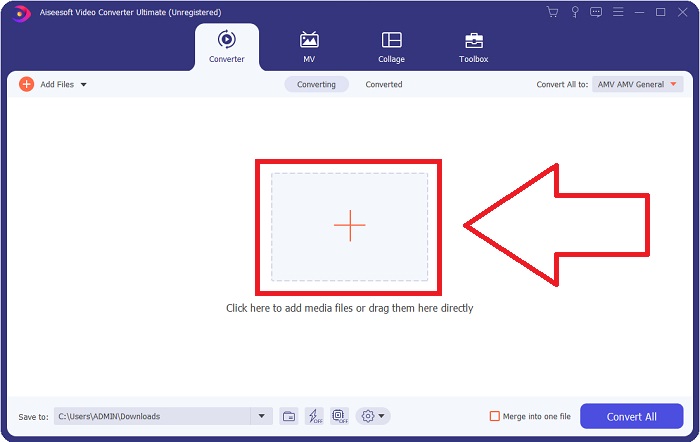
שלב 3: כדי להעלות קובץ, לחץ על סמל ה‑+ במרכז הממשק, או שפשוט גרור וידאו מהמחשב שלך.
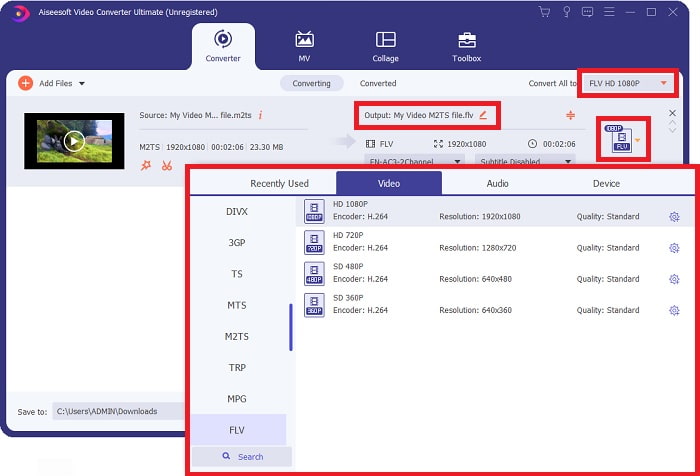
שלב 4: לאחר העלאת קובץ M2TS לממיר, עבור אל תפריט Convert All בפינה הימנית העליונה של החלון ולחץ עליו. יופיע חלון חדש המציג את כל סוגי הפורמטים שהתוכנה תומכת בהם; לאחר מכן בחר בפורמט הווידאו FLV מרשימת הקטגוריות של Video.
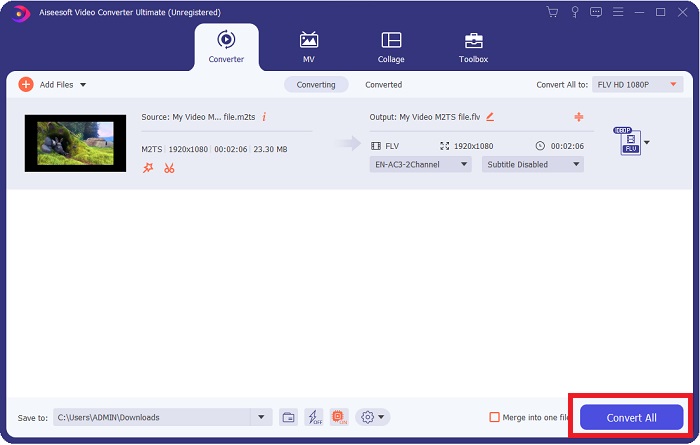
שלב 5: אם עדיין אינך מצליח להחליט באיזו איכות להשתמש משום שהאיכות שאתה מחפש אינה זמינה בין האפשרויות, באפשרותך ללחוץ על סמל גלגל השיניים ולשנות את כל ההגדרות של קצב הסיביות (bitrate), הרזולוציה, קצב הפריימים וכו'. כשתהיה מרוצה מכל השינויים, תוכל ללחוץ על Convert All כדי להתחיל בהמרת קובץ הווידאו שלך.
חלק 2. דרכים אחרות בחינם ויעילות להמרת M2TS ל-FLV באינטרנט
Free Video Converter Online הוא כלי מקוון המתאים להמרת פורמטי וידאו כמו FLV, MP4, MOV, MKV, MTS, ASF, VOB ועוד, במהירות גבוהה יותר מפלטפורמות המרה אחרות. למרות תהליך ההמרה המקוון הקצר שלו, כלי זה מייצא קובצי וידאו ללא בעיות באיכות. בלי להאריך בדיבורים, נעבור כעת על כל השלבים שעליך לבצע:
שלב 1: לחץ על קישור זה כדי להמשיך לאתר הראשי של Free Video Converter Online.
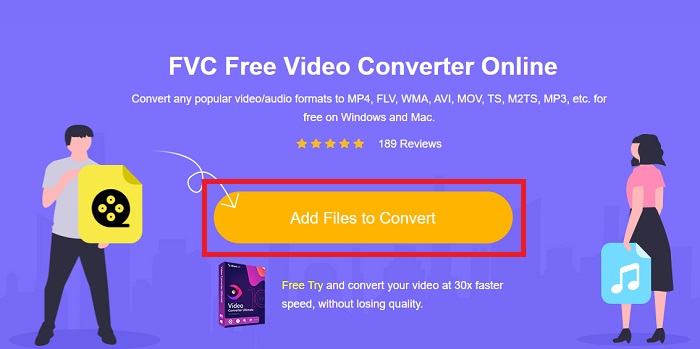
שלב 2: לאחר מכן לחץ על כפתור Add Files to Convert כדי להעלות את קובץ הווידאו M2TS שברצונך להמיר לפורמט וידאו FLV.
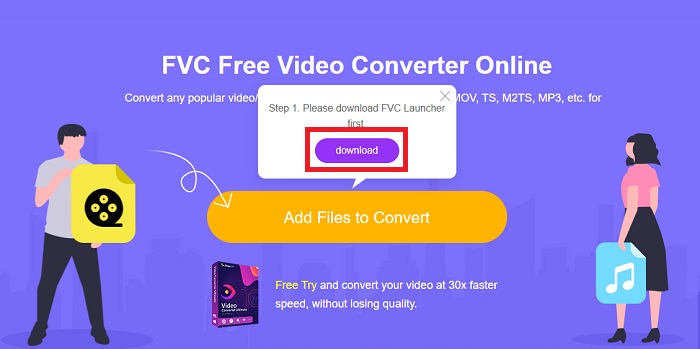
שלב 3: לאחר שתעלה קובץ, תראה חלון קופץ בחלק העליון של המסך שמבקש אישור להורדת המשגר (launcher) לשימוש בכלי המקוון. לחץ על המשגר שהורדת כדי להתקין אותו במחשב ולהתחיל בהמרה.
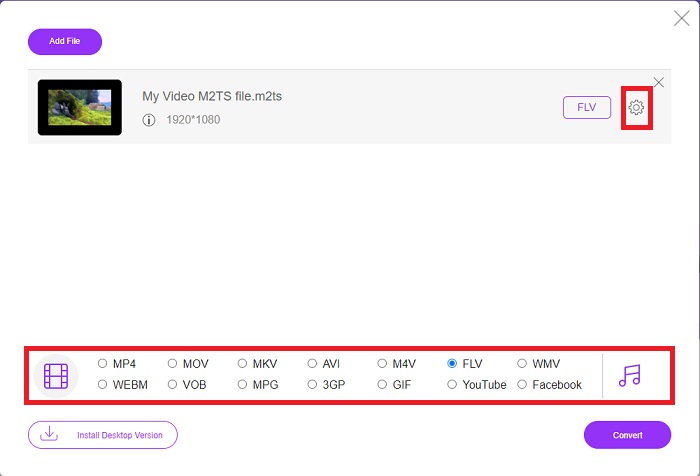
שלב 4: בחר את פורמט הווידאו FLV מתוך בחירת הפורמטים שבתחתית הממשק. בנוסף, תוכל לערוך את איכות פלט הווידאו על‑ידי לחיצה על סמל גלגל השיניים לצד פורמט הווידאו שבחרת. יופיע חלון נוסף המכיל את קצב הסיביות, הרזולוציה וקצב הפריימים. התחל לכוונן אותם, ולאחר שתסיים, לחץ על OK והמשך בתהליך ההמרה.
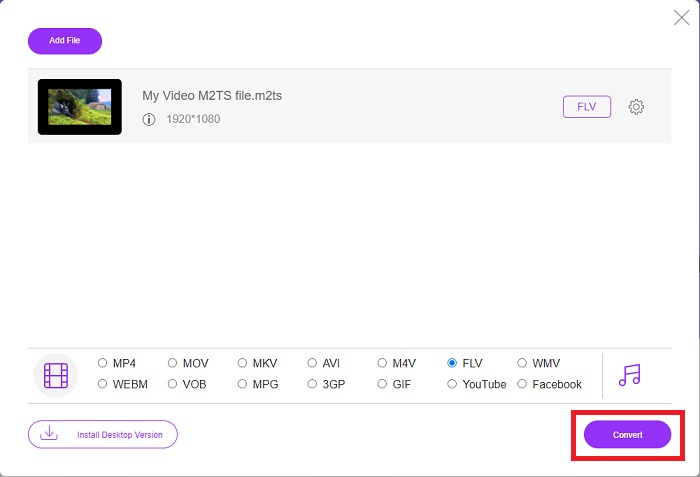
שלב 5: כעת תוכל להמיר את הקובץ על‑ידי לחיצה על כפתור Convert בפינה הימנית התחתונה של החלון.
חלק 3. השוואה בין M2TS ל-FLV
פורמט מיכל וידאו M2TS משמש לאחסון סרטוני וידאו בהבחנה גבוהה על גבי תקליטורי Blu-ray, AVCHD, כוננים קשיחים והתקנים אחרים התומכים בזרם התעבורה MPEG-2. Blu-ray Disc Audio-Video (BDAV) הוא השם שניתן לפורמט זה בשל השימוש הנרחב שלו בתקליטורי Blu-ray. למען הקטנת גודל הנתונים. במקום להשתמש בזרמי הובלה של CBR, נעשה שימוש בזרמי הובלה של VBR (קצב קבוע) בגלל תוכן האודיו והווידאו האיכותיים הכלולים בקבצי M2TS; VideoStudio Pro הוא יישום מצוין לעריכת קבצי M2TS.
| סיומת קובץ | M2TS | FLV |
| סוג קובץ | Blu-ray Disc Audio-Video MPEG-2 Transport Stream | קובץ וידאו פלאש |
| פותח על ידי | איגוד תקליטורי Blu-ray | מערכת אדובי |
| יתרונות | קובץ וידאו BDAV Blu-ray בהבחנה גבוהה מבוסס זרם תחבורה MPEG-2; משמש לאחסון נתוני וידאו בתקליטורי Blu-ray; תומך ברזולוציות 720p/1080i. | פורמט וידאו נפוץ, FLV נמצא בשימוש על ידי עשרות אלפי אתרי אינטרנט, מציע מגוון רחב של תכונות נוספות, ומייצר גדלי קבצים קטנים יותר מרוב פורמטי הווידאו האחרים. קובצי FLV מצוינים לאספקת וידאו באיכות גבוהה בקצב מהיר. |
| חסרונות | קובץ m2ts לא יכול להכיל פרקים. הם נשמרים במקום אחר במבנה התיקיות של Bluray. | יש צורך להתקין פלאגין פלאש כדי להפעיל קבצי פלאש באינטרנט. |
| תוכניות פותחות את פורמט הווידאו | ◆ALLPlayer ◆MPlayer ◆ נגן מדיה VLC ◆PotPlayer | ◆ נגן מדיה VLC ◆ Adobe Flash Player |
חלק 4. שאלות נפוצות לגבי המרת M2TS ל-FLV
איך אני מנגן קובץ M2TS?
Windows Media Player, SMPlayer, 5KPlayer, Splash ו- File Viewer Plus יכולים לנגן קבצי M2TS. חלק מנגני M2TS תואמים למגוון מערכות הפעלה. נגן המדיה VideoLAN VLC, למשל, יכול לנגן קבצי M2TS ב-Windows, Mac ו-Linux.
האם FLV הוא פורמט הקלטה מתאים?
Adobe Flash Player משתמש בפורמט הקבצים FLV. זהו אחד מפורמטי הווידאו הפופולריים והרב‑תכליתיים ביותר, הנתמך בכל פלטפורמות הווידאו והדפדפנים. פלטפורמות סטרימינג מקוונות כמו YouTube מרוויחות מהשימוש בפורמט FLV. קל להוריד אותם הודות לגודל הקובץ הקטן שלהם. לחץ כאן כדי ללמוד עוד על מקליטי FLV הזמינים.
האם עדיין משתמשים ב- FLV?
סרטונים, מודעות באנר, אנימציות ושידורים חיים הם כל האפשרויות. עבר זמן רב מאז סרטי פלאש, והם משתמשים בקליפים באינטרנט. עם זאת, למרות שפורמט FLV בדרך החוצה, הוא ממשיך להיות תקן וידאו עבור משתמשי אינטרנט ברחבי העולם.
סיכום
לסיום הדיון, כולנו חושבים שאין סוג של ממיר זמין להמרת M2TS ל-FLV. ובכל זאת, מאמר זה יתקן אותך אחרי הכל על ידי הצגת שני הממירים הטובים ביותר שאתה צריך לשקול להשתמש בהם, Free Video Converter Online או Video Converter Ultimate. שני הממירים הללו אינם דבר שאתה יכול לבקש מכיוון שהוא מציע לך את כל הכלים והתכונות האפשריות מבחינה מקצועית שיכולים לעזור לך מהמרת קובץ ועד הפיכת קובץ למראה טוב יותר.
-
 2 הדרכים הקלות ביותר להמיר קבצי WMV ל- FLV במחשב / מק
 כיצד ניתן להמיר WMV ל- FLV? ראשית, עליך לקרוא את ההמלצה שלנו ולמצוא את השיטה המועדפת עליך, ולאחר מכן לעקוב אחר המדריך שלנו כדי לבצע את העבודה במהירות.
-
 3 פתרונות כיצד להמיר FLV ל- PSP ללא הפסד
 כיצד להמיר FLV ל- PSP? כאן תקבל את המדריך שלב אחר שלב להמרת סרטוני פלאש לפורמטים הנתמכים ב- PSP (WMV, MP4, AVI, FLV וכו ') ב- Windows ו- Mac.
-
 2 שיטות להמרת FLV לאודיו WMA [חינם ומקוון]
 רוצה לחלץ אודיו WMA מסרטון FLV? להלן 2 מחליפי שמע WMA בחינם להמרת FLV (Flash Video) ל- WMA (Windows Media Audio) במהירות המרה מהירה ב- Mac OS X וב- Windows 10/8/7.
