


 ממיר וידאו אולטימטיבי
 מקליט מסך
 תיקון וידאו
2 מממירי M4V ל-FLV הטובים ביותר עבור Windows/Mac/Online
קובץ וידאו ואודיו שפותח בעיקר לשימוש ב‑Apple iTunes, בפורמט M4V. פורמט זה מוגן כדי למנוע בעיות זכויות יוצרים באמצעות הגנת זכויות דיגיטלית (DRM). במקרה כזה, קשה מאוד לנגן את הקובץ אם אין לך חשבון iTunes עם פרטי ההתחברות שלך. לכן, אם ברצונך לצפות בסרטונים במחשב האישי או בטלפון האנדרואיד, חובה להמיר אותם לקבצי FLV ניתנים לניגון. כדי לדעת איך להמיר M4V ל‑FLV, קרא מאמר זה וקבל מושג קצר על M4V ועל FLV.

חלק 1. בחירה ראשונה על המרת M4V ל-FLV ב-Mac & PC
זהו הממיר היעיל ביותר שתיהנה להשתמש בו, במיוחד אם אתה ממיר M4V ל‑FLV ב‑Mac או במחשב אישי. FVC Video Converter Ultimate הוא הממיר המועדף על משתמשים רבים שכבר סומכים עליו. בנוסף, אם אתה מעוניין בכלי רב‑תכליתי שמספק תוצאה מרשימה, זהו כלי חובה. כמו כן, אפשר להמיר בו כל קובץ מדיה ולכוונן את האיכות ל‑SD, HD, 1080p ואפילו סרטוני 4K. אל תצפה לפחות מזה אם תוריד את הכלי לכונן שלך, משום ששמו כבר רומז שהוא אולטימטיבי. יתרה מזאת, עקוב אחר המדריך הכתוב להלן אם אתה רוצה לחוות את יכולת ההמרה המקסימלית של הכלי הזה.
כיצד להמיר M4V ל‑FLV בעזרת FVC Video Converter Ultimate:
שלב 1. לחץ על כפתור ההורדה למטה, ובחר את מערכת ההפעלה שבה אתה משתמש כרגע. לאחר ההורדה, לחץ על Install, תופיע ממשקת קבלת פנים, ואז לחץ Start Now.
הורדה חינמיתל-Windows 7 ומעלההורדה מאובטחת
הורדה חינמיתל-MacOS 10.7 ומעלההורדה מאובטחת
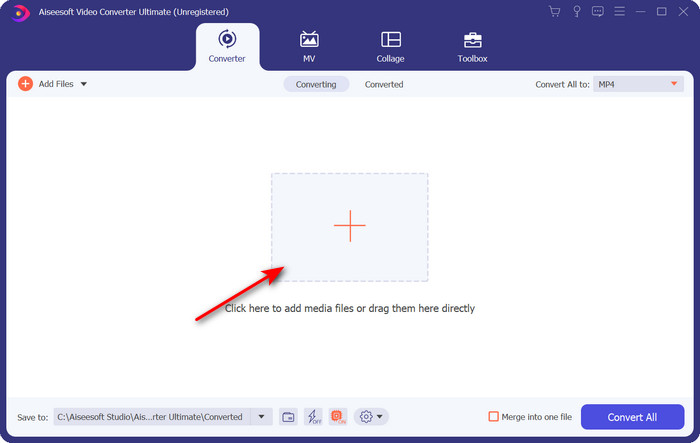
שלב 2. הפעל את הכלי, לחץ על סימן ה‑+ במרכז הממשק ובחר את קובץ ה‑.m4v בתיקייה שתופיע, לחץ עליו ואז לחץ על Open.
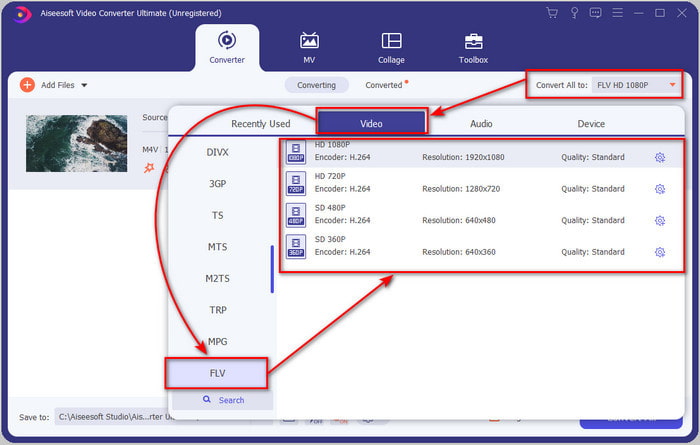
שלב 3. לאחר שקובץ ה‑.m4v מופיע בממשק, לחץ על Convert All to ומצא את פורמט ה‑FLV.
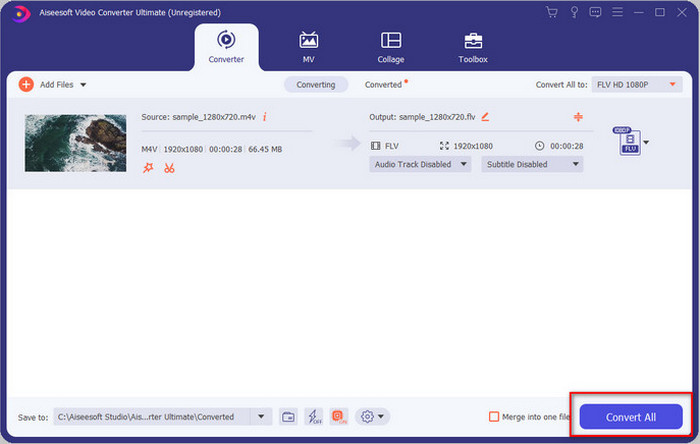
שלב 4. לחץ על Convert All כדי להתחיל בהמרת M4V ל‑FLV.
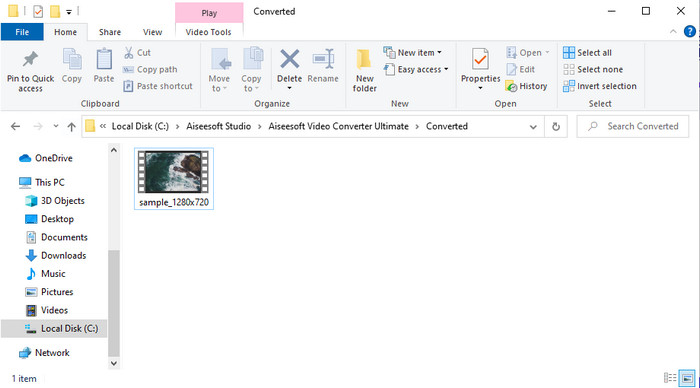
שלב 5. המרת הקובץ תימשך פחות מדקה בזכות מהירות ההמרה שהכלי מספק. תופיע תיקייה שתציג את הקובץ שהומר; לחץ על הקובץ כדי לצפות בו או לשתף אותו ברשת.
יתרונות
- המרה מהירה והאצת חומרה זמינים לחוויה הטובה ביותר.
- זמין בכל הפלטפורמות כמו PC או Mac.
- ניתן להתעלות כאן על ביצוע עריכת סרטונים כדי להפוך אותם ליוצאים מן הכלל.
חסרונות
- תשלום לפני השימוש אך המחיר סביר.
- הורד את התוכנה לפני השימוש.
חלק 2. בחירה שניה על המרת M4V ל-FLV בחינם דרך מקוונת
המרת הקבצים שלך אונליין יכולה להתבצע ביעילות אם אתה משתמש בממיר M4V ל‑FLV מקוון מתאים בעזרת FVC Free Video Converter Online. כלי מקוון זה הוא הממיר הטוב ביותר שניתן לגשת אליו מכל דפדפן אינטרנט כל עוד יש חיבור לרשת. בנוסף, אפשר להמיר כאן ללא הגבלת גודל, אך אי‑אפשר לבצע המרה באצווה. אף על פי שהתוכנה המקוונת מצוינת, עדיין נדרש חיבור אינטרנט, כך שאם אין לך – זה אינו פתרון עבורך, כמו ממירי רשת אחרים. אבל אם יש לך חיבור אינטרנט ואתה רוצה ליהנות מהמרה מקוונת חינמית ואיכותית, עליך לעקוב אחר השלבים שלהלן.
כיצד להמיר M4V ל‑FLV בעזרת FVC Free Video Converter Online:
שלב 1. לחץ על הקישור הזה כדי להיכנס לממיר המקוון החינמי ש‑FVC מציעים לך.
שלב 2. בממשק האינטרנט, לחץ על Add Files to Convert כדי להוריד את תוכנת העזר. לאחר סיום הורדת העזר, לחץ שוב על Add Files to Convert, תופיע תיקייה, ואז בחר את קובץ ה‑M4V.
הורד את גרסת הדסקטופ כדי להמיר קבצים במצב אצווה.
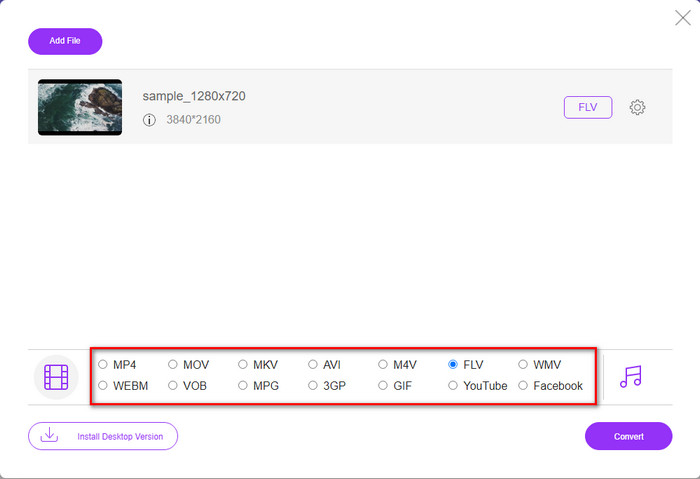
שלב 3. יופיע ממשק אינטרנט חדש; למטה בחר בפורמט FLV על‑ידי לחיצה עליו.
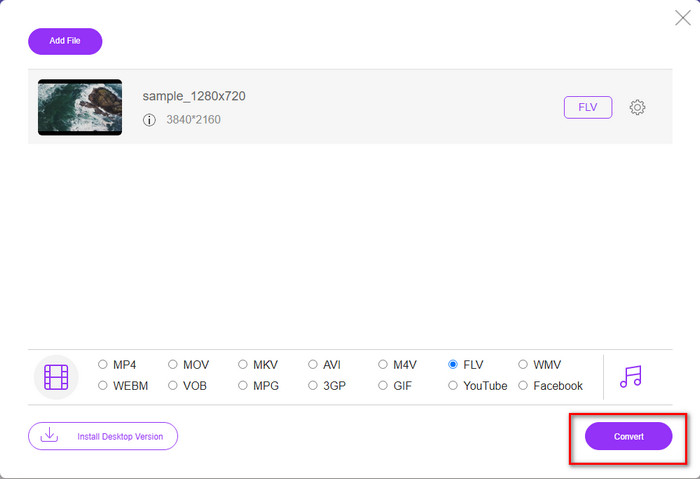
שלב 4. כדי להתחיל להמיר M4V ל‑FLV בחינם, לחץ על Convert.
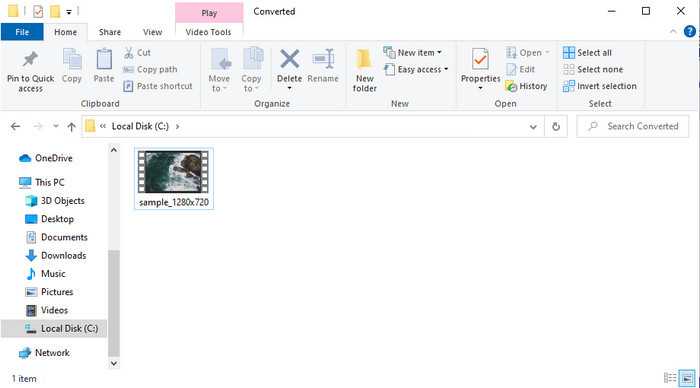
שלב 5. לאחר ההמרה, תופיע תיקייה בממשק; לחץ על הקובץ כדי לנגן אותו בנגן המדיה המקומי שלך.
יתרונות
- חינמי ותואם בכל דפדפני האינטרנט.
- גודל קובץ והמרה ללא הגבלה.
- בטוח וללא מודעות בכלי האינטרנט הראשי.
חסרונות
- הוא זקוק לחיבור לאינטרנט כדי להשתמש בכלי.
- פורמט פחות נתמך להעלאה ולהמרה.
חלק 3. הבדלים בין פורמטים M4V ו-FLV
M4V מאחסן את איכות הווידאו הגבוהה ביותר שהורדת בחנות Apple iTunes שלך. פורמט זה דומה ל-MP4 מכיוון שהם משתמשים ב-Codec MPEG-4 כמדחס. אבל סרטוני ה-M4V מוגנים תחת הגנת זכויות היוצרים של Apple FairPlay DRM. לכן, הפעלת סרטונים בפורמט הזה היא מסובכת מכיוון שהיא לא תפעל מיד אם תכניס אותם לנגן מדיה שאינו iTunes או Quicktime Player. ניתן לגשת לקבצי M4V לא מוגנים בנגן המדיה שלך על ידי שינוי סיומת הקובץ ל-.mp4.
לעומת זאת, FLV משמש להעברת נתוני וידאו ואודיו דרך האינטרנט במהירות האפשרית. Flash Video הוא הפורמט הכי נוח שיש בכל אתר HTML 5. עם זאת, פורמט זה הופסק מכיוון ש-Adobe Flash כבר יצאה משימוש. עם זאת, אתה עדיין יכול להפעיל את זה בתוספי נגן המדיה שלך הדרושים ברגע שאתה מוריד אותו או המרה.
M4V לעומת FLV
ה-M4V פותח על ידי אפל, אשר משתמשת גם ב-MPEG 4. קבצי M4V משמשים לעתים קרובות לאחסון סרטונים אלו שהורדו מחנות ה-iTunes של Apple, כמו סרטוני מוזיקה, פרקי טלוויזיה וכו'. ייתכן שתמצא כמה קבצי M4V מוגנים מפני העתקה מכיוון שהוא משתמש הגנת זכויות יוצרים של FairPlay DRM של אפל.
Adobe Flash Player השתמש ב-FLV כדי לספק תוכן וידאו כמו סרטים ותוכניות טלוויזיה. כיום, Adobe כבר לא מפתחת את הנגן וממליצה למשתמשים להסיר אותו מטעמי אבטחה. עם זאת, אתה עדיין יכול להשתמש בפורמט FLV בתוכניות רבות שאינן Adobe/Macromedia.
חלק 4. שאלות נפוצות לגבי המרת M4V ל-FLV
איזה יותר טוב; MP4 או M4V?
אם אתה רוצה להגן על הקובץ שלך, אז M4V הוא הפורמט שבו אתה חייב להשתמש כי זה זמין רק על Apples, והוא מוגן. אבל נניח שאתה רוצה פורמט התואם לכל נגני המדיה, העורך ועוד. במקרה כזה, MP4 הוא פורמט המדיה האוניברסלי שתשמח להשתמש בו.
האם אני יכול לשחק M4V ב-VLC?
VLC הוא נגן חינמי ותואם לכל הפלטפורמות, והוא גם מסוגל לנגן כמעט כל פורמט מדיה. אך קובצי M4V מוגנים אינם ניתנים לניגון בו משום שהם מוגנים. לכן, אם ברצונך לצפות בקובצי .m4v ב‑VLC, חובה להמיר את קובץ ה‑M4V ל‑MP4 או ל‑AVI.
האם אני מאבד את האיכות לאחר המרת M4V?
לאחר המרת M4V, האיכות שלו צריכה לשמור על השיעור הסטנדרטי של איכות ה-M4V המקורית. עם זאת, חלק מהממירים אינם תומכים בהמרת הווידאו ל-HD, 1080 או 4k. לכן, כדאי שתבחר בכלי המושלם ולא בכלי המתאים שיספיק לצרכים שלך בהמרה מבלי לאבד את איכותו.
סיכום
לסיכום, שני הכלים המקוונים והלא‑מקוונים שהוצגו כאן מיועדים להצליח, במיוחד אם ברצונך להמיר M4V ל‑FLV. בנוסף, קיבלנו תובנות על שני הפורמטים, M4V ו‑FLV. אף על פי שהמרת קובץ M4V נחוצה כדי לצפות בקובץ המוגן, בחירת הכלי המתאים למשימה המתאימה אינה תמיד פשוטה. לכן הצגנו שני כלים שבאמצעותם ניתן להמיר את הפורמט בחינם בעזרת FVC Free Video Converter Online, או לחוות רמת המרה גבוהה במיוחד באמצעות FVC Video Converter Ultimate. אז למה אתה מחכה אם אתה רוצה לצפות בקובצי ה‑M4V שלך בחינם? בחר אחד מהכלים למעלה, עקוב אחר השלבים המהירים והפשוטים שהוצגו, ותיהנה מהווידאו.
-
 [מדריך] כיצד להמיר סרטוני M4V לקובצי GIF מונפשים ב-Windows/Mac
 אם אתה רוצה ליצור קובצי GIF מונפשים מסרטוני M4V המועדפים עליך, תוכל ללמוד על 2 דרכים פשוטות ויעילות להמיר קטעי וידאו M4V ל- GIF עם הגדרות מותאמות אישית.
-
 3 תוכנית ממיר וידאו משמשת להמרת iTunes M4V ל-AVI ב-Mac
 אין לך מושג איך להמיר MKV לפורמט AVI? ככל שנמשיך לקרוא את המאמר הזה, נכיר את 3 הכלים שיכולים לעזור לך להמיר פורמט קובץ זה.
-
 ממיר M4V ל-MOV בחינם - כיצד להמיר M4V ל-MOV
 אם נגן המדיה שלך אינו תומך ב-M4V, האם אי פעם נאבקת לצפות בסרט באייפון שלך? הנושא העיקרי של מאמר זה הוא להמיר אותו לקובץ וידאו MOV.

