


 ממיר וידאו אולטימטיבי
 מקליט מסך
 תיקון וידאו
תהליך המרה לא מקוון ומקוון: הדרך הטובה ביותר להמיר OGV ל-FLV
When using OGV videos, this lossy file compression video format may irritate you since they blur after the adjustments. However, things will improve if you convert OGV to FLV format first before sharing online; the only challenge will be finding an easy-to-use yet powerful video converter program. Fortunately, we have the best one for offline and online usage to easily convert OGV to FLV file format. Just follow the steps provided in this article for your convenience.

חלק 1. כיצד להמיר OGV ל-FLV בקלות [לא מקוון]
To be honest, there are a lot of video converters available online, but only a handful of them can support an OGV conversion. Since the said format is not common to most video consumers, converters do not mind including them in their file format support. For this reason, is where Video Converter Ultimate comes in handy. It completely supports OGV input and enables you to convert OGV video files to FLV formats quickly. It's also worth noting that it can transform your OGV videos and edit them with practical tools. Everything you need is in Video Converter Ultimate. Hence, we provide you the most straightforward steps for you to follow:
Step 1: Before you can use the software, you must install it first on your desktop. You can do this by clicking one of the Free Download buttons below, depending on the OS that you use. Wait for the .exe or .dmg file to finish downloading, and once done, open it to start the installation process. Finally, you can launch the software right after finishing by clicking Start Now.
הורדה חינמיתל-Windows 7 ומעלההורדה מאובטחת
הורדה חינמיתל-MacOS 10.7 ומעלההורדה מאובטחת
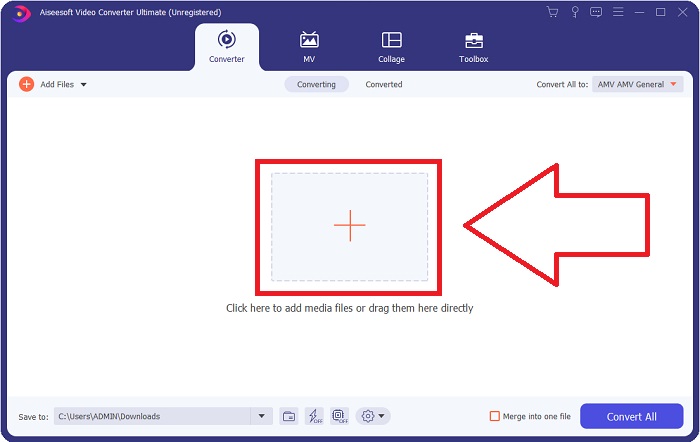
Step 2: Once the window has a pop-up, you will find yourself in an interface with a + button in the middle. To import the video file you wish to convert, click on it or drag and drop the file itself to the program.
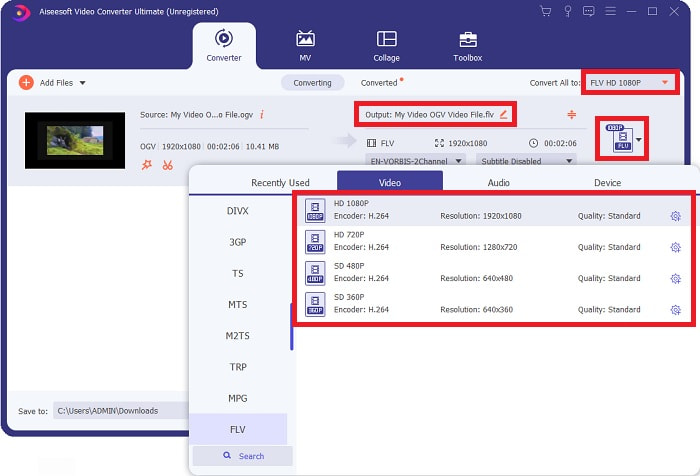
Step 3: On the right, it shows you the current file format of your video is. Click on it, and it will show you all the formats you can choose. In this case, scroll down and select FLV, or you can just search it in the search bar below. Now on the right side of the tab, you can also choose which video quality you want for your converted file.
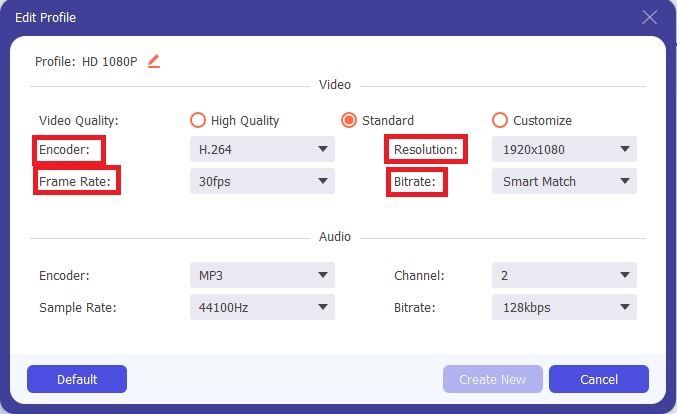
Step 4: If you are looking for more options, you can find those by clicking the gear icon beside your selected video quality. With this, you can further edit the video resolution and other options like frame rate, sample rate, bitrate, and encoder. Once satisfied, just click the Create New button on the bottom right corner to save the changes.
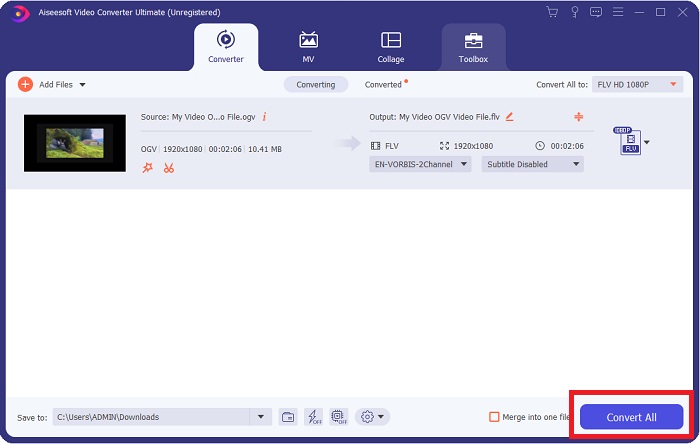
Step 5: When you finish with all the adjustments, you can start the conversion properly by clicking the Convert All button on the lower right corner, waiting for it to finish.
חלק 2. שיטה נוספת זמינה להמרת OGV ל-FLV [מקוונת]
If time does not permit and you need to convert your OGV file to FLV as quickly as possible, you need not worry because we still got you covered. You can use the online counterpart of the said software while still providing you utmost convenience following a smooth process of conversion. FVC Free Video Converter Online is a web tool that can easily turn OGV files into FLV and still offer the exact resolution and audio quality options. To use it, here are the steps you need to follow:
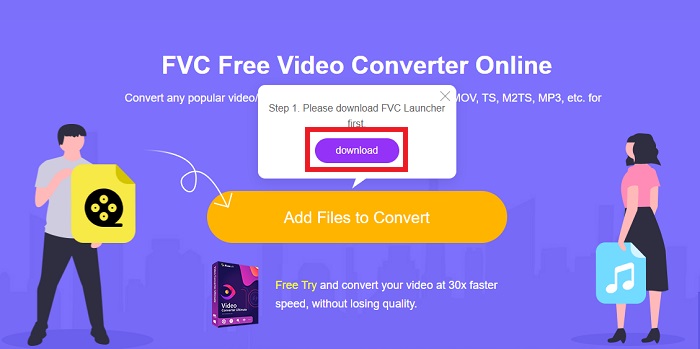
Step 1: Click this link, and it will redirect you to the online converter itself. In the middle of the page, there is a button saying Add Files to Convert. You have to click it to download the launcher; you need to import the video file you wish to convert.
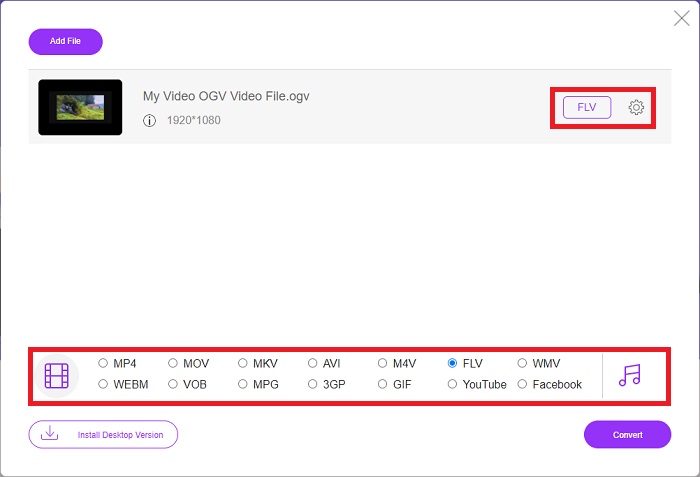
Step 2: Once you have finished, you can now upload your file by clicking once again the said button. An interface will appear if the upload is successful. From there, you can now select FLV among the other formats offered at the bottom of the window.
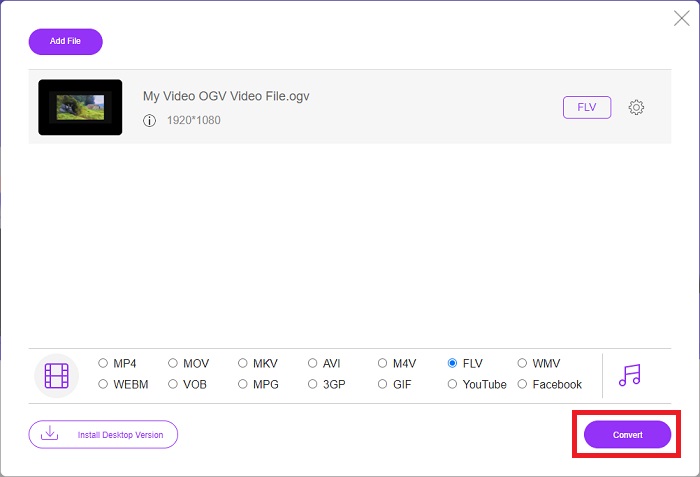
Step 3: Similarly, you can also find a gear icon on the far right in which you can further edit your video. By clicking it, you can find the video and audio settings for you to edit the encoders, resolution, frame rate, and more. Click OK and click the Convert button on the bottom right corner to start the conversion process.
חלק 3. ידע מורחב אודות OGV ו-FLV
אם אתה רוצה לדעת יותר על שני הקבצים המושוואים, כאן אנו מספקים לך את כל המידע הדרוש שאולי תרצה לקרוא:
שיטת קידוד הווידאו Ogg Vorbis יכולה לרוב לקשר עם קבצים בעלי סיומת הקובץ .ogv. Ogg Vorbis הוא פורמט דחיסת אודיו בקוד פתוח ללא פטנט. פורמט המכולה לקובצי אודיו, וידאו ומידע ידוע בשם Ogg, בעוד שטכנולוגיית דחיסת האודיו Vorbis נקראת על שמה. פורמט הקובץ OGV הוא מיכל לקובצי וידאו. זרמי וידאו המקושרים לרכיבי קוד אחד או יותר של וידאו, כגון Theora ו-DivX, עשויים להימצא בקבצי OGV. משתמשים יכולים להפעיל את החומר המוקלט בתוך קובץ התוכן במספר התקני מדיה באמצעות קבצים אלה.
מצד שני, קובץ וידאו המאוחסן בפורמט מיכל Adobe Flash Video (FLV) הוא קובץ FLV. Adobe Flash Player משתמש בו בעיקר כדי להציע תוכן וידאו מקוון כגון סרטים ופרקי טלוויזיה. כמו כן, חשוב לציין שזהו פורמט פתוח הנתמך על ידי מגוון אפליקציות שאינן Adobe/Macromedia. להשוואה ספציפית יותר של השניים, הכנו טבלה בדיוק בשבילכם.
| Ogg Vorbis (OGV) | Adobe Flash Video (FLV) | |
| סיומת קובץ | .ogv | .flv |
| מפתח | Xiph.Org Foundation | Adobe Systems Incorporated |
| תוכניות תומכות | MPlayer Classic, VLC Media Player, Jriver Media Center, MPUI | RealPlayer, Apple QuickTime Player, Mplayer, VLC Media Player |
| יתרונות | ל- OGG יש את היתרון בכך שהוא נטול פטנטים, מוכר באופן כללי ונתמך באופן מקורי על ידי רוב הדפדפנים. כתוצאה מכך, אם אתה רוצה להעלות סרט לאתר שלך, פורמט זה הוא אפשרות טובה. | היופי בפלאש הוא שהוא יכול לסייע לאתרים שרוצים לשלב תנועה ותוכן אינטראקטיבי. ההליך פשוט ובסופו של דבר עשוי להיות בעל השפעה משמעותית. כולם גם השתמשו בפלאש למשחקים ראשוניים במיטבו. |
| חסרונות | למרות השימוש הנרחב שלו, לפורמט הווידאו OGG יש כמה חסרונות. ספארי ואינטרנט אקספלורר, למשל, תומכים בו רק באופן חלקי; לפיכך, ייתכן שמשתמשים לא יראו כראוי את הסרטון שלך בדפדפנים אלה. | החיסרון, כמובן, הוא שפורמט ה-FLV הפך לא פופולרי יותר בשנים האחרונות. יצירת תוכן FLV עשויה להימשך זמן רב ולהיות יקרה. חיסרון נוסף הוא שלא ניתן להפעיל חומרי פלאש במכשירי iOS, מה שמגביל מאוד את יכולתו למשוך עוקבים חדשים. |
חלק 4. שאלות נפוצות לגבי המרת OGV ו-FLV
האם OGG ו-OGV זהים?
זוהי תת-קבוצה מתאימה של מדיה מסוג Ogg וידאו/Ogg עם סיומת הקובץ. ogv. אפליקציות Ogg אחרות משתמשות בסיומת הקובץ. ogv עם סוג המדיה application/ogg since. ogx הוא קבוצת על של וידאו/ogg.
האם האיכות של FLV טובה יותר מ-MP4?
MP4 is said to contain high-quality video and audio digital coding. The public's opinion on FLV is less clear, although the benefits and drawbacks of FLV can seldom focus on the file format's quality. With higher degrees of compression, MP4 has less loss of quality. Here you can check the ways to convert FLV files to MP4.
האם FLV נטול אובדן או הפסד כמו OGV?
פורמט קובץ ה-FLV עבור Flash Video תומך בשתי גרסאות של ה-codec שיתוף מסך (Screen video), שהוא שיטת קידוד מסך. פורמטים אלה מבוססים על אריחי מפת סיביות והם אובדים כאשר עומקי הצבע מצטמצמים ונדחסים באמצעות Zlib.
סיכום
לא משנה כמה זמן יש לך בהמרת קבצי הווידאו שלך, הן התוכנה והן מקבילה לכלי המקוון שלה יספקו לך את הנוח ביותר. אז במונחים קצרים, Video Convert Ultimate ו-Free Video Converter הם אלה שחייבים להיות הדבר הראשון שאתה חושב עליו כשמדובר בהמרת וידאו כדי לחסוך זמן גלישה באינטרנט ומציאת הטוב ביותר. הנה, אנו מגישים לך את הטוב ביותר.
-
 הדרכים הטובות ביותר להמיר VOB ל-FLV [כלול בחינם ומקוון]
 רוצה להמיר קובץ VOB לקובץ FLV? אתה יכול להשלים את המשימה בקלות באמצעות ממירים שולחניים או מקוונים. קרא מדריך זה ולמד כיצד להפוך את VOB ל- FLV בקלות ובמהירות.
-
 למעלה 4 יישומי RMVB ל FLV ממירים בחינם בשולחן העבודה או באינטרנט
 מאמר זה יספר לכם את תוכנות הממיר RMVB ל- FLV ויישומי האינטרנט הטובים ביותר שיכולים להמיר קבצי RMVB (RealMedia Variable Bitrate) לקבצי FLV.
-
 כיצד לדחוס קובץ OGV מבלי לאבד איכות
 לא יכול לשלוח קבצי OGV גדולים לאחרים? ובכן, מאמר זה יציג בפניכם 2 דרכים קלות שיעזרו לכם לדחוס קבצי OGV בקלות.
