


 ממיר וידאו אולטימטיבי
 מקליט מסך
 תיקון וידאו
טיפים וטריקים כיצד להמיר קבצי WebM ל-FLV עבור Windows/Mac/Online
האם אתה מתקשה לנגן סרטונים עם סיומת הקובץ WebM? אולי אתה מחפש כעת את הפתרון הטוב ביותר על‑ידי המרת הקובץ לפורמט שניתן לנגן במכשיר שלך. אם זה המצב, יש לך מזל, משום שהמאמר הזה ידון בשני ממירי WebM מהטובים ביותר שתוכל להשתמש בהם אונליין או אופליין. בוא נצלול אל תוך ממיר WebM ל‑FLV בחינם שתוכל להשתמש בו במחשב השולחני שלך ונלמד כיצד להמיר WebM באופן מעשי.

חלק 1. ממיר WebM ל-FLV מהשורה הראשונה ב-Windows ו-Mac
הראשון ברשימה הוא ממיר WebM ל‑FLV יוצא מן הכלל שניתן להוריד למחשב שלך כדי לסייע בפתרון הבעיה. FVC Video Converter Ultimate הוא בחירת הממיר הטובה ביותר כדי להשיג שיעור הצלחה של 100% בתהליך ההמרה שלך. הוא מיועד במיוחד להמרת פורמטי וידאו ואודיו לפורמט תואם מתוך יותר מ‑200 פורמטים לבחירתך. הוא אפילו משוכלל יותר, כי הוא מציע המרה פשוטה בתהליך המרה מהיר במיוחד מבלי לשנות את האיכות. ממיר זה מעלה את ההמרה לרמה הבאה – רוצה לחוות זאת? אם כן, בוא נלמד כיצד להשתמש בכלי הזה על‑פי השלבים המפורטים להלן.
שלבים להמרת קובצי WebM לפורמט FLV בעזרת FVC Video Converter Ultimate:
שלב 1. לחץ על כפתור ההורדה המוצג למטה ופעל לפי הוראות ההתקנה.
הורדה חינמיתל-Windows 7 ומעלההורדה מאובטחת
הורדה חינמיתל-MacOS 10.7 ומעלההורדה מאובטחת
שלב 2. כדי להוסיף את קובצי ה‑WebM שלך, לחץ על Add Files בפינה השמאלית‑על causes של הממשק. לאחר מכן בחר את קובץ ה‑.webm בתיקייה שלך ולחץ על Open.
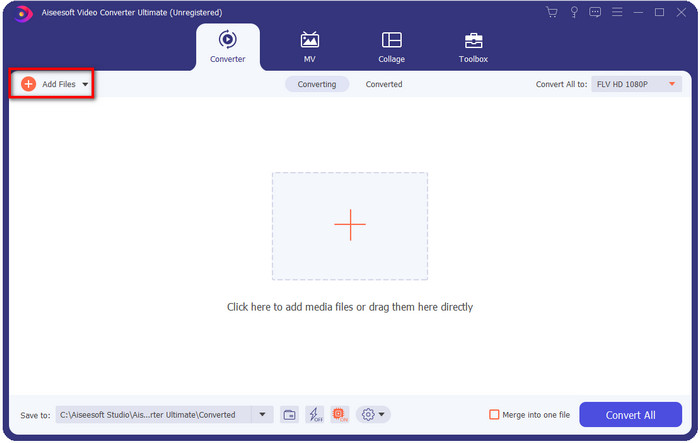
אתה יכול לגרור ולשחרר את הקבצים בממשק אם אתה רוצה להוסיף קבצי WebM מרובים או כל קובץ אחר כדי לבצע את ההמרה האצווה.
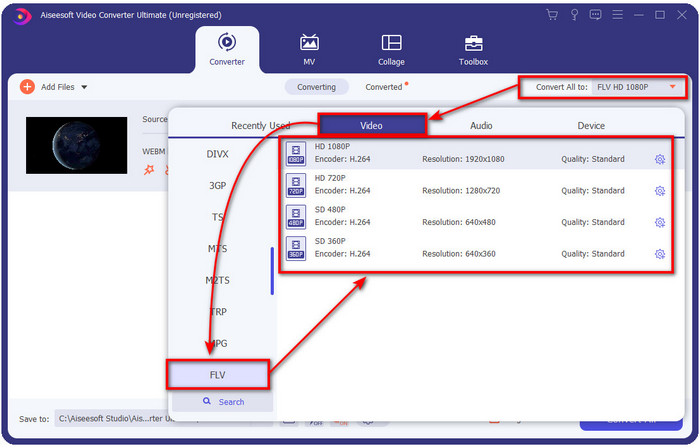
שלב 3. לחץ על האפשרות Convert All בפינה הימנית‑על causes של הממשק ובחר את פורמט FLV.
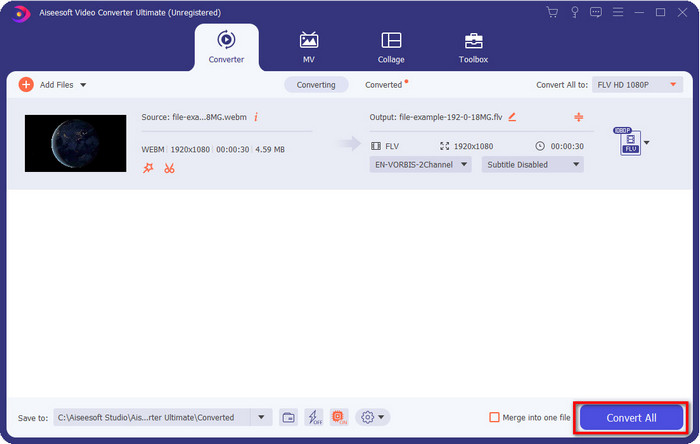
שלב 4. לחץ על Convert All כדי להתחיל ולהמיר WebM ל‑FLV. לאחר התהליך, תיקייה תופיע על המסך שלך ובה קובץ ה‑FLV שהומר זה עתה.
יתרונות
- זה תומך באינספור פרופילי פורמט שאתה יכול לבחור מהם.
- תומך בהאצת חומרה והמרה מהירה להליכי המרה מהירים יותר.
- הוא מציע מספר תכונות עריכה מתקדמות כגון חיתוך, מיזוג, חיתוך, הוספת אפקטים ועוד רבים.
- המר את קבצי ה-WebM שלך באצווה.
- זמין בכל מערכות ההפעלה כמו Windows ו-Mac.
חסרונות
- הורד אותו על שולחן העבודה שלך.
- ממיר בתשלום.
חלק 2. המר WebM ל-FLV בחינם באינטרנט
FVC Free Video Converter Online מציע לך ממיר WebM ל‑FLV אונליין חזק. ממיר זה זמין בכל מנועי החיפוש לפי בחירתך. במקום להוריד ממיר למחשב שלך, למה שלא תשתמש בכלי האינטרנט הזה כחלופה? מעבר לכך שהוא חינמי, הוא גם חופשי מפרסומות ותוכנות זדוניות. עם זאת, יש כאן פחות פונקציות מאלה שקיימות ב‑FVC Video Converter Ultimate, במיוחד מבחינת היקף הפורמטים הנתמכים. רוצה לדעת כיצד להשתמש בממיר האינטרנטי הזה? אז עקוב אחר השלבים המפורטים למטה.
שלבים להמרת קובצי WebM לפורמט FLV אונליין בעזרת FVC Free Video Converter Online:
שלב 1. לחץ על FVC Free Video Converter Online זה כדי לפתוח את אתר הממיר.
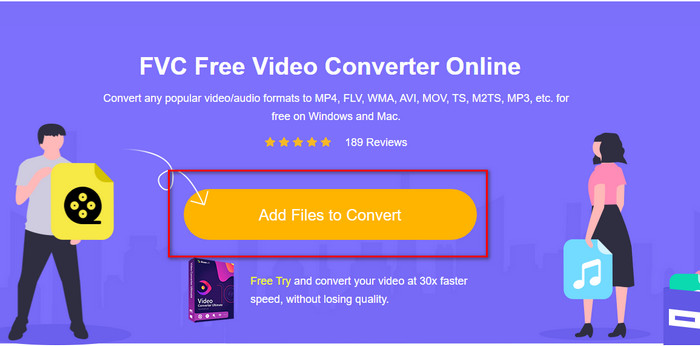
שלב 2. באתר הממיר, לחץ על Add Files to Convert כדי להתקין את המשגר של כלי האינטרנט. הקש עליו שוב, ותיקייה תיפתח; אתר את קובץ ה‑.webm ולחץ על Open.
שלב 3. הגדר את הפורמט ל‑FLV על‑ידי בחירתו מהרשימה המוגדרת.
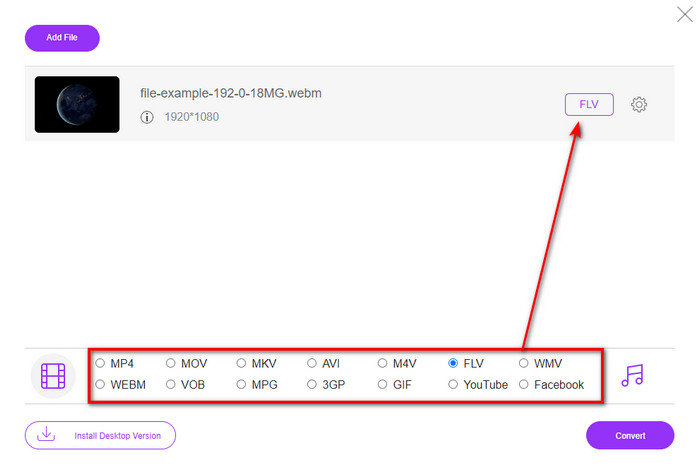
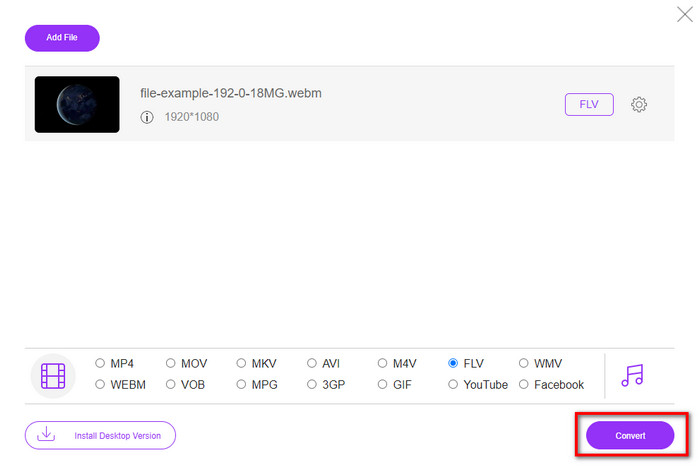
שלב 4. כדי להמיר את הקובץ, לחץ על Convert.
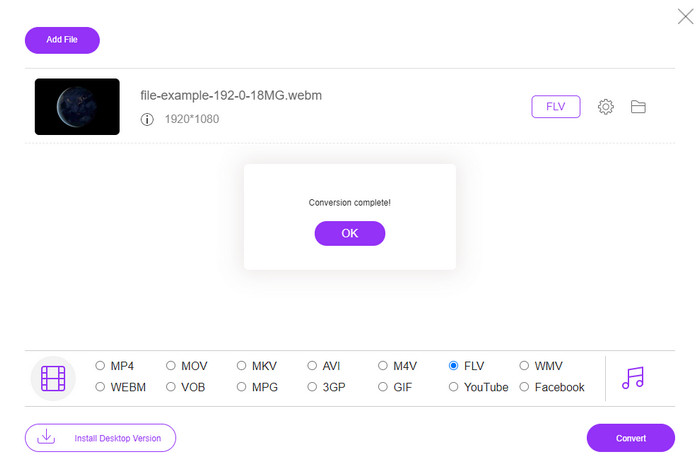
שלב 5. לאחר שההמרה תושלם, תיקייה תופיע על המסך שלך.
יתרונות
- זמין וחינמי לגישה בכל דפדפני האינטרנט.
- אין פרסומות סוררות, והיא נטולת תוכנות זדוניות.
- הוא תומך בפורמט לטווח בינוני.
חסרונות
- יש צורך בחיבור לאינטרנט.
- תכונות מיוחדות אינן זמינות בממיר זה.
חלק 3. WebM לעומת FLV
ניתן לשחק ב-WebM ברוב הדפדפנים שנמצאים תחת HTML5. מטרת הפורמט הזה היא להיות ללא תמלוגים וזמין בכל דפדפני האינטרנט להפעלת סרטונים ואודיו. יתר על כן, הוא יכול להתאים לכל מצב רוחב פס שיש למשתמשים. זה בעיקר מנגן סרטונים ואודיו מבלי להשפיע על האיכות, למרות שלמשתמשים יש קישוריות אינטרנט נוראית. תכונה נפלאה נוספת של פורמט זה היא שימוש בקודק נפרד בזרמי וידאו ואודיו. למרות שפורמט זה יכול להכיל וידאו באיכות גבוהה, חלק מהטלפונים החכמים ונגני המדיה אינם יכולים להפעיל סרטוני וידאו מסוג זה. ישנן סיבות רבות שאינך יכול להפעיל את הקובץ, ואחת מהן היא שגרסת מערכת ההפעלה שלך מיושנת.
שלא כמו WebM, מטרת FLV היא לספק תוכן וידאו דרך האינטרנט באמצעות Adobe Flash Player או Adobe Air. כמו כן, פורמט זה יכול להכיל לא רק תוכן וידאו אלא גם אלמנטים כגון מטא נתונים, כותרת קצרה, זרמי אודיו ווידאו. למרות שלפורמט יש תוספים, לא תזדקק לו כדי להפעיל את הקובץ בנגן המדיה שלך או לאחסן אותו בטלפון שלך. כמו עם WebM, פורמט זה משתמש גם ב-codec דחיסת וידאו ושמע נפרדים.
כדי להפוך את קובץ ה-WebM שלך לתואם, תצטרך להפוך את ה-WebM שלך ל-FLV. למרות שאתה יכול לאחסן קבצי WebM במכשיר שלך, זה עדיין בזבוז אחסון אם אתה לא יכול להשתמש בו. יתר על כן, הפיכת קובץ ה-WebM שלך לפורמט הניתן להפעלה תיתן לך את ההזדמנות לצפות בקובץ במספר מכשירים.
חלק 4. שאלות נפוצות לגבי המרת WebM ל-FLV
האם VLC תומך בפורמט WebM?
VLC הוא אחד מנגני המדיה הרב‑תכליתיים שניתן להוריד ל‑Windows, Mac ואפילו לסמארטפונים שלך. הוא תומך במגוון רחב של נגינת וידאו ואודיו, כולל קובצי .webm. אך אם ברצונך לצפות בקובצי WebM שלך בנגן מדיה טוב יותר, קרא את המאמר הזה כדי ללמוד עוד על חמשת התוכנות הטובות ביותר לניגון קובצי WebM.
כיצד להמיר WebM ל-GIF?
המרת קובצי WebM שלך ל‑GIF מונפש יכולה להיעשות בתוך דקה. רוצה לדעת כיצד להמיר WebM ל‑GIF? אם כן, לחץ על קישור זה כדי ללמוד עוד.
האם אוכל לדחוס את קובץ ה-WebM שלי?
בהחלט כן, אפשר להקטין את גודל קובץ ה‑WebM שלך כדי לשלוח אותו בדוא'ל או לחסוך מקום באחסון. אם אין לך תוכנה מועדפת, יש לך מזל, משום שאספנו עבורך 2 מדחסי WebM חינמיים שבהם תוכל להשתמש.
סיכום
כעת, כשאנו יודעים כיצד להמיר את קובצי ה‑WebM שלנו לפורמט FLV, הגיע הזמן לבחור את הממיר שבו כדאי להשתמש. למרות ששני ממירי ה‑WebM שהוצגו כאן יכולים להבטיח הצלחה, עדיין יש להם יכולות שונות. לדוגמה, נניח שאתה רוצה להמיר את קובצי ה‑WebM שלך אונליין בלי כל מגבלה ובלי פרסומות. במקרה כזה, עליך לבחור ב‑FVC Free Video Converter Online. אבל אם אתה רוצה לעשות יותר מאשר רק להמיר קבצים, הבחירה שלך צריכה להיות FVC Video Converter Ultimate. עדיין מפקפק ביכולות של הממיר האולטימטיבי? אם כן, עליך להוריד אותו עכשיו למחשב השולחני שלך כדי לחוות את מלוא הפונקציונליות של הממיר.
-
 3 דרכים להמיר WebM ל-MP3 מבלי לאבד את איכות הקול
 נתקלת בבעיה בגלל שלא ניתן להשתמש בקבצי WebM להפעלת האודיו שאתה שומר? לאחר מכן קרא את המאמר הזה כאשר אנו מספקים סיוע יעיל על ידי המרת WebM ל-MP3.
-
 3 תוכנות מדהימות המשמשות להמרת קובץ WebM לפורמט AVI
 אין לך מושג איך להמיר WebM ל-AVI? אז בואו נתחיל לקרוא את המאמר הזה. כפי שאנו מציינים את כל הפרטים על WebM ושלושת הממירים שבהם אתה יכול להשתמש כדי להמיר.
-
 שיטות קלות לביצוע כיצד להמיר WEBM ל-MOV
 האם אתה מתקשה שסרטוני ה-WebM שלך לא יכולים להיות מופעלים על ידי ספארי, ואינך רוצה לעבור לדפדפן התומך בפורמט הזה? קרא מאמר זה כדי ללמוד כיצד לשנות את WebM ל-MOV בקלות.
