


 ממיר וידאו אולטימטיבי
 מקליט מסך
 תיקון וידאו
כיצד לחתוך GIF בעזרת חותכי ה-GIF הטובים ביותר
בחירת קובצי ה‑GIF המתאימים למסרים שלך היא חובה כדי להעביר את הטון הנכון למה שאתה מתכוון. אבל יש GIF‑ים שצריך לחתוך כדי להראות את הכוונה האמיתית שלהם. כמו כן, אם אי פעם תנסה לחתוך את ה‑GIF‑ים שלך, איכות ה‑GIF לא צריכה להיפגע והוא צריך לשמור על אותו מספר פריימים לשנייה (fps). בשלב מסוים, בחירת החותך המתאים כדי לחתוך את ה‑GIF שלך יכולה להיות מעט קשה, משום שלא כל הכלים מאפשרים חיתוך. וחלק מהכלים שכן מאפשרים חיתוך פוגעים באיכות וב‑fps של ה‑GIF‑ים. במאמר זה תוכל לבחור את חותך ה‑GIF הטוב ביותר עבורך; כל הכלים שמופיעים בו כבר נבדקו על ידינו כדי לספק לך הוכחות מהימנות. בנוסף, אנו מציגים את חותך ה‑GIF הטוב ביותר הזמין בכל הפלטפורמות ומסבירים כיצד להשתמש בו. המשך לקרוא את הכתבה כדי לדעת עוד בנושא.

חלק 1. ה-GIF Cropper הטוב ביותר התומך במערכות הפעלה של Windows ו-Mac
1. FVC וידאו חינם ל- GIF Maker
הכלי הזה זמין בכל הפלטפורמות כמו Windows ו‑Mac. זהו חותך GIF מונפש מהטובים ביותר שפותח על‑ידי FVC — זהו FVC Free Video to GIF Maker. התוכנה מאפשרת למשתמשים לחקור ולשפר את קובצי ה‑GIF שכבר יצרו, או ליצור GIF‑ים חדשים אם ירצו. לכן, אם אתה מחפש לחתוך את ה‑GIF שלך, הכלי הזה יעזור לך לעשות זאת גם בלי חיבור אינטרנט. כך תוכל לחתוך את ה‑GIF שלך כך שיהיה מובחן יותר, בקלות ובאופן יעיל. כדי לדעת כיצד לחתוך את ה‑GIF שלך, עקוב אחר השלבים שלהלן.
שלב 1. התקן את הכלי לכונן שלך והתאם את ההעדפות בהתאם לצרכים שלך.
הורדה בחינםל‑Windows 7 ומעלההורדה מאובטחת
הורדה בחינםל‑MacOS 10.7 ומעלההורדה מאובטחת
שלב 2. לאחר הפעלת הכלי, תופיע על המסך שלך ממשק קטן כמו זה.
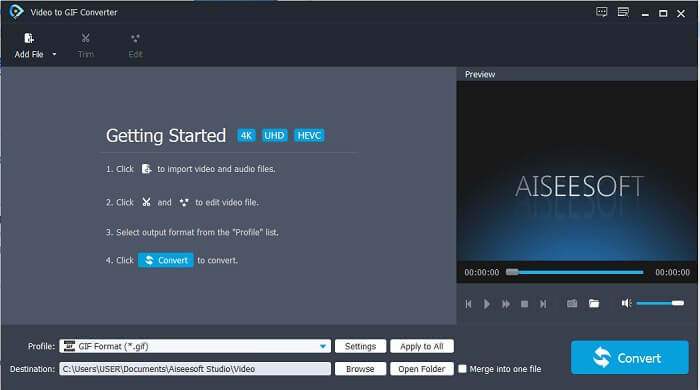
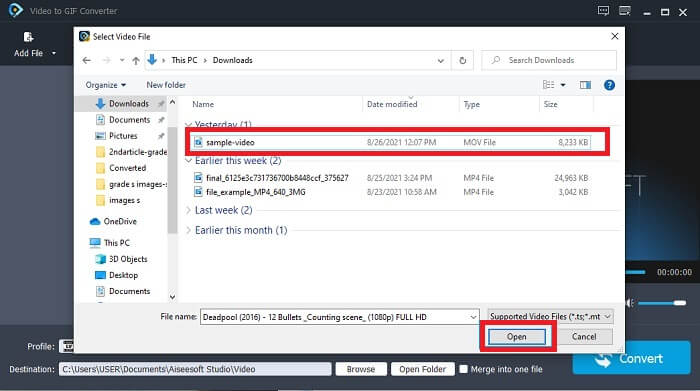
שלב 3. לחץ על Add File או פשוט גרור ושחרר את קובץ הווידאו אל ממשק הכלי.
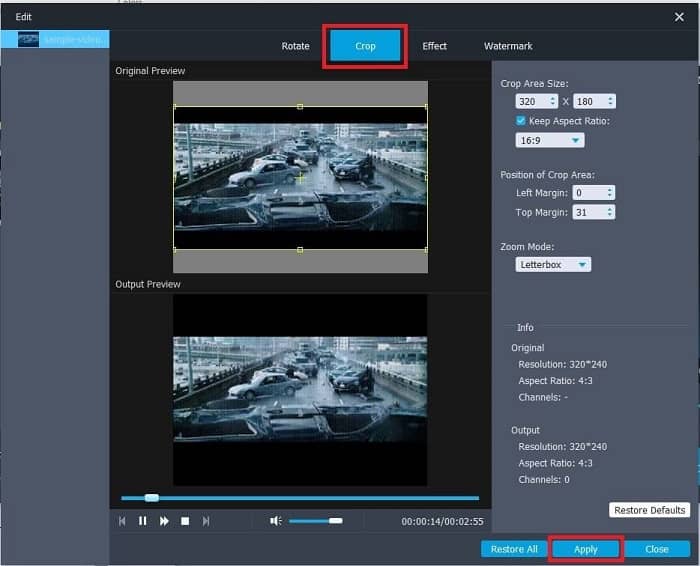
שלב 4. לחץ על Edit כדי לשפר את ה‑GIF שלך. עבור אל Crop והתאם את גודל ה‑GIF. תוכל גם לשנות את Aspect Ratio ואת Zoom Mode. לחץ על Apply כדי לשמור את ההתאמות שביצעת.
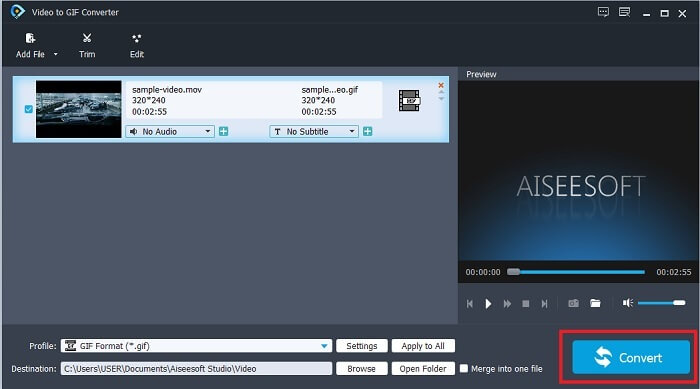
שלב 5. לחץ על Convert כדי להתחיל את ההמרה מווידאו ל‑GIF. כשההמרה תסתיים, תוכל לבדוק את קובץ הפלט הסופי בסייר הקבצים על‑ידי חיפוש לפי שם הווידאו.
יתרונות
- כל התכונות המשניות זמינות כאן.
- זה הרבה יותר טוב מהכלי המקוון ומחלק מהכלים להורדה גם כן.
- צור את ה-GIF שלך בקלות עם הכלי הזה.
חסרונות
- אתה לא יכול להשתמש בתכונות עיקריות שגרסת ה-Ultimate מספקת.
- זה תומך בווידאו בפורמט נמוך יותר מאשר בגרסת הפרימיום.
2. Video Converter Ultimate
הגרסה החינמית של הכלי הזה יכולה לעשות את העבודה הפשוטה אבל גרסת הפרימיום שלו היא חותך ה-GIF הטוב ביותר. Video Converter Ultimate הוא לא רק בשם אלא גם שהכלי הזה הוא האולטימטיבי בהמרת כל סרטון לקובץ GIF. שלא כמו הגרסה החינמית שלו ומהכלי שלהלן, כלי זה יכול להפוך את ה-GIF הפשוט שלך למרהיב יותר. הפוך את ה-GIF שלך למצטיין על ידי הוספת אפקטים שכלי זה יכול לספק רק. זה גם מספק המרה של סרטון ל-GIF, כמו MP4 ל-GIF, מיזוג סרטונים לאחד, יצרן תלת מימד ועוד רבים. אז, השתמש בכלי זה בתור החתך האישי שלך והוא לעולם לא יאכזב אותך. יתר על כן, המשך לקרוא את השלבים שלהלן כדי לדעת כיצד לחתוך את ה-GIF שלך כדי להעביר הודעה ספציפית יותר למקלט שלך.
שלב 1. לפני שתוכל להשתמש בכלי הזה, עליך להוריד אותו. התקן את הכלי לכונן שלך, שנה את ההעדפות בהתאם לצרכים שלך, ולחץ על finish כדי להתחיל להפעיל את הכלי על המסך שלך.
הורדה חינמיתל-Windows 7 ומעלההורדה מאובטחת
הורדה חינמיתל-MacOS 10.7 ומעלההורדה מאובטחת
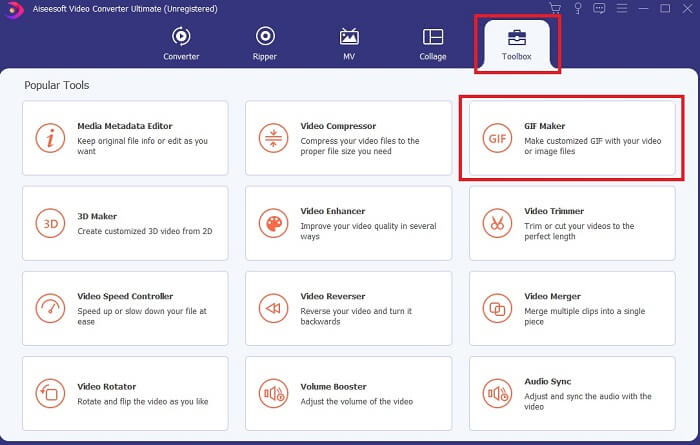
שלב 2. אם הכלי הותקן במלואו על הכונן שלך, ממשק נוח כמו זה יופיע על המסך. לחץ על שורת הכלים (Toolbar) ובtoolbar לחץ על GIF Maker.
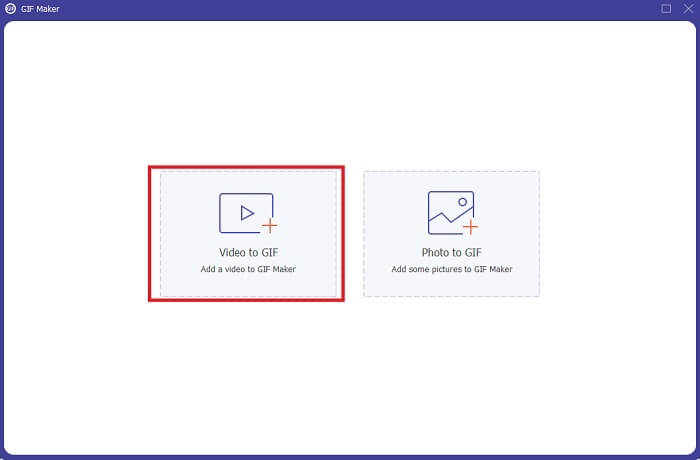
שלב 3. כדי להוסיף את הווידאו, לחץ על Video to GIF ואתר את ה‑GIF שברצונך לחתוך או לערוך. לאחר בחירת הווידאו, לחץ על Open כדי להתחיל לעבוד עם ה‑GIF Maker.
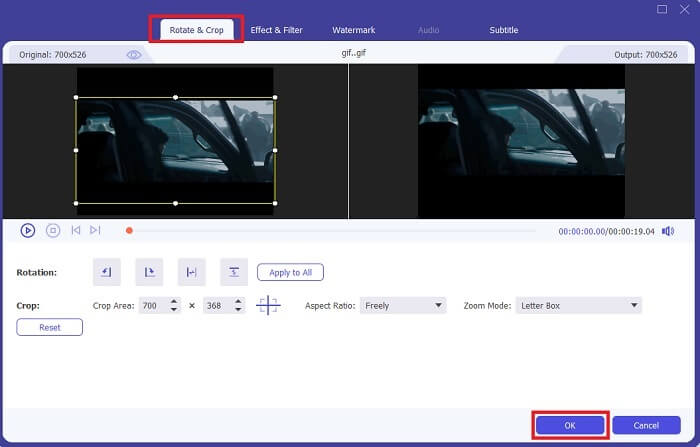
שלב 4. לחץ על הכפתור עם תמונת כוכב כדי להתחיל בעריכה. לחץ על Rotate & Crop כדי להתחיל לחתוך את ה‑GIF. תוכל גם להוסיף אפקטים ופילטרים, סימן מים וכתוביות. אם סיימת את כל ההתאמות, לחץ על OK כדי לשמור את השינויים.
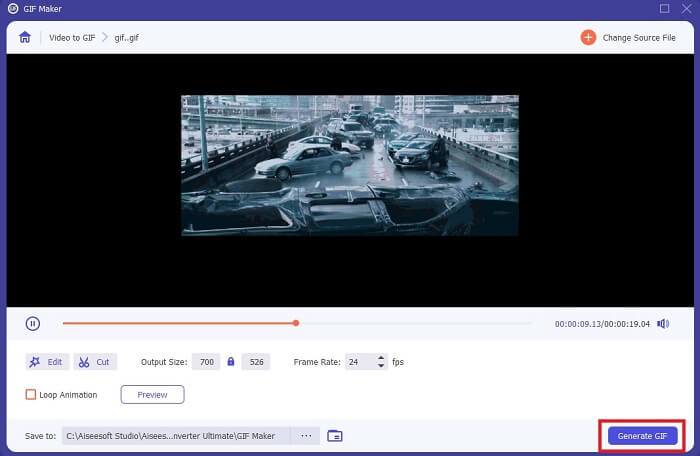
שלב 5. שנה את מיקום השמירה של קובץ הפלט הסופי כדי שיהיה קל יותר לאתר אותו. לחץ על Generate GIF כדי להתחיל את ההמרה. כאשר ההמרה תסתיים במלואה, מצא את קובץ הפלט הסופי במקום שבחרת לשמור אותו או במנהל הקבצים.
יתרונות
- הכלי שאתה צריך להשתמש בו אם אתה רוצה לשפר את ה-GIF שלך להרבה יותר אינטראקטיבי. השתמש בדמיון שלך כדי לתבל את הדברים לקובצי GIF שלך.
- זה יכול להפוך את ה-GIF שלך לפלט מרשים על ידי שימוש בתכונות העיקריות שהוא מספק שגרסת הפרימיום האחרת לא יכולה לספק.
- יותר ממיליון משתמשים בוחרים בכלי זה ככלי גרסת הפרימיום הבחירה הראשונה שלהם.
חסרונות
- כדי להשתמש בכלי, תחילה עליך לספק תשלום אך הוא לא כל כך יקר בוודאות. אז, אתה חייב לצפות ללא פחות אם קנית את הכלי הזה.
- הורד את הכלי לפני שתפעיל אותו. גם אם אין לך אינטרנט, אתה עדיין יכול להשתמש בכלי זה מכיוון שהוא לא תלוי באינטרנט.
חלק 2. חמשת ה-GIF Cropper הטובים ביותר שאפשר לגשת אליהם דרך האינטרנט
1. iLoveIMG
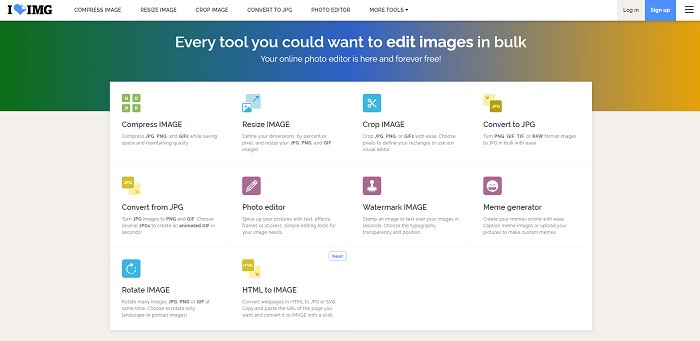
חתוך את ה‑GIF שלך בעזרת חותך ה‑GIF המקוון הזה. iLoveIMG ידוע כאחד מחותכי ה‑GIF, JPG ו‑PNG המקוונים הטובים ביותר. אמנם הכלי לא יכול להמיר וידאו לפורמט GIF משום שהוא מתמקד אך ורק בשיפור GIF, JPG ו‑PNG, אבל הממשק של האתר מעבר למצופה: הוא לא רק פשוט אלא גם אינטראקטיבי מאוד. כך שלא תשתעמם בזמן השימוש באתר. בדירוג, הוא מקבל 7 מתוך 10, שזה מצוין עבור יישום מבוסס‑אינטרנט.
יתרונות
- הכי טוב לשפר את ה-GIF, JPG ו-PNG שלך.
- הממשק של האתר מדהים ביופיו.
- אין צורך להוריד.
חסרונות
- קיים סיכוי לאובדן נתונים אם החיבור הופסק.
- אתה לא יכול להמיר פורמט וידאו לפורמט GIF.
2. RedKetchup
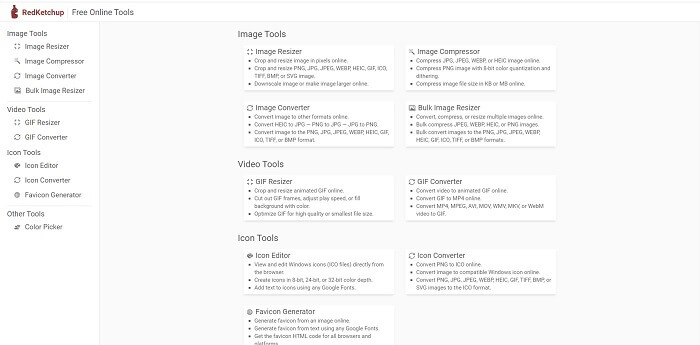
אם iLoveIMG אינו מתאים לך, כדאי לנסות את חותך ה‑GIF המקוון הזה. RedKetchup מאוד אינפורמטיבי בזכות התיאורים שהוא נותן לכל אחד מכלי העריכה. כך קל יותר להבין איך כל פונקציה עובדת גם אם אין לך מושג מוקדם. בנוסף, באפשרותך להמיר את התמונות שלך ל‑GIF, PNG, JPG, WEBP ועוד. הוא תומך ביותר פורמטים מאשר iLoveIMG, אך החיסרון של הכלי הזה הוא שממשק האתר משעמם למדי. כל הרקע של האתר בצבע לבן, והדבר היחיד בצבע הוא השם והסמל של RedKetchup.
יתרונות
- זה תומך ביותר פורמטים של תמונה מאשר iLoveIMG.
- לכל תכונה של כלי יש תיאור קצר כדי שהמשתמש יוכל להבין את הפונקציות שלו.
- זהו כלי מקוון בחינם.
חסרונות
- דף האינטרנט של הכלי הזה כל כך משעמם להסתכל עליו בגלל הצבע המונוטוני שלו.
- יש סיכוי שהקובץ לא יישמר כראוי אם האינטרנט שלך לא יציב.
3. קאפווינג
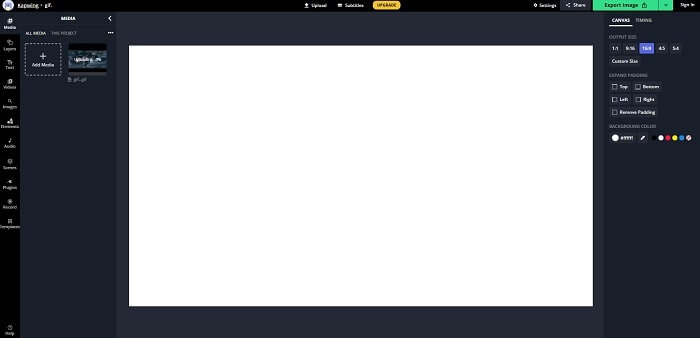
לכלי זה תכונות כמעט זהות לפוטושופ, אבל הוא פועל אונליין. זהו חותך פריימי GIF מהטובים ביותר באינטרנט. Kapwing ידוע ביצירת GIF‑ים מעולים שאתה רוצה לשתף עם החברים שלך. בניגוד לשני הכלים הראשונים למעלה, הכלי הזה תומך בחלק מפורמטי הווידאו להמרתם לפורמט GIF. אמנם לימוד אופן השימוש בכלי ידרוש מעט זמן, אבל זה ישתלם. ואם ברצונך ליצור GIF פשוט, זה הכלי המתאים ביותר לכך. לכלי זה תכונות כמעט זהות לפוטושופ, אבל הוא פועל אונליין. זהו חותך פריימי GIF מהטובים ביותר באינטרנט. Kapwing ידוע ביצירת GIF‑ים מעולים שאתה רוצה לשתף עם החברים שלך. בניגוד לשני הכלים הראשונים למעלה, הכלי הזה תומך בחלק מפורמטי הווידאו להמרתם לפורמט GIF. אמנם לימוד אופן השימוש בכלי ידרוש מעט זמן, אבל זה ישתלם. ואם ברצונך ליצור GIF פשוט, זה הכלי המתאים ביותר לכך.
יתרונות
- הממשק של אתר הכלים יעניק לכם כמעט את אותה אווירה עם פוטושופ.
- המר את הסרטון שלך לפורמט GIF.
- תכונות עריכה בסיסיות מסופקות.
חסרונות
- עיבוד הפלט הסופי של הסרטון יהיה תמיד תלוי במהירות האינטרנט שלך. אז יש צורך בסבלנות רבה כדי להפיק את הפלט הסופי.
- תצטרך להירשם כדי להסיר את סימן המים מהפלט שלך. אז, צפו למייל על כל עדכון שהוא אומר וכמה הודעות מעצבנות. כי אתה נותן להם לגשת לחשבון שלך.
4. קובצי GIFGIF
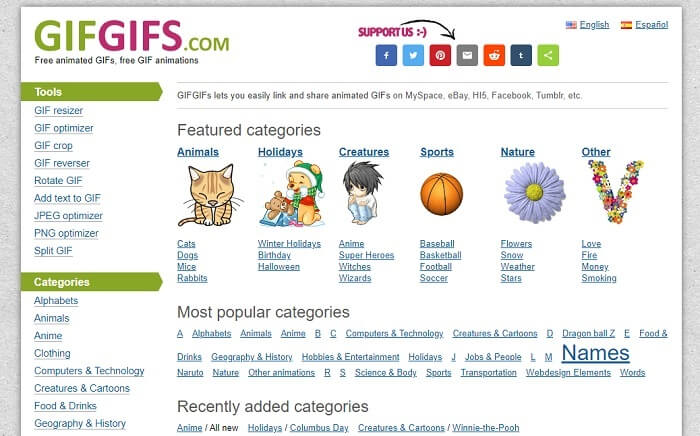
תוכל לחתוך את ה‑GIF‑ים שלך בעזרת חותך GIF ללא איבוד איכות. GIFGIFs מספק לך ברשת GIF‑ים מוכנים מהטובים ביותר. תוכל לבחור מתוך הקטגוריות שהוא מציע, כמו אלפבית, ספורט, אנימה, לבוש ועוד. בנוסף, הכלי הזה לא רק מספק את התכונה הטובה ביותר לשיפור ה‑GIF שלך, אלא מאפשר גם אופטימיזציה של JPG ו‑PNG.
יתרונות
- זוהי בחירה טובה לשפר את ה-GIF שלך לטוב יותר.
- הוא תומך באופטימיזציה של JPEG, PNG ו-GIF.
- בחר קובצי GIF שכבר בוצעו בקטעי הקטגוריה שלו.
חסרונות
- זה לא מספק סרגל חיפוש ולכן קשה למצוא את ה-GIF המושלם שבו אתה רוצה להשתמש.
- הממשק בסדר. זה לא משהו מיוחד או שצריך להגיד שזה לא טוב אבל לא רע.
5. VEED.IO
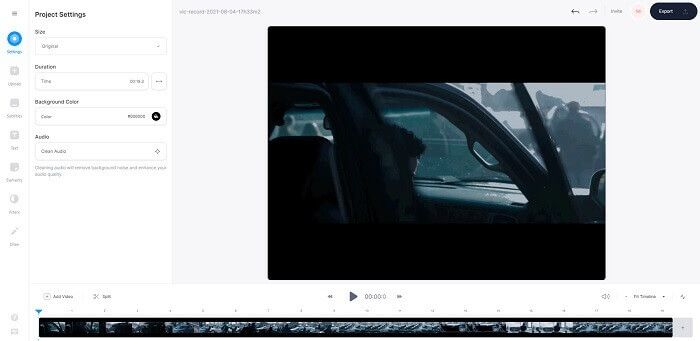
בחר את זה בתור הבחירה הראשונה שלך לחתוך GIF בחינם באינטרנט, אבל זה גם יכול להיות משודרג לגרסת פרימיום אם תרצה. ה-VEED.IO הוא אחד הכלים המקוונים הטובים ביותר לשיפור ה-GIF שלך לטוב יותר. אבל הגרסה החינמית של הכלי תומכת רק בגודל 50MB של קובץ GIF וכדי להוסיף עוד גודל קובץ עליך לקנות את גרסת הפרימיום של הכלי.
יתרונות
- הוא מספק תכונת עריכה נהדרת כדי לשפר את ה-GIF שלך.
- ממשק משתמש פשוט.
- אתה יכול להוסיף כתוביות אם אתה רוצה גם כן.
חסרונות
- זה לא מספק יצרן תלת מימד לשיפור התמונות הדו-ממדיות שלך.
- במקרים מסוימים התוכנה קורסת כאשר אתה מנסה להגדיל את ציר הזמן.
חלק 3. שאלות נפוצות אודות GIF Cropper
האם יש פורמט טוב יותר מפורמט GIF?
למרות שידוע מאוד ש-GIF הוא פורמט התנועה הטוב ביותר ברשת. אבל האם ידעת שיש פורמט טוב יותר מאשר GIF? זה ה-APNG. פורמט זה מספק פלטת צבע יותר מה-GIF והוא טוב יותר גם בדחיסה. אבל אתה יכול גם להשתמש ב-WEBP, MNG, FLIF ו-AVIF.
מה הסיבה שבגללה נוצרים קובצי GIF?
בסוף 1987 איש בשם סטיב וילהייט שאל את עצמו אם קיימת אפשרות ליצור קובץ תמונה קטן לתצוגה במחשב, ובאותו זמן נולד גם פורמט ה‑GIF. כדי לדעת עוד על GIF ניתן ללחוץ כאן.
איזה יותר טוב? JPG או GIF?
פורמט JPG מספק לך תמונה מפורטת יותר מכיוון שהוא תומך במגוון רחב של צבעים ולכן הוא הטוב ביותר בצילום תמונות. ה-GIF מספק כמות קטנה של לוח צבעים אבל הוא טוב ביצירת תמונה סטטית.
סיכום
לסיכום, עליך לבחור את חותך ה‑GIF הטוב ביותר שיספק לך את יכולות החיתוך שאתה צריך, מבלי לפגוע באיכות ה‑GIF עצמו גם כאשר אתה חותך אותו. אך ברור שעליך לבחור בכלי האולטימטיבי שפותח על‑ידי FVC, משום שהוא מספק לך את תכונות ה‑GIF הטובות ביותר שתרצה להוסיף ל‑GIF שלך כדי שייראה מרשים יותר מאחרים. לכן, חיתוך ה‑GIF שלך קל מתמיד אם אתה משתמש ב‑Video Converter Ultimate.
-
 מדריך לדחיסת GIF ולהפחית את גודל הקובץ באיכות גבוהה
 להלן שתי דרכים פשוטות לדחיסת GIF במחשב או בטלפון הנייד שלך. אתה יכול להשתמש ב- FVC Free Video Compressor Online וב- Photoshop להפחית את גודל קובץ ה- GIF בהיבטים שונים.
-
 נגן GIF - 5 נגני ה- GIF הטובים ביותר עבור Windows PC, Mac, Android ו- iPhone
 איזו תוכנית פותחת קבצי GIF? כיצד אוכל להציג קובצי GIF באנדרואיד? האם לאייפון יש נגן GIF לפתיחת קובצי GIF? פוסט זה משתף 5 נגני GIF הטובים ביותר עבורך.
-
 כיצד להמיר קטעי וידאו AVI לקבצי GIF מונפשים ב- Windows / Mac
 רוצה לבחור את קטעי ה- AVI המעניינים ליצירת ממים של GIF? מאמר זה יגיד לך את 2 השיטות הטובות ביותר לקליפ את קטעי הווידי AVI ולהמיר AVI לקבצי GIF מונפשים בחינם.
