


 ממיר וידאו אולטימטיבי
 מקליט מסך
 תיקון וידאו
9 המובילים: תוכנת עריכת GIF מונפשת הטובה ביותר למתחילים [מקוון ולא מקוון]
הדרך הטובה ביותר לבטא את הרגשות שלך טוב יותר היא להכניס קובצי GIF להודעה שלך. המטרה העיקרית שלו היא לאחסן ולתמוך בתמונות מונפשות וסטטיות. ידוע שקובצי GIF יכולים להיטען טוב יותר מהפורמט האחר הזמין באינטרנט והוא הרבה יותר קטן. זה יותר מרגש לראות GIF ולא תמונה בלבד. אבל לא כל קובצי ה-GIF שאתה מחפש באינטרנט יכולים לספק לך את הרגש שאתה רוצה להעביר.
So instead of searching GIFs over the internet they use a GIFs editor software to create their own GIFs. But maybe you're wondering what tool you should use to create a majestic GIF that will impress your receiver. Here are some lists of the best tools to create a GIF. All of the tools below can be used to convert, edit, make, and more to GIF. So, if you're looking for the right tool for the right job then continue reading below to know more about the tools.

חלק 1. עורך GIF לא מקוון הטוב ביותר שעובד ביעילות עבור PC ו-Mac
1. FVC וידאו חינם ל- GIF Maker
Convert your favorite video to a GIF format so you can send them over to your friends, family, and someone with ease. This FVC Free Video to GIF Maker gives you the chance to create your own GIFs. Its main job is to convert any video file format whether it is an MP4, MOV, AVI, and many more, and change them into a GIF format. It provides editing and trimming features as well. This GIF editor is available in all system programs. To know how to use this tool, here are some step-by-step procedures provided to you to follow.
Step 1. Download the tool into your drive, install it and set it up.
הורדה בחינםל‑Windows 7 ומעלההורדה מאובטחת
הורדה בחינםל‑MacOS 10.7 ומעלההורדה מאובטחת
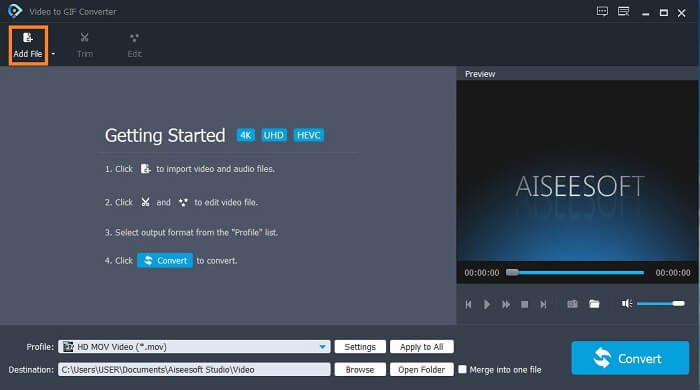
Step 2. An interface like this will show into your screen. Click the Add File or drag-and-drop the file into the converter.
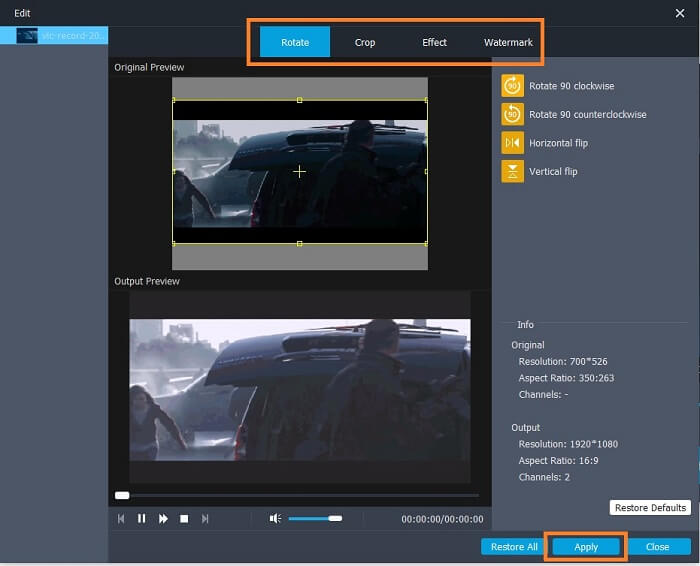
Step 3. If you have already added the GIF, you can also Trim it to make it shorter and click OK to save the changes. You may as well rotate, crop, add effects and watermark your GIF in the Edit to save the changes you made by clicking the Apply.
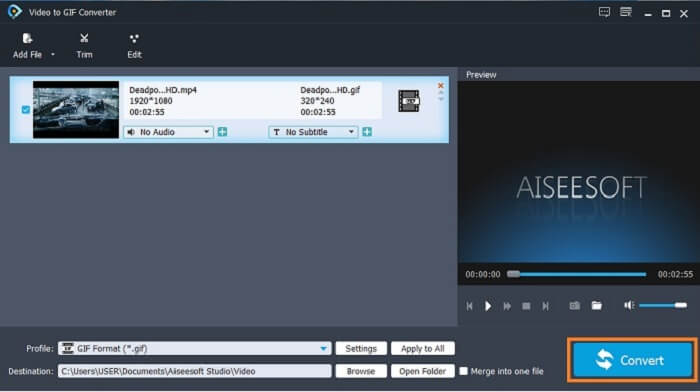
Step 4. Select the destination to place your final output. To start the conversion, click the Convert.
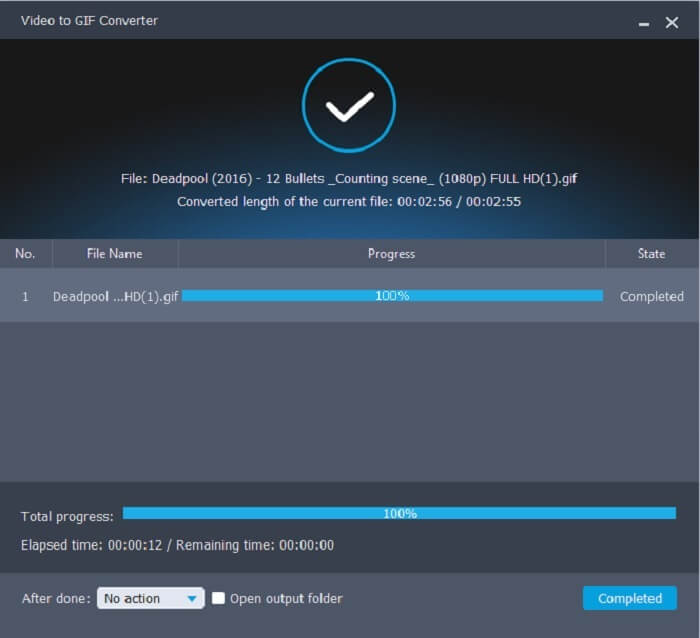
Step 5. If everything is done, you will see this in your display; it means that the conversion is completed.
יתרונות
- הכלי החינמי הטוב ביותר להמרת פורמט וידאו ל-GIF.
- זה זמין בכל הפלטפורמות המוכרות השונות ותמיד מייצר תפוקה מדהימה.
- זה עובד גם אם האינטרנט אינו זמין.
חסרונות
- לא כל התכונות האולטימטיביות מוצגות כאן.
- זהו כלי להורדה גם כמו גרסת הפרימיום.
2. Video Converter Ultimate
It is known that the GIF editor above gives you the class-A on making a GIF. But did you know that there is another tool that is much better than the tool above and below as well? The Video Converter Ultimate lives up to its name as the ultimate GIF maker available in all software. It is not just best at making GIFs but also it functions as a converter and many more. Add effects into your GIF to stand out among other GIFs. So, if you are in a battle of making the best GIF with your friends and want to win. Then this must be your chance to deliver the wow factor to them. Also, to know how to use the tool you must follow these steps correctly to have a successful GIF.
Step 1. Click the download button and install it on your computer drive. Change the preference and click finish to save and launch the tool.
הורדה חינמיתל-Windows 7 ומעלההורדה מאובטחת
הורדה חינמיתל-MacOS 10.7 ומעלההורדה מאובטחת
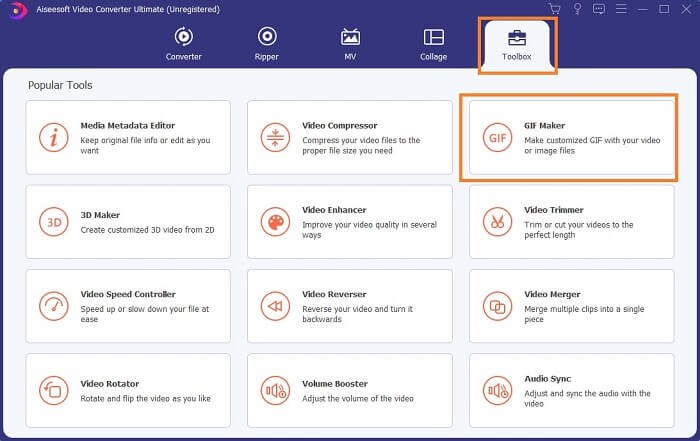
Step 2. If the tool is already running into your system an interface like this will pop up on your screen. Go to the Toolbox and GIF Maker to start making GIFs.
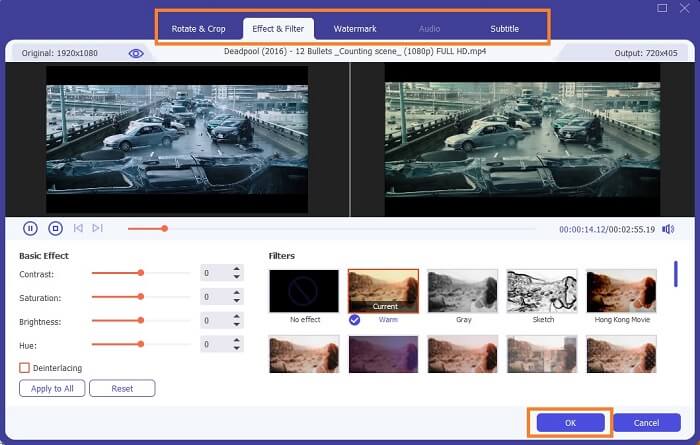
Step 3. Then click the Video to GIF and select what video you want to convert. After selecting the video file, you may as well edit the video like rotate and crop, effect filter, watermark, and subtitle as well. Click OK to save the adjustment.
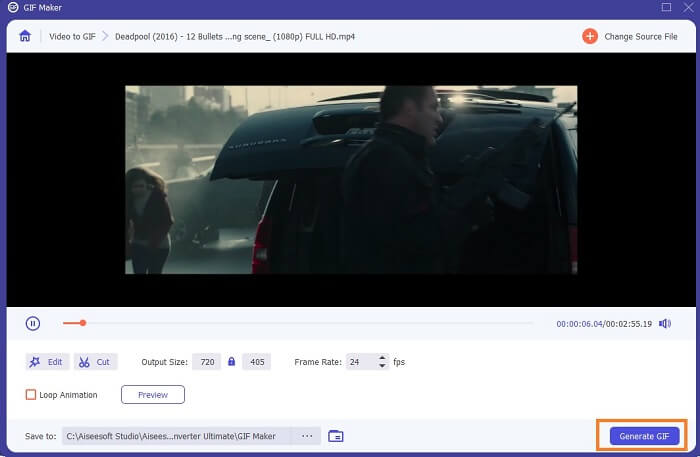
Step 4. Click the Preview to watch the first 10 seconds of the video you created. Hit on Generate GIF to start the conversion.
Step 5. If everything is done, locate the file into your file explorer and watch or send the final output.
יתרונות
- ממיר הווידאו הטוב ביותר עבור GIF עם הכלי האולטימטיבי לשיפור ה-GIF.
- זה תומך בכל הפורמטים המוכרים והלא ידועים של וידאו-אודיו דרך האינטרנט.
- כלי רב תכליתי עם הפלט הסופי המעולה.
חסרונות
- זהו כלי בתשלום לשימוש אך הוא זול יותר.
- יש להוריד אותו לאחסון שלך לפני שתוכל להשתמש בו.
חלק 2. 3 של עורכי ה-GIF המקוונים הטובים ביותר
1. אזגיף
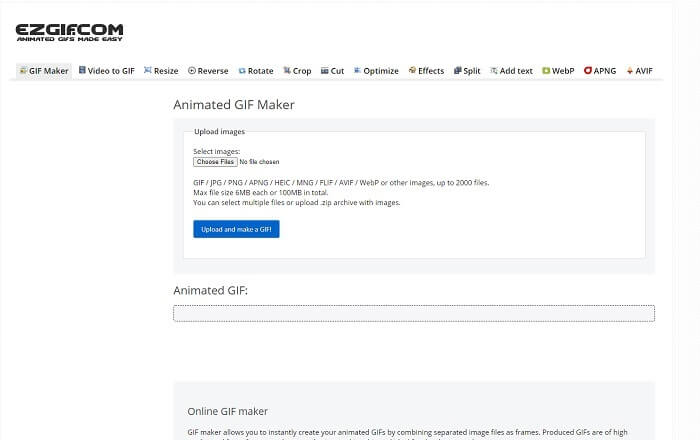
One of the GIF editors online that you might already encounter over the internet. Ezgif is known as one of the best GIF makers. Although this tool provides you numerous features like rotating the video, cropping the video, reversing it, and so on. They are all separated from one another, so instead of focusing on making GIFs and editing. You'll need to transfer the file to the editing tools you want to enhance it which is a hassle for you. Also, the interface has a white background which is simple yet boring to look at. It seems like the online tool doesn't get an update from the interface itself.
יתרונות
- כלי נקודתי עם אפשרויות שונות.
- כלי דף האינטרנט פשוט.
- יעיל ביצירת GIF.
חסרונות
- זה מוגבל ל-6MB כל אחד ו-100MB בסך הכל.
- זה לא ידידותי למשתמש מכיוון שכל התכונות של הכלי נמצאות בכל האתר. וזה קצת משעמם להסתכל בגלל הרקע הלבן הפשוט שלו.
2. VEED.IO
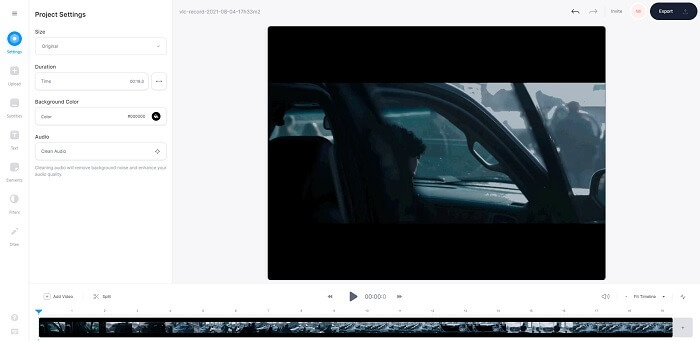
Another online GIF editor tool for making a GIF is VEED.IO. Create, edit, and convert your own video to a GIF format with this tool. The main website of the tool is somehow nice to look at, unlike Ezgif. But if you start making GIFs online, the webpage of the tool becomes unresponsive and somehow they are not secure. Also, don't try to put your password or credit cards because there is a chance that it can be stolen by the attacker.
יתרונות
- תמיכת לקוחות טובה יותר.
- הוא מספק גרסה מקצועית של הכלי.
- קל לגישה דרך האינטרנט.
חסרונות
- כלי האינטרנט אינו מוגן. אז, בקר באחריותך בלבד.
- אין תכונות עריכת תלת מימד.
3. גיפי
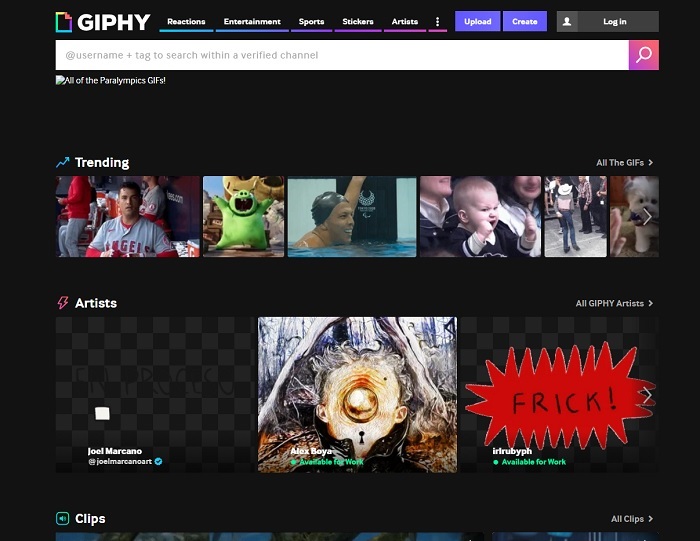
Giphy is an online animated GIF editor. This tool provides sample GIFs like reactions, entertainment, sports, and stickers. Though it is one of the best GIF makers, this tool needs your account before you may use it. It basically allows the website to gain access to your account. So, keep in mind that updates, new features, or new GIFs of the tool will always pop up into your mail.
יתרונות
- העלה וצור קובצי GIF באינטרנט.
- הספרייה הגדולה ביותר עבור קובצי GIF, קליפים ומדבקות בחינם באינטרנט.
- הממשק מעודכן והוא נראה מדהים.
חסרונות
- יהיה עליך להירשם לפני השימוש בכלי. לכן, אם אינך נרשם או לא מתחבר, הכלי אינו נגיש.
- האורך המרבי עבור ה-GIF הוא 30 שניות בלבד.
חלק 3. אפליקציות עורך GIF באנדרואיד ו-iOS
1. GIPHY: GIF & Sticker Keyboard & Maker
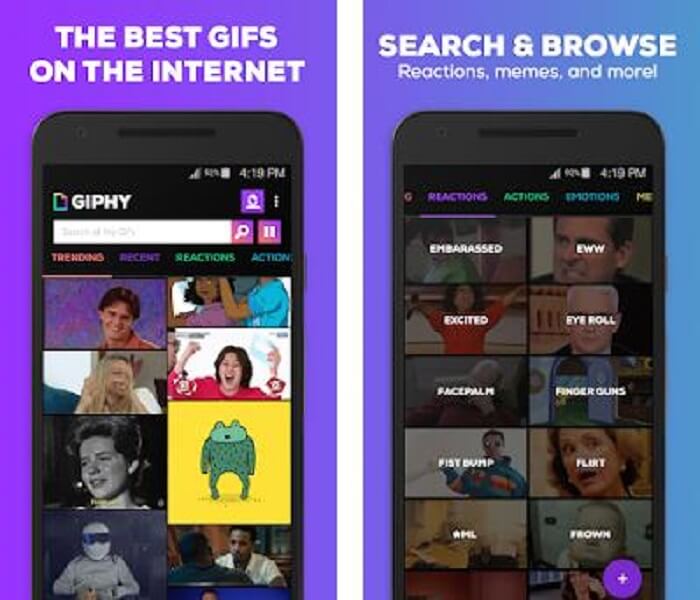
Another GIF editor app available on Android and iOS is the GIPHY: GIF & Sticker Keyboard & Maker. It is known as one of the largest storages of GIFs in the entire Play store and App Store. But not only that, this app can provide already done GIFs or maybe you want to create your own. Also, you can share your own GIFs in the app as well. In some cases, when you upload GIFs that work perfectly during the making or the one that is already on your phone. The app makes it a bit buggy and in some parts of the GIFs are faster and some are slow.
יתרונות
- קובצי GIF, מדבקות וסרטונים מדהימים.
- מעט עד אין מודעות באפליקציה.
- ערוך את ה-GIF שלך והוסף עוד אנימציה אסתטית ב-GIF.
חסרונות
- בהזדמנויות מסוימות כשאתה מוריד קובצי GIF מהאפליקציה הזו, תקבל תמונות סטילס. במקום להוריד אותו לפורמט gif הוא הפך ל- .jpeg.
- הכניסה לאפליקציה קצת מעצבנת כי במקרים מסוימים לא ניתן להיכנס כמו שצריך וצריך לעשות זאת יותר.
2. ImgPlay–GIF Maker
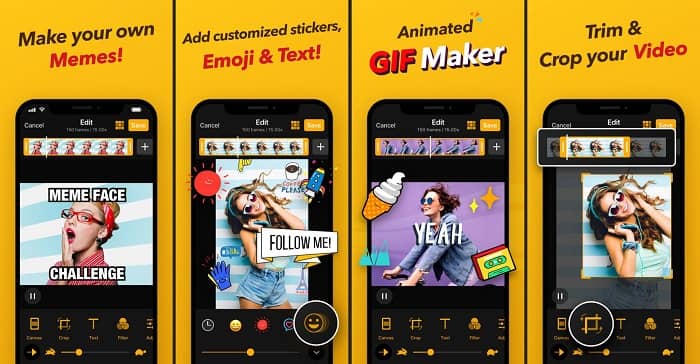
The best and easiest way to create a GIF whether it is a video or images. Imgplay can make your images or videos into a fully functional GIF. This app gives you the best features to make your GIF stand out as possible. If you were to save the final output of your GIF there will be a watermark at the bottom right side of the final GIF. To remove the watermark, you need to pay for the premium version of the tool.
יתרונות
- הוא תומך במכשירי אנדרואיד ו-iOS.
- החל יותר מ-30 מסננים על ה-GIF שלך כדי לשפר אותו, אם אתה קונה את גרסת הפרימיום של הכלי.
- צור GIF מהסרטונים והתמונות שלך בקלות.
חסרונות
- זה עובד טוב יותר ב-iOS ולא באנדרואיד. בעיקרון, אתה לא יכול להתאים את הבהירות, הניגודיות, הרוויה ואת קצב הפריימים גם עם תכונות עיקריות אחרות באנדרואיד.
- כמו כן, צפו למודעות גם באפליקציות אלו. כדי להסיר אותם אתה צריך לקנות את גרסת הפרימיום. גם ה-fps שלו סופר נמוך.
3. GIFX
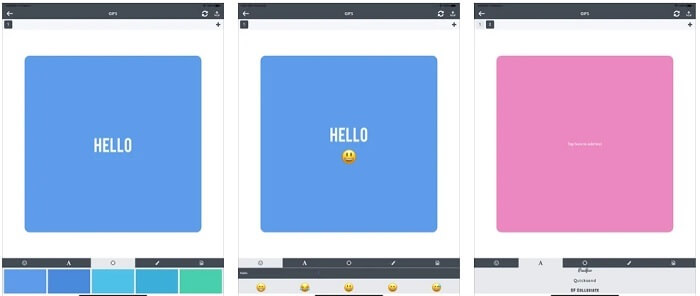
This GIF editor is only available on iOS. GIFX can do the work on making the best GIF you want to have. It also supports images and videos to become a GIF format. You can also share it via your mms and emails. Also, it provides adding emoji to your own GIF to express your emotion better with text as well.
יתרונות
- צור GIF מונפש משלך עם האפליקציה הזו ב-iOS.
- זה תומך במוצרים שונים של אפל כמו iPad, iPhone, iPod touch ו-Mac גם כן.
- התאם את מהירות ה-GIF שלך עם הכלי הזה.
חסרונות
- הכלי אומר שהוא תומך בסרטונים אבל הוא לא מאפשר לך להוסיף סרטונים ל-GIF שלך.
- דירוג האפליקציה הוא כוכב אחד בלבד ומקבל 2 ביקורות בלבד, וזה סופר נמוך עבור אפליקציה.
4. סטודיו GIF
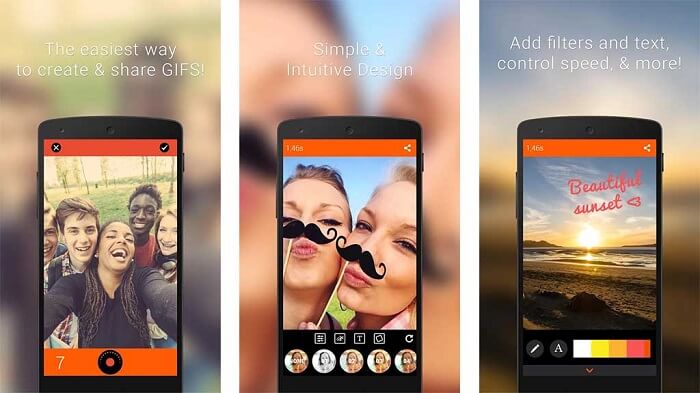
If you're looking for the best GIF editor app then this GIF Studio must be it. It gives you the chance to let your imagination play into your GIFs. Create, edit and play animated GIFs with this app. Also, if you're a user who finds making GIFs a bit troubling making GIFs this tool makes it easier for you. It also provides you with more features to add on to make it more amazing.
יתרונות
- מיזוג מספר GIF לאחד.
- הוסף טקסט לקובצי GIF שלך כדי ליצור כרטיס ברכה.
- שתף את קובצי ה-GIF שלך ושמור אותם בקלות.
חסרונות
- כי המפתחים עושים את זה פשוט. ממשק המשתמש מזעזע. ללמוד להשתמש באפליקציה הזו יהיה קצת נוקשה.
- זה לא תומך בקובצי GIF שנוצרו מיצרן GIF אחר.
חלק 4. שאלות נפוצות על עורך GIF
האם יש פורמטים אחרים שיכולים לאחסן תמונות תנועה כמו שה-GIF יכול לספק?
לאחר 30 שנה של היותו אחד הפורמטים המפורסמים של תמונה-וידאו. זה כבר יצר מתחרה: APNG, AVIF, MNG, WebP ו-FLIF.
איזו דחיסת נתונים היא GIF?
It is a lossless compression, so when you compress the data there will be no loss and it is easy to transfer the format over the internet. If your GIF is large, you can check on How to Compress Animated GIF into Small File Size
באיזה מקליט GIF אוכל להשתמש כדי להקליט פורמט GIF?
אתה יכול להשתמש ב-FVC Screen Recorder, מקליט GIF להורדה הזמין בכל הפלטפורמות השונות, המספק פורמט GIF ועוד. עם איכות סופר גבוהה ואפשרויות רבות נוספות. הורד מקליט מסך FVC בחינם עבור Windows הורד מקליט מסך FVC בחינם עבור Mac
סיכום
ועכשיו, כשברור מאוד שהדרך הטובה ביותר להעביר מסר נהדר היא להשתמש בקובצי GIF. למרות ששימוש במסר גולמי הוא טוב, הוספת GIF היא הרבה יותר טובה. לכן, בחירת עורך ה-GIF הטוב ביותר היא חובה כדי להעביר את הטון הנכון של ההודעה שברצונך לשתף ולקבל אמירה ברורה או להוסיף נימה מצחיקה. בחר בכלי האולטימטיבי ליצירת GIF אולטימטיבי כדי ליצור את הרושם הטוב ביותר שאתה רוצה לשתף.
-
 כיצד להמיר קטעי וידאו AVI לקבצי GIF מונפשים ב- Windows / Mac
 רוצה לבחור את קטעי ה- AVI המעניינים ליצירת ממים של GIF? מאמר זה יגיד לך את 2 השיטות הטובות ביותר לקליפ את קטעי הווידי AVI ולהמיר AVI לקבצי GIF מונפשים בחינם.
-
 [נפתר] כיצד להמיר סרטוני FLV לקובצי GIF מונפשים בחינם
 אם ברצונך ליצור קובצי GIF מקטעי הווידאו של FLV לשליחה טובה יותר, תוכל ללמוד עוד כיצד להמיר קטעי וידאו FLV לקבצי GIF בקלות ממאמר זה.
-
 [2 פתרונות] כיצד להמיר קבצי SWF ל-GIF בקלות בחינם
 כאשר אינך מצליח לייצא פורמט GIF באמצעות תוכנת Flash, תוכל לנסות לשמור את הקבצים בפורמט SWF בהתחלה. אז אתה יכול ללמוד 2 דרכים קלות להמיר SWF לקבצי GIF ממאמר זה.
