


 מקליט מסך
 תיקון וידאו
 הורדה מאובטחת
כיצד להמיר GIF ל-APNG: השוואת פורמטים ומדריך מקיף
למרות ש‑GIF עשויות להיות אחד האמצעים האהובים ביותר בכל הזמנים להעברת רגשות ותגובות, הן אינן מציעות את איכות התמונה הגבוהה ביותר – אז מדוע להתפשר על פחות? המירו GIF לפורמט APNG כדי ליהנות ממעברים חלקים יותר, צבעים חיים ואיכות מעולה. גלו שיטות שונות להמרת GIF ל‑APNG. כאן נגלה את ההבדלים בין GIF ל‑APNG ושלושה כלים חדשניים שנוכל להשתמש בהם כדי להמיר את הקבצים שלכם בצורה חלקה.

חלק 1. הצורך להמיר GIF ל-APNG
GIF לעומת APNG: מה ההבדלים ביניהם, ומה עדיף?
Graphic Interchange Format (GIF) ביסס את עצמו בתרבות המקוונת על ידי העברת רגשות בצורה קומית יותר מאשר טקסט. משורות אייקוניות מסדרות טלוויזיה פופולריות, סצנות הומוריסטיות מהסרטים האהובים עליך בכל הזמנים וממים קומיים, אתה יכול להשתמש בקובצי GIF כדי להעביר את הרגשות והדעות שלך בצורה מהנה ויצירתית. עם זאת, כפי שאולי שמתם לב, רוב קובצי ה-GIF יכולים להיות מאוד מפוקסלים ומחוספסים מכיוון שקובצי GIF אינם מציעים את האיכות הטובה ביותר. זה המקום שבו אנימציה PNG (APNG) נכנס לתמונה! APNG הוא פורמט קובץ שימושי שיכול לשמש כחלופה ל-GIF.
אז מה בדיוק ההבדל בין GIF ל-APNG? הנה ייצוג חזותי כדי להבין במהירות את ההבדל בין השניים.
| GIF | APNG |
| 8 סיביות לפיקסל: תומך ב-256 צבעים במסגרת אחת. | תמיכה ב-24 סיביות: טווח פלטת צבעים רחב ותוסס יותר. איכות טובה יותר |
| שקיפות של 1 סיביות. פיקסלים אטומים לחלוטין או שקופים לחלוטין. | פורמט APNG תומך בשקיפות אלפא. |
| דחיסה ללא אובדן מייצרת גודל קובץ גדול יותר. | דחיסה ללא אובדן או כמעט ללא הפסדים: מייצרת גודל קובץ קטן יותר מ-GIF. |
| נתמך ותואם לרוב התוכניות והדפדפנים הגדולים. (Firefox, Safari, Chrome וכו'). | פורמט APNG נתמך בעיקר על ידי תוכנות עדכניות ודפדפנים משמעותיים: כרום, ספארי ופיירפוקס; עם זאת, ייתכן שתזדקק להרחבות כדי לפתוח קבצי APNG דרך דפדפנים. |
חלק 2. כיצד להמיר GIF ל-APNG

ממיר וידאו אולטימטיבי
356+ הורדות- המר את הסרטונים שלך לפורמטים פופולריים כמו AVI, MOV, סרטוני 5K/8K ועוד.
- תומך כמעט בכל הפורמטים ותואם ל-Windows ול-Mac.
- ערוך, שפר, עשה קולאז' ומייפה את הסרטונים שלהם בכמה לחיצות בלבד.
- לספק פלטים באיכות גבוהה ללא סימני מים.
הורדה חינמיתעבור Windows 7 או גרסה מאוחרת יותרהורדה מאובטחת
הורדה חינמיתעבור MacOS 10.7 או גרסה מאוחרת יותרהורדה מאובטחת
1. EXGIF
EZGIF היא פלטפורמה מקוונת המאפשרת לך ליצור, לערוך ולהמיר GIF ותמונות אחרות. נניח שאתה רוצה להפוך קובצי GIF ל-APNG. במקרה זה, ערכת כלים מקוונת זו היא בחירה מצוינת להמרת GIF ל-APNG באופן מקוון ללא מאמץ, מכיוון שהיא מספקת כלי פשוט ושימושי למשתמשים לייעל את איכות עריכות ה-GIF שלהם.
קל יחסית להמיר GIF ל-APNG באמצעות EZGIF; בצע את השלבים המהירים והקלים הבאים:
שלב 1. ראשית, פתחו את הדפדפן המועדף עליכם וחפשו EZGIF, ואז בחרו בקישור הראשון שמופיע בתוצאות החיפוש.
שלב 2. לאחר מכן, חפשו בתפריט העליון את APNG ולחצו עליו.
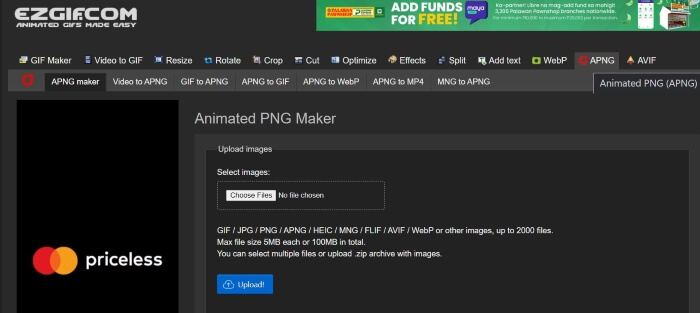
שלב 3. לאחר שתועברו לדף ה‑Animated PNG maker של EZGIF, לחצו על הכפתור Choose Files ובחרו את הקובץ שברצונכם להמיר. לאחר שהקובץ נטען, לחצו על הכפתור Upload כדי להעלות את הקבצים שלכם.
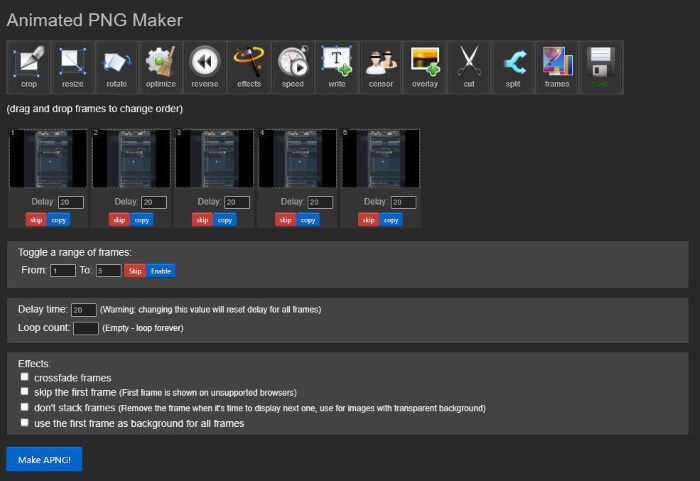
שלב 4. לאחר מכן, ייפתח דף חדש שיאפשר לכם לערוך ולהתאים את קובץ ה‑APNG בהתאם להעדפותיכם. כדי להמשיך בתהליך ההמרה, גללו מטה עד שתראו את הכפתור Make APNG ולחצו עליו; EZGIF יציג לכם תצוגה מקדימה של קובץ ה‑APNG. אם אתם מרוצים מהתוצאה, גללו מטה ולחצו על הכפתור Save כדי להוריד את קובץ ה‑APNG שלכם, וזה הכול! המרתם בהצלחה את קובץ ה‑GIF שלכם ל‑APNG!
2. ורטופל
שלב 1. פתחו את הדפדפן המועדף עליכם וחפשו Vertopal. בחרו בקישור הראשון שמופיע בתוצאות החיפוש.
שלב 2. לאחר שתועברו לדף הבית של Vertopal, לחצו על הכפתור Choose your File או גררו ושחררו את הקובץ/ים כדי להעלות אותם.
שלב 3. לאחר שהקבצים הועלו, בחרו את פורמט הקובץ שאליו תרצו להמיר. ניתן לבחור מבין אפשרויות שונות או לחפש את הפורמט הרצוי וללחוץ עליו. לאחר שבחרתם פורמט, תופיע הודעת אישור שתשאל אם ברצונכם להוסיף עוד קבצים, לשנות את פורמט הפלט או להמשיך בהמרה. לחצו על הכפתור Continue כדי להמשיך בתהליך ההמרה.
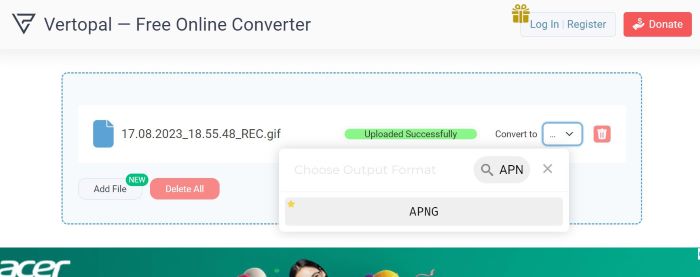
שלב 4. לאחר העלאת הקבצים, Vertopal יציג תצוגה מקדימה של הקובץ המומר. בפינה השמאלית העליונה מצאו ולחצו על הכפתור Convert כדי להמשיך. לאחר סיום ההמרה, יופיע דף חדש; לחצו על הכפתור Download כדי לשמור את קובץ ה‑APNG שלכם. זה כל מה שצריך! כעת יש לכם את קובץ ה‑APNG המומר שלכם!
3. RedKetchup GIF Converter
RedKetchup הוא ערכת כלים מקוונת מעשית נוספת עבור עורכי וידאו, עורכי תמונות ויוצרי תוכן. הוא מציע כלים רבים לצייד את המשתמשים ליצור, לשנות ולצחצח את התמונות, האנימציות והסרטונים שלהם. מלבד זאת, יש לו גם כלי ממיר GIF שבו אתה יכול להשתמש כדי להפוך קבצי GIF ל-APNG, WEBP ו-MP4. כך תוכל להשתמש בממיר GIF של RedKetchup כדי להפוך GIF ל-APNG:
שלב 1. פתחו את הדפדפן המועדף עליכם וחפשו RedKetchup GIF Converter, ואז לחצו על הקישור שמופיע בראש תוצאות החיפוש.
שלב 2. לאחר שתועברו לדף האינטרנט, העלו את הקבצים שלכם על‑ידי לחיצה על הכפתור Browse ואז בחירת הקבצים שברצונכם להעלות.
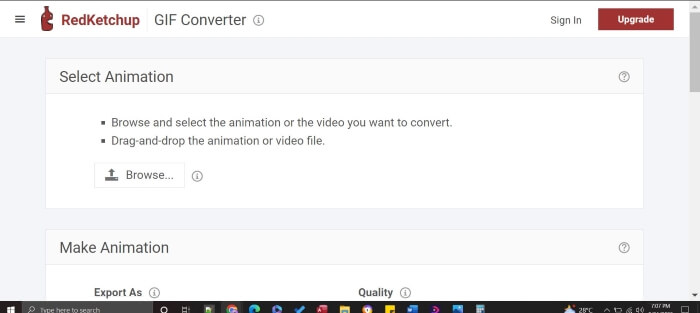
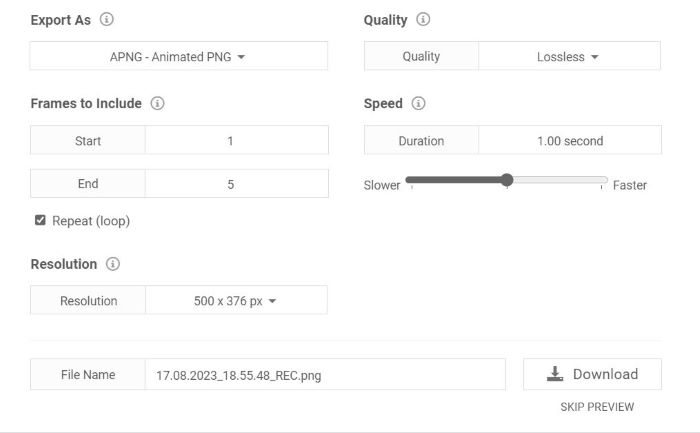
שלב 3. RedKetchup יציג מיד תצוגה מקדימה של הפלט. גללו מטה כדי לראות את ההגדרות; תוכלו לערוך ולהתאים את האיכות, הפריימים, הרזולוציה והמהירות. כדי להמשיך, מצאו את Export As והגדירו את הפורמט ל‑APNG. לאחר שביצעתם את השינויים ואתם מרוצים מהם, לחצו על הכפתור Download. כעת עליכם רק לשמור את המוצר המוגמר, וכבר יש לכם קובץ APNG איכותי במיוחד בכמה קליקים בלבד!
לקריאה נוספת:
כיצד להמיר GIF ל‑JPG בלי לאבד איכות
המדריך הטוב ביותר לחיתוך GIF‑ים כדי להוסיף עניין לתוכן שלך
חלק 3. שאלות נפוצות לגבי המרת GIF ל-APNG
האם אוכל להמיר APNG בחזרה ל-GIF?
כן אתה יכול! לרוב הממירים שהוזכרו לעיל יש כלים להמרת קבצי APNG לקובצי GIF.
האם כל הדפדפנים יכולים לתמוך ב-APNG?
גרסאות דפדפן עדכניות יכולות לתמוך ב-APNG, במיוחד דפדפנים אופנתיים כמו Chrome, Edge, Safari, Firefox ו-Opera. עם זאת, דפדפנים אחרים עשויים לדרוש הרחבות כדי לפתוח APNG מהמחשב שלך באמצעות דפדפנים.
האם המרת GIF ל-APNG משפרת את האיכות?
לא, המרת GIF ל-APNG לא בהכרח תשפר את האיכות אלא אם הממיר יאפשר לך לשנות הגדרות כדי לשפר את איכות הפלט עוד יותר; עם זאת, הוא יכול לספק אנימציה חלקה יותר מכיוון שהוא משתמש בשקיפות של 24 סיביות בהשוואה ל-GIF, שיש לו רק שקיפות של 8 סיביות.
האם כל הכלים תומכים בהמרת קבצי GIF ל-APNG?
כן, כל הכלים שהוזכרו תומכים בהמרה בכמות גדולה.
האם APNG טוב יותר מ-GIF?
למרות ש-GIF נמצא בשימוש נרחב יותר מ-APNG, מבחינת איכות וידאו, APNG טוב יותר מ-GIF מכיוון שהוא יכול לתמוך ביותר צבעים. זה יכול לספק אנימציה תוססת וחלקה יותר מאשר GIF. לגבי תאימות, רוב הדפדפנים המודרניים תומכים כעת בפורמט APNG, אך דפדפנים מסוימים עשויים לדרוש הרחבות כדי לפתוח קבצי APNG.
סיכום
בעוד ש‑GIF הייתה במשך שנים הבחירה הפופולרית להעברת הומור ורגשות, היא עלולה להיות מפוקסלת ומוגבלת באיכות. לכן APNG הוא חלופה חשובה, עם צבעים עשירים יותר, מעברים חלקים ואיכות גבוהה יותר. מאמר זה נכתב במיוחד עבור מי שמחפשים שיטות פשוטות ויעילות להמרת GIF ל‑APNG, ואנחנו כאן כדי להפוך את ההמרה מ‑GIF ל‑APNG לקלה עבורכם!
-
 5 האפשרויות הטובות ביותר להקלטת פורמט GIF עם מקלידי GIF למחשב ו- Mac
 מהו מקליט ה- GIF הטוב ביותר שעליך להשתמש בו כדי להקליט קובצי GIF? הרשימה שלהלן מספקת הוכחות על איזה מהם הוא מקליט המסך הטוב ביותר.
-
 [2023 עודכן] 9 עורכי ה-GIF הטובים ביותר עבור PC, Mac, iOS ואנדרואיד
 צריך להוסיף מגע אישי ל-GIF שלך כדי שיוכל להיות אקספרסיבי יותר? המשך לקרוא מאמר זה כדי לדעת כיצד לערוך והכלי הטוב ביותר לעבודה.
-
 הפוך GIF לפורמט וידאו: המרת GIF Memes לווידאו [2023]
 תוהה לגבי המרת GIF לווידאו עם הכלים המפורטים להלן. בחר אחד ולמד כיצד לעשות זאת כדי לקבל מספיק ראיות עליהם.
