


 ממיר וידאו אולטימטיבי
 מקליט מסך
 תיקון וידאו
3 הממירים האידיאליים המובילים להמרת קובץ VOB לפורמט GIF
קבצי VOB הם קבצים הנראים לרוב בתקליטורי ה-DVD, שיכולים להכיל כמעט את כל הנתונים כמו ניווט, תפריט, כתוביות, וידאו, אודיו וכו'. כמו כן, פורמט זה יכול לאחסן בקלות תוכניות השמעה ובכל זאת עדיין קשה לשמור עליהן שולחן העבודה שלך. כדי לשתף כמה מדגישות הווידאו בפורמט של VOB לפלטפורמות המדיה החברתיות האחרות בקלות וביעילות. הפורמט הטוב ביותר שאתה יכול להשתמש בו הוא פורמט GIF, למרות שפורמט זה אינו תומך בקובץ אודיו עדיין זה הפורמט הטוב ביותר לשיתוף ברחבי העולם. אז, כדי לקבל מושג נוסף על מה אנחנו מדברים, בואו נמשיך עם הכלי שבו אתה יכול להשתמש כדי להמיר קובץ VOB ל-GIF כדי שתוכל לצפות בו ולשתף אותו לעולם.

חלק 1. 3 שיטות שונות כיצד להפוך קובץ VOB ל-GIF
שיטה 1. השתמש בתוכנת שולחן העבודה - FVC Free Video Converter
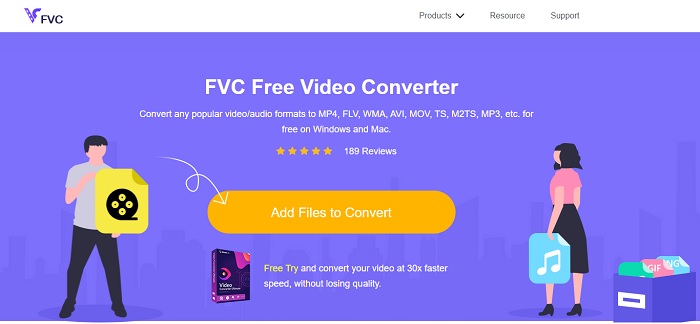
ממיר האונליין הטוב ביותר שהפותח כדי להמיר קובץ VOB ל‑GIF על־ידי FVC הוא FVC Free Video Converter. למרות שהכלי הזה חינמי, הוא עדיין חסר כמה פורמטים, אך הפורמטים הבסיסיים זמינים כאן. בנוסף, באפשרותך לשנות את קצב הסיביות (bitrate), ה‑fps והרזולוציה של קובץ הווידאו בכלי ווב זה. עם זאת, אפשרויות עריכה מרכזיות כמו שיפור הווידאו והשמע, יצירת GIFים או הגברת עוצמת השמע אינן זמינות כאן. מצד שני, ההמרה מהירה בהרבה מזו של fConvert וגם דף האינטרנט של הכלי הזה נקי מפרסומות מציקות. לכן, כדי לדעת כיצד הכלי פועל, עליך לעקוב אחר השלבים שלהלן וללמוד מהכלי המקוון הטוב ביותר שאפשר להשתמש בו בחינם.
שלבים כיצד להשתמש ב‑FVC Free Video Converter כדי להמיר אונליין
שלב 1. לחץ על הקישור לעיל שמפנה לאתר הראשי של FVC Free Video Converter.
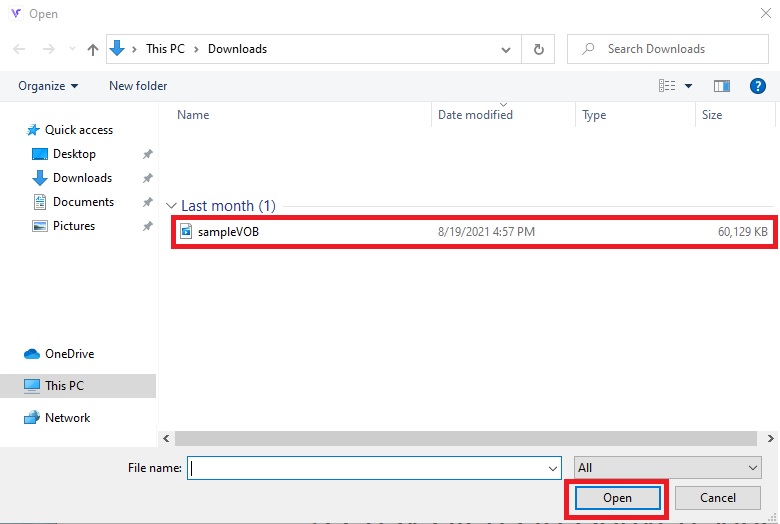
שלב 2. לחץ על Add Files to Convert, מצא את קובץ ה‑VOB ו‑open אותו.
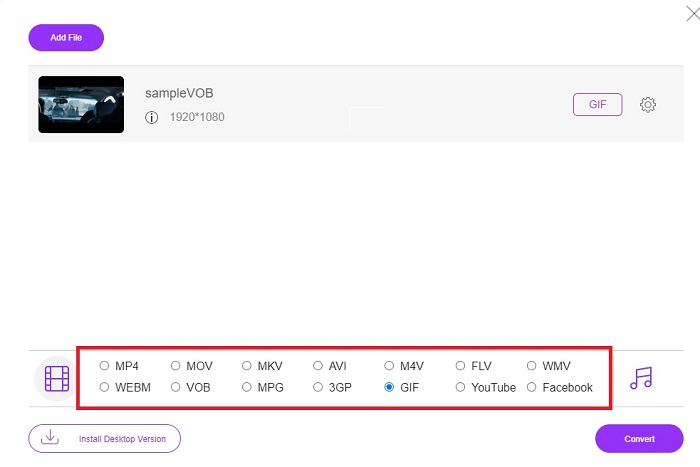
שלב 3. בחר את הפורמט שבו אתה רוצה שהפלט הסופי יהיה בחלק התחתון ואז לחץ עליו.
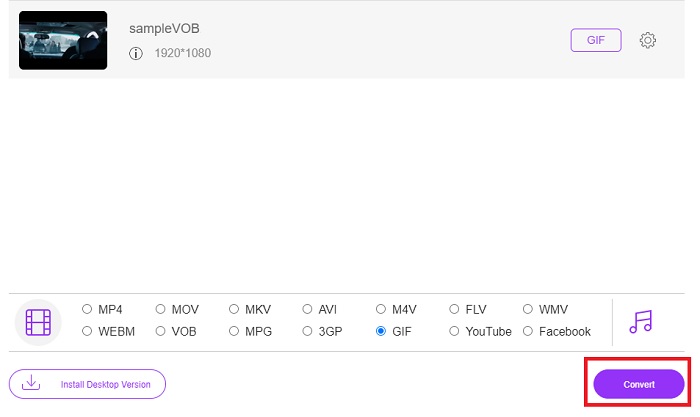
שלב 4. כדי להתחיל את ההמרה, לחץ על Convert.
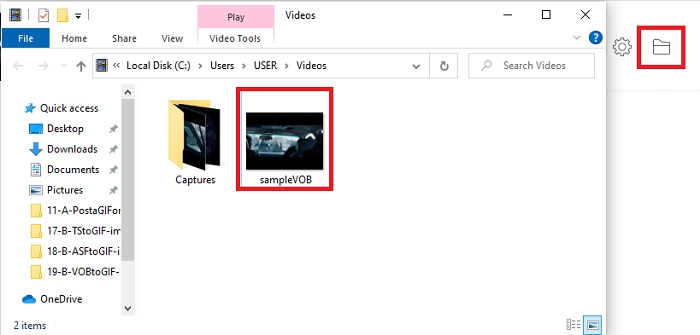
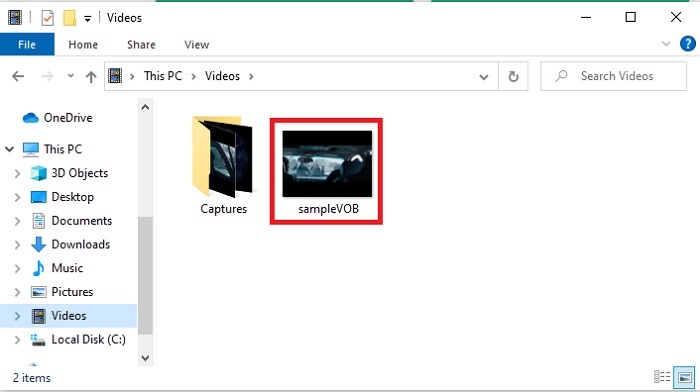
שלב 5. כדי לאתר את קובץ ה‑VOB שהמרת קודם, לחץ על הכפתור הדמוי‑תיקייה כדי לפתוח את תיקיית הקבצים שבה נמצא הקובץ שהומר.
שיטה 2. השתמש בתוכנה חופשית - FVC Video Free to GIF Maker
אם הכלי המקוון מדהים, למד אז כיצד להמיר קובץ .vob ל‑GIF בעזרת FVC Free Video to GIF Maker. אם ההמרה היא הבעיה שלך, נפתור אותה בעזרת הכלי החינמי שניתן להורדה הזו. הוא תומך ביותר פורמטים מאשר הכלי המקוון החינמי וכן בפונקציות עריכה בסיסיות. אך לכלי זה אין אפשרויות עריכה מתקדמות כמו לממיר האולטימטיבי ש‑FVC יכולה להציע לך. לצד הממיר האולטימטיבי, עדיין תוכל להשתמש בו, שכן הוא הפך לאחד הכלים הטובים ביותר להמרה בטוחה ויעילה. בנוסף, הוא מהיר הרבה יותר מכל כלי מבוסס‑אתר שניתן לגשת אליו אונליין. לכן, אם אתה רוצה המרה מהירה ויעילה, עקוב אחרי השלבים המופיעים למטה.
שלבים כיצד להשתמש ב-FVC Video Free to GIF Maker כדי להמיר במצב לא מקוון
שלב 1. הורד את FVC Free Video to GIF Maker לכונן ה‑PC או ה‑Mac שלך. לאחר מכן שנה את הגדרות ההתקנה ולחץ על Finish בסיום ההתקנה כדי לשמור את השינויים.
הורדה בחינםל‑Windows 7 ומעלההורדה מאובטחת
הורדה בחינםל‑MacOS 10.7 ומעלההורדה מאובטחת
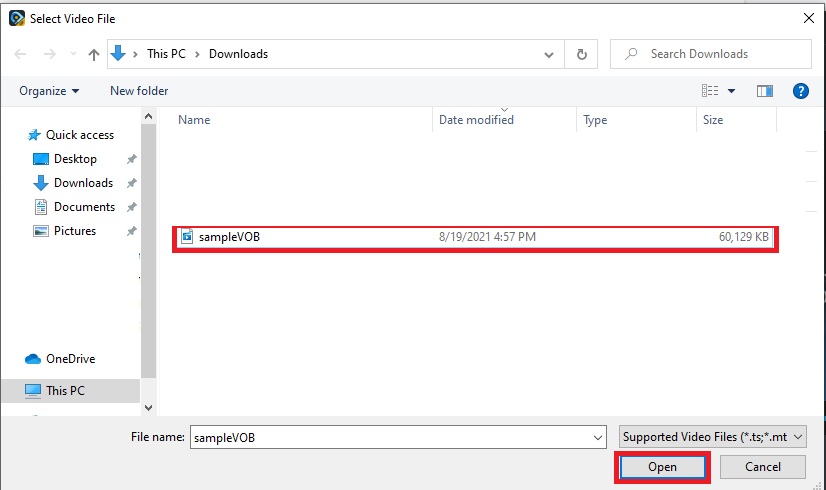
שלב 2. כדי להכניס את הקבצים לממשק, לחץ על כפתור Add File בצד השמאלי העליון של הממשק. לאחר מכן לחץ על open כדי להוסיף את קובץ ה‑VOB לממשק הראשי.
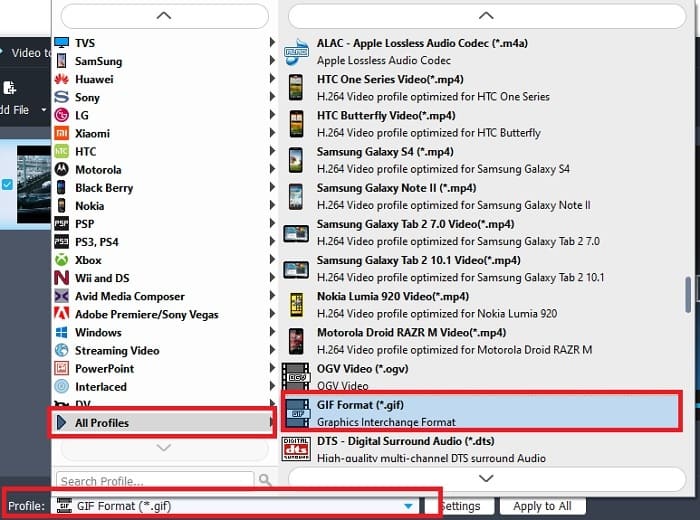
שלב 3. שנה את הפורמט על־ידי לחיצה על Profile והחלט מה יהיה הפלט הסופי הרצוי.
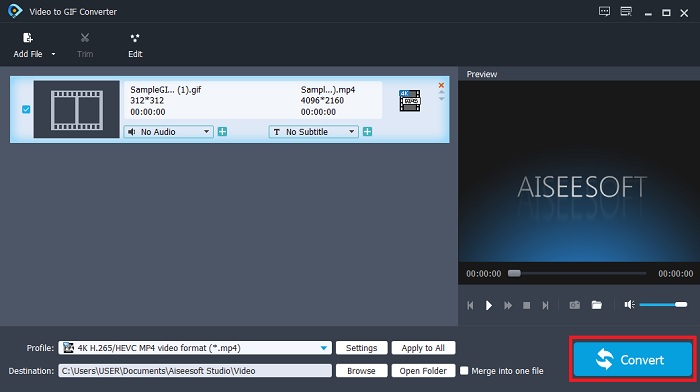
שלב 4. כדי להתחיל את שינוי קבצי ה‑VOB, לחץ על כפתור Convert.
שלב 5. אתר את הקובץ במנהל הקבצים שלך וצפה בקובץ ה‑VOB שהמרת קודם.
שיטה 3. השתמש בכלי מקוון - fConvert
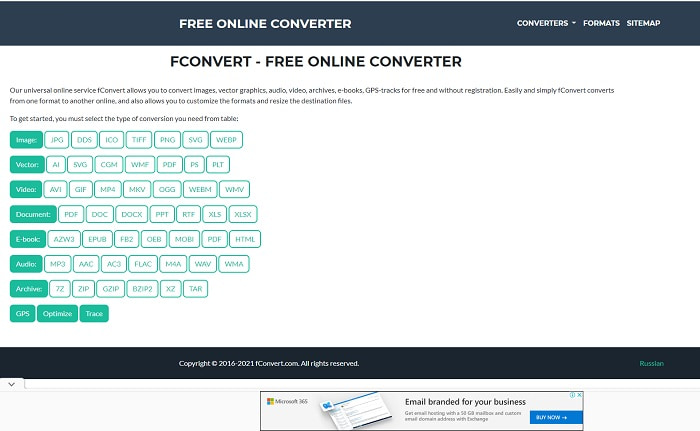
כלי אונליין נוסף שניתן להשתמש בו כדי להמיר קובצי VOB הוא fConvert. כלי ווב זה מאפשר למשתמש להמיר כל פורמט קובץ מדיה לגרסה חדשה לשימוש. אך באתר יש כמה פרסומות מציקות סביבו. למרות שהפרסומות עדיין נסבלות, הפרסומות בעמוד הראשי שלו מעצבנות. אף על פי ש‑fConvert תומך כמעט בכל סוגי ההמרות שניתן לבצע, מספר הפורמטים שהוא מציע עדיין קטן מזה של FVC Free Video Converter. מידע נוסף: אם תתחיל את תהליך ההמרה, יהיו יותר פרסומות מאשר באתר עצמו, אז היזהר שלא להיות מועבר לאתר אחר.
שלב 1. פתח את מנוע החיפוש שלך וחפש את האתר הרשמי של הכלי.
שלב 2. בחר את תהליך ההמרה שברצונך לבצע.
שלב 3. לאחר מכן הוסף את הקובץ להמרה והמתן לסיום.
חלק 2. שאלות נפוצות לגבי המרת VOB ל-GIF
מהו קובץ VOB?
VOB יכול להכיל טופס זרם נתונים מרובים ל-DVD ורוב הזמן פורמט זה גם מוצפן. עם זאת, לא ניתן לקרוע בקלות קבצי VOB ל-DVD בגלל ההגבלה שהפורמט הזה מספק. אם תכריחו לקרוע את קובץ ה- .vob יש סיכוי שהתוצאה תפסה הרבה נתונים או אם יתמזל מזלכם הסיכוי להיקרע כמו שצריך הוא קלוש מאוד. אבל אתה יכול להוריד קבצי VOB דרך האינטרנט אבל אתה לא יכול להפעיל אותם בטלפונים או במחשבים שולחניים אם אין לך את הקובץ המתאים. יש סיכוי שהתראה כמו קובץ זה אינה נתמכת או שהקובץ הזה מוצפן תוצג במסך שלך.
היכן אוכל להפעיל את קובץ ה-VOB שלי מבלי להמיר אותו?
המרתו היא פתרון אידיאלי לבעיה זו. אך אם אינך רוצה להתעסק בהמרה, תוכל לנגן אותו כאן. נגן המדיה הזה גם הוא מובא אליך על־ידי FVC כדי לנגן את כל הפורמטים שלא הצלחת לנגן עד כה. Blu-ray Player הוא אחד הפתרונות לניגון קובץ VOB שלא ניתן לנגנו, ללא שימוש בתוכנה נוספת. כדי להוריד את הכלי הזה לחץ על הקישור שלהלן. הורד Blu-ray Player ל‑PC הורד Blu-ray Player ל‑Mac
מה עדיף: VOB או MP4?
אם היינו מתכוונים לאחסן את הקובץ בתקליטורי DVD או תקליטורים אז זה אידיאלי יותר להשתמש בקבצי VOB מאשר MP4. מכיוון שהקובץ הזה הרבה יותר קטן מה שאומר שאתה יכול לאחסן יותר מבלי לאבד את האיכות. אבל אם אתה רוצה לאחסן אותו בטלפון או בשולחן העבודה שלך, אז MP4 הוא הרבה יותר טוב מקובץ VOB. כדי להמיר MP4 ל-VOB, או להיפך, אתה יכול לנצל את כלי ממיר הווידאו, כמו FVC Free Video Converter כדי להשיג את המרת הפורמט.
האם לאחר המרת VOB, האיכות של זה תאבד?
זה אפשרי רק אם אתה משתמש בממיר לא נכון. אף על פי שהמרה עשויה להיראות קלה לביצוע, בחירת הממיר קשה יותר ממה שאתה חושב. אם אתה רוצה לחוות המרה יוצאת דופן, עליך להוריד את FVC Video Converter Ultimate ולנסות אותו בעצמך. הורד FVC Video Converter Ultimate ל‑PC הורד FVC Video Converter Ultimate ל‑Mac
סיכום
כדי לסיים את הדיון, אם אתה נתקל שוב בקובצי ה-VOB הבלתי ניתנים להפעלה, עליך לשקול להמיר אותם לפורמט הניתן להפעלה. למרות ש-FVC Video Converter Ultimate לא מוזכר כאן, עדיין תהליך ההמרה שהכלי הזה מספק הוא מהיר, קל, יעיל ואפקטיבי בניגוד לאחרים. כדי לחקור את הכלי עליך להוריד אותו למחשב או ל-Mac שלך עכשיו.
-
 [2 פתרונות] כיצד להמיר קבצי SWF ל-GIF בקלות בחינם
 כאשר אינך מצליח לייצא פורמט GIF באמצעות תוכנת Flash, תוכל לנסות לשמור את הקבצים בפורמט SWF בהתחלה. אז אתה יכול ללמוד 2 דרכים קלות להמיר SWF לקבצי GIF ממאמר זה.
-
 [2 פתרונות] כיצד להמיר סרטוני WMV לקבצי GIF בחינם
 אם אתה רוצה לצלם את החלקים הנפלאים של סרטוני ה-WMV וליצור מהם קובצי GIF, תוכל ללמוד על 2 שיטות קלות להעברת סרטוני WMV לקובצי GIF במאמר זה
-
 MOV ל- GIF - כיצד להמיר MOV ל- GIF מונפש ב- Mac, PC ובחינם באינטרנט
 מהו GIF? כיצד להמיר וידאו ל- GIF? כיצד לשנות MOV ל- GIF מונפש באינטרנט? פוסט זה מספר 3 דרכים להמיר MOV ל- GIF מקוון, ב- Mac/PC.
