


 ממיר וידאו אולטימטיבי
 מקליט מסך
 תיקון וידאו
 הורדה מאובטחת
כיצד לדחוס קבצי SVG: השג פלט איכותי ללא אובדן
SVG, או Scalable Vector Graphics, הוא פורמט תמונה ייחודי המאחסן תמונות באמצעות נוסחאות מתמטיות המבוססות על הנקודות והקווים המדויקים שלהן על רשת. זה מנוגד לחלוטין ל-JPEG, שהם קובצי רסטר מבוססי פיקסלים. יתר על כן, קבצים מסוג זה משמשים בדרך כלל לעיצוב אינטרנט וגרפי בשל יכולת המדרגיות שלו וגודל הקובץ הניתן לעבודה.
עם זאת, משתמשים כיום דוחסים בדרך‑כלל קובץ זה כדי לשפר את זמני הטעינה והביצועים. לכן, אם אתה מחפש כלי לדחיסת קובצי SVG, אתה נמצא במקום הנכון. במאמר זה תלמד על כלי הדחיסה ל‑SVG הטובים ביותר וכיצד להשתמש בהם ביעילות כדי לאפשר אופטימיזציה לתמונות שלך מבלי לוותר על האיכות.

חלק 1: דחוס SVG בגודל מינימלי ללא אובדן איכות ברור באינטרנט
אם ברצונך לדחוס את קובצי ה‑SVG שלך לגודל מינימלי בלי ירידה ניכרת באיכות באופן מקוון, הכלי הטוב ביותר לשם כך הוא FVC Free Image Compressor. הכלי הזה הוא 100% חינמי, ובניגוד לכלי דחיסה אחרים המציעים שירות חינמי, הוא יוצא דופן בכך שהוא דוחס קובצי תמונה תוך שמירה על האיכות שלהם.
שלב 1. תחילה, עליך לבקר באתר הרשמי של הכלי הזה.
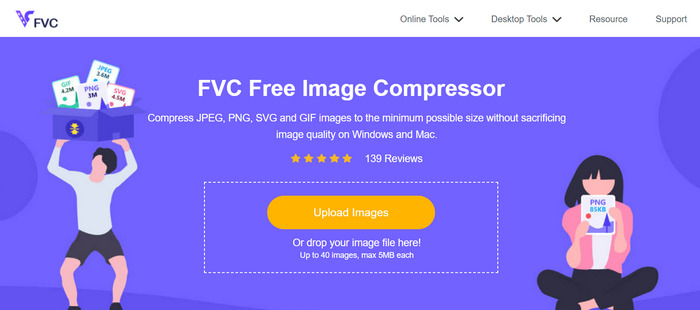
שלב 2. לאחר שנכנסת לממשק הראשי, עליך ללחוץ על הכפתור Upload Images כדי לייבא את התמונות שברצונך לדחוס.
שלב 3. המתן לסיום תהליך ההמרה. לאחר מכן תופיע שורת מצב המציינת שהתהליך הושלם. כעת לחץ על Download כדי לשמור את התמונה.
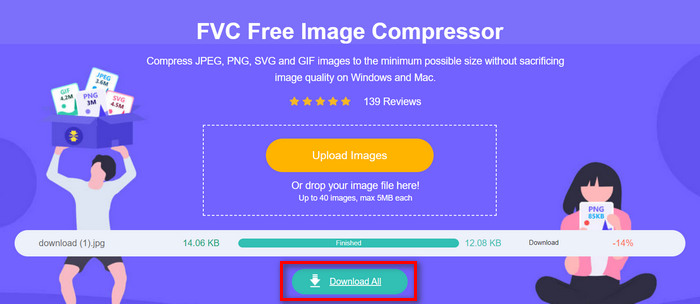
מה שהכי טוב בכלי הדחיסה של SVG זה הוא שהוא מבצע דחיסה אוטומטית בעת העלאה. יתר על כן, תכונת עיבוד האצווה שלו מאפשרת למשתמשים לדחוס עד 40 קבצי תמונה בו-זמנית. זה מועיל לאלה שיש להם חבורה של קבצי SVG שצריכים דחיסה. כמו כן, קבצים אלה מצטמצמים במהירות ובאופן אוטומטי למקסימום של 5MB כדי להבטיח ביצועי עומס בעת השימוש בהם. לבסוף, מלבד קבצי SVG, אתה יכול לדחוס פורמטים אחרים של קבצי תמונה כמו JPEG, PNG ו- GIF.
חלק 2: דחוס SVG עם תוכנה מקצועית- Adobe Illustrator
אם אתה רוצה תוכנה מקצועית לדחיסת קבצי SVG, Adobe Illustrator תהיה הבחירה הטובה ביותר. תוכנה זו ידועה ביכולות העיצוב הגרפי המתקדמות שלה. ובכל זאת, הוא גם מסוגל לייעל ולהקטין את גודל הקובץ של קובץ ה-SVG שלך תוך שמירה על איכות גבוהה.
להלן השלבים כיצד ניתן לדחוס קבצי SVG כאשר אתה משתמש ב-Adobe Illustrator:
שלב 1. בתוכנית Adobe Illustrator שלך, פתח את קובץ ה‑SVG על‑ידי מעבר ללשונית File ולחיצה על הכפתור Open.
לאחר שתהיה בממשק הראשי, עבור שוב ללשונית File ולחץ על הכפתור Save As או לחץ על Shift-Control-S כדי לשמור את המסמך.
שלב 2. כעת בחר Adobe Illustrator.Ai כסוג הקובץ, הגדר את שם המסמך ואז לחץ על Save.
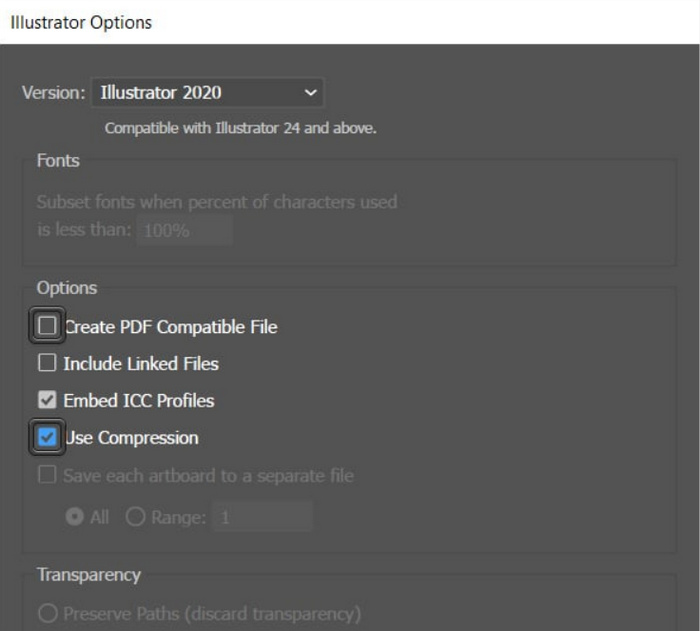
שלב 3. כעת בטל את הסימון בתיבה Create PDF Compatible File וודא שהתיבה Use Compression מסומנת. לאחר שסיימת, פשוט לחץ על OK כדי לשמור את הקובץ כשהוא מוקטן בגודלו.
כאן תוכל גם להשתמש בכלי הזה כדי לייצא SVG ל‑JPG או PNG לפי הצורך.
משתמשים יכולים לנצל את היתרונות של שיטה זו כאשר הם יוצרים פרוייקטים של קבצי SVG בתוכנית Adobe Illustrator. לתוכנית יש תכונה המאפשרת למשתמשים לדחוס את הקובץ ישירות לפני שמירתו. עם זאת, זה לא כלי הדחיסה הטיפוסי של SVG שמציע המרת אצווה עבור חבורה של קבצי SVG ויש לו שיעור דחיסה אוטומטי, אבל שוב, כשאתה משתמש בתוכנה זו, אתה יכול לדחוס קבצים מסוג זה בקלות ובמהירות גודל הקובץ הקטן ביותר האפשרי תוך שמירה על שלמות האיכות שלהם.
חלק 3: דחוס SVG במהירות מהירה
אם אתה מחפש כלי דחיסה ל‑SVG בעל מהירות גבוהה, ייתכן ש־Compress-Or-Die הוא המושלם עבורך. זהו כלי דחיסת תמונות מקוון שלא רק מקטין את גודל קובצי התמונה שלך, אלא גם מנתח ומתקן אותם. בנוסף, כלי זה דוחס קובצי SVG לגודל קטן יותר תוך שמירה מרבית על האיכות.
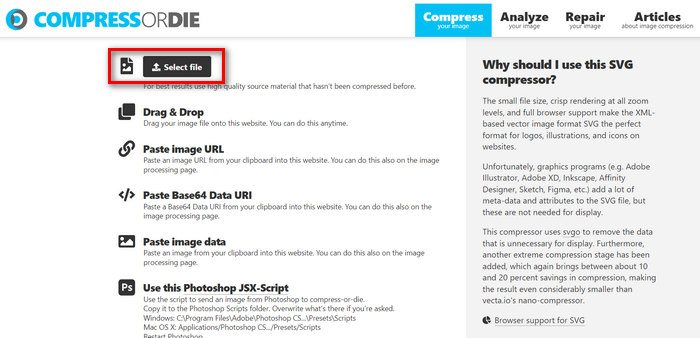
שלב 1. תחילה, יבא את קובץ ה‑SVG על‑ידי לחיצה על הכפתור Select File. בנוסף, תוכל להשתמש גם בפונקציית Drag & Drop או פשוט להדביק את כתובת ה‑URL.
שלב 2. לאחר שבחרת את קובץ ה‑SVG שלך, הוא יידחס באופן אוטומטי.
שלב 3. לאחר הדחיסה תראה את גודל הקובץ החדש של קובץ ה‑SVG שלך. כעת, כדי לשמור אותו, פשוט לחץ על הכפתור Download.
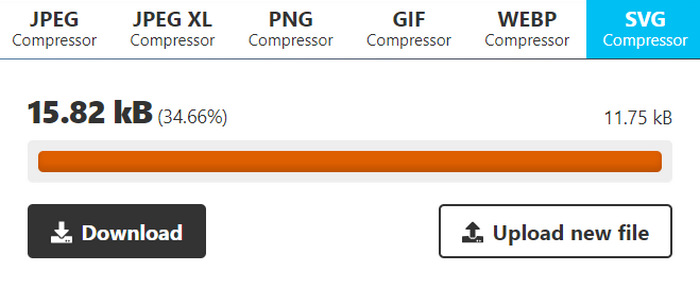
כלי זה מציע נוחות וגמישות בכל הנוגע לדחיסת קבצי SVG. משתמשים יכולים להתאים אישית את הגדרות הדחיסה עבור רמות שונות של אופטימיזציה ולהשוות בין תמונות מקוריות ודחוסות. עם זאת, היעדר תמיכה בדחיסת תמונות אצווה מגביל את היעילות עבור משתמשים המנהלים מספר תמונות בו זמנית. מהירות הדחיסה משתנה בהתאם לגורמים כמו גודל התמונה והמורכבות. בסך הכל, למרות שהוא מצטיין במשימות דחיסה בודדות, ייתכן שהוא אינו אופטימלי עבור משתמשים הדורשים יכולות עיבוד אצווה.
חלק 4: שאלות נפוצות על דחיסת SVG
האם אתה יכול לשנות את גודל קבצי SVG עבור Cricut?
כֵּן. קובצי SVG הם גרפיקה וקטורית ניתנת להרחבה, כלומר ניתן לשנות את גודלם מבלי לאבד איכות. זה הופך אותם לאידיאליים לשימוש עם מכונות חיתוך כמו Cricut, מכיוון שאתה יכול לשנות את גודל העיצוב כך שיתאים לפרויקט שלך בצורה מושלמת.
האם קבצי SVG מאבדים איכות בעת שינוי גודל?
לא. רכיבי SVG אינם מאבדים איכות בעת שינוי הגודל. בניגוד לפורמטים אחרים של תמונה כמו JPEG או PNG, שעלולים להפוך לפיקסלים בעת שינוי הגודל, קבצי SVG שומרים על איכותם מכיוון שהם מבוססים על נוסחאות מתמטיות ולא על רשת קבועה של פיקסלים.
כיצד ליצור SVG שניתן לשנות גודל?
יצירת SVG שניתן לשינוי גודל כרוכה בעיצוב הגרפיקה באמצעות תוכנה מבוססת וקטורים כגון Adobe Illustrator. בעת שמירת הקובץ, ודא שהוא נשמר בתבנית SVG. תבנית זו מאפשרת להגדיל או להקטין את הגרפיקה ללא איבוד איכות, מה שהופך אותה לניתנת לשינוי גודל עבור יישומים ומכשירים שונים. בדוק כאן דרכים נוספות ל‑המרת תמונות ל‑SVG.
סיכום
זהו, כעת תוכל לדחוס קובצי SVG באמצעות שלושה כלים שונים בהתאם לצרכים שלך. כל אחד מהם מציע סט תכונות ייחודי משלו, כדי להתאים להעדפותיך ולדרישותיך. זכור, הקטנת גודל קובצי ה‑SVG שלך לא רק משפרת ביצועים, אלא גם מסייעת באופטימיזציה של צריכת רוחב‑הפס, בשיפור זמני הטעינה ובהבטחת חוויית משתמש חלקה יותר. לכן, חקור את הכלים האלה, התנסה בתכונותיהם ומצא את הפתרון המושלם שמתאים לזרימת העבודה שלך. התחל לדחוס עכשיו!
-
 דרכים מובילות וקלות להמרת HEIC ל-SVG
 ממירי HEIC ל-SVG אלה יעזרו לך להמיר HEIC ל-SVG בקלות. קרא מאמר זה כדי להכיר את הכלים המקוונים הטובים והחינמיים הללו.
-
 שיטות ללא מאמץ כיצד להמיר SVG לפורמט JPG
 מוצא את הדרך הטובה ביותר להמיר SVG ל-JPG? פוסט זה ייתן כמה הדרכות בטוחות שתוכלו לנסות. אתה גם תגלה עבורך את ממיר SVG ל-JPG.
-
 דרכים מובילות כיצד להמיר JPG ל-SVG [פתורה]
 בפוסט זה תקבלו את הנתונים שלא תוכלו להרשות לעצמכם לפספס על הדרכים הטובות ביותר להמיר JPG ל-SVG. קרא את הפוסט כדי להשתמש בממירי JPG ל-SVG.
