


 ממיר וידאו אולטימטיבי
 מקליט מסך
 תיקון וידאו
סקירת Cutout Pro Image Enhancer: תכונות עיקריות לקסום
Image enhancers have become a thing in the field of digital imagery, and finding the right tool to elevate your photos from ordinary to extraordinary is paramount. There are a bunch of tools out there that enhance your image, but it's hard to find a reliable, safe, and efficient one. Luckily, Cutout Pro Image Enhancer turns out to be the one you are looking for in a tool. At its core, Cutout Pro Image Enhancer is designed to unlock the potential and elevate what's lacking in your photos. It provides seamless results with quality, catering to your visual needs. Navigating through its standout features that set the tool to be ideal for you, this article will surely provide an in-depth look at Cutout Pro Image Enhancer, from output quality to supported image formats. Continuing to read this article will supply you with information to enhance photos on Cutout Pro. Thus, a suggested alternative to keep an eye on will also be featured in this article. Don't just shoot, edit, and upload your photos; instead, include image enhancement from your steps starting today!

חלק 1. סקירת Cutout Pro Image Enhancer
Cutout Pro יוצר כלי שימושי המסייע למשתמשים בעריכת תמונות מהירה, במקרה זה משפר תמונה. הממשק של Cutout Pro Image enhancer ידידותי למשתמש הן למתחילים והן למקצוענים כדי להשיג תוצאות באיכות תמונה ללא אובדן. משפר תמונה זה משתמש בבינה מלאכותית כדי לחדד את הפרטים הקטנים ביותר שאפילו אנשי מקצוע אולי התעלמו מהם. ברגע אחד, תחסוך זמן בכך שתאפשר ל-AI לעשות את העבודה של זיהוי ושיפור חלקים מהתמונה שלך. כלי זה המופעל על ידי AI לא רק מספק שיפור תמונה, אלא יש לו גם תכונות כמו הסרת רקע וממיר תמונות, מה שהופך אותו לכלי גמיש בעת ריבוי משימות. להלן כמה מהתכונות העיקריות שניתן לצפות להן.
תכונות עיקריות
◆ Photo enhancement. The AI technology that is integrated into the tools uses advanced processing to upscale, color correct, sharpen, and reduce noise, depending on the needs of your image.
◆ Availability on multiple devices. Any of your local web browsers can use photo enhancement. This access lets you use its features and such in the comfort of your go-to device.
◆ Batch processing. Cutout Pro Image Enhancer takes pride in the idea of multi-tasking and saving time, making the tool batch processing and letting you process multiple images seamlessly without the need to wait time to process another image to enhance.
◆ AI cutout tools. It lets you remove unwanted objects, persons, messes, and imperfections in your images that ruin the overall aesthetic of your images. The same goes for unwanted text from images, how to remove text from image?
◆ Background removal. This feature has one of the best accuracy in background removal. A greenscreen is not needed as its AI automatically identifies the focus and draws around the subject to remove the background with precision.
◆ Photo colorizer. It can turn your old black-and-white photos to life by putting on the color that the tool thinks represents the photos vibrantly.
איכות פלט
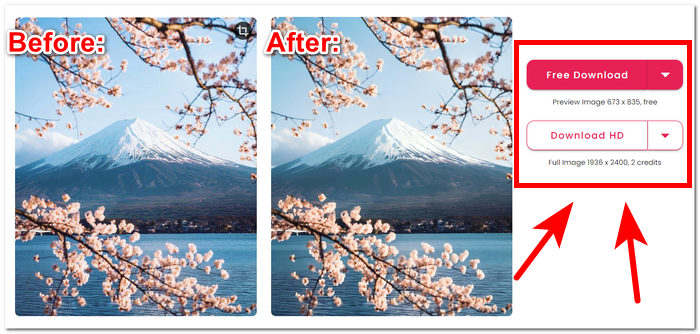
איכות הפלט עבור Cutout Pro Image Enhancer מוגבלת עד פי 2 בלבד, כאשר היא משולמת באמצעות זיכויים. להלן מפורטות איכות הפלט הזמינה ב-Cutout Pro Image Enhancer.
Free Download: PNG and JPG - 673 x 835 quality
HD Download: PNG and JPG - 1936 x 2400 quality
פורמטי תמונה נתמכים
Cutout Pro Image Enhancer תומך במגוון פורמטים של תמונה, מה שמבטיח גמישות בטיפול בסוגי קבצים שונים. פורמטי התמונה הנתמכים כוללים PNG, JPG, JPEG, BMP ו-WEBP. בין אם אתה עובד עם תמונות שקופות, תמונות באיכות גבוהה או פורמטים שונים ידידותיים לאינטרנט, Cutout Pro מאפשר למשתמשים לשפר ולערוך תמונות בצורה חלקה במגוון של סיומות קבצים נפוצות.
תכונות Cutout Pro Image Enhancer יכולות בהחלט לטפל בבעיות של העלאת קנה המידה שלך באיכות התמונה בקלות. עם זאת, חיוני לבדוק את הגרסה והעדכונים הספציפיים של Cutout Pro לקבלת המידע המדויק והעדכני ביותר לגבי פורמטי תמונה נתמכים, תכונות ואיכות פלט.
חלק 2. אלטרנטיבה ל-Cutout Pro לשיפור הצילום
Looking for an efficient, free, and reliable alternative to Cutout Pro just in case there are instances where you can't access it? Worry no more; FVC Free Image Upscaler has your back. It is considered one of the best web-based tools in the image enhancer category, with magnification options up to 8 times better than other web-based tools on the web, making it the rightful Cutout Pro Image Enhancer alternative. FVC uses AI-advance technology to produce flawless and near-perfection results, considering that it is free to use. Cutout Pro Image Enhancer, on the other hand, may have limited output quality for free users and has up to 2 times magnification settings to enhance your image. To find out what makes FVC Free Image Upscaler, listed below are some of its key features.
◆ AI-integrated image upscaler. Utilizing AI to recognize blurred parts and refine them automatically makes the task fast and easy without worrying about the loss of quality. It enhances your image according to what your photo needs by adjusting its pixels, sharpening, and colors.
◆ Eight times magnification. FVC goes beyond the number. Usually, image enhancer tools are limited to only two times magnification options, and some offer higher options for paid subscriptions. This tool lets users enhance their image up to eight times better.
◆ Easy to use. Its interface is as straightforward as its goal of helping users enhance their image without ads and hidden charges.
◆ Printing and wallpaper. Results can be used in printing and used as your desktop or mobile wallpaper without losing quality. The high-quality image enhancers made it possible to use your blurry and repurpose it for other uses like printing and wallpapers.
◆ Versatile format compatibility. Transform your image into a stunning masterpiece! Regardless of the format, whether it's a JPG, JPEG, or BMP, you can easily upload it to our platform. Let us help you bring your vision to life!
◆ Flash speed enhancement. Processing speeds are fast and guarantee promising results as AI is trained to process millions of images with high-quality results for pixel perfection.
לסיום הדברים, שני הכלים מייצרים באופן מקצועי תוצאות באיכות הטובה ביותר שלהם. לא משאיר מקום לתמונות מטושטשות ולפגמים, מה שהופך את FVC ו-Cutout Pro לכלי אמין לשימוש. מבחינת תכונות, ל-Cutout Pro יש יתרון בזמינות במספר מכשירים ובעיבוד אצווה. מצד שני, FVC Free Image Upscaler זכה בתוצאות האיכות, העיבוד המהיר וזמינות הפיצ'רים בחינם.
חלק 3. שאלות נפוצות על Cutout Pro Image Enhancer
האם Cutout Pro שומר תמונות?
Cutout Pro מאפשר למשתמשים לשמור ללא מאמץ את התמונות המשופרות שלהם על ידי הצעת מגוון אפשרויות שמירה. עם הגמישות לבחור מבין פורמטים ורזולוציות שונות, המשתמשים יכולים להתאים את התמונות השמורות שלהם כך שיתאימו להעדפות הספציפיות ולדרישות הפרויקט שלהם. תכונה זו מבטיחה חוויה חלקה וניתנת להתאמה אישית לשמירה על התוצאות הערוכות עם בהירות ופרטים מיטביים.
האם Cutout Pro מציע אפליקציות לא מקוונות?
Cutout Pro אינו מספק יישומים לא מקוונים, ואינו מעניק למשתמשים את היכולת לערוך ולשפר את התמונות שלהם ללא צורך בחיבור רציף לאינטרנט. כדי להשתמש בתכונות שיפור התמונה של Cutout Pro, עליך להתחבר לאינטרנט מכיוון שמדובר בכלי מבוסס אינטרנט.
האם אוכל לצלם תמונה בגודל 2×2 עם Cutout Pro?
Cutout Pro, משתמשים יכולים ליצור בקלות תמונה בגודל 2×2 באמצעות כלי העריכה המגוונים שלו. התוכנה תומכת במידות מותאמות אישית, ומספקת את הגמישות לחתוך ולשנות את גודל התמונות במדויק בהתאם לדרישות ספציפיות, מה שהופך אותה לאידיאלית ליצירת פריסות תמונה מותאמות אישית של 2×2. תכונה זו מאפשרת למשתמשים להשיג את הקומפוזיציה והפורמט הרצויים עבור התמונות שלהם ללא מאמץ.
האם Cutout Pro טוב או רע?
האפקטיביות של Cutout Pro משתנה בהתאם להעדפות אישיות ודרישות ספציפיות. למרות שהכרה נרחבת היא כמשפר תמונה חזק עם תכונות מגוונות, התאמתו תלויה בגורמים כמו ממשקים ידידותיים למשתמש, פונקציות רצויות והעדפות עריכה אישיות. מומלץ למשתמשים פוטנציאליים לחקור את התוכנה כדי לוודא את התאימות שלה לציפיות ולזרימת העבודה שלהם.
האם Cutout Pro בחינם?
Cutout Pro מספקת למשתמשים גרסאות חינמיות וגם גרסאות פרימיום. לפני שבוחרים בגרסה מסוימת, חיוני לבחון היטב את פרטי התמחור ואפשרויות הרישוי הקשורות אליה. זכור שתכונות או יכולות מתקדמות עשויות להיות בלעדיות לגרסאות הפרימיום, מה שהופך את זה לקשה ופחות סביר לבחור להיות הכלי הרצוי שלך.
סיכום
In conclusion, both Cutout Pro Image Enhancer and FVC Free Image Upscaler stand out as professionally crafted tools, leveraging the power of AI to elevate image enhancement to unprecedented levels of quality. Their commitment to breaking the boundaries of visual excellence makes them valuable assets for everyone. Ultimately, the choice between these two exceptional tools boils down to personal convenience and practicality. Whether opting for the advanced features of Cutout Pro or the user-friendly approach of FVC Free Image Upscaler, users can confidently enhance their images with AI-integrated technology tailored to their specific needs. The realm of image editing continues to be enriched by these tools, offering a diverse range of options for visual enhancement.
-
 סקירת PicWish Photo Enhancer וכלי אלטרנטיבי לנסות
 גלה את הקסם שמשפר התמונה PicWish מביא לעולם עריכת התמונות. סקירה מעמיקה ובחינת חלופות כדאיות שתוכל לנסות.
-
 סקירת Fotor עבור מסיר רקע ומשפר תמונות
 כל מה שאתה צריך לדעת על מסיר רקע של Fotor ומשפר תמונות. עיין בכמה מהתכונות שלו וראה את החלופה המוצעת שמתאימה לצרכים שלך.
-
 כיצד להגדיל את גודל התמונה באופן מקוון ולא מקוון
 גלה את הדרך הקלה ביותר להגדיל את גודל התמונה מבלי לאבד איכות. ראה את הכלים והתוכנה שלנו לשינוי גודל כדי להבטיח איכות אופטימלית לתמונות שלך.
