


 ממיר וידאו אולטימטיבי
 מקליט מסך
 תיקון וידאו
 הורדה מאובטחת
תקן בצורה מדהימה את איכות התמונה באמצעות הכלים המדהימים ביותר
תמונה באיכות ירודה עלולה להיות מטרידה למדי. אם גם יש לך תמונה באיכות נמוכה, עליך לשפר את איכות התמונה. אבל איך אפשר לעשות זאת? קיימים רבים ממגדילי התמונות (image upscalers) שתוכל להשתמש בהם במחשב שלך כדי להעלות את איכות התמונה. ואם אתה שואל איך לתקן את איכות התמונה שלך, אנו נעזור לך בכך. קרא את כל המאמר הזה כדי ללמוד כיצד לתקן את איכות התמונה במהירות.
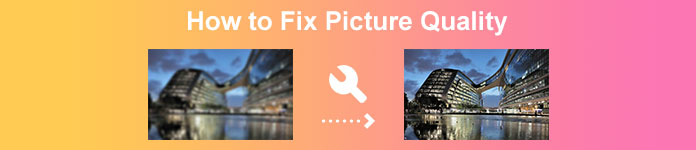
חלק 1. כיצד לתקן איכות תמונה בחינם באינטרנט
יש טונות של שיפורי תמונות שתוכל להוריד למחשב האישי שלך. עם זאת, עליך לרכוש אותם לפני שתוכל לשפר את איכות התמונה שלך. ואם אתם מחפשים משדרג תמונות בחינם, אז יש לנו את הכלי המתאים. קרא את החלק הזה ביסודיות כדי ללמוד כיצד לשפר את איכות התמונה בחינם באמצעות שני הכלים המקוונים הפנטסטיים ביותר.
FVC Free Image Upscaler
FVC Free Image Upscaler הוא יישום מקוון חינמי שיעזור לך לתקן את איכות התמונה. הכלי המקוון הזה ידידותי למתחילים מכיוון שממשק התוכנה שלו קל לשימוש. בנוסף, הוא יכול לתת לך ארבע תוצאות של הגדלה פי 2, פי 4, פי 6 ופי 8, עם תוצאות מצוינות. כמו כן, אינך צריך לדאוג לבטיחות הנתונים שלך, משום ש־FVC Free Image Upscaler מבטיח לך שהשימוש בו בטוח. ומה שמרשים עוד יותר בכלי הזה הוא שהוא משתמש בטכנולוגיית בינה מלאכותית (AI) שמזהה אוטומטית את החלקים המטושטשים. נוסף על כך, הכלי הזה מאפשר לך לתקן בצורה מושלמת פיקסלים שאבדו, מרקמי צבע ופרטים נוספים. אם ברצונך להשתמש בכלי זה כדי לשפר את איכות התמונה שלך, קרא את ההוראות שלהלן.
כיצד לתקן איכות תמונה מקוונת באמצעות FVC Free Image Upscaler:
שלב 1. בדפדפן שבו אתה משתמש, חפש FVC Free Image Upscaler בתיבת החיפוש. לחץ על קישור זה כדי לעבור ישירות לדף הראשי שלהם.
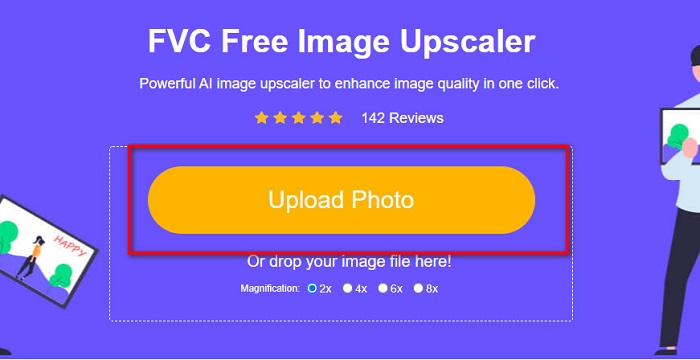
שלב 2. בממשק המשתמש הראשי, לחץ על הכפתור Upload Photo כדי להעלות את התמונה שברצונך להגדיל. ייפתח חלון קבצי המחשב שלך, שבו תבחר את התמונה באיכות הנמוכה ותעלה אותה.
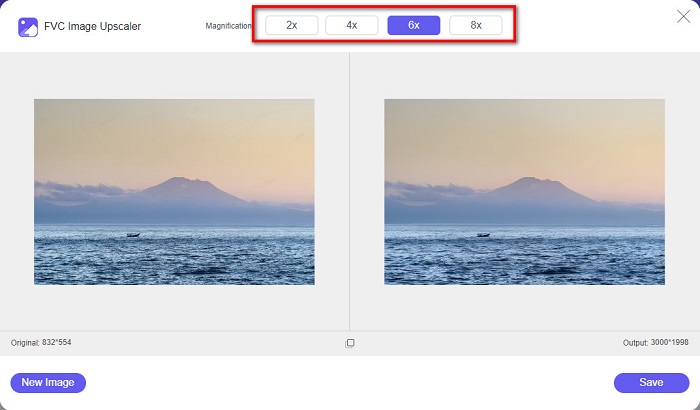
שלב 3. לאחר מכן, בחר את מידת ההגדלה הרצויה לתמונה שלך. ככל שההגדלה גדולה יותר, כך האיכות טובה יותר. באפשרותך לבחור בין 2x, 4x, 6x, ו־8x.
שלב 4. לאחר מכן, לחץ על כפתור Save כדי לשמור את התמונה המשופרת בתיקיות המחשב שלך.
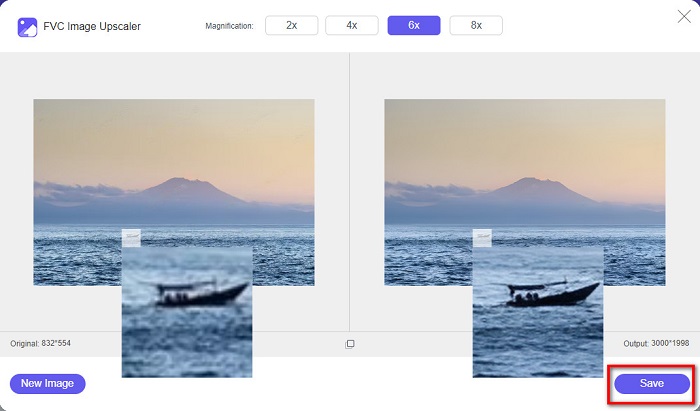
פשוט, נכון? בקלות כמו א-ב-ג, באפשרותך לתקן את איכות התמונה באמצעות FVC Free Image Upscaler.
Icons8.com
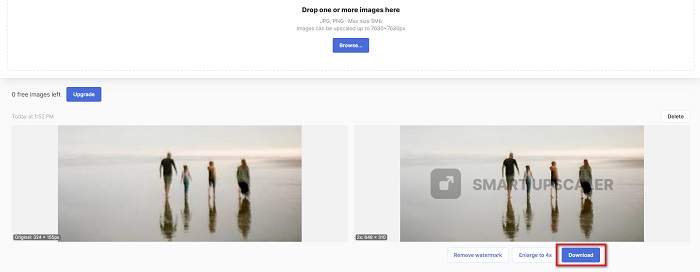
Icons8.com הוא מגדיל תמונות מקוון נוסף, הזמין כמעט בכל הדפדפנים, כולל Google, Firefox ו־Safari. היישום המקוון הזה קל לשימוש משום שיש לו ממשק משתמש פשוט. גם הכלי המקוון הזה משתמש בטכנולוגיית בינה מלאכותית שמזהה אוטומטית את החלקים המטושטשים בתמונה. נוסף על כך, ניתן להגדיל את התמונות שלך עד 7680 x 7680 פיקסלים. עם זאת, הוא משאיר סימן מים על הקובץ הסופי. אף על פי כן, זהו עדיין כלי יעיל להגדלת התמונה שלך.
כיצד לתקן תמונה באיכות נמוכה ב-Icons8.com:
שלב 1. פתח את הדפדפן שלך וחפש Icons8.com. לאחר מכן, בממשק הראשי, לחץ על כפתור Browse.
שלב 2. מכיוון ש־Icons8.com משתמש גם הוא בטכנולוגיית AI, הוא מזהה באופן אוטומטי את החלקים המטושטשים בתמונה שלך.
שלב 3. לבסוף, לחץ על כפתור Download כדי לשמור את התמונה במחשב שלך.
חלק 2. כיצד לתקן תמונות באיכות גרועה בפוטושופ
זה לא קשה לשפר את התמונה של האיכות שלך. אבל השימוש בפוטושופ כדי לשדרג את התמונה שלך עשוי להיות די מאתגר בגלל הממשק והפונקציות שלה. אבל אל תדאג, כי אנחנו נלמד אותך איך להשתמש ב-Adobe Photoshop כדי לשפר את איכות התמונה שלך.
Adobe Photoshop מצטיין בעריכת תמונות ובמניפולציה של תמונות. תוכנת העריכה הזו משמשת עורכים מקצועיים רבים ברחבי העולם. בנוסף, יש בה כלי עריכה מתקדמים רבים שניתן להשתמש בהם לעריכת התמונה שלך. כמו כן, ניתן להוריד את Adobe Photoshop בכל פלטפורמות המדיה, כולל Windows, Mac ו־Linux. יתרה מזו, באפשרותך לערוך בעזרתו באנרים, לוגואים, חוברות ועוד. ורבים מהמשתמשים אינם יודעים שהוא גם יכול לשפר את איכות התמונה שלך. אף שעליך לרכוש אותו לפני ההורדה, Adobe Photoshop שווה את כספך.
כיצד לתקן תמונות באיכות נמוכה בפוטושופ:
במדריך זה, נשפר את איכות התמונה על ידי הגדלתה כדי לראות את הרזולוציה שלה.
שלב 1. הורד את Adobe Photoshop למחשב שלך. עקוב אחר תהליך ההתקנה ולאחר מכן הפעל את האפליקציה במחשב.
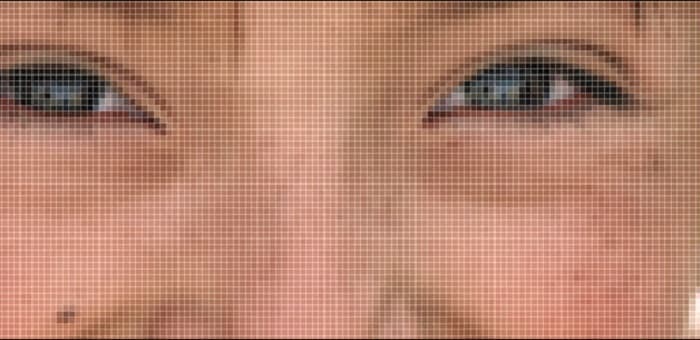
שלב 2. פתח את התמונה ברזולוציה הנמוכה ב־Adobe Photoshop. הנה דוגמה לתמונה המוגדלת ל־100%. כפי שאתה רואה, לתמונה רזולוציה נמוכה.
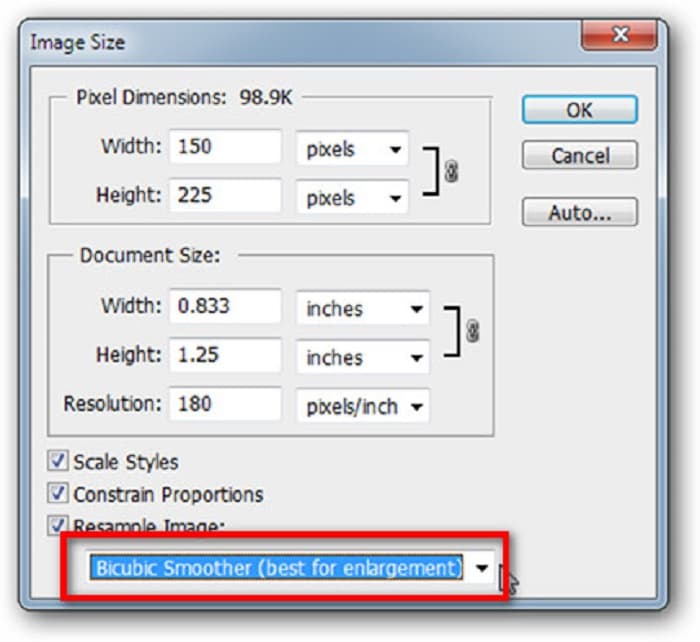
שלב 3. לאחר מכן, עבור אל Image > Image Size. לאחר מכן, שנה את סוג ה־anti-aliasing כדי להגדיל ולהחליק את התמונה שלך בשדה Resample Image. שנה ל־Bicubic Smoother, שהוא המומלץ ביותר להגדלה.
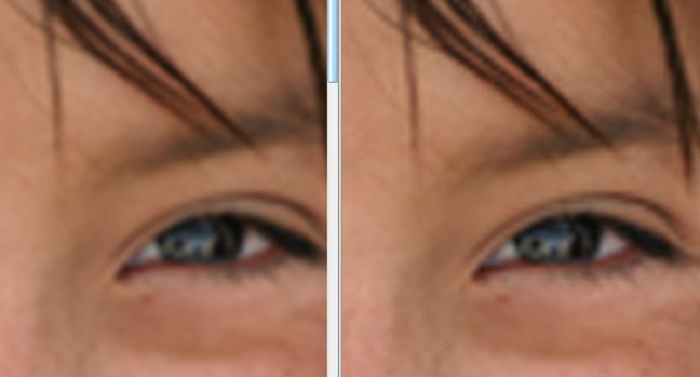
שלב 4. באפשרותך לראות את ההבדל בין שתי התמונות שלהלן כאשר משנים לגרסה של Bicubic Smoother. שינוי ה־anti-aliasing יוצר הבדל גדול בחלקות התמונה שלך.
שלב 5. כעת נשפר את התמונה המוגדלת על ידי שינוי הפרטים שלה. רוב משתמשי Photoshop אינם חורגים מ־RGB ו־CMYK. והיום נשתמש במצב צבע אחר, Lab Color. עבור אל Image > Mode > Lab Color.
שלב 6. לאחר מכן, ודא שאתה פותח חלונית על ידי מעבר אל Windows > Channels > Lightness channel. ניתן גם ללחוץ על סמל הסתרת השכבה לצד הערוצים a ו־b.
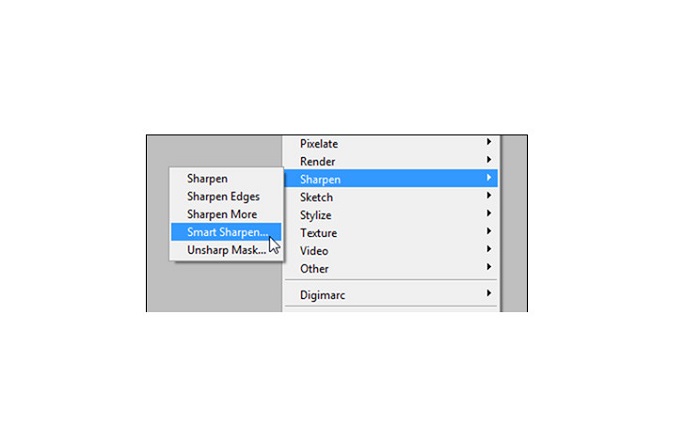
שלב 7. כאשר אתה בוחר את ערוץ ה־Lightness, עבור אל Filter > Smart Sharpen > Sharpen כדי להוסיף את מסנן Smart Sharpen.
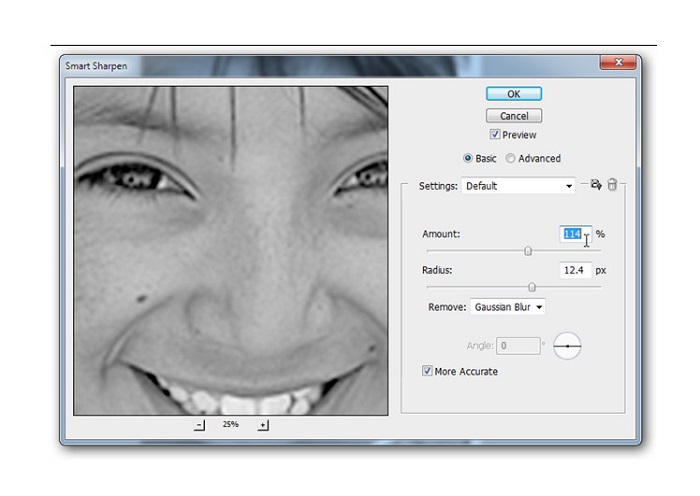
שלב 8. לאחר מכן, באפשרותך לכוונן את ההגדרות של התמונה שלך ולמצוא את התוצאה הרצויה. זכור תמיד שעליך להשאיר את הגדרת Remove על Gaussian Blur.
שלב 9. ניתן לבחור האם להשאיר את התמונה במצב Lab Color או להחזיר אותה ל־RGB. וזהו! הנה התוצאה של התמונה שלך. תבחין כי איכות התמונה השתפרה ויש לה מרקם עשיר יותר.
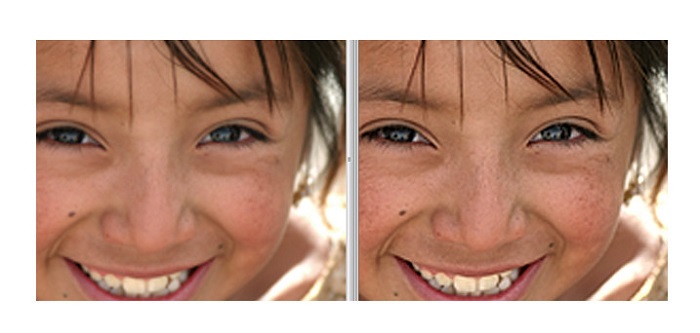
והרי! על ידי ביצוע המדריך לעיל כיצד לתקן תמונות באיכות ירודה בפוטושופ, תוכל לשפר את איכות התמונה שלך.
חלק 3. שאלות נפוצות לגבי איך לתקן איכות תמונה
האם אוכל לשפר תמונות באיכות ירודה באייפון?
כן. אתה יכול להוריד אפליקציות רבות באייפון שלך שיעזרו לך לשפר את איכות התמונה שלך. אחת האפליקציות הטובות ביותר לשיפור התמונות היא Remini, אפליקציה ידידותית למשתמש.
האם אני יכול לשנות את הרזולוציה של תמונות JPEG?
אתה יכול לשנות את הרזולוציה של כל פורמט תמונה שאתה רוצה לשדרג. אתה יכול להשתמש בכלים שהוזכרו לעיל כדי לשפר את איכות תמונת ה-JPEG שלך.
איך לתקן איכות תמונה באינסטגרם?
כדי לתקן את איכות התמונות שלך באינסטגרם, שנה את הגדרת הImage Resolution בתוסף לגודל תמונה גדול יותר, כדי להציג את התמונה ברזולוציה הנכונה. ניתן לעשות זאת על ידי ניווט למיקומים הבאים: Instagram Feed > Customize > Posts > Photos > Image Resolution.
סיכום
אנו מקווים שענינו על השאלה שלך בנוגע לכיצד לתקן את איכות התמונה. באפשרותך לבחור מבין הכלים שהוצגו לעיל את זה שהכי מתאים לך. ייתכן ש־Adobe Photoshop הוא כלי מקצועי יותר, אך הוא אינו כלי ידידותי למשתמש. לכן, אם אתה רוצה מגדיל תמונה חינמי וקל לשימוש, השתמש ב־FVC Free Image Upscaler.
-
 כיצד להמיר תמונה ברזולוציה נמוכה לרזולוציה גבוהה באינטרנט
 אם אתה רוצה ללמוד איך להמיר תמונות ברזולוציה נמוכה לתמונות ברזולוציה גבוהה באינטרנט, אז המאמר הזה הוא בשבילך. קרא במלואו כדי ללמוד כיצד.
-
 הסר את סימן המים של DaVinci Resolve בסרטונים מיוצאים עם הדרכה מלאה
 כדי להסיר את סימן המים של Davinci Resolve תצטרך להשתמש בכלי או לרכוש את הגרסה הרשמית שלו, המשך לקרוא את זה כדי לדעת יותר.
-
 כיצד להיפטר מסימן המים של Power Director בחינם [השלם]
 כיצד להיפטר מסימן המים Power Director בחינם? הכלים הטובים ביותר להעלמת סימן המים נמצאים כאן אז למד אותם על ידי קריאה זו.
